本项目使用Servlet+JSP+Mysql+Tomcat数据库
本系统在Myeclipse中的结构图:

先创建Web Project(web项目)
在src文件夹下建立dao包,该包下定义两个类:

BaseDao.java类,本类用来定义一些通用的方法,在该项目中定义了有获取数据库连接方法getConnection(),释放资源方法close(),增删改方法update(String sql,Object[] params),查询方法query(String sql,Object[] params)。
package dao;

import java.sql.Connection;
import java.sql.DriverManager;
import java.sql.PreparedStatement;
import java.sql.ResultSet;
import java.sql.SQLException;

public class BaseDao {
	final static String URL = "jdbc:mysql://127.0.0.1:3306/train";//数据库地址
	final static String USERNAME = "root";	//数据库账号
	final static String PASSWORD = "lfl";	//数据库密码
	final static String DRIVER = "com.mysql.jdbc.Driver";
	protected ResultSet rs = null;
	protected PreparedStatement pstmt = null;
	protected Connection connection = null;
		//提取重复方法,获取数据库连接
	public Connection getConnection(){
		try {
			//1.加载驱动
			Class.forName(DRIVER);
			//2.通过DriverManager驱动管理器获取Connection数据库连接
			connection = DriverManager.getConnection(URL, USERNAME, PASSWORD);
		} catch (Exception e) {
			e.printStackTrace();
		}
		return connection;
	}


	public void close(){
		//5.释放资源
		try{
			if(null != rs){
				rs.close();
			}
		}catch(SQLException e){
			e.printStackTrace();
		}try{
			if(null != pstmt){
				pstmt.close();
			}
		}catch(SQLException e){
			e.printStackTrace();
		}try {
			if(null != connection){
				connection.close();
			}
		}catch(SQLException e){
			e.printStackTrace();
		}
	}


		// 增删改 delete from news_detail where id=? and title=?
	public void update(String sql,Object[] params){
		try {
			//获取数据库连接
			connection = getConnection();
			//prepareStatement方法只用于预编译了sql语句,并未执行
			pstmt = connection.prepareStatement(sql);
			//将参数给占位符赋值
			//将参数给占位符赋值
			if(null != params){
				for (int i = 0; i < params.length; i++) {
					pstmt.setObject(i+1, params[i]);
				}
			}
			//4.执行sql语句
			pstmt.executeUpdate();
		} catch (Exception e) {
			e.printStackTrace();
		} finally {
			//更新方法可以在此公共方法中释放资源,因为执行完毕后不需要操作结果集,不需要数据库连接了
			//5.释放资源
			close();
		}
	}


		// 查询
		public ResultSet query(String sql,Object[] params){
			try {
				//获取数据库连接
				connection = getConnection();
				//3.创建prepareStatement对象
				//?表示占位符,用于在执行sql语句之前动态传参
				//prepareStatement方法只用于预编译了sql语句,并未执行
				pstmt = connection.prepareStatement(sql);
				//将参数给占位符赋值
				if(null != params){
					for (int i = 0; i < params.length; i++) {
						pstmt.setObject(i+1, params[i]);
					}
				}
				//4.执行sql语句
				rs = pstmt.executeQuery();
			} catch (Exception e) {
				e.printStackTrace();
			}
			return rs;
		}
}
创建TrainDao:
本接口定义了一些方法
package dao;

import java.util.List;

import entity.Train;

public interface TrainDao {
	//查询单个车次信息
	public Train getById(String train_no);
	//查询全部车次信息
	public List<Train> getAll();

	//删除单个车次信息
	public void delById(String train_no);


	//增加车次信息
	public void addTrain(Train train);

	//修改车次信息
	public void updateTrain(String train_no,String type);

}
在dao包下定义一个包impl,本包用来实现TrainDao接口
package dao.impl;


import java.sql.ResultSet;
import java.sql.SQLException;
import java.util.ArrayList;
import java.util.List;

import util.Page;

import dao.BaseDao;

import dao.TrainDao;

import entity.Train;

public class ImplTrainDao  implements TrainDao{

	BaseDao bs = new BaseDao();

	//分页查询总条数
	public int getTotalCount(){
		int count = 0;
		try {
			String sql = " select count(1) totalcount from train_info ";
			Object[] params = new Object[]{};
			//结果集只会存在一条记录
			ResultSet rs = bs.query(sql, params);
			if(rs.next()){
				count = rs.getInt("totalcount");
			}
		} catch (Exception e) {
			e.printStackTrace();
		} finally {
			//5.释放资源
			bs.close();
		}
		return count;
	}


	//获取page对象
	public Page<Train> getPage(Integer pageNo, Integer pageSize){
		ImplTrainDao sd = new ImplTrainDao();
		Page<Train> pg = new Page<Train>();
		pg.setPageNo(pageNo);
		pg.setPageSize(pageSize);
		pg.setTotalCount(sd.getTotalCount());
		pg.setList(sd.getTrains(pageNo, pageSize));
		System.out.println("pg:"+pg);
		return pg;
	}

	/**
	 * 分页查询列表数据
	 * @param pageNo	当前页码
	 * @param pageSize	每页条数
	 * @return
	 */
	public List<Train> getTrains(Integer pageNo, Integer pageSize){
		List<Train> trains = new ArrayList<Train>();
		try {
			//定义SQL语句
			String sql = " SELECT train_no,start_station,arrival_station,start_time,arrival_time,type,runtime,mile FROM train_info limit ?,? ";
			//定义参数
			Object[] params = new Object[]{(pageNo-1)*pageSize,pageSize};
			//调用查询方法
			ResultSet rs = bs.query(sql, params);
			//遍历结果集rs
			while(rs.next()){
				//取出每条数据字段的值
				String train_no = rs.getString("train_no");
				String start_station = rs.getString("start_station");
				String arrival_station = rs.getString("arrival_station");
				String start_time = rs.getString("start_time");
				String arrival_time = rs.getString("arrival_time");
				String type = rs.getString("type");
				String runtime = rs.getString("runtime");
				Double mile = rs.getDouble("mile");

				//将字段值封装到Train对象中
				Train t = new Train(train_no, start_station, arrival_station, start_time, arrival_time, type, runtime, mile);
				//将对象添加到集合中
				trains.add(t);
			}
		} catch (SQLException e) {
			e.printStackTrace();
		} finally {
			//5.释放资源
			bs.close();
		}
		return trains;
	}

	//查询所有车次信息
	public List<Train> getAll() {
		List<Train> trains = new ArrayList<Train>();
		try {
			String sql = "SELECT train_no,start_station,arrival_station,start_time,arrival_time,type,runtime,mile FROM train_info";
			//定义参数
			Object[] params = new Object[]{};
			//调用查询方法
			ResultSet rs = bs.query(sql, params);
			//遍历结果集rs
			while(rs.next()){
				String train_no = rs.getString("train_no");
				String start_station = rs.getString("start_station");
				String arrival_station = rs.getString("arrival_station");
				String start_time = rs.getString("start_time");
				String arrival_time = rs.getString("arrival_time");
				String type = rs.getString("type");
				String runtime = rs.getString("runtime");
				Double mile = rs.getDouble("mile");

				Train train = new Train(train_no, start_station, arrival_station, start_time, arrival_time, type, runtime, mile);
				trains.add(train);

			}
		}catch (SQLException e) {
			e.printStackTrace();
		}finally{
	//			5)关闭城门(释放资源)
			bs.close();

		}
		return trains;

	}

	//查询单辆车次信息
	public Train getById(String train_no) {

		Train train =null;
		try {
			String sql = "SELECT train_no,start_station,arrival_station,start_time,arrival_time,type,runtime,mile FROM train_info where train_no=?";
			Object[] params = {train_no};

			ResultSet rs = bs.query(sql, params);
			while(rs.next()){
				String start_station = rs.getString("start_station");
				String arrival_station = rs.getString("arrival_station");
				String start_time = rs.getString("start_time");
				String arrival_time = rs.getString("arrival_time");
				String type = rs.getString("type");
				String runtime = rs.getString("runtime");
				Double mile = rs.getDouble("mile");

				train = new Train(train_no, start_station, arrival_station, start_time, arrival_time, type, runtime, mile);

			}
		}catch (SQLException e) {
			e.printStackTrace();
		}finally{
			bs.close();
			}
		return train;
	}

	//删除单辆车次信息
	public void delById(String train_no) {
		String sql = "DELETE FROM train_info WHERE train_no = ?";
		Object[] params = new Object[]{train_no};
		bs.update(sql, params);

	}


	//添加车次信息
	public void addTrain(Train train) {
		String sql = "INSERT INTO train_info(train_no,start_station,arrival_station,start_time,arrival_time,type,runtime,mile)" +
				" VALUES(?,?,?,?,?,?,?,?)";
		Object[] params = new Object[]{train.getTrain_no(),train.getStart_station(),train.getArrival_station(),
				train.getStart_time(),train.getArrival_time(),train.getType(),train.getRuntime(),train.getMile()};
		bs.update(sql, params);

	}
	//修改车次信息
	public void updateTrain(String train_no, String type) {
		String sql = "UPDATE train_info SET type=? WHERE train_no=?";
		Object[] params = new Object[]{type,train_no};
		bs.update(sql, params);
	}

}
在实体包entity中,创建Train实体类:
package entity;

public class Train {
	private String train_no;
	private String start_station;
	private String arrival_station;
	private String start_time;
	private String arrival_time;
	private String type;
	private String runtime;
	private Double mile;
	public Train(String train_no, String start_station, String arrival_station,
			String start_time, String arrival_time, String type,
			String runtime, Double mile) {
		super();
		this.train_no = train_no;
		this.start_station = start_station;
		this.arrival_station = arrival_station;
		this.start_time = start_time;
		this.arrival_time = arrival_time;
		this.type = type;
		this.runtime = runtime;
		this.mile = mile;
	}
	public String getTrain_no() {
		return train_no;
	}
	public void setTrain_no(String train_no) {
		this.train_no = train_no;
	}
	public String getStart_station() {
		return start_station;
	}
	public void setStart_station(String start_station) {
		this.start_station = start_station;
	}
	public String getArrival_station() {
		return arrival_station;
	}
	public void setArrival_station(String arrival_station) {
		this.arrival_station = arrival_station;
	}
	public String getStart_time() {
		return start_time;
	}
	public void setStart_time(String start_time) {
		this.start_time = start_time;
	}
	public String getArrival_time() {
		return arrival_time;
	}
	public void setArrival_time(String arrival_time) {
		this.arrival_time = arrival_time;
	}
	public String getType() {
		return type;
	}
	public void setType(String type) {
		this.type = type;
	}
	public String getRuntime() {
		return runtime;
	}
	public void setRuntime(String runtime) {
		this.runtime = runtime;
	}
	public Double getMile() {
		return mile;
	}
	public void setMile(Double mile) {
		this.mile = mile;
	}

}
service包下面创建两个服务类(给用户提供服务,相当于餐馆里面的服务员)
TrainService.java
package service;
import java.util.List;
import util.Page;
import dao.impl.ImplTrainDao;
import entity.Train;

public class TrainService {

	//调用工具类page完成数据的封装,让doList.jsp只做控制动作,而不需要进行计算等其他操作
	public Page<Train> getPage(Integer pageNo,Integer pageSize){
		ImplTrainDao itd = new ImplTrainDao();
		return itd.getPage(pageNo, pageSize);
		}

	//获取车次集合
	public List<Train> getList(){
		ImplTrainDao itd = new ImplTrainDao();
		return itd.getAll();
	}

	//查看单辆车次信息
	public Train getInfo(String train_no){
		ImplTrainDao itd = new ImplTrainDao();
		return itd.getById(train_no);
	}

	//删除单辆车次信息
	public void delInfo(String train_no){
		ImplTrainDao itd = new ImplTrainDao();
		itd.delById(train_no);
	}

	//添加车次信息
	public void addInfo(Train train){
		ImplTrainDao itd = new ImplTrainDao();
		itd.addTrain(train);
	}

	//修改车次信息
	public void updateInfo(String train_no, String type){
		ImplTrainDao itd = new ImplTrainDao();
		itd.updateTrain(train_no, type);
	}
}
UserService.java
本类用来登陆验证,即输入的账号密码是否正确
package service;

public class UserService {
	//用户服务,做一个判断,即输入的账号密码是否正确,返回一个布尔值
		public boolean login(String name, String pwd){
			if("admin".equals(name)&&"123".equals(pwd)){
				return true;
			}else{
				return false;
			}
		}
}
util包下面也有一个类
Page.java
本类用来分页操作
package util;
import java.util.List;
public class Page<T> {

	//当前页码
	private Integer pageNo;
	//页面显示条数
	private Integer pageSize=3;
	//数据库中总条数
	private Integer totalCount;
	//我们需要显示的总页数
	private Integer totalPage;

	//返回的火车信息列表
	List<T> list;

	public Integer getPageNo() {
		return pageNo;
	}

	public void setPageNo(Integer pageNo) {
		this.pageNo = pageNo;
	}

	public Integer getPageSize() {
		return pageSize;
	}

	public void setPageSize(Integer pageSize) {
		this.pageSize = pageSize;
	}

	public Integer getTotalCount() {
		return totalCount;
	}

	public void setTotalCount(Integer totalCount) {
		this.totalCount = totalCount;
	}

	public Integer getTotalPage() {
		return (totalCount%pageSize)>0?(totalCount/pageSize)+1:(totalCount/pageSize);
	}

	public void setTotalPage(Integer totalPage) {
		this.totalPage = totalPage;
	}

	public List<T> getList() {
		return list;
	}

	public void setList(List<T> list) {
		this.list = list;
	}
}
servlet包下面(new创建servlet文件,都是继承HTTPServlet)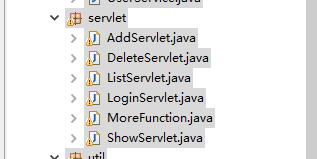
AddServlet.java是DoAdd.jsp做的事情是一样的,进行增加逻辑控制
AddServlet.java
package servlet;

import java.io.IOException;
import java.io.PrintWriter;

import javax.servlet.ServletException;
import javax.servlet.http.HttpServlet;
import javax.servlet.http.HttpServletRequest;
import javax.servlet.http.HttpServletResponse;
import service.TrainService;
import entity.Train;
public class AddServlet extends HttpServlet {

	public void doGet(HttpServletRequest request, HttpServletResponse response)
			throws ServletException, IOException {

			this.doPost(request, response);
	}


	public void doPost(HttpServletRequest request, HttpServletResponse response)
			throws ServletException, IOException {
		//设置接受字符编码
		request.setCharacterEncoding("UTF-8");
		//1.接收客户端请求的数据(获取输入的数据)
		String train_no = request.getParameter("train_no");
		String start_station = request.getParameter("start_station");
		String arrival_station = request.getParameter("arrival_station");
		String start_time = request.getParameter("start_time");
		String arrival_time = request.getParameter("arrival_time");
		String type = request.getParameter("type");
		String runtime = request.getParameter("runtime");
		String mile = request.getParameter("mile");

		Train train = new Train(train_no ,start_station,arrival_station,start_time,arrival_time,type,runtime,Double.parseDouble(mile));
		TrainService ts = new TrainService();
		ts.addInfo(train);
		//3.存储处理的结果到作用域

		//4.页面跳转
		String path = request.getContextPath();
		response.sendRedirect(path+"/servlet/ListServlet");
		/*response.sendRedirect("list.jsp");*/

	}

	public void init() throws ServletException {
	}
}
DeleteServlet.java跟doDelete.jsp所做的事情也一样
package servlet;

import java.io.IOException;
import java.io.PrintWriter;

import javax.servlet.ServletException;
import javax.servlet.http.HttpServlet;
import javax.servlet.http.HttpServletRequest;
import javax.servlet.http.HttpServletResponse;

import service.TrainService;

public class DeleteServlet extends HttpServlet {

	public void doGet(HttpServletRequest request, HttpServletResponse response)
			throws ServletException, IOException {
			this.doPost(request, response);
	}


	public void doPost(HttpServletRequest request, HttpServletResponse response)
			throws ServletException, IOException {
			String train_no = request.getParameter("del");
			//2.调用service方法处理客户端请求 - 根据train_no删除车次信息
			TrainService nts = new TrainService();

			nts.delInfo(train_no);
			//3.存储处理的结果到作用域

			//4.页面跳转
			String path = request.getContextPath();
			response.sendRedirect(path+"/servlet/ListServlet");
			/*response.sendRedirect("list.jsp");*/
	}
	public void init() throws ServletException {

	}
}
ListServlet.java和doList.jsp功能一样
package servlet;

import java.io.IOException;
import java.io.PrintWriter;

import javax.servlet.ServletException;
import javax.servlet.http.HttpServlet;
import javax.servlet.http.HttpServletRequest;
import javax.servlet.http.HttpServletResponse;

import entity.Train;

import service.TrainService;
import util.Page;

public class ListServlet extends HttpServlet {


	public void doGet(HttpServletRequest request, HttpServletResponse response)
			throws ServletException, IOException {
			this.doPost(request, response);


	}


	public void doPost(HttpServletRequest request, HttpServletResponse response)
			throws ServletException, IOException {
		//1.接收客户端请求的数据(获取当前页码数)
	 	//第一次进来用户未点击分页条,pageNo为null值,默认显示第一页,所以pageNo默认等于1
	 	//每页显示条数
		int pageSize = 3;
		//当前页码
		int pageNo = request.getParameter("pageNo") == null ? 1 : Integer.parseInt(request.getParameter("pageNo"));

		//2.调用service方法处理客户端请求
		TrainService ts = new TrainService();

		Page<Train> pg = ts.getPage(pageNo, pageSize);

		//3.存储处理的结果到作用域
		request.setAttribute("pg", pg);
		//4.页面跳转
		request.getRequestDispatcher("/pages/list.jsp").forward(request, response);


	}

	public void init() throws ServletException {

	}
}
LoginServlet.java和doLogin.jsp
package servlet;

import java.io.IOException;
import java.io.PrintWriter;
import java.net.URLEncoder;

import javax.servlet.ServletException;
import javax.servlet.http.Cookie;
import javax.servlet.http.HttpServlet;
import javax.servlet.http.HttpServletRequest;
import javax.servlet.http.HttpServletResponse;

import service.UserService;

public class LoginServlet extends HttpServlet {


	public void doGet(HttpServletRequest request, HttpServletResponse response)
			throws ServletException, IOException {
			this.doPost(request, response);
	}


	public void doPost(HttpServletRequest request, HttpServletResponse response)
			throws ServletException, IOException {
		//1.接受客户端的请求
		String name = request.getParameter("userName");
		String pwd = request.getParameter("passWord");
		//2.调用service方法处理数据

		//创建UserService类的对象
		UserService us = new UserService();
		boolean flag = us.login(name, pwd);
		if(!flag){
				//3.存储处理的结果到作用域--提示用户账号或者密码错误

				request.setAttribute("msg","用户名或密码错误!");
				//4.跳转回到login.jsp
				request.getRequestDispatcher("/login.jsp").forward(request, response);

		}else{//输入正确

			//3.存储登录的用户名到session作用域
			//session.setAttribute("loginUserName", userName);
			request.getSession().setAttribute("loginUserName", name);
			//4.页面跳转
				String path = request.getContextPath();
				response.sendRedirect(path+"/servlet/ListServlet?method=doList");
	 			/*response.sendRedirect("list.jsp");*/


		}


	}

	public void init() throws ServletException {

	}

}
ShowServlet.java和doShow.jsp做显示控制
package servlet;
import java.io.IOException;
import java.io.PrintWriter;
import javax.servlet.ServletException;
import javax.servlet.http.HttpServlet;
import javax.servlet.http.HttpServletRequest;
import javax.servlet.http.HttpServletResponse;
import entity.Train;
import service.TrainService;

public class ShowServlet extends HttpServlet {


	public void doGet(HttpServletRequest request, HttpServletResponse response)
			throws ServletException, IOException {			this.doPost(request, response);
}

	public void doPost(HttpServletRequest request, HttpServletResponse response)
			throws ServletException, IOException {

		//1.接收客户端请求的数据
	 	String trainNo = request.getParameter("train_no");
		//2.调用service方法处理客户端请求 - 根据

		TrainService ts = new TrainService();
		Train train = ts.getInfo(trainNo);
		/* System.out.println(train); */
		//3.存储处理的结果到作用域
		request.setAttribute("train", train);
		//4.页面跳转
		request.getRequestDispatcher("/pages/show.jsp").forward(request, response);
	}

	public void init() throws ServletException {
	}

}
特殊的servlet**
MoreFunction.java是把上面所有的servlet中的逻辑控制类聚合到本类中,其他的类本可以删除,即没有作用了,但是为了让自己理解更加透彻,所以保留。最终实现本系统也是通过调用本类!
package servlet;

import java.io.IOException;
import java.io.PrintWriter;

import javax.servlet.ServletException;
import javax.servlet.http.HttpServlet;
import javax.servlet.http.HttpServletRequest;
import javax.servlet.http.HttpServletResponse;

import entity.Train;

import service.TrainService;
import service.UserService;
import util.Page;

public class MoreFunction extends HttpServlet {

	public void doGet(HttpServletRequest request, HttpServletResponse response)
			throws ServletException, IOException {
				this.doPost(request, response);
	}


	public void doPost(HttpServletRequest request, HttpServletResponse response)
			throws ServletException, IOException {


		String method = request.getParameter("method");

		switch(method){
			case "doLogin":
				this.doLogin(request,response);
				break;
			case "doList":
				this.doList(request,response);
				break;
			case "doAdd":
				this.doAdd(request,response);
				break;
			case "doDelete":
				this.doDelete(request,response);
				break;
			case "doShow":
				this.doShow(request,response);
				break;

			default:
				String path = request.getContextPath();
				response.sendRedirect(path+"/pages/404.jsp");
		}

	}


	public void doShow(HttpServletRequest request, HttpServletResponse response)
			throws ServletException, IOException {

		//1.接收客户端请求的数据
	 	String trainNo = request.getParameter("train_no");
		//2.调用service方法处理客户端请求 - 根据

		TrainService ts = new TrainService();
		Train train = ts.getInfo(trainNo);
		/* System.out.println(train); */
		//3.存储处理的结果到作用域
		request.setAttribute("train", train);
		//4.页面跳转
		request.getRequestDispatcher("/pages/show.jsp").forward(request, response);
	}
	public void doDelete(HttpServletRequest request, HttpServletResponse response)
			throws ServletException, IOException {
			String train_no = request.getParameter("del");
			//2.调用service方法处理客户端请求 - 根据train_no删除车次信息
			TrainService nts = new TrainService();

			nts.delInfo(train_no);
			//3.存储处理的结果到作用域
			this.doList(request, response);
			//4.页面跳转
//			String path = request.getContextPath();
//			response.sendRedirect(path+"/servlet/MoreFunction?method=doList");
			/*response.sendRedirect("list.jsp");*/
	}

	public void doLogin(HttpServletRequest request, HttpServletResponse response)
			throws ServletException, IOException {
		//1.接受客户端的请求
		String name = request.getParameter("userName");
		String pwd = request.getParameter("passWord");
		//2.调用service方法处理数据

		//创建UserService类的对象
		UserService us = new UserService();
		boolean flag = us.login(name, pwd);
		if(!flag){
				//3.存储处理的结果到作用域--提示用户账号或者密码错误

				request.setAttribute("msg","用户名或密码错误!");
				//4.跳转回到login.jsp
				request.getRequestDispatcher("/login.jsp").forward(request, response);

		}else{//输入正确

			//3.存储登录的用户名到session作用域
			//session.setAttribute("loginUserName", userName);
			request.getSession().setAttribute("loginUserName", name);
			//4.页面跳转
			this.doList(request, response);
//				String path = request.getContextPath();
//				response.sendRedirect(path+"/servlet/MoreFunction?method=doList");
	 			/*response.sendRedirect("list.jsp");*/


		}}


	public void doList(HttpServletRequest request, HttpServletResponse response)
				throws ServletException, IOException {
			//1.接收客户端请求的数据(获取当前页码数)
		 	//第一次进来用户未点击分页条,pageNo为null值,默认显示第一页,所以pageNo默认等于1
		 	//每页显示条数
			int pageSize = 3;
			//当前页码
			int pageNo = request.getParameter("pageNo") == null ? 1 : Integer.parseInt(request.getParameter("pageNo"));

			//2.调用service方法处理客户端请求
			TrainService ts = new TrainService();

			Page<Train> pg = ts.getPage(pageNo, pageSize);

			//3.存储处理的结果到作用域
			request.setAttribute("pg", pg);
			//4.页面跳转
			request.getRequestDispatcher("/pages/list.jsp").forward(request, response);


		}


	public void doAdd(HttpServletRequest request, HttpServletResponse response)
				throws ServletException, IOException {
			//设置接受字符编码
			request.setCharacterEncoding("UTF-8");
			//1.接收客户端请求的数据(获取输入的数据)
			String train_no = request.getParameter("train_no");
			String start_station = request.getParameter("start_station");
			String arrival_station = request.getParameter("arrival_station");
			String start_time = request.getParameter("start_time");
			String arrival_time = request.getParameter("arrival_time");
			String type = request.getParameter("type");
			String runtime = request.getParameter("runtime");
			String mile = request.getParameter("mile");

			Train train = new Train(train_no ,start_station,arrival_station,start_time,arrival_time,type,runtime,Double.parseDouble(mile));
			TrainService ts = new TrainService();
			ts.addInfo(train);
			//3.存储处理的结果到作用域

			this.doList(request, response);
//			//4.页面跳转
//			String path = request.getContextPath();
//			response.sendRedirect(path+"/servlet/MoreFunction?method=doList");
			/*response.sendRedirect("list.jsp");*/
		}
filter包:实现过滤即不管是请求还是响应都必须先经过过滤器才能实现操作
两个类: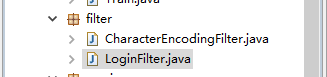
CharacterEncodingFilter.java
本类实现字符编码的过滤
package filter;

import java.io.IOException;

import javax.servlet.Filter;
import javax.servlet.FilterChain;
import javax.servlet.FilterConfig;
import javax.servlet.ServletException;
import javax.servlet.ServletRequest;
import javax.servlet.ServletResponse;

public class CharacterEncodingFilter implements Filter {

	public void destroy() {
		System.out.println("destroy----------");

	}

	public void doFilter(ServletRequest request, ServletResponse response,
			FilterChain chain) throws IOException, ServletException {
		System.out.println("doFilter----------");
		request.setCharacterEncoding("UTF-8");
		response.setCharacterEncoding("UTF-8");

		chain.doFilter(request, response);

	}
	public void init(FilterConfig arg0) throws ServletException {
		System.out.println("init----------");
	}
}
LoginFilter.java
本类用来实现登录过滤,只有登录成功了才能进行响应的操作,如果是未登录状态去直接进行访问操作,指挥将页面重定向为登录login.jsp页面。/servlet/*即对servlet包下的所有文件进行过滤,除了提交参数servlet/MoreFunction的才放行(登陆时放行)
package filter;

import java.io.IOException;

import javax.servlet.Filter;
import javax.servlet.FilterChain;
import javax.servlet.FilterConfig;
import javax.servlet.ServletException;
import javax.servlet.ServletRequest;
import javax.servlet.ServletResponse;
import javax.servlet.http.HttpServletRequest;
import javax.servlet.http.HttpServletResponse;

public class LoginFilter implements Filter {

	public void destroy() {
		// TODO Auto-generated method stub

	}

	public void doFilter(ServletRequest request, ServletResponse response,
			FilterChain chain) throws IOException, ServletException {

			//HttpServletRequest和HttpServletResponse是ServletRequest和ServletResponse的子类,所以需要向下转型
			HttpServletRequest hrq = (HttpServletRequest) request;
			HttpServletResponse hrs = (HttpServletResponse) response;

			System.out.println(hrq.getRequestURL());
			Object obj = hrq.getSession().getAttribute("loginUserName");
			if( null !=obj || hrq.getRequestURI().endsWith("servlet/MoreFunction")){

				chain.doFilter(request, response);
			}else{


				String path = hrq.getContextPath();
				hrs.sendRedirect(path+"/pages/login.jsp");
			}

	}

	public void init(FilterConfig arg0) throws ServletException {
		// TODO Auto-generated method stub

	}

}
jsp文件(list.jsp能正常运行,飘红是因为工具的原因)
404.jsp
<%@ page language="java" import="java.util.*" pageEncoding="UTF-8"%>
<%
String path = request.getContextPath();
String basePath = request.getScheme()+"://"+request.getServerName()+":"+request.getServerPort()+path+"/";
%>

<!DOCTYPE HTML PUBLIC "-//W3C//DTD HTML 4.01 Transitional//EN">
<html>
  <head>
    <base href="<%=basePath%>">

    <title>My JSP '404.jsp' starting page</title>

	<meta http-equiv="pragma" content="no-cache">
	<meta http-equiv="cache-control" content="no-cache">
	<meta http-equiv="expires" content="0">
	<meta http-equiv="keywords" content="keyword1,keyword2,keyword3">
	<meta http-equiv="description" content="This is my page">
	<!--
	<link rel="stylesheet" type="text/css" href="styles.css">
	-->

  </head>

  <body>
    <h1 align="center">抱歉,您所访问的页面无法显示!</h1>
  </body>
</html>
add.jsp
<%@ page language="java" import="java.util.*" pageEncoding="UTF-8"%>
<%
String path = request.getContextPath();
String basePath = request.getScheme()+"://"+request.getServerName()+":"+request.getServerPort()+path+"/";
%>

<!DOCTYPE HTML PUBLIC "-//W3C//DTD HTML 4.01 Transitional//EN">
<html>
  <head>
  <script type="text/javascript" src="<%=request.getContextPath()%>/ckeditor/ckeditor.js"></script>
    <base href="<%=basePath%>">

    <title>My JSP 'add.jsp' starting page</title>

	<meta http-equiv="pragma" content="no-cache">
	<meta http-equiv="cache-control" content="no-cache">
	<meta http-equiv="expires" content="0">
	<meta http-equiv="keywords" content="keyword1,keyword2,keyword3">
	<meta http-equiv="description" content="This is my page">
	<!--
	<link rel="stylesheet" type="text/css" href="styles.css">
	-->

  </head>

  <body>
    <h1 >增加车次信息</h1>
	<form id="form1" name="form1" method="post" action="<%=request.getContextPath()%>/servlet/MoreFunction?method=doAdd" >
		<table  width="60%" border="1" cellspacing="0" cellpadding="5" >
			<tr>
				<td>车次编号:</td>
				<td><input type="text" name="train_no" id="train_no" />
				</td>
			</tr>
			<tr>
				<td>起始站:</td>
				<td><input type="text" name="start_station" id="start_station" />
				</td>
			</tr>
			<tr>
				<td>终点站:</td>
				<td><input type="text" name="arrival_station" id="arrival_station" />
				</td>
			</tr>
			<tr>
				<td>发车时间:</td>
				<td><input type="text" name="start_time" id="start_time" />
				</td>
			</tr>
			<tr>
				<td>到站时间:</td>
				<td><input type="text" name="arrival_time" id="arrival_time" />
				</td>
			</tr>
			<tr>
				<td>车型:</td>
				<td><select name="type" id="type">
						<option value="">--请选择车型--</option>
						<option value="特快">特快</option>
						<option value="普快">普快</option>
						<option value="动车">动车</option>
						<option value="直达">直达</option>
				</select>
				</td>
			</tr>
			<tr>
				<td class="ckeditor">运行时间:</td>
				<td><input type="text" name="runtime" id="runtime" />
				</td>
			</tr>
			<tr>
				<td>运行里程:</td>
				<td><input type="text" name="mile" id="mile" />
				</td>
			</tr>
			<!-- <tr>
				<td>图片:</td>
				<td><input type="file" name="picture" id="picture" />
				</td>
			</tr> -->
			<tr>
				<td colspan="2" align="center"><input type="submit" name="sbt"
					id="sbt" value="提交" />
				</td>
			</tr>

		</table>
	</form>
  </body>
</html>
doAdd.jsp
<%@page import="service.TrainService"%>
<%@page import="entity.Train"%>
<%@ page language="java" import="java.util.*" pageEncoding="UTF-8"%>

<%
	//设置接受字符编码
	request.setCharacterEncoding("UTF-8");
	//1.接收客户端请求的数据(获取输入的数据)
	String train_no = request.getParameter("train_no");
	String start_station = request.getParameter("start_station");
	String arrival_station = request.getParameter("arrival_station");
	String start_time = request.getParameter("start_time");
	String arrival_time = request.getParameter("arrival_time");
	String type = request.getParameter("type");
	String runtime = request.getParameter("runtime");
	String mile = request.getParameter("mile");

	Train train = new Train(train_no ,start_station,arrival_station,start_time,arrival_time,type,runtime,Double.parseDouble(mile));
	TrainService ts = new TrainService();
	ts.addInfo(train);
	//3.存储处理的结果到作用域

	//4.页面跳转
	response.sendRedirect("list.jsp");
%>
doDelete.jsp
<%@page import="service.TrainService"%>
<%@ page language="java" import="java.util.*" pageEncoding="UTF-8"%>

<%
	//1.接收客户端请求的数据
	/* String []ts = request.getParameterValues("del");
	String train_no="";
	for(int i = 0;i<ts.length;i++){
		System.out.print(ts[i]);
		if(ts[i]!=null){

		}
	} */
	String train_no = request.getParameter("del");
	//2.调用service方法处理客户端请求 - 根据train_no删除车次信息
	TrainService nts = new TrainService();

	nts.delInfo(train_no);
	//3.存储处理的结果到作用域

	//4.页面跳转

	response.sendRedirect("list.jsp");
%>
doList.jsp
<%@page import="service.TrainService"%>
<%@page import="entity.Train"%>
<%@page import="util.Page"%>
<%@page import="dao.impl.ImplTrainDao"%>
<%@ page language="java" import="java.util.*" pageEncoding="UTF-8"%>

<%
	//1.接收客户端请求的数据(获取当前页码数)
 	//第一次进来用户未点击分页条,pageNo为null值,默认显示第一页,所以pageNo默认等于1
 	//每页显示条数
	int pageSize = 3;
	//当前页码
	int pageNo = request.getParameter("pageNo") == null ? 1 : Integer.parseInt(request.getParameter("pageNo"));

	//2.调用service方法处理客户端请求
	TrainService ts = new TrainService();

	Page<Train> pg = ts.getPage(pageNo, pageSize);

	//3.存储处理的结果到作用域
	request.setAttribute("pg", pg);
	//4.页面跳转
	request.getRequestDispatcher("list.jsp").forward(request, response);

%>
doLogin.jsp
<%@page import="service.UserService"%>
<%@ page language="java" import="java.util.*" pageEncoding="UTF-8"%>

<%
	//1.接受客户端的请求
	String name = request.getParameter("userName");
	String pwd = request.getParameter("passWord");
	//2.调用service方法处理数据

	//创建UserService类的对象
	UserService us = new UserService();
	boolean flag = us.login(name, pwd);
	if(!flag){
			//3.存储处理的结果到作用域--提示用户账号或者密码错误

			request.setAttribute("msg","用户名或密码错误!");
			//4.跳转回到login.jsp
			request.getRequestDispatcher("login.jsp").forward(request, response);

	}else{//输入正确

			String rememberUserName = request.getParameter("rememberUserName");
			if(rememberUserName !=null && rememberUserName.equals("1")){
			Cookie cookie = new Cookie("loginUserName",name);
			response.addCookie(cookie);
			}


			//3.存储处理的结果到session作用域,没有这一步
			session.setAttribute("userName",name );

			//4.跳转回到login.jsp
			/*request.getRequestDispatcher("list.jsp").forward(request, response);*/

 			response.sendRedirect("list.jsp");
	}
%>
doShow.jsp
<%@page import="entity.Train"%>
<%@page import="service.TrainService"%>
<%@ page language="java" import="java.util.*" pageEncoding="UTF-8"%>
<%
	//1.接收客户端请求的数据
 	String trainNo = request.getParameter("train_no");
	//2.调用service方法处理客户端请求 - 根据

	TrainService ts = new TrainService();
	Train train = ts.getInfo(trainNo);
	/* System.out.println(train); */
	//3.存储处理的结果到作用域
	request.setAttribute("train", train);
	//4.页面跳转
	request.getRequestDispatcher("show.jsp").forward(request, response);

%>
list.jsp
<%@page import="util.Page"%>
<%@page import="entity.Train"%>
<%@page import="service.TrainService"%>
<%@ page language="java" import="java.util.*" pageEncoding="UTF-8"%>
<%@ taglib uri="http://java.sun.com/jsp/jstl/core" prefix="c" %>
<%
String path = request.getContextPath();
String basePath = request.getScheme()+"://"+request.getServerName()+":"+request.getServerPort()+path+"/";
%>

<!DOCTYPE HTML PUBLIC "-//W3C//DTD HTML 4.01 Transitional//EN">
<html>
  <head>
    <base href="<%=basePath%>">

    <title>My JSP 'list.jsp' starting page</title>

	<meta http-equiv="pragma" content="no-cache">
	<meta http-equiv="cache-control" content="no-cache">
	<meta http-equiv="expires" content="0">
	<meta http-equiv="keywords" content="keyword1,keyword2,keyword3">
	<meta http-equiv="description" content="This is my page">
	<!--
	<link rel="stylesheet" type="text/css" href="styles.css">
	-->

  </head>
  <%	//TrainService ts = new TrainService();
  	/* 	Page<Train> pg = (Page<Train>)request.getAttribute("pg");
  		System.out.println(pg);
  		List<Train> list = pg.getList(); */

  		/* TrainService ts = new TrainService();
  		  List<Train> list = ts.getList();
  		 */
   %>

   <script type="text/javascript" src="js/jquery-1.12.4.js"></script>
	<script type="text/javascript">
	 var num = ${pg.totalPage};
		$(document).ready(function(){
			$("#goBtn").click(function(){
				var goPage = $("#goPage").val();
				if(isNaN(goPage)){
					alert("页码必须为数字");
					return;
				}
				if(goPage<=0|| goPage> num){
					alert("页码必须大于0小于等于总页数");
					return;
				}
				//页面跳转
				window.location.href = "servlet/ListServlet?pageNo="+goPage;
			})
		})
	</script>
  <body>
<p>
  <a href="pages/add.jsp"><input type="submit" name="add" id="add" value="增加车次信息" /></a>
</p>


<form action="<%=request.getContextPath() %>/servlet/MoreFunction?method=doDelete" method="post">
<table width="90%" border="1" cellpadding="5" cellspacing="0">
<h1 align="center">深圳站车次信息表</h1>
  <tr>

  <td><input type="submit" name="sbt" id="sbt" value="删除" /></td>

    <td>车次</td>
    <td>发车--到达</td>
    <td>发时--到时</td>
    <td>车型</td>
    <td>运行时间(小时)</td>
    <td>运行里程</td>
  </tr>
 	<%-- <%
			for (int i = 0; i < list.size(); i++) {
				Train t = list.get(i);
				out.println("<tr>");
				out.println("<td><input type='checkbox' name='del' value='"+t.getTrain_no()+"'/></td>");
				out.println("<td><a href='pages/doShow.jsp?train_no="+t.getTrain_no()+"'>"+t.getTrain_no()+"</a></td>");
				out.println("<td>"+t.getStart_station()+"--"+t.getArrival_station()+"</td>");
				out.println("<td>"+t.getStart_time()+"--"+t.getArrival_time()+"</td>");
				out.println("<td>"+t.getType()+"</td>");
				out.println("<td>"+t.getRuntime()+"</td>");
				out.println("</tr>");
			}
	  %> --%>
	   <c:forEach items="${pg.list}" var="stu" varStatus="status" >
  		<tr>
  			<td><input type='checkbox' name='del' value="${stu.train_no}" /></td>

  			<td><a href='<%=request.getContextPath() %>/servlet/MoreFunction?method=doShow&train_no=${stu.train_no}'>${stu.train_no}</a></td>
  			<td>${stu.start_station}--${stu.arrival_station}</td>
  			<td>${stu.start_time}--${stu.arrival_time}</td>
  			<td>${stu.type}</td>
  			<td>${stu.runtime}</td>
  			<td>${stu.mile}</td>
  	</tr>
  </c:forEach>
   <tr>
    <td colspan="7">
    	<c:import url="rollPage.jsp">
    		<c:param name="pageNo" value="${pg.pageNo}"></c:param>
    		<c:param name="totalCount" value="${pg.totalCount}"></c:param>
    		<c:param name="totalPage" value="${pg.totalPage}"></c:param>
    			<c:param name="firstPgUrl" value="/Train/servlet/MoreFunction?method=doList&pageNo=1"></c:param>
    		<c:param name="prePgUrl" value="/Train/servlet/MoreFunction?method=doList&pageNo=${pg.pageNo-1}"></c:param>
    		<c:param name="nextPgUrl" value="/Train/servlet/MoreFunction?method=doList&pageNo=${pg.pageNo+1}"></c:param>
    		<c:param name="lastPgUrl" value="/Train/servlet/MoreFunction?method=doList&pageNo=${pg.totalPage}"></c:param>
    	</c:import>
    </td>
  </tr>
</table>
</form>
  </body>
</html>
login.jsp
<%@ page language="java" import="java.util.*" pageEncoding="UTF-8"%>
<%
String path = request.getContextPath();
String basePath = request.getScheme()+"://"+request.getServerName()+":"+request.getServerPort()+path+"/";
%>

<!DOCTYPE HTML PUBLIC "-//W3C//DTD HTML 4.01 Transitional//EN">
<html>
  <head>
    <base href="<%=basePath%>">

    <title>My JSP 'login.jsp' starting page</title>

	<meta http-equiv="pragma" content="no-cache">
	<meta http-equiv="cache-control" content="no-cache">
	<meta http-equiv="expires" content="0">
	<meta http-equiv="keywords" content="keyword1,keyword2,keyword3">
	<meta http-equiv="description" content="This is my page">
	<!--
	<link rel="stylesheet" type="text/css" href="styles.css">
	-->

  </head>
  <%
  Object objmsg = request.getAttribute("msg");
  String msg = "";
  if(objmsg!=null){
  msg = (String)objmsg;
  }

   %>
  <body>
  <h1 align="center">用户登录</h1>
  <div align="center" style="color:red"><%=msg%></div>
    <form action="<%=request.getContextPath() %>/servlet/MoreFunction?method=doLogin" method="post">
    <table border="1px" align="center">
    	<tr>
    	<td>账号:</td>
    	<td><input type="text" name="userName" id="userName" value="" /></td>
    	</tr>

    	<tr>
    	<td>密码:</td>
    	<td><input type="passWord" name="passWord" id="passWord" value=""  /></td></td>
    	</tr>

    	<tr align="center">
    	<td colspan="2" >
    	<input type="submit" name="sbt" id="sbt" value="登 录" />
    	<input type="submit" name="rgst" id="rgst" value="注册" />
    	</td>

    	</tr>
    </table>
    </form>
  </body>
</html>
rollPage.jsp
<%@page import="util.Page"%>
<%@ page language="java" import="java.util.*" pageEncoding="UTF-8"%>
<%@ taglib uri="http://java.sun.com/jsp/jstl/core" prefix="c" %>
<c:if test="${param.pageNo > 1 }">
 	<a href="${param.firstPgUrl}">首页</a>
 	<a href="${param.prePgUrl}">上一页</a>
</c:if>
<c:if test="${param.pageNo < param.totalPage }">
 	<a href="${param.nextPgUrl}">下一页</a>
 	<a href="${param.lastPgUrl}">尾页</a>
</c:if>
第${param.pageNo}/${param.totalPage}页 共${param.totalCount}条记录 跳<input type="text" id="goPage" value="" size="2"/><input type="button" id="goBtn" value="go"/>页
show.jsp
<%@page import="entity.Train"%>
<%@ page language="java" import="java.util.*" pageEncoding="UTF-8"%>
<%
String path = request.getContextPath();
String basePath = request.getScheme()+"://"+request.getServerName()+":"+request.getServerPort()+path+"/";
%>

<!DOCTYPE HTML PUBLIC "-//W3C//DTD HTML 4.01 Transitional//EN">
<html>
  <head>
    <base href="<%=basePath%>">

    <title>My JSP 'show.jsp' starting page</title>

	<meta http-equiv="pragma" content="no-cache">
	<meta http-equiv="cache-control" content="no-cache">
	<meta http-equiv="expires" content="0">
	<meta http-equiv="keywords" content="keyword1,keyword2,keyword3">
	<meta http-equiv="description" content="This is my page">
	<!--
	<link rel="stylesheet" type="text/css" href="styles.css">
	-->

  </head>

  <body>
  <%-- 	<%
		//取出doShow.jsp转发过来的请求request中的属性对象
		Object obj = request.getAttribute("train");
		Train t = null;
		if(obj != null){
			t = (Train)obj;
		}
	%> --%>
	<h1>车次信息详情</h1>

	<table width="60%" border="1" cellspacing="0" cellpadding="5">
		<tr>
			<td>车次:</td>
			<td>${train.train_no}</td>
		</tr>
		<tr>
			<td>发车--到达</td>
			<td>${train.start_station}--${train.arrival_station}</td>
		</tr>
		<tr>
			<td>发时--到时</td>
			<td>${train.start_time}--${train.arrival_time}</td>
		</tr>
		<tr>
			<td>车型:</td>
			<td>${train.type}</td>
		</tr>
		<tr>
			<td>运行时间(小时):</td>
			<td>${train.runtime}</td>
		</tr>
		<tr>
			<td>里程:</td>
			<td>${train.mile}</td>
		</tr>


	</table>

  </body>
</html>
相关组件: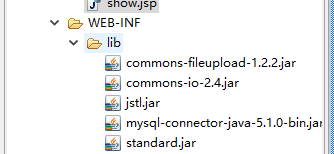
commons-fileupload-1.2.2.jar以及commons-io-2.4.jar是第三方控件用来文件上传
jstl.jar以及standard.jar用以在jsp文件中使用jstl表达式
mysql-connector-java-5.1.0-bin.jar用以项目和数据库进行连接
web.xml配置
<?xml version="1.0" encoding="UTF-8"?>
<web-app version="2.5"
	xmlns="http://java.sun.com/xml/ns/javaee"
	xmlns:xsi="http://www.w3.org/2001/XMLSchema-instance"
	xsi:schemaLocation="http://java.sun.com/xml/ns/javaee
	http://java.sun.com/xml/ns/javaee/web-app_2_5.xsd">
  <display-name></display-name>
<!--   <servlet>
    <description>This is the description of my J2EE component</description>
    <display-name>This is the display name of my J2EE component</display-name>
    <servlet-name>AddServlet</servlet-name>
    <servlet-class>servlet.AddServlet</servlet-class>
  </servlet>
  <servlet>
    <description>This is the description of my J2EE component</description>
    <display-name>This is the display name of my J2EE component</display-name>
    <servlet-name>DeleteServlet</servlet-name>
    <servlet-class>servlet.DeleteServlet</servlet-class>
  </servlet>
  <servlet>
    <description>This is the description of my J2EE component</description>
    <display-name>This is the display name of my J2EE component</display-name>
    <servlet-name>LoginServlet</servlet-name>
    <servlet-class>servlet.LoginServlet</servlet-class>
  </servlet>
  <servlet>
    <description>This is the description of my J2EE component</description>
    <display-name>This is the display name of my J2EE component</display-name>
    <servlet-name>ShowServlet</servlet-name>
    <servlet-class>servlet.ShowServlet</servlet-class>
  </servlet>
  <servlet>
    <description>This is the description of my J2EE component</description>
    <display-name>This is the display name of my J2EE component</display-name>
    <servlet-name>ListServlet</servlet-name>
    <servlet-class>servlet.ListServlet</servlet-class>
  </servlet> -->
  <servlet>
    <description>This is the description of my J2EE component</description>
    <display-name>This is the display name of my J2EE component</display-name>
    <servlet-name>MoreFunction</servlet-name>
    <servlet-class>servlet.MoreFunction</servlet-class>
  </servlet>


<!--   <servlet-mapping>
    <servlet-name>AddServlet</servlet-name>
    <url-pattern>/servlet/AddServlet</url-pattern>
  </servlet-mapping>
  <servlet-mapping>
    <servlet-name>DeleteServlet</servlet-name>
    <url-pattern>/servlet/DeleteServlet</url-pattern>
  </servlet-mapping>
  <servlet-mapping>
    <servlet-name>LoginServlet</servlet-name>
    <url-pattern>/servlet/LoginServlet</url-pattern>
  </servlet-mapping>
  <servlet-mapping>
    <servlet-name>ShowServlet</servlet-name>
    <url-pattern>/servlet/ShowServlet</url-pattern>
  </servlet-mapping>
  <servlet-mapping>
    <servlet-name>ListServlet</servlet-name>
    <url-pattern>/servlet/ListServlet</url-pattern>
  </servlet-mapping> -->
  <servlet-mapping>
    <servlet-name>MoreFunction</servlet-name>
    <url-pattern>/servlet/MoreFunction</url-pattern>
  </servlet-mapping>


   <filter>
  	<filter-name>CharacterEncodingFilter</filter-name>
  	<filter-class>filter.CharacterEncodingFilter</filter-class>
  </filter>

  <filter-mapping>
  	<filter-name>CharacterEncodingFilter</filter-name>
  	<url-pattern>/*</url-pattern>
  </filter-mapping>

     <filter>

  	<filter-name>LoginFilter</filter-name>
  	<filter-class>filter.LoginFilter</filter-class>
  </filter>

  <filter-mapping>
  	<filter-name>LoginFilter</filter-name>
  	<url-pattern>/servlet/*</url-pattern>
  </filter-mapping>


  <welcome-file-list>
    <welcome-file>index.jsp</welcome-file>
  </welcome-file-list>
</web-app>
数据库相关:本系统用到数据库字段如下:
存储的数据如下:
、
因为我们聚合了所有的servlet控制层中的方法在MoreFunction()中,所以每次逻辑控制操作都需要进到/servlet/MoreFunction中。
界面展示:
账号:admin
密码:123
可以从UserService.java查看规定的账号密码
<a href='<%=request.getContextPath() %>/servlet/MoreFunction?method=doShow&train_no=${stu.train_no}'>${stu.train_no}</a>


项目开发完成后,部署在tomcat服务器上;
登录逻辑:
在浏览器输入http://localhost:8080/Train/pages/login.jsp,输入账号密码,提交进入MoreFunction.java中执行doLogin方法,(此处会调用UserService.java验证账号正确与否),正确就调用doList()方法,该方法会跳转至list.jsp进行分页显示。账号密码不符,就重新回到登录页面,并且出现红色提示“账号密码不正确”。
增加信息逻辑:
在list页面点击增加信息按钮,会跳转到add.jsp,在该页面输入行营的信息,点击提交按钮,会将数据提交至MoreFunction.java中执行doAdd方法,该方法将数据存入数据库。并且调用doList方法,完成信息的更新显示。
<form id="form1" name="form1" method="post" action="<%=request.getContextPath()%>/servlet/MoreFunction?method=doAdd" >
删除逻辑:
在list页面勾选复选框并且点击删除按钮,会将数据提交至MoreFunction.java中执行doDelete方法,该方法删除相应id的信息。并且调用doList方法,完成信息的更新显示。
action="<%=request.getContextPath() %>/servlet/MoreFunction?method=doDelete"
查看逻辑:
在list页面点击车次下的超链接,会将数据提交至MoreFunction.java中执行doShow方法,该方法根据id取出相应的车次信息,存储到request作用域中,name为“train”,并转发到show.jsp中,在show.jsp中通过EL语句去除存储在request作用域中的数据显示。
<a href='<%=request.getContextPath() %>/servlet/MoreFunction?method=doShow&train_no=${stu.train_no}'>${stu.train_no}</
本系统真正起作用的:servlet:MoreFunction.java
service:TrainService.java UserService.java
util:Page.java
entity:Train.java
dao:BaseDao.java TrainDao.java
dao.impl:ImplTrainDao.java
filter:CharacterEncodingFilter.java LoginFilter.java
pages:404.jsp add.jsp list.jsp login.jsp rollPage.jsp show.jsp
最后特别需要注意:web.xml中的文件配置,千万别忘记,不然在浏览器中访问不到,会报404;其他的错误就是500,这就需要我们自己去解决。