
环境:Mac Air OS X 10.10;CentOS6.7
PXE安装系统原理
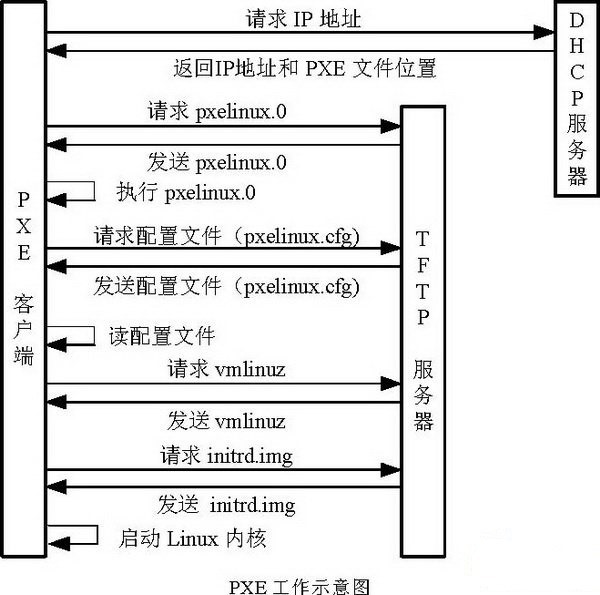
配置DHCP server
方法一
- 安装获得dhcpd命令
brew install isc-dhcp- 修改 /usr/local/etc/dhcpd.conf
#cat /usr/local/etc/dhcp.conf default-lease-time 600; max-lease-time 7200; authoritative; #option domain-name ustc.edu.cn ; #option domain-name-servers 202.38.64.7 ; subnet 192.168.1.0 netmask 255.255.255.0 { range dynamic-bootp 192.168.1.2 192.168.1.250; #range 192.168.1.2 192.168.1.250; option routers 192.168.1.1; option domain-name-servers 202.38.64.7 ; next-server 192.168.1.1; filename "BOOTX64.efi"; #filename "/private/pxe/share_tftp/pxelinux.0"; }- 启动DHCP
连接以太网络网线,并找到其网络设备名,此地为en3
#/usr/local/sbin/dhcpd -f -d en3
方法二(not tested)
- 编辑/etc/bootpd.plist使:
$cat /etc/bootpd.plist
<?xml version="1.0" encoding="UTF-8"?>
<!DOCTYPE plist PUBLIC "-//Apple//DTD PLIST 1.0//EN" "http://www.apple.com/DTDs/PropertyList-1.0.dtd">
<plist version="1.0">
<dict>
	<key>dhcp_enabled</key>
	<string>en3</string>
	<key>Subnets</key>
	<array>
		<dict>
			<key>name</key>
			<string>192.168.1</string>
			<key>net_mask</key>
			<string>255.255.255.0</string>
			<key>net_address</key>
			<string>192.168.1.0</string>
			<key>net_range</key>
			<array>
				<string>192.168.1.2</string>
				<string>192.168.1.254</string>
			</array>
			<key>allocate</key>
			<true/>
			<key>dhcp_option_66</key>
			<string>192.168.1.1</string>
			<key>dhcp_option_67</key>
			<data>cHhlbGludXguMAA=</data>
		</dict>
	</array>
</dict>
- 注意其中dhcp_option_67的参数由以下对pxelinux.0转换而来:
$print %s00 `echo -n pxelinux.0 | xxd -p` | xxd -r -p | openssl base64 cHhlbGludXguMAA- 载入启动
#launchctl load -w /System/Library/LaunchDaemons/bootps.plist
#launchctl unload -w /System/Library/LaunchDaemons/bootps.plist
配置TFTP server
- 复制 /System/Library/LaunchDaemons/tftp.plist 到 /private/pxe/tftp.plist 并修改为(或者直接修改使用前面文件):
sh-3.2# cat /private/pxe/tftp.plist <?xml version="1.0" encoding="UTF-8"?> <!DOCTYPE plist PUBLIC "-//Apple Computer//DTD PLIST 1.0//EN" "http://www.apple.com/DTDs/PropertyList-1.0.dtd"> <plist version="1.0"> <dict> <key>Disabled</key> <true/> <key>Label</key> <string>com.apple.tftpd</string> <key>ProgramArguments</key> <array> <string>/usr/libexec/tftpd</string> <string>-i</string> <string>/private/pxe/share_tftp</string> </array> <key>inetdCompatibility</key> <dict> <key>Wait</key> <true/> </dict> <key>InitGroups</key> <true/> <key>Sockets</key> <dict> <key>Listeners</key> <dict> <key>SockServiceName</key> <string>tftp</string> <key>SockType</key> <string>dgram</string> </dict> </dict> </dict> </plist> sh-3.2#- to start the TFTP server
#launchctl load -F /private/pxe/tftp.plist(-w可以在TFTP sever disable的情况下自动enable,-F则是强制load)
to stop it
#launchctl unload -F /private/pxe/tftp.plist- 放入必要文件,the folder reads:
sh-3.2# ls -R /private/pxe/share_tftp
LegacyBOOT

./LegacyBOOT:
DFPT.jpg	centos6.7	menu.msg	pxelinux.0	pxelinux.cfg

./LegacyBOOT/centos6.7:
TRANS.TBL	initrd.img	vmlinuz

./LegacyBOOT/pxelinux.cfg:
default
检查TFTP服务是否工作
sh-3.2# tftp localhost tftp> get LegacyBOOT/pxelinux.0 Received 27157 bytes in 0.0 seconds tftp> quit sh-3.2# ls dhcpd.conf pxelinux.0 share_nfs share_tftp tftp.plist sh-3.2# rm pxelinux.0- cat menu.msg
sh-3.2# cat share_tftp/menu.msg Choose one of the following labels in order to boot: - centos6.7 sh-3.2#- cat pxelinux.cfg/default
sh-3.2# cat /private/pxe/share_tftp//LegacyBOOT/pxelinux.cfg/default timeout 100 prompt 1 display menu.msg default 0 label locate localboot 0 label centos menu label CentOS 6.7 x86_64 KS kernel centos6.7/vmlinuz append initrd=centos6.7/initrd.img ramdisk_size=100 ksdevice=eth0 ks=nfs:192.168.1.1:/private/pxe/share_nfs/ks.cfg ip=dhcp- ks.cfg是kickstart无值守安装配置文件
- 此处略过,按需操作。
配置NFS服务
- 编辑文件
sudo nano /etc/exports为
sh-3.2# cat /etc/exports /private/pxe/share_nfs -maproot=nobody -ro -alldirs -network 192.168.0.0 -mask 255.255.0.0 sh-3.2#- 运行
正常没有输出。nfsd checkexports- 检查NFS状态
nfsd status- 检查共享目录
sh-3.2# showmount -e
Exports list on localhost:
/private/pxe/share_nfs              192.168.0.0
修改为支持UEFI PXE启动
准备文件,新增目录EFIBOOT
sh-3.2# ls -R /private/pxe/share_tftp/EFIBOOT/
BOOTX64.conf	BOOTX64.efi	TRANS.TBL	efidefault	splash.xpm.gz
除efidefault外,其他均来自CentOS 6.7 x86-64 ISO中的 EFI/BOOT目录。
修改dhcpd.conf为支持UEFI
sh-3.2# cat /usr/local/etc/dhcpd.conf # for PXE default-lease-time 600; max-lease-time 7200; authoritative; #option domain-name ustc.edu.cn ; #option domain-name-servers 202.38.64.7 ; option space PXE; option PXE.mtftp-ip code 1 = ip-address; option PXE.mtftp-cport code 2 = unsigned integer 16; option PXE.mtftp-sport code 3 = unsigned integer 16; option PXE.mtftp-tmout code 4 = unsigned integer 8; option PXE.mtftp-delay code 5 = unsigned integer 8; option arch code 93 = unsigned integer 16; # RFC4578 subnet 192.168.1.0 netmask 255.255.255.0 { range dynamic-bootp 192.168.1.2 192.168.1.250; #range 192.168.1.2 192.168.1.250; option routers 192.168.1.1; option domain-name-servers 202.38.64.7 ; #host examplehost { # hardware ethernet AA:BB:CC:DD:EE:FF; # fixed-address 192.168.1.250; #} class "pxelients" { match if substring(option vendor-class-identifier, 0, 9) = "PXEClient"; next-server 192.168.1.1; if option arch = 00:06 { filename "EFIBOOTIA/BOOTIA32.efi"; } else if option arch = 00:07 { filename "EFIBOOT/BOOTX64.efi"; } else { filename "LegacyBOOT/pxelinux.0"; } } }- pxelinux.cfg/default文件换成efidefault
sh-3.2# cat EFIBOOT/efidefault
timeout 60

#prompt 1

splashimage=(nd)/splash.xpm.gz

#hiddenmenu

#display menu.msg

default=0
#default centos6.7
#default vesamenu.c32
#default rescue


title Install centos6.7 UEFI KS
  root (nd)
  kernel LegacyBOOT/centos6.7/vmlinuz ramdisk_size=100 ksdevice=eth0 ks=nfs:192.168.1.1:/private/pxe/share_nfs/ks.cfg ip=dhcp
  initrd LegacyBOOT/centos6.7/initrd.img
注意UEFI中的kickstart配置文件ks.cfg等需要置于 kernel vmlinuz 后,而不是legacy 下的 initrd 后。
配置PXE LiveOS
CentOS 6.7 LIve PXE
- 首先使用 livecd-iso-to-pxeboot 将iso中的kernel与initrd转化为支持Live PXE的,其中initrd中包含整个系统。
- PXE配置中使用生成的kernel与initrd。
客户端安装系统
- 设置BIOS为网络PXE安装(注意Legacy与UEFI两种方式的区别)
- 启动安装
参考
KickStart:
http://blog.csdn.net/taiyang1987912/article/details/42176709
Mac PXE sever:
https://fvtool.wordpress.com/2013/01/02/osx-as-pxeboot-server/
http://hints.macworld.com/article.php?story=20130625164022823
centOS & EFI:
https://access.redhat.com/documentation/en-US/Red_Hat_Enterprise_Linux/6/html/Installation_Guide/s1-netboot-pxe-config-efi.html
转载于:https://my.oschina.net/emptytimespace/blog/753951