集群数据均衡
1)节点间数据均衡
(1)开启数据均衡命令
start-balancer.sh -threshold 10对于参数10,代表的是集群中各个节点的磁盘空间利用率相差不超过10%,可根据实际情况进行调整
(2)停止数据均衡命令
stop-balancer.sh注意:于HDFS需要启动单独的Rebalance Server来执行Rebalance操作,所以尽量不要在NameNode上执行start-balancer.sh,而是找一台比较空闲的机器
2)磁盘间数据均衡
(1) 生成均衡计划
(2)执行均衡计划
(3)查看当前均衡任务的执行情况
(4)取消均衡任务
hdfs diskbalancer -plan hadoop103
hdfs diskbalancer -execute hadoop103.plan.json
hdfs diskbalancer -query hadoop103
hdfs diskbalancer -cancel hadoop103.plan.json
支持LZO压缩配置
1)hadoop-lzo编译
hadoop本身并不支持lzo压缩,故需要使用twitter提供hadoop-lzo开源组件。hadoop-lzo需以来hadoop和lzo进行编译
2)将编译好后的hadoop-lzo-0.4.20.jar 放入hadoop-3.1.3/share/hadoop/common/
3)同步hadoop-lzo-0.420.jar放入hadoop103,hadoop104
[atguigu@hadoop102 common]$ pwd
/opt/module/hadoop-3.1.3/share/hadoop/common
[atguigu@hadoop102 common]$ ls
hadoop-lzo-0.4.20.jar

[atguigu@hadoop102 common]$ xsync hadoop-lzo-0.4.20.jar
4)core-site.xml增加配置支持lzo压缩 并同步core-site.xml到hadoop103 hadoop104
<configuration>
    <property>
        <name>io.compression.codecs</name>
        <value>
            org.apache.hadoop.io.compress.GzipCodec,
            org.apache.hadoop.io.compress.DefaultCodec,
            org.apache.hadoop.io.compress.BZip2Codec,
            org.apache.hadoop.io.compress.SnappyCodec,
            com.hadoop.compression.lzo.LzoCodec,
            com.hadoop.compression.lzo.LzopCodec
        </value>
    </property>

    <property>
        <name>io.compression.codec.lzo.class</name>
        <value>com.hadoop.compression.lzo.LzoCodec</value>
    </property>
</configuration>
[atguigu@hadoop102 hadoop]$ xsync core-site.xml5)启动及查看集群
[atguigu@hadoop102 hadoop-3.1.3]$ sbin/start-dfs.sh
[atguigu@hadoop103 hadoop-3.1.3]$ sbin/start-yarn.sh
6)测试数据准备
[atguigu@hadoop102 hadoop-3.1.3]$ hadoop fs -mkdir /input
[atguigu@hadoop102 hadoop-3.1.3]$ hadoop fs -put README.txt /input
7)测试压缩
[atguigu@hadoop102 hadoop-3.1.3]$ hadoop jar share/hadoop/mapreduce/hadoop-mapreduce-examples-3.1.3.jar wordcount -Dmapreduce.output.fileoutputformat.compress=true -Dmapreduce.output.fileoutputformat.compress.codec=com.hadoop.compression.lzo.LzopCodec /input /outputLZO创建索引
1)创建lzo文件的索引
LZO压缩文件的可切片特性依赖于其索引,故需要手动为LZO压缩文件创建索引。若无索引。则LZO文件的切片只有一个
hadoop jar /path/to/your/hadoop-lzo.jar com.hadoop.compression.lzo.DistributedLzoIndexer big_file.lzo2)测试
(1) 将bigtable.lzo(200M)上传到集群的根目录
[atguigu@hadoop102 module]$ hadoop fs -mkdir /input
[atguigu@hadoop102 module]$ hadoop fs -put bigtable.lzo /input
(2)执行wordcount程序
[atguigu@hadoop102 module]$ hadoop jar /opt/module/hadoop-3.1.3/share/hadoop/mapreduce/hadoop-mapreduce-examples-3.1.3.jar wordcount -Dmapreduce.job.inputformat.class=com.hadoop.mapreduce.LzoTextInputFormat /input /output1(3)对上传的LZO文件建索引
[atguigu@hadoop102 module]$ hadoop jar /opt/module/hadoop-3.1.3/share/hadoop/common/hadoop-lzo-0.4.20.jar com.hadoop.compression.lzo.DistributedLzoIndexer /input/bigtable.lzo(4)再次执行WordCount程序
[atguigu@hadoop102 module]$ hadoop jar /opt/module/hadoop-3.1.3/share/hadoop/mapreduce/hadoop-mapreduce-examples-3.1.3.jar wordcount -Dmapreduce.job.inputformat.class=com.hadoop.mapreduce.LzoTextInputFormat /input /output2基准测试
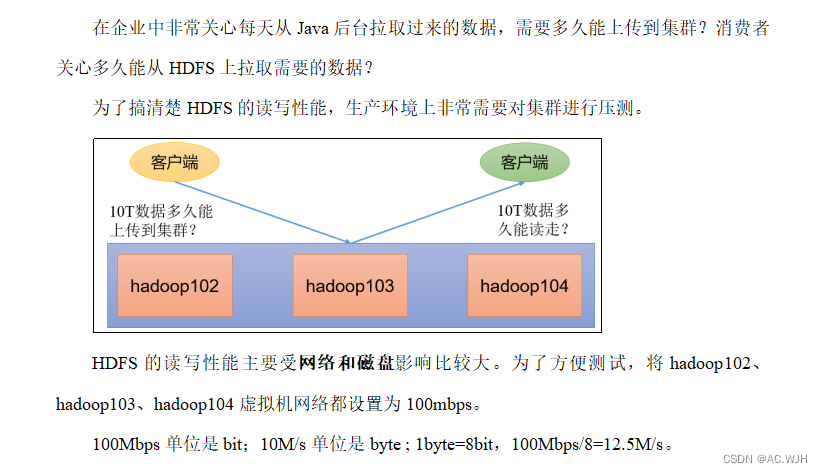
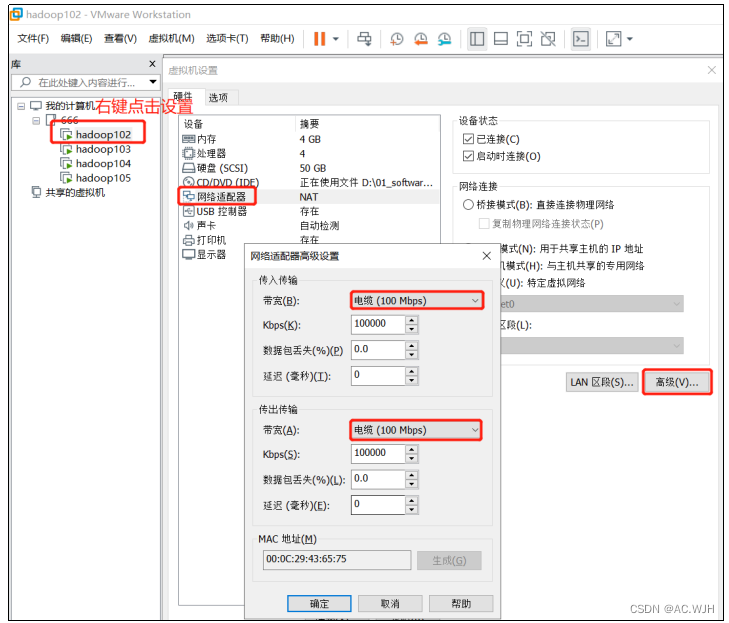
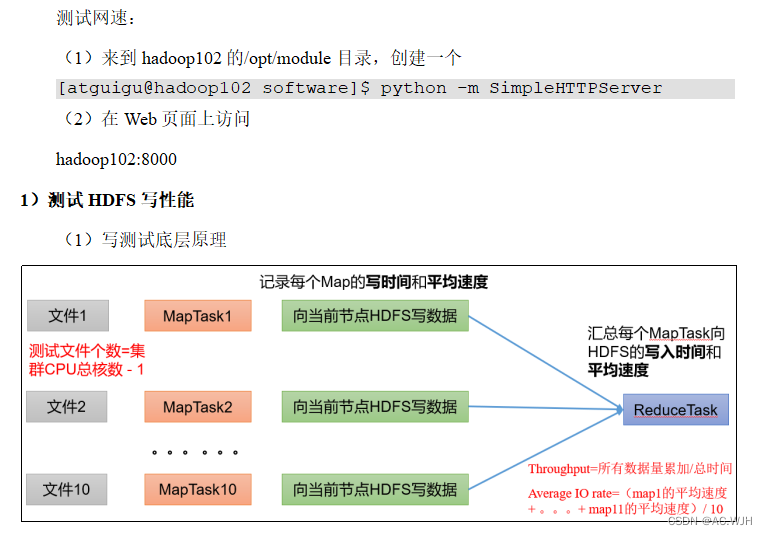
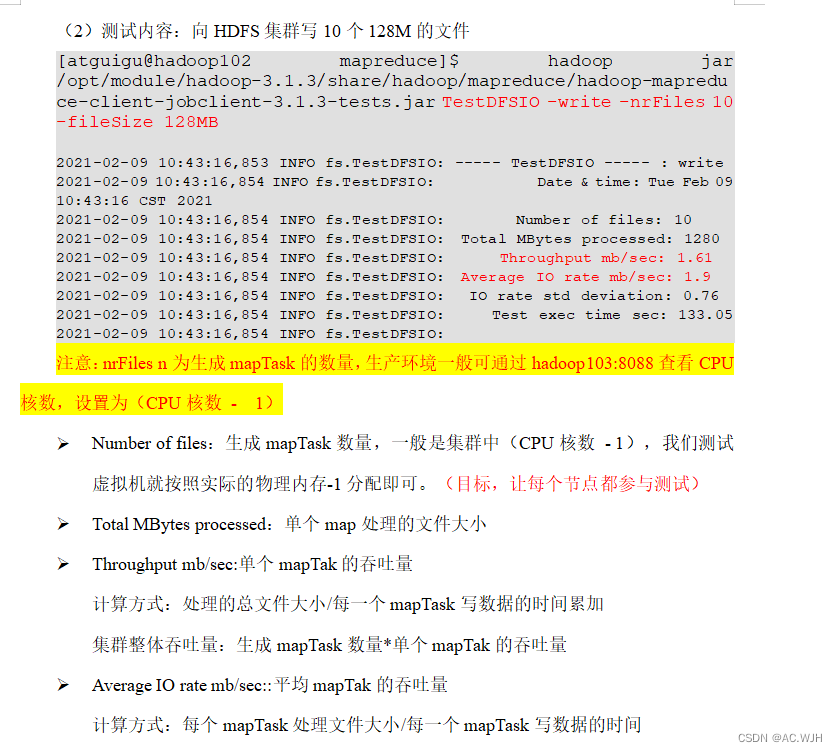
Hadoop参数调优
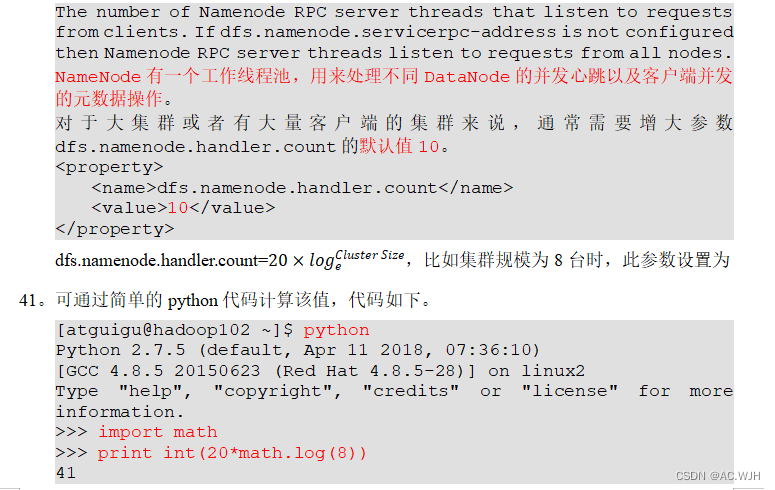
1)HDFS参数调优hdfs-site.xml
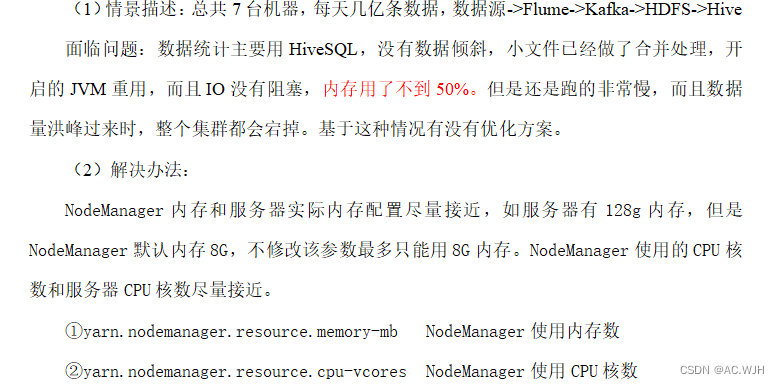
2)YARN参数调优yarn-site.xml
版权声明:本文为weixin_63816398原创文章,遵循CC 4.0 BY-SA版权协议,转载请附上原文出处链接和本声明。