Mybatis
环境:
- jdk1.8
- mysql5.7+
- maven3.6.0
- Idea
回顾:
- jdbc
- mysql
- java基础
- maven
- junit
SSM框架:
- mybatis官方文档:
https://mybatis.org/mybatis-3/zh/index.html
设计模式
https://www.runoob.com/design-pattern/design-pattern-tutorial.html
工厂模式
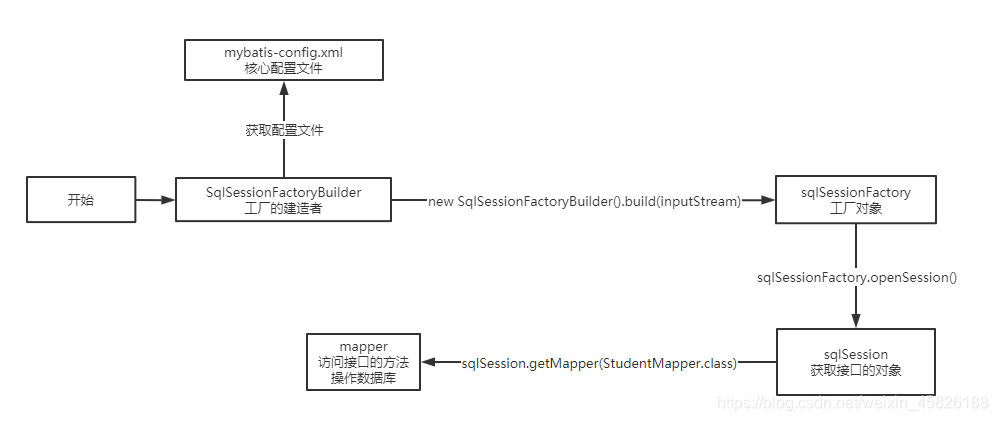
工厂模式(Factory Pattern)是 Java 中最常用的设计模式之一。这种类型的设计模式属于创建型模式,它提供了一种创建对象的最佳方式。
在工厂模式中,我们在创建对象时不会对客户端暴露创建逻辑,并且是通过使用一个共同的接口来指向新创建的对象。
介绍
意图:
定义一个创建对象的接口,让其子类自己决定实例化哪一个工厂类,工厂模式使其创建过程延迟到子类进行。
主要解决:
主要解决接口选择的问题。
何时使用:
我们明确地计划不同条件下创建不同实例时。
如何解决:
让其子类实现工厂接口,返回的也是一个抽象的产品。
关键代码:
创建过程在其子类执行。
应用实例:
1、您需要一辆汽车,可以直接从工厂里面提货,而不用去管这辆汽车是怎么做出来的,以及这个汽车里面的具体实现。 2、Hibernate 换数据库只需换方言和驱动就可以。
优点:
1、一个调用者想创建一个对象,只要知道其名称就可以了。 2、扩展性高,如果想增加一个产品,只要扩展一个工厂类就可以。 3、屏蔽产品的具体实现,调用者只关心产品的接口。
缺点:
每次增加一个产品时,都需要增加一个具体类和对象实现工厂,使得系统中类的个数成倍增加,在一定程度上增加了系统的复杂度,同时也增加了系统具体类的依赖。这并不是什么好事。
使用场景:
1、日志记录器:记录可能记录到本地硬盘、系统事件、远程服务器等,用户可以选择记录日志到什么地方。 2、数据库访问,当用户不知道最后系统采用哪一类数据库,以及数据库可能有变化时。 3、设计一个连接服务器的框架,需要三个协议,“POP3”、“IMAP”、“HTTP”,可以把这三个作为产品类,共同实现一个接口。
注意事项:
作为一种创建类模式,在任何需要生成复杂对象的地方,都可以使用工厂方法模式。有一点需要注意的地方就是复杂对象适合使用工厂模式,而简单对象,特别是只需要通过 new 就可以完成创建的对象,无需使用工厂模式。如果使用工厂模式,就需要引入一个工厂类,会增加系统的复杂度。
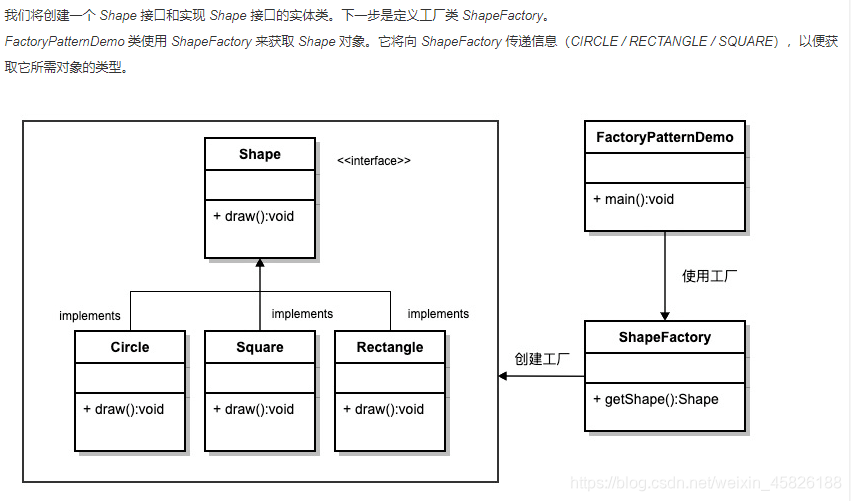
Mybatis简介
什么是Mybatis?
MyBatis 是一款优秀的持久层框架,它支持自定义 SQL、存储过程以及高级映射。MyBatis 免除了几乎所有的 JDBC 代码以及设置参数和获取结果集的工作。MyBatis 可以通过简单的 XML 或注解来配置和映射原始类型、接口和 Java POJO(Plain Old Java Objects,普通老式 Java 对象)为数据库中的记录。
MyBatis 本是apache的一个开源项目iBatis, 2010年这个项目由apache software foundation 迁移到了google code,并且改名为MyBatis 。2013年11月迁移到Github。
iBATIS一词来源于“internet”和“abatis”的组合,是一个基于Java的持久层框架。iBATIS提供的持久层框架包括SQL Maps和Data Access Objects(DAOs)
如何获得Mybatis
- 在Github,搜索mybatis
https://github.com/search?q=mybatis&type=
[外链图片转存失败,源站可能有防盗链机制,建议将图片保存下来直接上传(img-3gPhgoXD-1603850789104)(Mybatis.assets/image-20201010142135879.png)]
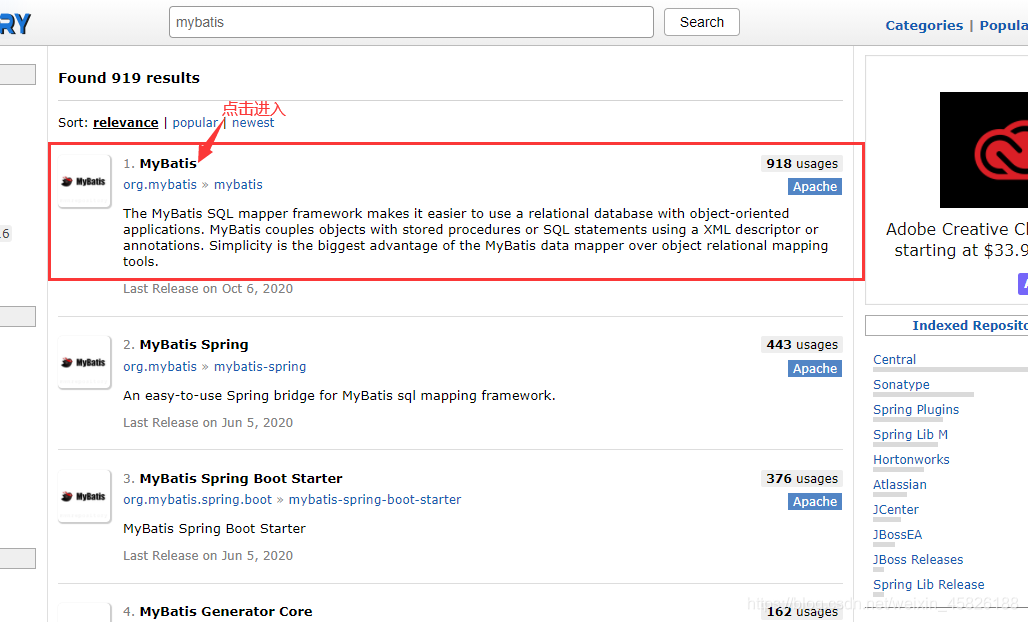
maven仓库
https://mvnrepository.com/search?q=mybatis
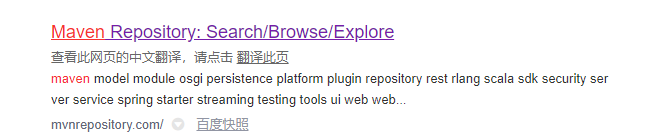
百度搜maven;
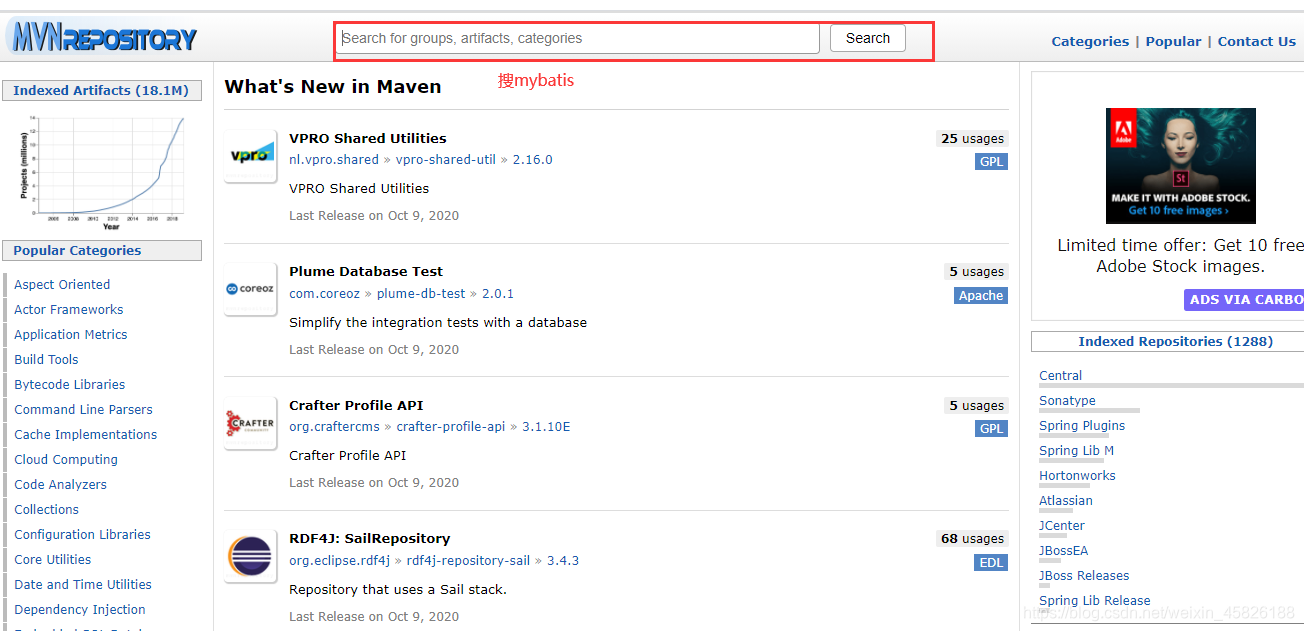
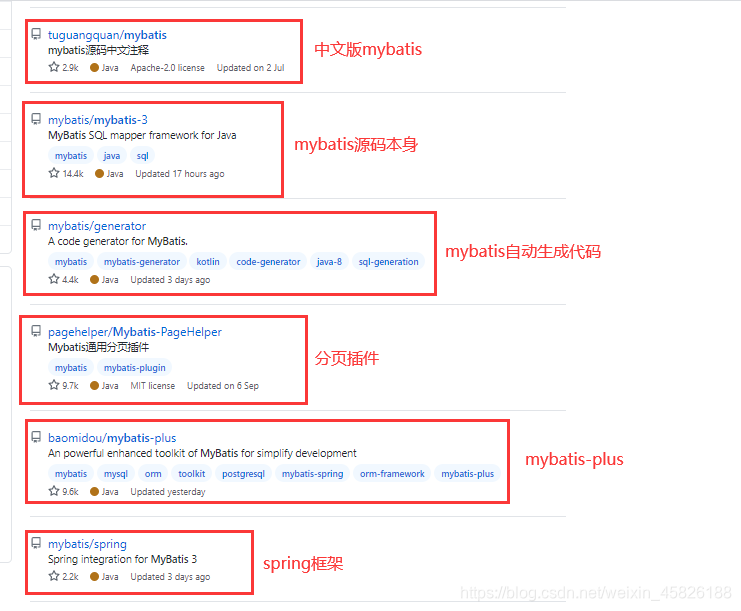
<!-- https://mvnrepository.com/artifact/org.mybatis/mybatis -->
<dependency>
    <groupId>org.mybatis</groupId>
    <artifactId>mybatis</artifactId>
    <version>3.4.6</version>
</dependency>
持久化
数据持久化:
- 持久化就是将程序的数据在持久状态和瞬时状态转化的过程;
- 内存:断电即失
为什么需要持久化
有一些对象不能让他丢失。
持久层
- 完成持久化工作的代码块
- 层是界限十分明显的
为什么需要mybatis
帮助编码人员将数据存储在数据库中;
方便;
传统的jdbc代码太复杂了,简化,框架,自动化;
Mybatis的特点:
- 简单易学:本身就很小且简单。没有任何第三方依赖,最简单安装只要两个jar文件+配置几个sql映射文件易于学习,易于使用,通过文档和源代码,可以比较完全的掌握它的设计思路和实现。
- 灵活:mybatis不会对应用程序或者数据库的现有设计强加任何影响。 sql写在xml里,便于统一管理和优化。通过sql语句可以满足操作数据库的所有需求。
- 解除sql与程序代码的耦合:通过提供DAO层,将业务逻辑和数据访问逻辑分离,使系统的设计更清晰,更易维护,更易单元测试。sql和代码的分离,提高了可维护性。
- 提供映射标签,支持对象与数据库的orm字段关系映射
- 提供对象关系映射标签,支持对象关系组建维护
- 提供xml标签,支持编写动态sql。
第一个Mybatis程序(查询)
框架搭建
创建数据库:
CREATE DATABASE mabatis;
USE mabatis;
CREATE TABLE student(
	id INT(20) NOT NULL,
	name VARCHAR(20) DEFAULT NULL,
	pwd VARCHAR(20) DEFAULT NULL,
	PRIMARY KEY(id)
)ENGINE=INNODB DEFAULT CHARSET=utf8;

INSERT INTO student VALUES
(1001,"李思聪","123456"),
(1002,"李四","123456"),
(1003,"王五","123456"),
(1004,"张三","123456")
新建项目
新建普通的maven项目;
删除src目录;
导入依赖及build;
<!--依赖-->
    <dependencies>
        <!--mybatis-->
        <!-- https://mvnrepository.com/artifact/org.mybatis/mybatis -->
        <dependency>
            <groupId>org.mybatis</groupId>
            <artifactId>mybatis</artifactId>
            <version>3.4.6</version>
        </dependency>
        <!--mysql驱动-->
        <dependency>
            <groupId>mysql</groupId>
            <artifactId>mysql-connector-java</artifactId>
            <version>8.0.20</version>
        </dependency>
        <!--Junit-->
        <dependency>
            <groupId>junit</groupId>
            <artifactId>junit</artifactId>
            <version>4.12</version>
        </dependency>
    </dependencies>
  <build>
      <resources>
          <resource>
              <directory>src/main/resources</directory>
              <includes>
                  <include>**/*.properties</include>
                  <include>**/*.xml</include>
              </includes>
              <filtering>true</filtering>
          </resource>
          <resource>
              <directory>src/main/java</directory>
              <includes>
                  <include>**/*.properties</include>
                  <include>**/*.xml</include>
              </includes>
              <filtering>true</filtering>
          </resource>
      </resources>
  </build>
创建一个模块(module)
编写mybatis的核心配置文件(连接数据库的配置)
mybatis-config.xml
<?xml version="1.0" encoding="UTF8" ?>
<!DOCTYPE configuration
PUBLIC "-//mybatis.org//DTD Config 3.0//EN"
"http://mybatis.org/dtd/mybatis-3-config.dtd">
<!--configuration核心配置文件-->
<configuration>
<!--environments可以配置多套环境-->
<environments default="development">
<environment id="development">
<transactionManager type="JDBC"/>
<dataSource type="POOLED">
<property name="driver" value="com.mysql.cj.jdbc.Driver"/>
<property name="url" value="jdbc:mysql://localhost:3306/mybatis?useSSL=true&useUnicode=true&characterEncoding=utf-8&serverTimezone=UTC"/>
<property name="username" value="root"/>
<property name="password" value="root"/>
</dataSource>
</environment>
</environments>
<!-- 每个mapper.xml都需要在mybatis核心配置文件中注册-->
<mappers>
<mapper resource="com/simon/mapper/xml/studentMapper.xml"/>
</mappers>
</configuration>
- 编写mybatis工具类
package com.simon.utils;

import org.apache.ibatis.io.Resources;
import org.apache.ibatis.session.SqlSession;
import org.apache.ibatis.session.SqlSessionFactory;
import org.apache.ibatis.session.SqlSessionFactoryBuilder;

import java.io.IOException;
import java.io.InputStream;

public class MybatisUtils {

    private SqlSessionFactory sqlSessionFactory;
    //获取sqlSessionFactory对象
    {
        try {
            String resource = "mybatis-config.xml";
            InputStream inputStream = Resources.getResourceAsStream(resource);
            sqlSessionFactory = new SqlSessionFactoryBuilder().build(inputStream);
        } catch (IOException e) {
            e.printStackTrace();
        }
    }

    //操作数据库的方法
    public SqlSession getSqlSession(){
        return sqlSessionFactory.openSession();
    }

}
- 编写代码,操作数据库
实体类
<!--        lombok-->
        <dependency>
            <groupId>org.projectlombok</groupId>
            <artifactId>lombok</artifactId>
            <version>1.18.4</version>
            <scope>provided</scope>
        </dependency>
package com.simon.entity; import lombok.Data; @Data public class Student { private int id; private String name; private String pwd; }mapper接口
public interface StudentMapper {
    public List<Student> getStuList();
}
mapper接口实现类(由原来的impl实现类转换为xml文件)
<?xml version="1.0" encoding="UTF8" ?>
<!DOCTYPE mapper
        PUBLIC "-//mybatis.org//DTD Mapper 3.0//EN"
        "http://mybatis.org/dtd/mybatis-3-mapper.dtd">
<!--namespace:命名空间,绑定对应的mapper接口-->
<mapper namespace="com.simon.mapper.StudentMapper">
<!--id:对应方法名 resultType:对应返回的数据类型,即实体类-->
    <select id="getStuList" resultType="com.simon.entity.Student">
-- 执行sql
    select * from student
  </select>
</mapper>
单元测试
异常:
org.apache.ibatis.binding.BindingException: Type interface com.simon.mapper.StudentMapper is not known to the MapperRegistry.
<!--    每个mapper.xml都需要在mybatis核心配置文件中注册-->
    <mappers>
        <mapper resource="com/simon/mapper/xml/StudentMapper.xml"/>
    </mappers>
资源导出失败的问题:
<!--在build中配置resource,防止资源导出失败的问题-->
    <build>
        <resources>
            <resource>
                <directory>src/main/resources</directory>
                <includes>
                    <include>**/*.properties</include>
                    <include>**/*.xml</include>
                </includes>
                <filtering>true</filtering>
            </resource>
            <resource>
                <directory>src/main/java</directory>
                <includes>
                    <include>**/*.properties</include>
                    <include>**/*.xml</include>
                </includes>
                <filtering>true</filtering>
            </resource>
        </resources>
    </build>
测试类:
package com.simon.mapper;

import com.simon.entity.Student;
import com.simon.utils.MybatisUtils;
import org.apache.ibatis.session.SqlSession;
import org.junit.Test;

import java.util.List;

public class StudentMapperTest {
    @Test
    public void test(){
        //获取SqlSession对象
        MybatisUtils mybatisUtils = new MybatisUtils();
        SqlSession sqlSession = mybatisUtils.getSqlSession();
        //执行sql
        //获取StudentMapper对象
        StudentMapper studentMapper = sqlSession.getMapper(StudentMapper.class);
        //访问方法,得到返回结果集
        List<Student> stuList = studentMapper.getStuList();

        //遍历数组
        for (Student student : stuList) {
            System.out.println(student);
        }
        //关闭sqlSession
        sqlSession.close();

    }
}
测试结果:
Student(id=1, name=Lisa, pwd=123)
Student(id=2, name=Bob, pwd=645)
Student(id=3, name=Jack, pwd=864)
Student(id=4, name=Simon, pwd=513)
增删改
就第一个程序需要修改的地方:
接口:
package com.simon.mapper;

import com.simon.entity.Student;

import java.util.List;

public interface StudentMapper {
    //查询数据库,获取全部的数据
    public List<Student> getStuList();
    //根据id查询用户
    public List<Student> queryById(int id);
    //增添数据
    public int insertStudent(Student student);
    //修改数据
    public int updateStudent(Student student);
    //删除数据
    public int deleteStudent(int id);

}
接口的实现xml
<?xml version="1.0" encoding="UTF8" ?>
<!DOCTYPE mapper
        PUBLIC "-//mybatis.org//DTD Mapper 3.0//EN"
        "http://mybatis.org/dtd/mybatis-3-mapper.dtd">
<!--namespace:命名空间,绑定对应的mapper接口-->
<mapper namespace="com.simon.mapper.StudentMapper">
<!--<select></select>:查询标签-->
<!--id:对应方法名 resultType:对应返回的数据类型,即实体类-->
    <select id="getStuList" resultType="com.simon.entity.Student">
-- 执行sql
    select * from student
  </select>
<!--根据id查询-->
<!--parameterType:传入的参数类型 #{id}:获取传入的参数-->
    <select id="queryById" parameterType="int" resultType="com.simon.entity.Student">
--         执行sql
        select * from student where id=#{id}
    </select>
<!--   <insert></insert> 插入数据-->
    <insert id="insertStudent" parameterType="com.simon.entity.Student">
        insert into student(id,name,pwd) values (#{id},#{name},#{pwd})
    </insert>

<!--<update></update> 修改数据    -->
    <update id="updateStudent" parameterType="com.simon.entity.Student">
        update student set name = #{name}  where id = #{id} ;
    </update>

<!--  删除数据  -->
    <delete id="deleteStudent" parameterType="int">
        delete from student where id = #{id};
    </delete>
</mapper>
测试类
需要注意的是,增删改,需要手动提交事务,否则修改不成功
也可以自动提交事务,只需要修改sqlSessionFactory.openSession(true)
//操作数据库的方法
public SqlSession getSqlSession(){
    return sqlSessionFactory.openSession(true);
}
package com.simon.mapper;

import com.simon.entity.Student;
import com.simon.utils.MybatisUtils;
import org.apache.ibatis.session.SqlSession;
import org.junit.Test;

import java.util.List;

public class StudentMapperTest {
    @Test
    public void test(){
        //获取SqlSession对象
        MybatisUtils mybatisUtils = new MybatisUtils();
        SqlSession sqlSession = mybatisUtils.getSqlSession();
        //执行sql
        //获取StudentMapper对象
        StudentMapper studentMapper = sqlSession.getMapper(StudentMapper.class);
        //访问方法,得到返回结果集
        List<Student> stuList = studentMapper.getStuList();

        //遍历数组
        for (Student student : stuList) {
            System.out.println(student);
        }
        //关闭sqlSession
        sqlSession.close();
    }

    @Test
    public void queryById(){
        //获取SqlSession对象
        MybatisUtils mybatisUtils = new MybatisUtils();
        SqlSession sqlSession = mybatisUtils.getSqlSession();
        //执行sql
        //获取StudentMapper对象
        StudentMapper studentMapper = sqlSession.getMapper(StudentMapper.class);
        //访问方法,得到返回结果集
        List<Student> students = studentMapper.queryById(2);

        //遍历结果集
        for (Student student : students) {
            System.out.println(student);
        }

        //关闭SQLSession
        sqlSession.close();
    }

    //增删改需要手动提交事务,才能真正的操作成功
    //增添数据
    @Test
    public void insertTest(){
        //获取sqlSession
        MybatisUtils mybatisUtils = new MybatisUtils();
        SqlSession sqlSession = mybatisUtils.getSqlSession();

        //获取接口,以便访问其中的方法
        StudentMapper mapper = sqlSession.getMapper(StudentMapper.class);
        //执行方法
        int i = mapper.insertStudent(new Student(6,"Lily","686"));

        System.out.println(i);
        //手动提交事务
        sqlSession.commit();
        //关闭sqlSession
        sqlSession.close();
    }

    @Test
    public void updateTest(){
        //获取sqlSession
        MybatisUtils mybatisUtils = new MybatisUtils();
        SqlSession sqlSession = mybatisUtils.getSqlSession();

        //实例化接口,以便访问其中的方法
        StudentMapper mapper = sqlSession.getMapper(StudentMapper.class);
        //执行方法
        int i = mapper.updateStudent(new Student(6,"lscong","686"));

        System.out.println(i);
        //手动提交事务
        sqlSession.commit();
        //关闭sqlSession
        sqlSession.close();
    }

    @Test
    public void deleteTest(){
        //获取sqlSession
        MybatisUtils mybatisUtils = new MybatisUtils();
        SqlSession sqlSession = mybatisUtils.getSqlSession();

        //实例化接口,以便访问其中的方法
        StudentMapper mapper = sqlSession.getMapper(StudentMapper.class);
        //执行方法
        int i = mapper.deleteStudent(6);

        System.out.println(i);
        //手动提交事务
        sqlSession.commit();
        //关闭sqlSession
        sqlSession.close();
    }
}
Map
如果实体类的字段非常的多,那么就不适合使用实体类传参了,这个时候就使用Map来传参,只需要传递需要的参数,如果使用实体类就需要传递所有的参数。
测试类:
@Test
public void test1(){
    MybatisUtils mybatisUtils = new MybatisUtils();
    SqlSession sqlSession = mybatisUtils.getSqlSession();

    StudentMapper mapper = sqlSession.getMapper(StudentMapper.class);

    //new Map
    HashMap<String, Object> map = new HashMap<String, Object>();
    //存放数据
    map.put("StuName","lscong");
    map.put("StuId",4);
    //访问方法
    mapper.updateStudent1(map);
    System.out.println(map);

    //手动提交事务
    sqlSession.commit();

    sqlSession.close();
}

//结果:
//{StuName=lscong, StuId=4}
接口实现xml
<!--<update></update> 修改数据使用map传参   -->
<update id="updateStudent1" parameterType="map">
    update student set name = #{StuName}  where id = #{StuId} ;
</update>
接口
//修改数据使用map传参
public int updateStudent1(Map<String,Object> map);
模糊查询
为了防止sql注入问题,所以直接将%%拼接死。
1. 直接在sql语句中拼接,select * from student where name like “%”#{StuName}"%"
2. 在实体类中传入参数时拼接: map.put(“StuName”,"%L%");
接口
public List<Student> likeQuery(Map<String,Object> map);
xml
<!--    模糊查询-->
    <select id="likeQuery" parameterType="map" resultType="com.simon.entity.Student">
        select * from student where name like "%"#{StuName}"%";
    </select>
实现类
@Test
public void test2(){
    MybatisUtils mybatisUtils = new MybatisUtils();
    SqlSession sqlSession = mybatisUtils.getSqlSession();

    StudentMapper mapper = sqlSession.getMapper(StudentMapper.class);

    //new Map
    HashMap<String, Object> map = new HashMap<String, Object>();
    //存放数据
    map.put("StuName","L");

    //访问方法
    List<Student> list = mapper.likeQuery(map);

    for (Student student : list) {
        System.out.println(student);

    }
    //手动提交事务
    sqlSession.commit();

    sqlSession.close();
}
核心配置解析
MyBatis 的配置文件
配置文件的编写顺序,必须按照这个顺序编写:
configuration(配置)
- properties(属性)
- settings(设置)
- typeAliases(类型别名)
- typeHandlers(类型处理器)
- objectFactory(对象工厂)
- plugins(插件)
- environments(环境配置)
  - environment(环境变量)
    - transactionManager(事务管理器)
    - dataSource(数据源)
- databaseIdProvider(数据库厂商标识)
- mappers(映射器)
核心配置
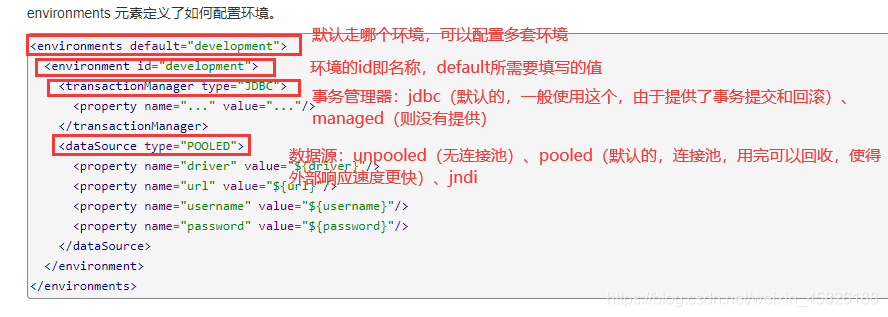
properties
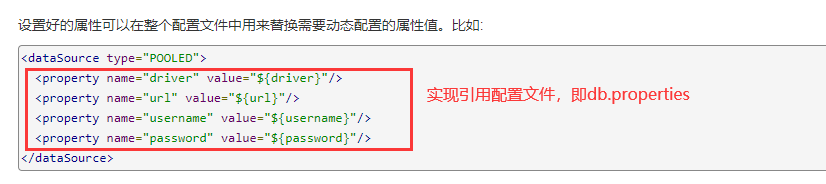
编写一个外部的db.properties
driver=com.mysql.cj.jdbc.Driver
url=jdbc:mysql://localhost:3306/mybatis?useSSL=true&useUnicode=true&characterEncoding=utf-8&serverTimezone=UTC
username=root
password=root
在核心配置文件中引入:
<properties resource="db.properties" />
起别名
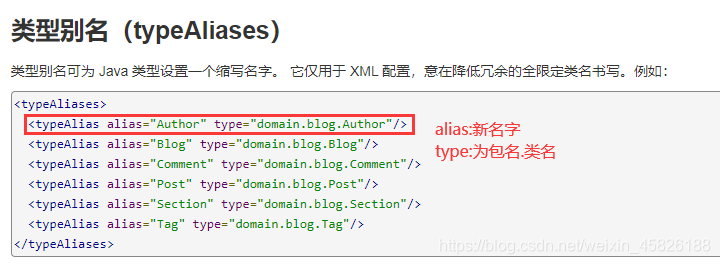
<!--起别名-->
    <typeAliases>
        <typeAlias type="com.simon.entity.Student" alias="Student"/>
    </typeAliases>
<!--自动扫描包,包下的实体类,自动使用小写作为别名-->
<package name="com.simon.entity"/>
注意:在实体类较少的情况下使用第一种,实体类较多的情况下使用第二种;但是第一种可以自定义别名。
设置


mapper
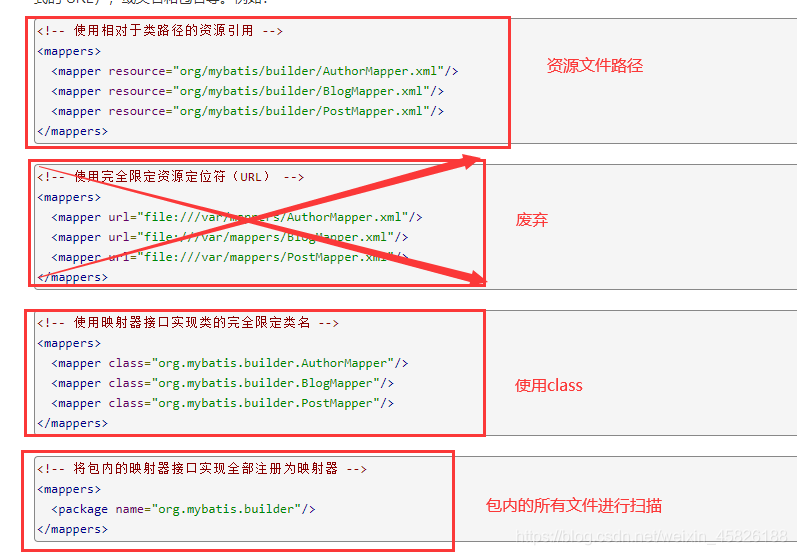
<!--    每个mapper.xml都需要在mybatis核心配置文件中注册-->
<!--    找到xml配置全路径-->
    <mappers>
        <mapper resource="com/simon/mapper/xml/studentMapper.xml"/>
    </mappers>
<!--    找到配置文件的接口,但是xml必须名字一致且在同一个包下-->
<mappers>
    <mapper class="com.simon.mapper.StudentMapper"/>
</mappers>
<!--    找到配置文件的接口,但是xml必须名字一致且在同一个包下-->
<mappers>
    <package name="com.simon.mapper"/>
</mappers>
ResultMap结果集映射
解决实体类属性名和数据库字段名不一致的问题
<?xml version="1.0" encoding="UTF8" ?>
<!DOCTYPE mapper
        PUBLIC "-//mybatis.org//DTD Mapper 3.0//EN"
        "http://mybatis.org/dtd/mybatis-3-mapper.dtd">
<!--namespace:命名空间,绑定对应的mapper接口-->
<mapper namespace="com.simon.mapper.StudentMapper">
<!--    id对应下面的resultMap的值,type为实体类的映射-->
    <resultMap id="StudentMap" type="student">
<!--        column为数据库字段名,property为实体类的属性名-->
        <result column="id" property="id"/>
        <result column="name" property="userName"/>
        <result column="pwd" property="passWord"/>
    </resultMap>

<!--根据id查询-->
<!--parameterType:传入的参数类型 #{id}:获取传入的参数-->
    <select id="queryById" parameterType="int" resultMap="StudentMap">
--         执行sql
        select * from student where id=#{id}
    </select>

<!--    模糊查询-->
    <select id="likeQuery" parameterType="map" resultType="student">
        select * from student where name like "%"#{StuName}"%";
    </select>
</mapper>
分页-limit
- 减少数据的处理量,提高查询效率
limit分页语法:
select * from user limit currentPageNo,pageSize;
mapper接口
//分页查询
public List<Student> limitPage(Map<String,Integer> map);
xml
<!--    分页查询-->
    <select id="limitPage" resultType="student" parameterType="map">
        select * from student limit #{currentPage},#{pageSize};
    </select>
测试类
@Test
public void test01(){
    MybatisUtils mybatisUtils = new MybatisUtils();
    SqlSession sqlSession = mybatisUtils.getSqlSession();

    StudentMapper mapper = sqlSession.getMapper(StudentMapper.class);
    Map<String, Integer> map = new HashMap<String, Integer>();

    map.put("currentPage",0);
    map.put("pageSize",3);

    List<Student> list = mapper.limitPage(map);

    for (Student student : list) {
        System.out.println(student);
    }

    sqlSession.close();
}

//结果:
/*Student(id=1, name=Lisa, pwd=123)
Student(id=2, name=Bob, pwd=645)
Student(id=3, name=Jack, pwd=864)*/
分页RowBounds
xml
<!--    分页查询RowBounds-->
<select id="limitPage1" resultType="student">
    select * from student;
</select>
mapper
//分页查询rowbounds
public List<Student> limitPage1();
测试类
 @Test
    public void test02(){
        MybatisUtils mybatisUtils = new MybatisUtils();
        SqlSession sqlSession = mybatisUtils.getSqlSession();
        //实例化RowBounds
        RowBounds bounds = new RowBounds(0, 3);
        //sqlSession.selectList()
        List<Student> list = sqlSession.selectList("com.simon.mapper.StudentMapper.limitPage1", null, bounds);

        for (Student student : list) {
            System.out.println(student);
        }

        sqlSession.close();
    }
使用注解开发
注解开发基于查询语句较为简单的情况下使用,如果复杂的查询语句就使用xml映射。
mapper
package com.simon.mapper;


import com.simon.entity.Student;
import org.apache.ibatis.annotations.Select;

import java.util.List;

public interface StudentMapper {

    @Select("select * from student")
    public List<Student> getStudent();
}
核心配置
<?xml version="1.0" encoding="UTF8" ?>
<!DOCTYPE configuration
        PUBLIC "-//mybatis.org//DTD Config 3.0//EN"
        "http://mybatis.org/dtd/mybatis-3-config.dtd">
<!--configuration核心配置文件-->
<configuration>
    <!--    引入外部文件-->
    <properties resource="db.properties" />
<!--environments可以配置多套环境-->
    <environments default="development">
        <environment id="development">
            <transactionManager type="JDBC"/>
            <dataSource type="POOLED">
                <property name="driver" value="${driver}"/>
                <property name="url" value="${url}"/>
                <property name="username" value="${username}"/>
                <property name="password" value="${password}"/>
            </dataSource>
        </environment>
    </environments>

<!--    注解映射-->
    <mappers>
        <mapper class="com.simon.mapper.StudentMapper"/>
    </mappers>

</configuration>
测试类
@Test
public void test(){
    MybatisUtils mybatisUtils = new MybatisUtils();
    SqlSession sqlSession = mybatisUtils.getSqlSession();

    StudentMapper mapper = sqlSession.getMapper(StudentMapper.class);
    List<Student> student = mapper.getStudent();
    for (Student student1 : student) {
        System.out.println(student1);
    }

    sqlSession.close();

}
动态sql
什么是动态sql:指的是根据不同的条件生成不同的sql语句
所谓的动态sql,实质上还是sql语句,只是在sql层面执行了逻辑代码
使用动态 SQL 并非一件易事,但借助可用于任何 SQL 映射语句中的强大的动态 SQL 语言,MyBatis 显著地提升了这一特性的易用性。
如果你之前用过 JSTL 或任何基于类 XML 语言的文本处理器,你对动态 SQL 元素可能会感觉似曾相识。在 MyBatis 之前的版本中,需要花时间了解大量的元素。借助功能强大的基于 OGNL 的表达式,MyBatis 3 替换了之前的大部分元素,大大精简了元素种类,现在要学习的元素种类比原来的一半还要少。
- if
- choose (when, otherwise)
- trim (where, set)
- foreach
新建一个module
核心配置文件
<?xml version="1.0" encoding="UTF8" ?>
<!DOCTYPE configuration
        PUBLIC "-//mybatis.org//DTD Config 3.0//EN"
        "http://mybatis.org/dtd/mybatis-3-config.dtd">
<!--configuration核心配置文件-->
<configuration>
    <!--    引入外部文件-->
    <properties resource="db.properties" />
<!--environments可以配置多套环境-->
    <environments default="development">
        <environment id="development">
            <transactionManager type="JDBC"/>
            <dataSource type="POOLED">
                <property name="driver" value="${driver}"/>
                <property name="url" value="${url}"/>
                <property name="username" value="${username}"/>
                <property name="password" value="${password}"/>
            </dataSource>
        </environment>
    </environments>
</configuration>
实体类
package com.simon.entity;

import lombok.Data;

import java.util.Date;

@Data
public class Blog {
    private String id;
    private String title;
    private String author;
    private Date create_time;
    private int view;
}
基础工具类
package com.simon.untils;

import org.apache.ibatis.io.Resources;
import org.apache.ibatis.session.SqlSession;
import org.apache.ibatis.session.SqlSessionFactory;
import org.apache.ibatis.session.SqlSessionFactoryBuilder;

import java.io.IOException;
import java.io.InputStream;

public class MybatisUtils {

    private SqlSessionFactory sqlSessionFactory;
    //获取sqlSessionFactory对象
    {
        try {
            String resource = "mybatis-config.xml";
            InputStream inputStream = Resources.getResourceAsStream(resource);
            sqlSessionFactory = new SqlSessionFactoryBuilder().build(inputStream);
        } catch (IOException e) {
            e.printStackTrace();
        }
    }

    //操作数据库的方法
    public SqlSession getSqlSession(){
        return sqlSessionFactory.openSession(true);
    }

}
mapper及xml文件
public int insertBlog(Blog blog);<?xml version="1.0" encoding="UTF8" ?> <!DOCTYPE mapper PUBLIC "-//mybatis.org//DTD Mapper 3.0//EN" "http://mybatis.org/dtd/mybatis-3-mapper.dtd"> <mapper namespace="com.simon.mapper.BlogMapper"> <insert id="insertBlog" parameterType="blog" > insert into blog values (#{id},#{title},#{author},#{createTime},#{view}); </insert> </mapper>测试
@org.junit.Test
public void test(){
    MybatisUtils mybatisUtils = new MybatisUtils();
    SqlSession sqlSession = mybatisUtils.getSqlSession();
    BlogMapper mapper = sqlSession.getMapper(BlogMapper.class);

    int insertBlog = mapper.insertBlog(new Blog(IdUtils.getId(),"Study_java","simon",new Date(),50));
    int insertBlog2 = mapper.insertBlog(new Blog(IdUtils.getId(),"mybatis","simon",new Date(),100));
    int insertBlog3 = mapper.insertBlog(new Blog(IdUtils.getId(),"spring boot","simon",new Date(),150));
    System.out.println(insertBlog);

    sqlSession.close();
}
if
xml
<!--查询数据-->
    <select id="selectBlog" parameterType="map" resultType="blog">
        select * from blog
        where 1=1
        <if test="views != null">
            and views >= #{views}
        </if>
        <if test="author != null">
            and author like "%"#{author}"%"
        </if>
    </select>
测试
//接口
public List<Blog> selectBlog(Map<String, Object> map);

@org.junit.Test
public void test01(){
    MybatisUtils mybatisUtils = new MybatisUtils();
    SqlSession sqlSession = mybatisUtils.getSqlSession();
    BlogMapper mapper = sqlSession.getMapper(BlogMapper.class);
    Map<String, Object> map = new HashMap<String,Object>();

    map.put("views",100);
    map.put("author","simon");

    List<Blog> list = mapper.selectBlog(map);
    for (Blog blog : list) {
        System.out.println(blog);
    }
    sqlSession.close();
}
trim、where、set
它有点像 Java 中的 switch 语句
where
<select id="selectBlog2" parameterType="map" resultType="blog">
    select * from blog
    <where>
        <choose>
            <when test="views != null">
                 views >= #{views}
            </when>
            <when test="author != null">
                and author like "%"#{author}"%"
            </when>
            <otherwise>
                and 1=1
            </otherwise>
        </choose>
    </where>
</select>
Set:可以自动去除“,”
<update id="updateBlog" parameterType="map">
    update blog
    <set>
        <if test="views != null">views = #{views},</if>
        <if test="author != null">author = #{author},</if>
    </set>
    where title = #{title}
</update>
choose、when、otherwise
where 元素只会在子元素返回任何内容的情况下才插入 “WHERE” 子句。而且,若子句的开头为 “AND” 或 “OR”,where 元素也会将它们去除。
choose,when,otherwise
<select id="selectBlog1" parameterType="map" resultType="blog">
    select * from blog
    where 1=1
    <choose>
        <when test="views != null">
            and views >= #{views}
        </when>
        <when test="author != null">
            and author like "%"#{author}"%"
        </when>
        <otherwise>
            and 1=1
        </otherwise>
    </choose>
</select>
缓存
简介:
- 存在内存中的临时数据。
- 将用户经常查询的数据放在缓存(内存)中,用户再次去查询的时候就不用再从数据库去查询了,直接从缓存中查询得到,从而提高查询效率,解决高并发系统性能的问题。
- 减少数据库的交互次数,减少系统的开销,提高系统的效率。
- 经常查询或不经常改变的数据使用缓存。
mybatis缓存
- mybatis包含一个非常强大的查询缓存特性,他非常方便的定制和配置缓存,缓存可以提高查询效率。
- mybatis系统中默认开启了2级缓存:一级缓存、二级缓存。
- 默认情况下,只自动开启了一级缓存,他是基于sqlSession级别的缓存,也成为本地缓存;
- 二级缓存需要手动开启和配置,他是基于namespace级别的缓存;
- 为了提高扩展性,mybatis定义了缓存接口,可以通过实现cache接口来自定义二级缓存。
一级缓存
- mybatis自动开启一级缓存:
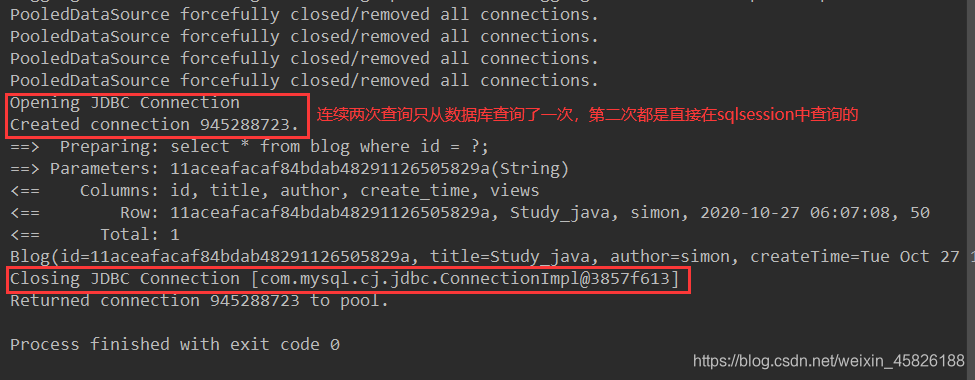
- 缓存失效的情况
- 映射语句文件中的所有 insert、update 和 delete 语句会刷新缓存。
- 查询不同的东西。
- 查询不同的mapper.xml
- 手动清理缓存。
sqlSession.clearCache();
二级缓存
默认情况下,只启用了本地的会话缓存,它仅仅对一个会话中的数据进行缓存。 要启用全局的二级缓存,只需要在你的 SQL 映射文件中添加一行:
<cache/>
<cache
  eviction="FIFO"
  flushInterval="60000"
  size="512"
  readOnly="true"/>
这个更高级的配置创建了一个 FIFO 缓存,每隔 60 秒刷新,最多可以存储结果对象或列表的 512 个引用,而且返回的对象被认为是只读的,因此对它们进行修改可能会在不同线程中的调用者产生冲突。
可用的清除策略有:
LRU– 最近最少使用:移除最长时间不被使用的对象。FIFO– 先进先出:按对象进入缓存的顺序来移除它们。SOFT– 软引用:基于垃圾回收器状态和软引用规则移除对象。WEAK– 弱引用:更积极地基于垃圾收集器状态和弱引用规则移除对象。
默认的清除策略是 LRU。
flushInterval(刷新间隔)属性可以被设置为任意的正整数,设置的值应该是一个以毫秒为单位的合理时间量。 默认情况是不设置,也就是没有刷新间隔,缓存仅仅会在调用语句时刷新。
size(引用数目)属性可以被设置为任意正整数,要注意欲缓存对象的大小和运行环境中可用的内存资源。默认值是 1024。
readOnly(只读)属性可以被设置为 true 或 false。只读的缓存会给所有调用者返回缓存对象的相同实例。 因此这些对象不能被修改。这就提供了可观的性能提升。而可读写的缓存会(通过序列化)返回缓存对象的拷贝。 速度上会慢一些,但是更安全,因此默认值是 false。
步骤:
- 开启全局缓存;
<!--        显式开启全局缓存-->
        <setting name="cacheEnabled" value="true"/>
在需要使用二级缓存的mapper.xml中开启
<cache
        eviction="FIFO"
        flushInterval="60000"
        size="512"
        readOnly="true"/>
测试
 @org.junit.Test
    public void test01(){
        MybatisUtils mybatisUtils = new MybatisUtils();
        //两个不同的对象
        SqlSession sqlSession = mybatisUtils.getSqlSession();
        SqlSession sqlSession1 = mybatisUtils.getSqlSession();
        BlogMapper mapper = sqlSession.getMapper(BlogMapper.class);
        BlogMapper mapper1 = sqlSession1.getMapper(BlogMapper.class);

        List<Blog> list = mapper.selectById("11aceafacaf84bdab48291126505829a");
        for (Blog blog : list) {
            System.out.println(blog);
        }
        sqlSession.close();
//        sqlSession.clearCache();

        List<Blog> list1 = mapper1.selectById("11aceafacaf84bdab48291126505829a");
        for (Blog blog : list1) {
            System.out.println(blog);
        }

        sqlSession1.close();
    }
问题:
- 我们需要将实体类序列化,否则就会报错。
package com.simon.entity;

import lombok.AllArgsConstructor;
import lombok.Data;
import lombok.NoArgsConstructor;

import java.io.Serializable;
import java.util.Date;

@Data
@NoArgsConstructor
@AllArgsConstructor
public class Blog implements Serializable {
    //序列化
    public static final long serialVersionUID = 1L;
    private String id;
    private String title;
    private String author;
    private Date createTime;
    private int views;
}
第一次查询的所有数据都会先放在一级缓存中,只有会话(sqlSession)关闭才会提交到二级缓存中。
第一次查询先查看二级缓存中是否存在数据,如果没有再进入一级缓存查询,如果都没有就直接从数据库查询。
自定义缓存
ehcache
导入依赖:
<!-- https://mvnrepository.com/artifact/org.mybatis.caches/mybatis-ehcache -->
<dependency>
    <groupId>org.mybatis.caches</groupId>
    <artifactId>mybatis-ehcache</artifactId>
    <version>1.2.1</version>
</dependency>
xml中的配置
<cache type="org.mybatis.caches.ehcache.EhcacheCache"/>
       for (Blog blog : list) {
           System.out.println(blog);
       }
       sqlSession.close();
// sqlSession.clearCache();
       List<Blog> list1 = mapper1.selectById("11aceafacaf84bdab48291126505829a");
       for (Blog blog : list1) {
           System.out.println(blog);
       }

       sqlSession1.close();
   }
问题:

1. 我们需要将实体类序列化,否则就会报错。

```java
package com.simon.entity;

import lombok.AllArgsConstructor;
import lombok.Data;
import lombok.NoArgsConstructor;

import java.io.Serializable;
import java.util.Date;

@Data
@NoArgsConstructor
@AllArgsConstructor
public class Blog implements Serializable {
 //序列化
 public static final long serialVersionUID = 1L;
 private String id;
 private String title;
 private String author;
 private Date createTime;
 private int views;
}
第一次查询的所有数据都会先放在一级缓存中,只有会话(sqlSession)关闭才会提交到二级缓存中。
第一次查询先查看二级缓存中是否存在数据,如果没有再进入一级缓存查询,如果都没有就直接从数据库查询。
自定义缓存
ehcache
导入依赖:
<!-- https://mvnrepository.com/artifact/org.mybatis.caches/mybatis-ehcache -->
<dependency>
    <groupId>org.mybatis.caches</groupId>
    <artifactId>mybatis-ehcache</artifactId>
    <version>1.2.1</version>
</dependency>
xml中的配置
<cache type="org.mybatis.caches.ehcache.EhcacheCache"/>