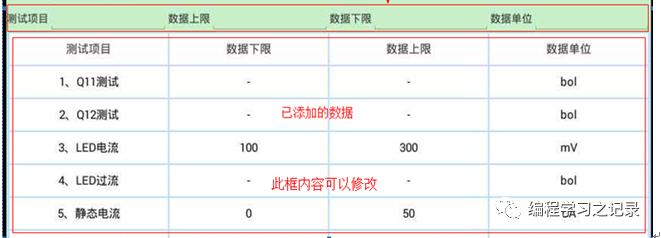
以下是例程代码
package com.example.andruartate01;import java.util.ArrayList;import java.util.List;import android.app.Activity;import android.content.Context;import android.content.res.Resources;import android.graphics.Color;import android.util.DisplayMetrics;import android.view.Gravity;import android.widget.EditText;import android.widget.LinearLayout;import android.widget.ScrollView;import android.widget.TableLayout;import android.widget.TableRow;import android.widget.TextView;import android.widget.TableRow.LayoutParams;public class TableView { private Context CONTEXT; private int DISW; private int DISH; private TableLayout TABLE1; private TableLayout TABLE2; private ScrollView SCRO; private int TABHEIGE; private int ROWCOLOR = Color.rgb(189, 219, 255); private int TEXTCOLOR = Color.rgb(255, 255, 255); private int LAYOUT; private int TXTSIZE = 15; List txtlist = new ArrayList(); private int sy, sy1; private int wilen; private int txtxy; private boolean TXTEDIT = false; private TableRow row; private int tabw2=0; /** * @作者: gaoy * @方法名:构造函数 * @功能:为表头添加Context,Layout * @参数:con=xx.this,lay=R.id.xx * @返回:无 * @修改日期:2018-6-9 */ public TableView(Context con, int lay){ CONTEXT = con; LAYOUT = lay; } /** * @作者: gaoyang; * @方法名:Disp_W_H() * @功能:获取屏幕高度宽度 * @参数:无 * @返回:无 * @修改日期:2018-6-9 */ private void Disp_W_H(){ Resources re1 = CONTEXT.getResources(); DisplayMetrics dm1 = re1.getDisplayMetrics(); DISW = dm1.widthPixels; DISH = dm1.heightPixels; } /** * @作者: gaoy * @方法名:TableHead() * @功能:创建表头,设置滚动条高度 * @参数:tab=表头文本,scrollheig=关闭滚动条高度 int tabw=表格宽度 * @返回:无 * @修改日期:2018-6-9 */ public void TableHead(String[] tab, int scrollheig,int tabw){ Disp_W_H(); tabw2=tabw; LinearLayout inearLayout1 = (LinearLayout) ((Activity) CONTEXT).findViewById(LAYOUT); TABLE1 = new TableLayout(CONTEXT); inearLayout1.addView(TABLE1); if (TABHEIGE < 1) TABHEIGE = 40; TableRow row = new TableRow(CONTEXT); row.setBackgroundColor(ROWCOLOR); row.setGravity(Gravity.CENTER); for (int i = 0; i < tab.length; i++) { TextView te1 = new TextView(CONTEXT); te1.setText(tab[i]); if(tabw==0)te1.setWidth(DISW / tab.length - 3); else te1.setWidth(tabw/ tab.length - 3); te1.setGravity(Gravity.CENTER); te1.setBackgroundColor(TEXTCOLOR); LinearLayout.LayoutParams llm = new LayoutParams(LayoutParams.WRAP_CONTENT, TABHEIGE); llm.setMargins(1, 1, 1, 1); te1.setLayoutParams(llm); te1.setTextSize(TXTSIZE); row.addView(te1); } TABLE1.addView(row); ConstructTable(scrollheig); } /** * @作者: gaoyang; * @方法名:ConstructTable(int scrollheig) * @功能:创建带滚动条的表格 * @参数:scrollheig=滚动条布局高度,如果是0则自适应高度 * @返回:无 * @修改日期:2018-6-9 */ private void ConstructTable(int scrollheig){ Disp_W_H(); if (scrollheig == 0) scrollheig = LayoutParams.WRAP_CONTENT; LinearLayout inearLayout1 = (LinearLayout) ((Activity) CONTEXT).findViewById(LAYOUT); LinearLayout.LayoutParams llm1 = new LayoutParams(LayoutParams.FILL_PARENT, scrollheig); SCRO = new ScrollView(CONTEXT); SCRO.setLayoutParams(llm1); inearLayout1.addView(SCRO); TABLE2 = new TableLayout(CONTEXT); SCRO.addView(TABLE2); } /** * @作者: gaoy * @方法名:DispTable(String[] tab) * @功能:添加表格 * @参数:tab= String[] TAB={"a","b".....} * @调用方法: TAB2[cc]="A"; TAB3[cc]="B"; TAB4[cc]="C"; String[] * TAB1={TAB2[cc],TAB3[cc],TAB4[cc]}; * @返回:无 * @修改日期:2018-6-9 */ public void DispTable(String[] tab){ wilen = tab.length; if (TABHEIGE < 1) TABHEIGE = 40; row = new TableRow(CONTEXT); row.setBackgroundColor(ROWCOLOR); row.setGravity(Gravity.CENTER); for (int i = 0; i < tab.length; i++) { if (TXTEDIT == false) { TextView te1 = new TextView(CONTEXT); txtlist.add(te1); te1.setText(tab[i]); if(tabw2==0)te1.setWidth(DISW / tab.length - 3); else te1.setWidth(tabw2 / tab.length - 3); te1.setGravity(Gravity.CENTER); te1.setBackgroundColor(TEXTCOLOR); LinearLayout.LayoutParams llm = new LayoutParams(LayoutParams.WRAP_CONTENT, TABHEIGE); llm.setMargins(1, 1, 1, 1); te1.setLayoutParams(llm); te1.setTextSize(TXTSIZE); row.addView(te1); } else { EditText te1 = new EditText(CONTEXT); txtlist.add(te1); te1.setText(tab[i]); te1.setWidth(DISW / tab.length - 3); te1.setGravity(Gravity.CENTER); te1.setBackgroundColor(TEXTCOLOR); LinearLayout.LayoutParams llm = new LayoutParams(LayoutParams.WRAP_CONTENT, TABHEIGE); llm.setMargins(1, 1, 1, 1); te1.setLayoutParams(llm); te1.setTextSize(TXTSIZE); row.addView(te1); } } TABLE2.addView(row); setScroll_bar(); } /** * @作者: gaoy * @方法名:getTabDat() * @功能:获取表格行数 * @参数:无 * @返回:无 * @修改日期:2019-2-20 */ public int getTabRow(){ try { int a = TABLE2.getChildCount(); return a; } catch (Exception e) { return 0 ; } } /** * @作者: gaoy * @方法名:getTabDat() * @功能:获取表格列数 * @参数:无 * @返回:无 * @修改日期:2019-2-20 */ public int getTabCol(){ try{ int a = row.getChildCount(); return a; } catch (Exception e) { return 0; } } /** * @作者: gaoy * @方法名:getTabDat() * @功能:获取表格文本内容 * @参数:无 * @返回:无 * @修改日期:2019-2-20 */ public String[][] getTabDat(boolean b) { TextView te0 = null; EditText et0 = null; try{ String[][] WRITETXTDAT = new String[TABLE2.getChildCount()][row.getChildCount()]; for (int i = 0; i < WRITETXTDAT.length; i++) { row = (TableRow) TABLE2.getChildAt(i); for (int x = 0; x < row.getChildCount(); x++) { if(b == false) { te0 =(TextView) row.getChildAt(x); WRITETXTDAT[i][x] = te0.getText().toString(); } else { et0 = (EditText) row.getChildAt(x); WRITETXTDAT[i][x] = et0.getText().toString(); } } } return WRITETXTDAT; } catch (Exception e) { return null; } } /** * @作者: gaoy * @方法名:setTabTxt(String txt,int x,int y) * @功能:设置表格文本 * @参数:文本,y=行,x=列 * @返回:无 * @修改日期:2018-5-31 */ public void setTabTxt(String txt, int y, int x){ txtxy = (y * wilen) + x; if (txtxy < txtlist.size() && (y < getTabRow())) { TextView te1 = txtlist.get(txtxy); te1.setText(txt); } else { return; } } /** * @作者: gaoy * @方法名:setTabTxt(String txt,int x,int y) * @功能:清除文本 * @参数:文本,y=行,x=列 * @返回:无 * @修改日期:2018-5-31 */ public void DelTabTxt(int y, int x){ txtxy = (y * wilen) + x; if (txtxy < txtlist.size() && (y < getTabRow())) { TextView te1 = txtlist.get(txtxy); te1.setText(""); } else { return; } } /** * @作者: gaoy * @方法名:setTxtSize(int size) * @功能:设置字体大小 * @参数:size=字体大小 * @返回:无 * @修改日期:2018-5-31 */ public void setTxtSize(int size){ TXTSIZE = size; } /** * @作者: gaoy * @方法名:setTabHeigh(int heigh) * @功能:设置表格行高 * @参数:heigh=高度 * @返回:无 * @修改日期:2018-5-31 */ public void setTabHeigh(int heigh){ TABHEIGE = heigh; } /** * @作者: gaoy * @方法名:setTabLineColor(int color) * @功能:设置表格线条颜色 * @参数:r=0~255,g=0~255,b=0~255 * @返回:无 * @修改日期:2018-5-31 */ public void setTabLineColor(int color){ ROWCOLOR = color; } /** * @作者: gaoy * @方法名:setTabColor(int color) * @功能:设置表格填充颜色 * @参数:r=0~255,g=0~255,b=0~255 * @返回:无 * @修改日期:2018-5-31 */ public void setTabColor(int color){ TEXTCOLOR = color; } /** * @作者: gaoy * @方法名:setTabColor(int color) * @功能:设置文本内容是否能编辑 * @参数:r=0~255,g=0~255,b=0~255 * @返回:无 * @修改日期:2018-5-31 */ public void setTxtEdit(boolean a){ TXTEDIT = a; } /** * @作者: gaoy * @方法名:Scroll_bar() * @功能:设置滚动条始终在底端 * @参数:无 * @返回:无 * @修改日期:2018-5-31 */ public void setScroll_bar(){ SCRO.post(new Runnable() { @Override public void run() { SCRO.fullScroll(ScrollView.FOCUS_DOWN);// } }); } /** * @作者: gaoy * @方法名:Scroll_bar() * @功能:设置滚动条跟随文本移动 * @参数:0=跟随移动,1=返回到最顶端 * @返回:无 * @修改日期:2018-5-31 */ public void setScroll_bar1(int a){ switch (a) { case 0: SCRO.post(new Runnable() { @Override public void run() { sy = sy + TABHEIGE + 4; if (sy >= DISH / 2) { sy1 = sy1 + TABHEIGE + 4; SCRO.scrollTo(0, sy1); } } }); break; case 1: sy = 0; sy1 = 0; SCRO.post(new Runnable() { @Override public void run() { SCRO.scrollTo(0, 0); } }); break; } } /** * @作者: gaoy * @方法名:DelTab() * @功能:删除表格所有行 * @参数:无 * @返回:无 * @修改日期:2018-5-31 */ public void DelAllTab(){ int len = getTabRow(); for (int i = len; i >= 0; i--) { TABLE2.removeView(TABLE2.getChildAt(i)); } txtlist.clear(); } /** * @作者: gaoy * @方法名:DelTab() * @功能:删除1行表格 * @参数:无 * @返回:无 * @修改日期:2018-5-31 */ public void DelCellTab(){ int len = getTabRow(); if (len >= 0) { TABLE2.removeView(TABLE2.getChildAt(len - 1)); txtlist.clear(); } }// /**// * @作者: gaoy// * @方法名:getTablen()// * @功能:获取表格行数// * @参数:无// * @返回:无// * @修改日期:2018-5-31// */// public int getTablen()// {// int len = TABLE2.getChildCount();// return len;// } }版权声明:本文为weixin_36328025原创文章,遵循CC 4.0 BY-SA版权协议,转载请附上原文出处链接和本声明。