- 这里使用了iconfont字体图标,具体使用教程可以参考如下教程:
iconfont字体图标的使用方法 - 页面效果图如下:
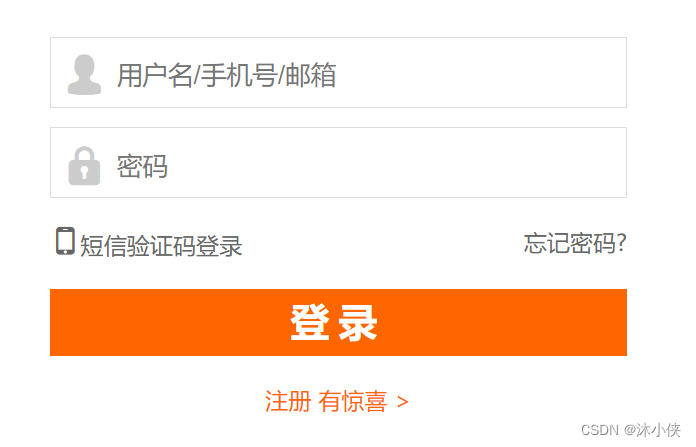
- 实现代码
<!DOCTYPE html>
<html>
<head>
<meta charset="utf-8">
<title>登录</title>
<link href="css/iconfont.css" rel="stylesheet"/>
<style>
*{
margin: 0;
padding: 0;
}
.login{
width: 300px;
margin: 20px auto;
}
/* 去除input标签的边框 */
.login input{
border: none;
outline: none;
}
.login-item{
border:1px solid rgb(220,220,220);
margin-bottom: 10px;
height: 35px;
line-height: 35px;
padding-left: 5px;
}
.login-item span{
font-size: 24px;
color: rgb(204,204,204);
vertical-align: middle;
}
.login-item input{
height: 30px;
line-height: 30px;
}
.login-type {
margin-top: 15px;
height: 15px;
}
.login-type a{
text-decoration: none;
font-size: 12px;
color: #666;
}
.login-type a:first-child{
float: left;
}
.login-type a:last-child{
float: right;
}
input[type="submit"]{
width:100% ;
height: 35px;
line-height: 35px;
background-color: rgb(255,102,0);
color: rgb(255,255,255);
font-size: 20px;
font-weight: bolder;
letter-spacing: 5px;
margin-top: 15px;
}
.register{
text-align: center;
margin-top: 10px;
}
.register a{
text-decoration: none;
font-size: 12px;
color: rgb(255,102,0);
}
</style>
</head>
<body>
<div class="login">
<form action="" method="post">
<div class="login-item">
<span class="iconfont icon-yonghu"></span>
<input type="text" name="username" placeholder="用户名/手机号/邮箱"/>
</div>
<div class="login-item">
<span class="iconfont icon-mima"></span>
<input type="password" name="password" placeholder="密码"/>
</div>
<div class="login-type">
<a href="#"><span class="iconfont icon-shouji"></span>短信验证码登录</a>
<a href="#">忘记密码?</a>
</div>
<div class="login-btn">
<input type="submit" value="登录"/>
</div>
</form>
<div class="register">
<a href="">注册 有惊喜 ></a>
</div>
</div>
</body>
</html>
欢迎大家阅读,本人见识有限,写的博客难免有错误或者疏忽的地方,还望各位指点,在此表示感激不尽。文章持续更新中…
版权声明:本文为weixin_41092938原创文章,遵循CC 4.0 BY-SA版权协议,转载请附上原文出处链接和本声明。