1. 应用场景
CommandLineRunner和ApplicationRunner是一个FunctionalInterface,只定义了一个run方法
SpringApplication在启动完成后,会执行一次所有实现了这些接口类的run方法;
需要在SpringApplication启动的时候执行一些内容,如读取配置文件信息,清除缓存信息等。
在Spring Boot中,可以通过CommandLineRunner和ApplicationRunner接口实现
源码解读:
在org.springframework.boot.SpringApplication类的public ConfigurableApplicationContext run(String... args) { 方法中,
	/**
	 * Run the Spring application, creating and refreshing a new
	 * {@link ApplicationContext}.
	 * @param args the application arguments (usually passed from a Java main method)
	 * @return a running {@link ApplicationContext}
	 */
	public ConfigurableApplicationContext run(String... args) {
		StopWatch stopWatch = new StopWatch();
		stopWatch.start();
		DefaultBootstrapContext bootstrapContext = createBootstrapContext();
		ConfigurableApplicationContext context = null;
		configureHeadlessProperty();
		SpringApplicationRunListeners listeners = getRunListeners(args);
		listeners.starting(bootstrapContext, this.mainApplicationClass);
		try {
			ApplicationArguments applicationArguments = new DefaultApplicationArguments(args);
			ConfigurableEnvironment environment = prepareEnvironment(listeners, bootstrapContext, applicationArguments);
			configureIgnoreBeanInfo(environment);
			Banner printedBanner = printBanner(environment);
			context = createApplicationContext();
			context.setApplicationStartup(this.applicationStartup);
			prepareContext(bootstrapContext, context, environment, listeners, applicationArguments, printedBanner);
			refreshContext(context);
			afterRefresh(context, applicationArguments);
			stopWatch.stop();
			if (this.logStartupInfo) {
				new StartupInfoLogger(this.mainApplicationClass).logStarted(getApplicationLog(), stopWatch);
			}
			listeners.started(context);
			//SpringBoot在启动完成之后会执行该方法
			callRunners(context, applicationArguments);
		}
		catch (Throwable ex) {
			handleRunFailure(context, ex, listeners);
			throw new IllegalStateException(ex);
		}

	private void callRunners(ApplicationContext context, ApplicationArguments args) {
		List<Object> runners = new ArrayList<>();
		runners.addAll(context.getBeansOfType(ApplicationRunner.class).values());
		runners.addAll(context.getBeansOfType(CommandLineRunner.class).values());
		//根据@Order 进行排序
		AnnotationAwareOrderComparator.sort(runners);
		/*
		* 所有实现该Runner函数接口的实现类,会执行run方法,该方法只会执行一次,
		* 如果想在boot启动完成之后做一次性的事情,那么可以使用该方法
		*/
		for (Object runner : new LinkedHashSet<>(runners)) {
			if (runner instanceof ApplicationRunner) {
				callRunner((ApplicationRunner) runner, args);
			}
			if (runner instanceof CommandLineRunner) {
				callRunner((CommandLineRunner) runner, args);
			}
		}
	}
2.区别
根据两个接口的定义,发现除了参数接收不一样,其他都一样
不同点在于:
- 前者的run参数是ApplicationArguments,对参数进行了封装
- 后者的的run方法参数是String…args,直接传入字符串
//ApplicationRunner的run方法
void run(ApplicationArguments args) throws Exception;
//CommandLineRunner的run方法
void run(String... args) throws Exception;
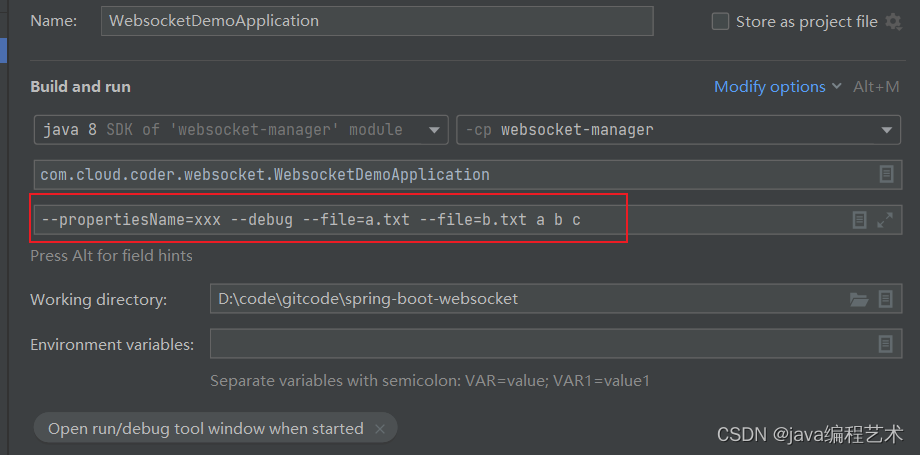
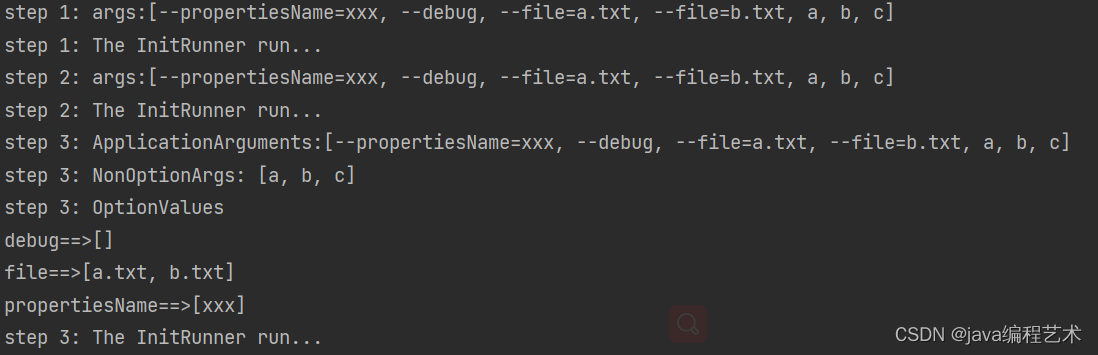
3. 如何修改执行顺序
如果有多个实现类,需要按照一定的顺序执行的话,那么应该怎么办?
- 方案一:可以在实现类加上@Order注解指定执行的顺序
- 方案二:可以在实现类上实现Ordered来标识。
注意:数字越小,优先级越高,也就是@Order(1)注解的类会在@Order(2)注解的类之前执行。
4. 使用示例
import lombok.extern.slf4j.Slf4j;

import java.util.Arrays;

import org.springframework.boot.CommandLineRunner;
import org.springframework.core.annotation.Order;
import org.springframework.stereotype.Component;

@Component
@Order(0)
@Slf4j
public class InitRunner implements CommandLineRunner {
    @Override
    public void run(String... args) throws Exception {
        log.info("step 1: args:"+ Arrays.toString(args));
        log.info("step 1: The InitRunner run...");
    }
}

@Component
@Order(1)
@Slf4j
public class InitRunner2 implements CommandLineRunner {
    @Override
    public void run(String... args) throws Exception {
        log.info("step 2: args:"+ Arrays.toString(args));
        log.info("step 2: The InitRunner run...");
    }
}

@Component
@Order(2)
@Slf4j
public class InitRunner3 implements ApplicationRunner {
    @Override
    public void run(ApplicationArguments args) throws Exception {
        log.info("step 3: ApplicationArguments:"+ Arrays.toString(args.getSourceArgs()));
        log.info("step 3: NonOptionArgs: "+ args.getNonOptionArgs());
        log.info("step 3: OptionValues");
        args.getOptionNames().stream().forEach((arg) -> {
            log.info("{}==>{}",arg,args.getOptionValues(arg));
        });
        log.info("step 3: The InitRunner run...");
    }
}
2022-09-18 11:15:01.418  INFO 1356 --- [main] c.c.c.w.WebsocketDemoApplication         : Started WebsocketDemoApplication in 3.827 seconds (JVM running for 4.556)
2022-09-18 11:15:01.418  INFO 1356 --- [main] c.cloud.coder.websocket.init.InitRunner  : step 1: args:[--propertiesName=xxx, --debug, --file=a.txt, --file=b.txt, a, b, c]
2022-09-18 11:15:01.418  INFO 1356 --- [main] c.cloud.coder.websocket.init.InitRunner  : step 1: The InitRunner run...
2022-09-18 11:15:01.418  INFO 1356 --- [main] c.c.coder.websocket.init.InitRunner2     : step 2: args:[--propertiesName=xxx, --debug, --file=a.txt, --file=b.txt, a, b, c]
2022-09-18 11:15:01.418  INFO 1356 --- [main] c.c.coder.websocket.init.InitRunner2     : step 2: The InitRunner run...
2022-09-18 11:15:01.418  INFO 1356 --- [main] c.c.coder.websocket.init.InitRunner3     : step 3: ApplicationArguments:[--propertiesName=xxx, --debug, --file=a.txt, --file=b.txt, a, b, c]
2022-09-18 11:15:01.418  INFO 1356 --- [main] c.c.coder.websocket.init.InitRunner3     : step 3: NonOptionArgs: [a, b, c]
2022-09-18 11:15:01.418  INFO 1356 --- [main] c.c.coder.websocket.init.InitRunner3     : step 3: OptionValues
2022-09-18 11:15:01.418  INFO 1356 --- [main] c.c.coder.websocket.init.InitRunner3     : debug==>[]
2022-09-18 11:15:01.418  INFO 1356 --- [main] c.c.coder.websocket.init.InitRunner3     : file==>[a.txt, b.txt]
2022-09-18 11:15:01.418  INFO 1356 --- [main] c.c.coder.websocket.init.InitRunner3     : propertiesName==>[xxx]
2022-09-18 11:15:01.418  INFO 1356 --- [main] c.c.coder.websocket.init.InitRunner3     : step 3: The InitRunner run...
版权声明:本文为penriver原创文章,遵循 CC 4.0 BY-SA 版权协议,转载请附上原文出处链接和本声明。