脚注,一般附在文章页面的底部,用于对文档某段或某处内容加以注释说明,常用在一些说明书、标书、论文等正式文书中。以此来让原文保持完整、流畅。本文将通过使用Java程序来演示如何在Word文档中添加和删除脚注。
使用工具:Free Spire.Doc for Java(免费版)
Jar文件获取及导入:
方法1:通过E-iceblue中文官网下载获取jar包。解压后将lib文件夹下的Spire.Doc.jar文件导入Java程序。(如下图)

方法2:通过maven仓库安装导入。具体安装详情参见E-iceblue中文官网。
【示例1】添加脚注
情况1:在整个段落后面添加脚注。
import com.spire.doc.*;import com.spire.doc.documents.*;import com.spire.doc.fields.*;import java.awt.*;public class AddFootnote { public static void main(String[] args) { //加载示例文档 Document doc = new Document(); doc.loadFromFile("D:DesktopSample.docx", FileFormat.Docx_2010); //获取第一个section的第二段 Paragraph para = doc.getSections().get(0).getParagraphs().get(18); //在第一段后面添加脚注 Footnote footnote = para.appendFootnote(FootnoteType.Footnote); //添加脚注内容并设置字体格式 TextRange text = footnote.getTextBody().addParagraph().appendText("注:确属本公司产品质量问题,自购置之日起保修期为3个月。"); text.getCharacterFormat().setFontName("Arial Black"); text.getCharacterFormat().setFontSize(10); text.getCharacterFormat().setTextColor(new Color(255, 140, 0)); footnote.getMarkerCharacterFormat().setFontName("Calibri"); footnote.getMarkerCharacterFormat().setFontSize(12); footnote.getMarkerCharacterFormat().setBold(true); footnote.getMarkerCharacterFormat().setTextColor(new Color(0, 0, 139)); //保存文档 doc.saveToFile("output/Addfootnote1.docx", FileFormat.Docx_2010); }}脚注添加效果:
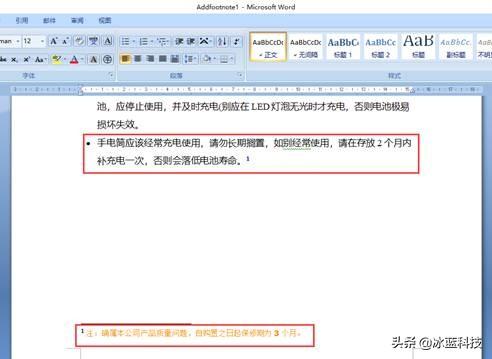
情况2:查找指定文本,并在查找的文本后面添加脚注
import com.spire.doc.*;import com.spire.doc.documents.*;import com.spire.doc.fields.*;import java.awt.*;public class AddFootnote2 { public static void main(String[] args) { //加载示例文档 Document doc = new Document(); doc.loadFromFile("D:DesktopSample.docx", FileFormat.Docx_2010); //查找文本AC110V/220V TextSelection[] selections = doc.findAllString("AC110V/220V", false, true); for (TextSelection selection : selections) { TextRange range = selection.getAsOneRange(); Paragraph para = range.getOwnerParagraph(); //在指定文本后添加脚注 Footnote footnote = para.appendFootnote(FootnoteType.Footnote); int index = para.getChildObjects().indexOf(range); para.getChildObjects().insert(index + 1, footnote); //添加脚注内容并设置字体格式 TextRange text = footnote.getTextBody().addParagraph().appendText("直流电110/220伏"); text.getCharacterFormat().setFontName("Arial Black"); text.getCharacterFormat().setFontSize(10); text.getCharacterFormat().setTextColor(new Color(255, 140, 0)); footnote.getMarkerCharacterFormat().setFontName("Calibri"); footnote.getMarkerCharacterFormat().setFontSize(12); footnote.getMarkerCharacterFormat().setBold(true); footnote.getMarkerCharacterFormat().setTextColor(new Color(0, 0, 139)); //保存文本 doc.saveToFile("output/Addfootnote2.docx", FileFormat.Docx_2010); } }}脚注添加效果:
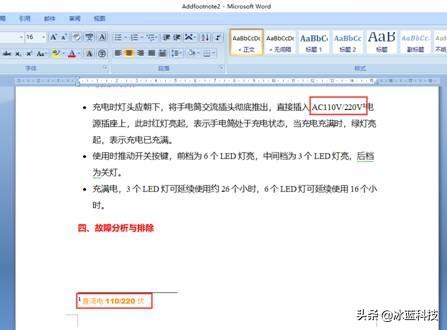
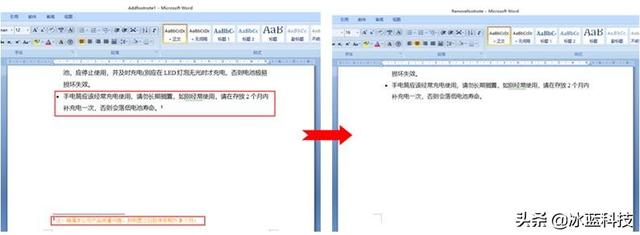
【示例2】删除脚注
import com.spire.doc.*;import com.spire.doc.documents.Paragraph;import com.spire.doc.fields.*;public class DeleteFootnote { public static void main(String[] args) { //加载示例文档 Document document = new Document(); document.loadFromFile("D:DesktopAddfootnote1.docx"); Section section = document.getSections().get(0); //遍历section中的段落并获取所有脚注 for (int j = 0; j < section.getParagraphs().getCount(); j++) { Paragraph para = section.getParagraphs().get(j); int index = -1; for (int i = 0, cnt = para.getChildObjects().getCount(); i < cnt; i++) { ParagraphBase pBase = (ParagraphBase) para.getChildObjects().get(i); if (pBase instanceof Footnote) { index = i; break; } } if (index > -1) //移除脚注 para.getChildObjects().removeAt(index); } document.saveToFile("output/Removefootnote.docx", FileFormat.Docx); }}脚注删除效果:
(本文完)