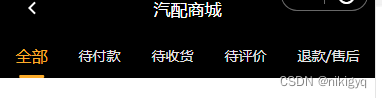
wxml

<!-- tab -->
  <view class="oa_tab">
    <block wx:for="{{navList}}" wx:key="index">
      <view class="oa_tab_flex {{nav_type == index ? 'oa_tab_flex_on' : ''}}" catchtap="changeType" data-index="{{index}}">{{item}}</view>
    </block>
  </view>


js


data: {

    navList: ['全部', '待付款', '待收货', '待评价', '退款/售后'],
    nav_type: 0,
  },

 changeType: function (e) {
    let {
      index
    } = e.currentTarget.dataset;
    if (this.data.type === index || index === undefined) {
      return false;
    } else {
      this.setData({
        nav_type: index
      })
    }
  },


css


.oa_tab {
  width: 100%;
  height: 88rpx;
  line-height: 88rpx;
  display: flex;
  background: #000;
  align-items: center;
  justify-content: space-around;
}

.oa_tab_flex {
  /* flex: 1; */
  text-align: center;
  font-size: 28rpx;
  font-family: PingFang SC;
  font-weight: 500;
  color: #E6E6E6;
}

.oa_tab_flex_on {
  font-size: 32rpx;
  color: #FBAB2A;
  position: relative;
}

.oa_tab_flex_on::after {
  content: "";
  position: absolute;
  bottom: 0;
  width: 80%;
  height: 6rpx;
  background: #FBAB2A;
  border-radius: 3rpx;
  left: 50%;
  transform: translateX(-50%);
}
版权声明:本文为qq706352062原创文章,遵循CC 4.0 BY-SA版权协议,转载请附上原文出处链接和本声明。