背景
Anaconda使用selenium时报错:WebDriverException:Message: ‘chromedriver‘ executable needs to be in PATH
解决方法
下载与chrome版本匹配的chromedriver,解压后将exe文件放入和chrome.exe应用程序的同一个目录下,编辑path环境变量,修改原代码
1、查看自己的chrome浏览器版本
右上角-帮助-关于Google Chrome-查看chrome版本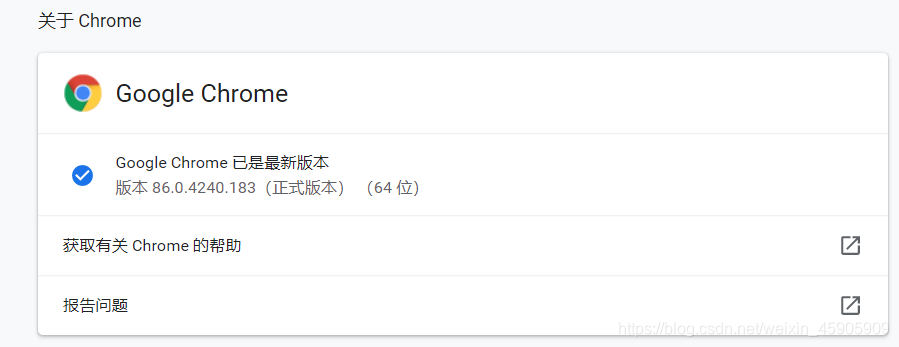
2、查看chromedriver与chrome版本映射表,找到适合自己的版本
版本映射表地址:https://blog.csdn.net/huilan_same/article/details/51896672
3、下载相应版本的chromedriver
下载地址:http://chromedriver.storage.googleapis.com/index.html
4、移动exe文件
解压压缩包,将里面的chromedriver.exe文件移动至chrome.exe应用程序的同一个目录下

5、path中新增路径
右键点击“我的电脑”,进入属性,选择“高级系统设置”-环境变量,编辑path,在最后新增chromedriver.exe路径(路径前需要加一个分号),点击确认保存
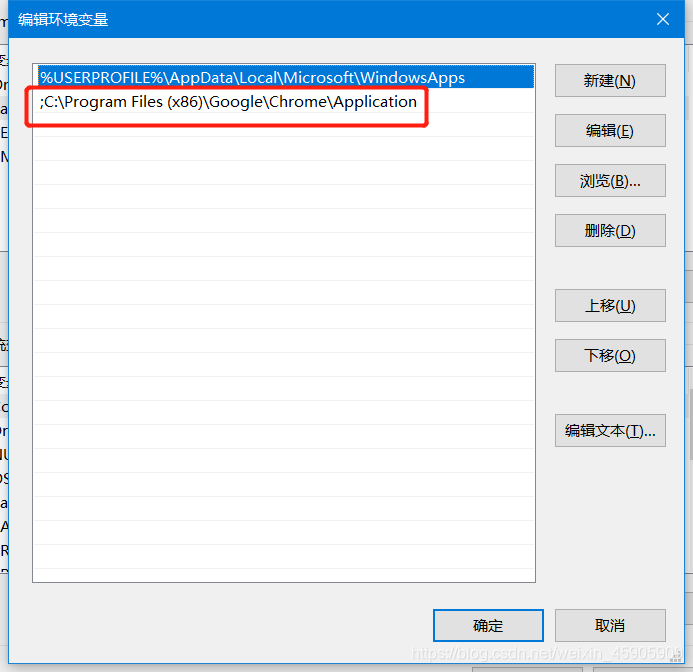
6、代码调用时指定chromedriver.exe目录
原代码:
from selenium import webdriver
from selenium.webdriver.chrome.options import Options

driver = webdriver.Chrome(options=chrome_options)
修改代码:
from selenium import webdriver
from selenium.webdriver.chrome.options import Options

chrome_driver = 'C:\Program Files (x86)\Google\Chrome\Application\chromedriver.exe'
driver = webdriver.Chrome(executable_path=chrome_driver)
即可成功抓取信息。
参考文章:
1、@yx868yx:https://blog.csdn.net/yx868yx/article/details/105958213
2、@huilan_same:https://blog.csdn.net/huilan_same/article/details/51896672
3、@solimania:
https://blog.csdn.net/qq_24023869/article/details/81543336
感恩的心。