这次先上工程的完整结构图
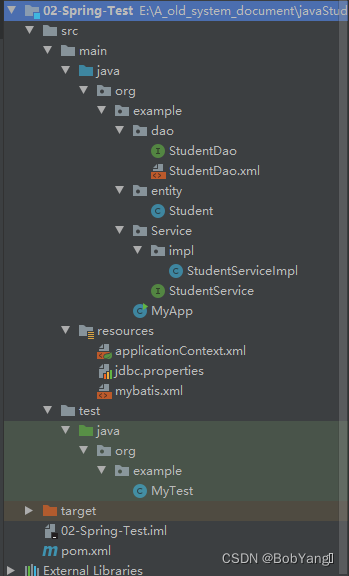
新建Project
File-New-Project... 新建一个Project
左侧选择Empty Project,给project起名,并设置路径,点Finish
新建Module
File-New-Module...
左侧选择Maven,勾选Create from archetype,选择这个quickstart,起名设路径,点Next。

在main文件夹下右键新建Directory,选择这个resources

在 org.example文件夹下新建dao,entity,service三个文件夹
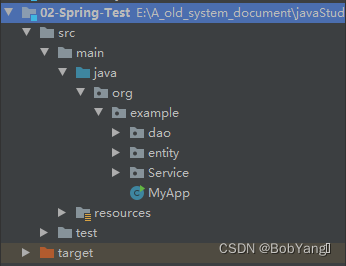
在pom.xml文件中加入maven的依赖
其中oracle的依赖配置在这个博客有讲述:IDEA中MyBatis配置Oracle
  <dependencies>
    <dependency>
      <groupId>junit</groupId>
      <artifactId>junit</artifactId>
      <version>4.11</version>
      <scope>test</scope>
    </dependency>
    <!--spring依赖-->
    <dependency>
      <groupId>org.springframework</groupId>
      <artifactId>spring-context</artifactId>
      <version>5.2.5.RELEASE</version>
    </dependency>
    <dependency>
      <groupId>org.springframework</groupId>
      <artifactId>spring-tx</artifactId>
      <version>5.2.5.RELEASE</version>
    </dependency>
    <dependency>
      <groupId>org.springframework</groupId>
      <artifactId>spring-jdbc</artifactId>
      <version>5.2.5.RELEASE</version>
    </dependency>
    <!--oracle驱动-->
    <dependency>
      <groupId>com.oracle</groupId>
      <artifactId>ojdbc6</artifactId>
      <version>11.1.0.6.0</version>
    </dependency>
    <!--mybatis依赖-->
    <dependency>
      <groupId>org.mybatis</groupId>
      <artifactId>mybatis</artifactId>
      <version>3.5.1</version>
    </dependency>
    <!--mybatis和spring集成的依赖-->
    <dependency>
      <groupId>org.mybatis</groupId>
        <artifactId>mybatis-spring</artifactId>
      <version>1.3.1</version>
    </dependency>
    <dependency>
      <groupId>com.alibaba</groupId>
      <artifactId>druid</artifactId>
      <version>1.1.12</version>
    </dependency>
  </dependencies>

  <build>
    <plugins>
      <plugin>
        <artifactId>maven-compiler-plugin</artifactId>
        <version>3.1</version>
        <configuration>
          <!--jdk版本是1.8的-->
          <source>1.8</source>
          <target>1.8</target>
        </configuration>
      </plugin>
    </plugins>
    <resources>
      <resource>
        <directory>src/main/java</directory><!--所在的目录   src/main/java-->
        <includes><!--包括目录下的.properties,.xml 文件都会扫描到-->
          <include>**/*.properties</include>
          <include>**/*.xml</include>
        </includes>
        <filtering>false</filtering>
      </resource>
      <resource>
        <directory>src/main/resources</directory><!--所在的目录   src/main/java-->
        <includes><!--包括目录下的.properties,.xml 文件都会扫描到-->
          <include>**/*.properties</include>
          <include>**/*.xml</include>
        </includes>
        <filtering>false</filtering>
      </resource>
    </resources>
  </build>
在Oracle中新建t_student表
CREATE TABLE t_student (
 id number(10) NOT NULL,
 name varchar2(50) DEFAULT NULL,
 email varchar2(50) DEFAULT NULL,
 age number(10) DEFAULT NULL,
 PRIMARY KEY (id)
); 在resources文件夹下创建mybatis.xml,applicationContext.xml和jdbc.properties三个文件
定义MyBatis主配置文件-mybatis.xml
功能:1、给实体类设置别名 2、指定sql映射文件的位置
<?xml version="1.0" encoding="UTF-8" ?>
<!DOCTYPE configuration
        PUBLIC "-//mybatis.org//DTD Config 3.0//EN"
        "http://mybatis.org/dtd/mybatis-3-config.dtd">
<configuration>

    <!-- 别名 -->
    <typeAliases>
        <!--
            package:包下面的所有类名作为其别名
            name:实体类所在的包名-->
        <package name="org.example.entity"/>
    </typeAliases>

    <!-- sql映射文件的位置 -->
    <mappers>
        <!--
           package指定Dao接口所在包的位置,能将这个包中所有的mapper.xml一次都加载
           name是mapper文件所在的包名
           注意:此种方法要求 Dao 接口名称和 mapper 映射文件名称相同,且在同一个目录中
        -->
        <package name="org.example.dao"/>

    </mappers>
</configuration>写数据库的配置文件-jdbc.properties,使Spring配置文件从中读取数据库连接信息。
jdbc.url=jdbc:oracle:thin://localhost:1521:orcl
jdbc.user=bby
jdbc.password=123定义Spring配置文件-applicationContext.xml
功能:0、配置组件扫描器component-scan,用于在指定的基本包中扫描注解
1、配置数据库连接池
2、注册SqlSessionFactoryBean
3、定义 Mapper 扫描配置器 MapperScannerConfigurer,对目标路径中的所有Dao接口创建对应的接口实现类对象,并放入到Spring容器中
4、注册studentService
<?xml version="1.0" encoding="UTF-8"?>
<beans xmlns="http://www.springframework.org/schema/beans"
       xmlns:xsi="http://www.w3.org/2001/XMLSchema-instance"
       xmlns:context="http://www.springframework.org/schema/context"
       xsi:schemaLocation="http://www.springframework.org/schema/beans
       http://www.springframework.org/schema/beans/spring-beans.xsd http://www.springframework.org/schema/context https://www.springframework.org/schema/context/spring-context.xsd">

<!--   【0、组件扫描器component-scan】-->
    <context:component-scan base-package="org.example"/>

<!--   【1、数据源DataSource】-->
    <context:property-placeholder location="classpath:jdbc.properties"/>
    <bean id="myDataSource" class="com.alibaba.druid.pool.DruidDataSource"
          init-method="init"    destroy-method="close">
        <property name="url" value="${jdbc.url}"/>
        <property name="username" value="${jdbc.user}"/>
        <property name="password" value="${jdbc.password}"/>
    </bean>

<!--    【2、sqlSessionFactory】-->
    <bean id="sqlSessionFactory" class="org.mybatis.spring.SqlSessionFactoryBean">
        <property name="dataSource" ref="myDataSource" />
        <property name="configLocation" value="classpath:mybatis.xml" />
    </bean>

<!--    【3、Dao对象】
         使用SqlSession的getMapper(StudentDao.class)
         MapperScannerConfigurer:在内部调用getMapper()生成dao包中每个dao接口的代理对象。-->
    <bean class="org.mybatis.spring.mapper.MapperScannerConfigurer">
        <property name="sqlSessionFactoryBeanName" value="sqlSessionFactory" />
        <property name="basePackage" value="org.example.dao"/>
    </bean>

<!--    【4、声明service对象】-->
    <bean id="studentService" class="org.example.Service.impl.StudentServiceImpl">
        <property name="studentDao" ref="studentDao"/>
    </bean>
</beans>在entity路径下创建实体类Student--用来保存表中的一行数据
其中@Component注解用于创建student对象,@Value注解用于给各属性赋值
package org.example.entity;

import org.springframework.beans.factory.annotation.Value;
import org.springframework.stereotype.Component;

@Component("student")
public class Student {
    @Value("3")
    private int id;
    @Value("spring_bby")
    private String name;
    @Value("spring_bby@163.com")
    private String email;
    @Value("18")
    private int age;


    public int getId() {
        return id;
    }

    public String getName() {
        return name;
    }

    public String getEmail() {
        return email;
    }

    public int getAge() {
        return age;
    }

    public void setId(int id) {
        this.id = id;
    }

    public void setName(String name) {
        this.name = name;
    }

    public void setEmail(String email) {
        this.email = email;
    }

    public void setAge(int age) {
        this.age = age;
    }

    @Override
    public String toString() {
        return "Student{" +
                "id=" + id +
                ", name='" + name + '\'' +
                ", email='" + email + '\'' +
                ", age=" + age +
                '}';
    }
}
在dao文件夹下创建StudentDao接口--定义操作数据库的方法
package org.example.dao;

import org.example.entity.Student;
import org.springframework.stereotype.Repository;

import java.util.List;

public interface StudentDao {
    //增
    public int insertStudent(Student student);
    //查
    public List<Student> selectStudent();
    //删
    public int deleteStudent(int id);
    //改
    public int updateStudent(Student student);
}在dao文件夹下创建StudentDao.xml映射文件--写和Dao接口中方法对应的sql语句
<?xml version="1.0" encoding="UTF-8" ?>
<!DOCTYPE mapper
        PUBLIC "-//mybatis.org//DTD Mapper 3.0//EN"
        "http://mybatis.org/dtd/mybatis-3-mapper.dtd">
<mapper namespace="org.example.dao.StudentDao">
    <select id="selectStudent" resultType="Student">
        select * from t_student
    </select>
    <insert id="insertStudent">
        insert into t_student values(#{id},#{name},#{email},#{age})
    </insert>
    <delete id="deleteStudent">
        delete from t_student where id = #{id}
    </delete>
    <update id="updateStudent">
        update t_student set name=#{name},email=#{email},age=#{age} where id=#{id}
    </update>
</mapper>在service文件夹下创建StudentService接口--调用dao层中的方法
package org.example.Service;

import org.example.entity.Student;

import java.util.List;

public interface StudentService {
    int addStudent(Student student);
    List<Student> queryStudents();
    int removeStudent(int id);
    int freshStudent(Student student);
}在service.impl文件夹下创建StudentServiceImpl类--借助dao对象实现StudentService接口的方法
package org.example.Service.impl;

import org.example.Service.StudentService;
import org.example.dao.StudentDao;
import org.example.entity.Student;
import org.springframework.beans.factory.annotation.Autowired;
import org.springframework.stereotype.Service;

import java.util.List;

public class StudentServiceImpl implements StudentService {
    //定义Dao的引用类型的属性

    private StudentDao studentDao;

    //使用set注入,赋值
    public void setStudentDao(StudentDao studentDao) {
        this.studentDao = studentDao;
    }

    @Override
    public int addStudent(Student student) {
        return studentDao.insertStudent(student);
    }

    @Override
    public List<Student> queryStudents() {
        return studentDao.selectStudent();
    }

    @Override
    public int removeStudent(int id) {
        return studentDao.deleteStudent(id);
    }

    @Override
    public int freshStudent(Student student) {
        return studentDao.updateStudent(student);
    }

}最后,在org.example文件夹下创建MyApp类,执行对orcale数据库的增删改查功能
package org.example;

import org.example.Service.StudentService;
import org.example.entity.Student;
import org.springframework.context.support.ClassPathXmlApplicationContext;

import java.util.List;

public class MyApp {
    public static void main(String[] args) {
        ClassPathXmlApplicationContext ctx = new ClassPathXmlApplicationContext("applicationContext.xml");
        StudentService service = (StudentService) ctx.getBean("studentService");

        //增
/*        Student student = (Student) ctx.getBean("student");
        int nums = service.addStudent(student);
        System.out.println("成功添加的条数是"+nums);*/

        //删
/*        int num2 = service.removeStudent(3);
        System.out.println("成功删除的条数是"+num2);*/

        //改
/*        Student studentUpdate = new Student();
        studentUpdate.setId(3);
        studentUpdate.setAge(28);
        studentUpdate.setEmail("update@163.com");
        studentUpdate.setName("Spring-bby");
        service.freshStudent(studentUpdate);*/

        //查
/*        List<Student> list = service.queryStudents();
        list.forEach(stu -> System.out.println(stu));*/
    }
}