前言:本文章只是集成及简单使用,非项目开发,作者为了省事,所以一切配置从简;
一、创建springboot项目,此步骤省略
二、添加相关依赖
 <!--freemarker依赖start-->
 <dependency>
            <groupId>org.springframework.boot</groupId>
            <artifactId>spring-boot-starter-freemarker</artifactId>
            <version>2.5.0</version>
            <scope>compile</scope>
 </dependency>
 <!--freemarker依赖end-->
 <!--springboot模板依赖start-->
 <dependency>
            <groupId>org.springframework.boot</groupId>
            <artifactId>spring-boot-starter-thymeleaf</artifactId>
            <version>2.1.6.RELEASE</version>
</dependency>
<!--springboot模板依赖end-->
三、yml文件配置
server:
  port: 8080
  servlet:
    context-path: /demo
    encoding:
      charset: UTF-8
      enabled: true
      force: true
spring:
  freemarker:
    #    template-loader-path: classpath:/templates
    cache: false
    suffix: .html
    charset: UTF-8
    content-type: text/html
    expose-request-attributes: true
    expose-session-attributes: true
    allow-session-override: true
    expose-spring-macro-helpers: true
    request-context-attribute: request
四、项目目录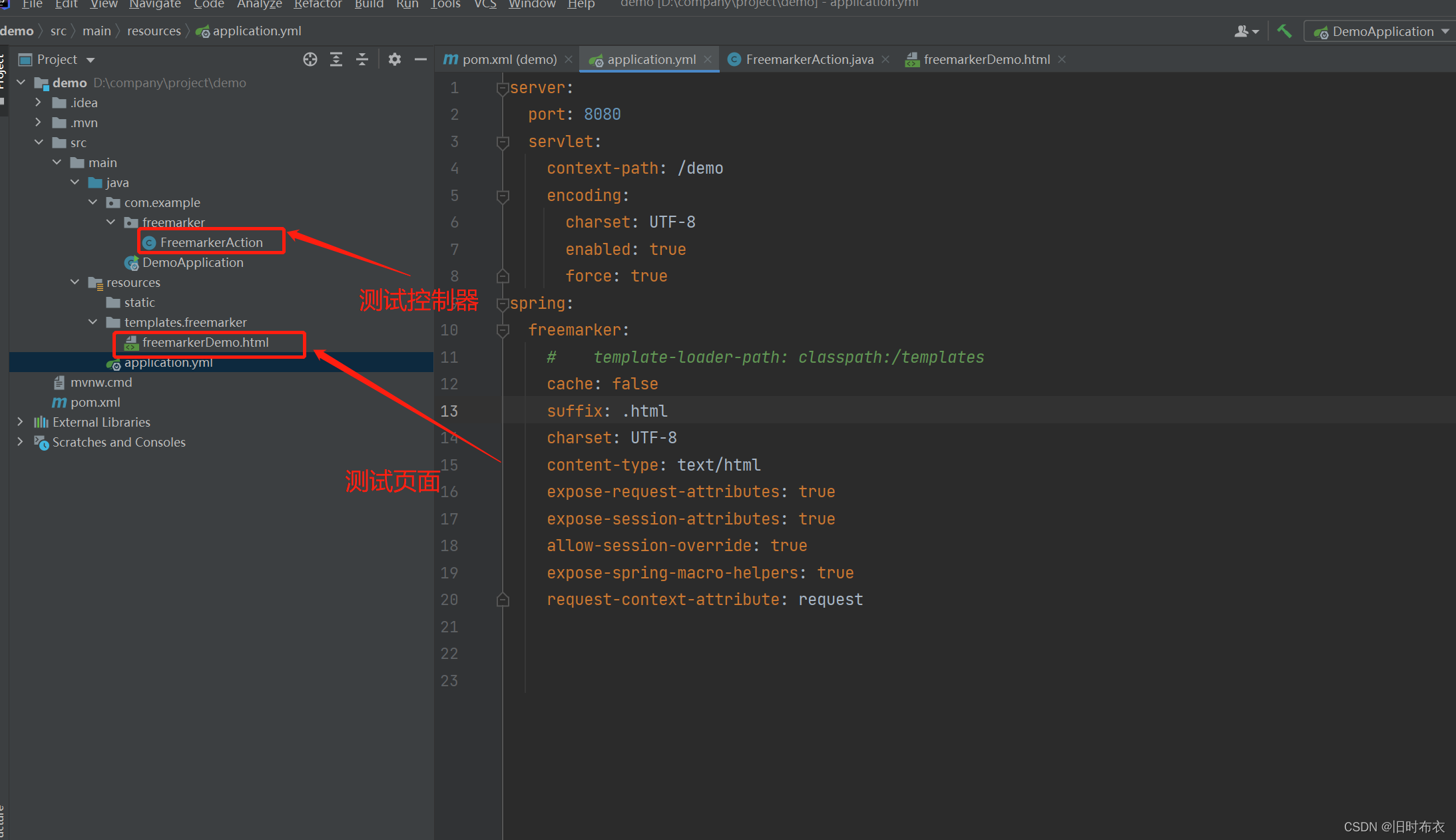
五、使用
后端代码
package com.example.freemarker;

import org.springframework.stereotype.Controller;
import org.springframework.web.bind.annotation.RequestMapping;
import org.springframework.web.servlet.ModelAndView;

import java.util.ArrayList;
import java.util.HashMap;
import java.util.List;
import java.util.Map;

/**
 * @author wei
 * @date 2021/12/30
 * @describe
 */
@Controller
@RequestMapping("/freemarker")
public class FreemarkerAction {

    @RequestMapping("/freekarkerJumpMethod")
    public ModelAndView freekarkerJumpMethod(){
        ModelAndView mav = new ModelAndView("freemarker/freemarkerDemo");
        Map<String, Object> paramMap = new HashMap<>();
        paramMap.put("name", "北京");
        List<Map<String, Object>> paramList = new ArrayList<>();
        Map<String, Object> obj;
        for (int i = 0; i < 200; i++) {
            obj = new HashMap<>();
            obj.put("column1", "世界真大"+i);
            obj.put("column2", "世界真好"+i);
            obj.put("column3", "世界真美"+i);
            obj.put("column4", "世界真小"+i);
            paramList.add(obj);
        }
        mav.addObject("map",paramMap);
        mav.addObject("list",paramList);
        return mav;
    }


}
前端代码
<!DOCTYPE html>

<html>
<head>
    <meta charset="utf-8"/>
    <title></title>
    <style>
        body{
            font-size: 14px;
            font-family: "宋体";
        }
        * {
            margin: 0;
            padding: 0;
            box-sizing: border-box;
            font-family: SIMSUN;
        }
        section {
            display:block;
            margin: 20px 10px;
        }
        .title {
            text-align: center;
        }
        .preface p {
            line-height: 30px;
        }
        .preface p.content {
            text-indent: 2em;
        }
        section {
            page-break-inside: avoid;
        }
        section table {
            table-layout: fixed;
            width: 100%;
            margin: 20px 0px;
            text-align:center;
            word-wrap:break-word;
        }
        table {
            border: 1px solid #999;
            border-collapse:collapse;
        }
        section table{
            margin-top:0px;
            margin-bottom: 0px;
        }
        tr, th, td {
            border:1px solid #999;
        }
        section table td {
            padding:5px 0px;
        }
    </style>
</head>
<body>
<!-- 标题 start -->

<!-- 标题 end -->

<!-- 明细 start -->
<div id="page-1-1">
    <section class="title">
        <h2>${(map.name)!''}</h2>
    </section>
    <section>
        <table>
            <tr>
                <td>序号</td>
                <td>列1</td>
                <td>列2</td>
                <td>列3</td>
                <td>列4</td>
            </tr>
            <#if list??>
                <#list list as li>
                    <tr>
                        <td>${(li_index+1)!''}</td>
                        <td>${(li.column1)!''}</td>
                        <td>${(li.column2)!''}</td>
                        <td>${(li.column3)!''}</td>
                        <td>${(li.column4)!''}</td>
                    </tr>
                </#list>
            </#if>
        </table>

    </section>
</div>


</body>
</html>
六、运行结果
七、结语
本文只是简单集成及其使用,也是为了自己下次搭建项目的时候可以直接拿来直接使用,至于freemarker的语法指令,如果各位有需要,作者后续有时间会更新关于freemarker的具体使用;
版权声明:本文为W18738842008原创文章,遵循CC 4.0 BY-SA版权协议,转载请附上原文出处链接和本声明。