首先声明本文不是讨论Linq,在Framwork2.0中也不支持linq操作的,主要是记录一下List集合的使用方法。
List 一般主要用到的查找遍历方法:
Find:搜索指定谓词所定义条件相匹配的元素,并返回整个List中的第一个匹配元素。
FindLast:搜索指定谓词所定义条件相匹配的元素,并返回整个List中的最后一个匹配元素。
Find:搜索指定谓词所定义条件相匹配的元素,并返回整个List中的第一个匹配元素。
FindLast:搜索指定谓词所定义条件相匹配的元素,并返回整个List中的最后一个匹配元素。
FindAll:检索与指定谓词定义条件匹配的所有元素。
FindIndex:搜索指定谓词所定义条件相匹配的元素,并返回整个List中的第一个匹配元素从0开始的索引,未找到返回-1。
FindLastIndex:搜索指定谓词所定义条件相匹配的元素,并返回整个List中的最后一个匹配元素从0开始的索引,未找到返回-1。
ForEach:对每个List执行指定的操作。参数 Action委托。
注意:
ListFind(), ListFindLast()的不同是, ListFind()由Index=0开始寻找, 而ListFindLast()由Index = List.Count - 1开始寻找.
我们创建一个控制台程序并参照一下代码实例:
首先创建一个实体类Player:
usingSystem.Collections.Generic;namespaceListDemo1
{public classPlayer
{public Player(int id, string name, stringteam)
{this.Id =id;this.Name =name;this.Team =team;
}public int Id { get; set; }public string Name { get; set; }public string Team { get; set; }
}
}
创建一个集合类PlayerList继承List:
usingSystem.Collections.Generic;namespaceListDemo1
{public class PlayerList : List{publicPlayerList()
{this.Add(new Player(1, "科比-布莱恩特", "湖人队"));this.Add(new Player(2, "保罗-加索尔", "湖人队"));this.Add(new Player(3, "拉玛尔-奥多姆", "湖人队"));this.Add(new Player(4, "德克-诺维茨基", "小牛队"));this.Add(new Player(5, "杰森-特里", "小牛队"));this.Add(new Player(6, "肖恩-马里昂", "小牛队"));this.Add(new Player(7, "凯文-加内特", "凯尔特人队"));
}
}
}
Main 函数代码:
usingSystem;usingSystem.Collections.Generic;namespaceListDemo1
{classProgram
{static void Main(string[] args)
{
PlayerList players= newPlayerList();//查找所有队员数据:
Action listAll = delegate(Player p)
{
Console.WriteLine(string.Format("队员Id={0} | 队员名称={1} | 所属球队={2}", p.Id, p.Name, p.Team));
};
Console.ForegroundColor=ConsoleColor.Red;
Console.WriteLine(string.Format("数据库所有队员信息为:"));
players.ForEach(listAll);//查找小牛队队员的谓词定义
Predicate findValue = delegate(Player p)
{return p.Team.Equals("小牛队");
};//第一个匹配元素
Player firstPlayer =players.Find(findValue);
Console.ForegroundColor=ConsoleColor.Green;
Console.WriteLine("\r\nFind方法获得第一个小牛队员是:{0}", firstPlayer.Name);//获得所有的匹配元素
List findPlayers =players.FindAll(findValue);
Console.ForegroundColor=ConsoleColor.Yellow;
Console.WriteLine(string.Format("\r\nFindAll方法查找到的所有小牛球员为:"));
Action listFindAll = delegate(Player p)
{
Console.WriteLine(string.Format("队员Id={0} | 队员名称为={1}", p.Id, p.Name));
};
findPlayers.ForEach(listFindAll);
Console.ReadKey();
}
}
}
运行结果如下图:
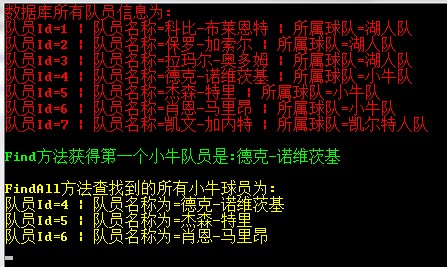
至此本篇List集合的遍历与查找介绍完毕,下一篇主要介绍一下List集合的排序方式