目录
前言
为了提高开发效率,对于简单但纯粹费时的dao,domain,service我们都希望能根据数据库字段自动生成,于是idea提供了能执行自定义groovy脚本的方式来生成需要的实体类等。
Intellij Idea自动生成jpa实体类
1.idea连接数据库
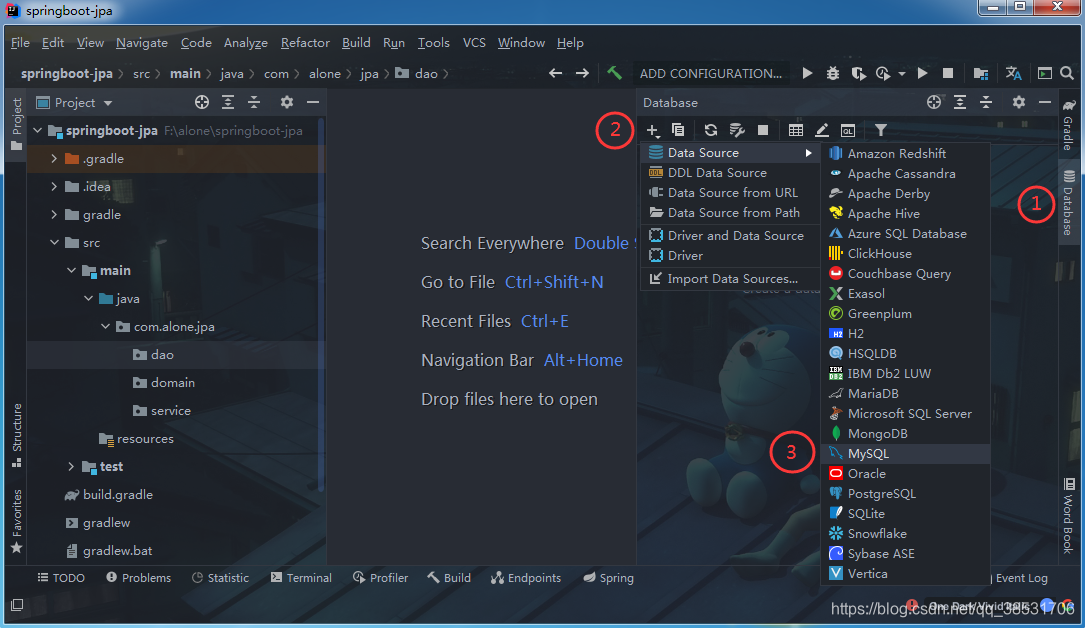
如果还未安装驱动,左下角会提示安装,先点击安装即可。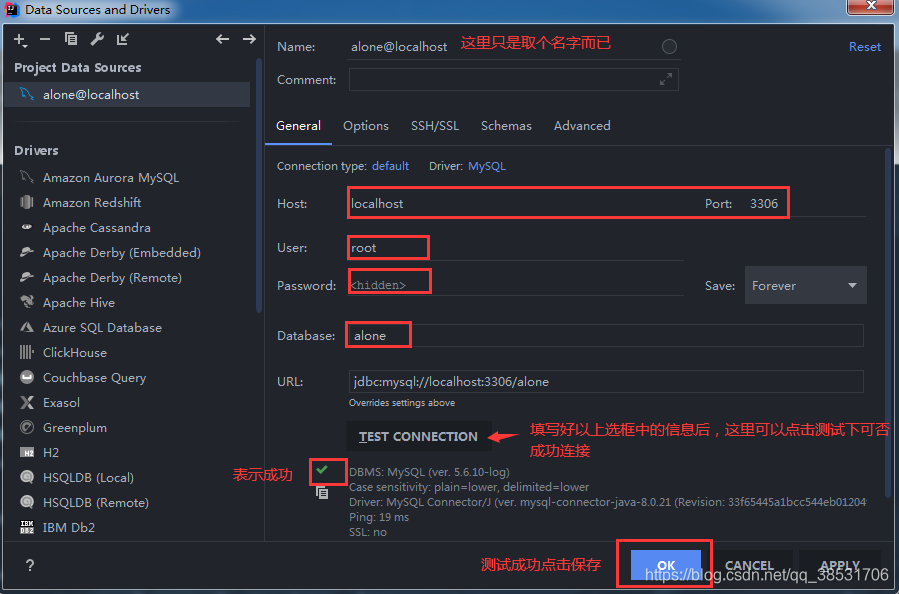
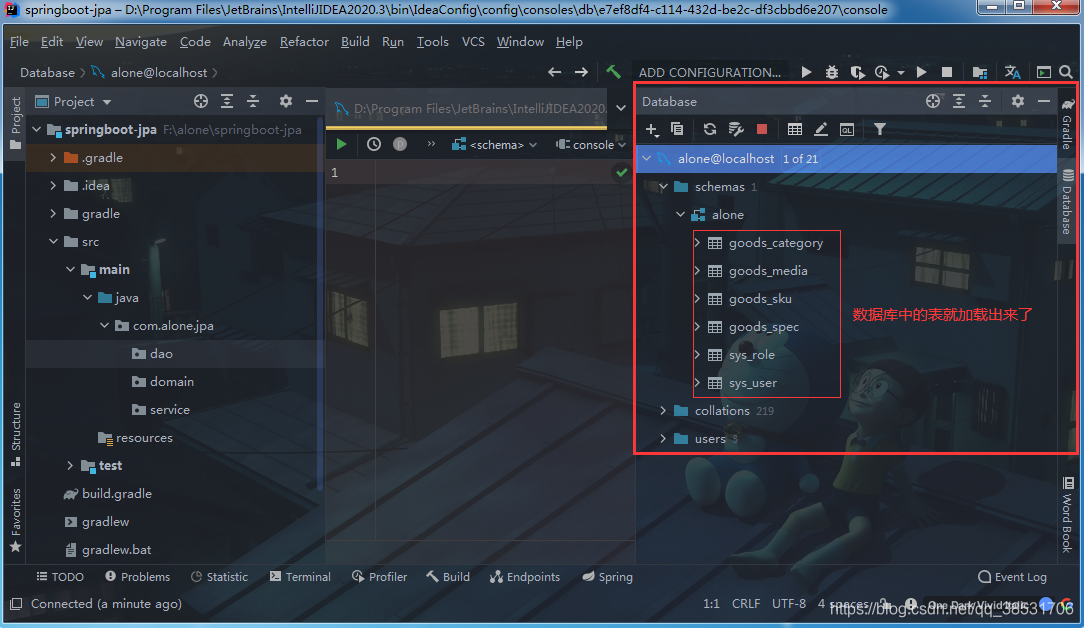
2.添加自定义groovy脚本
(1)对任意表 右键 > Scripted Extensions > Go To Scripts Diretory 就会跳转到脚本所在目录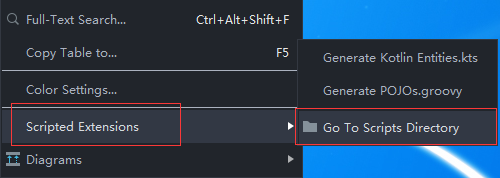
(2)通过上一步跳转的目录,可以看到目录已经有一个自带的脚本 Generate POJOs.groovy。后续我们自定义的脚本就放在这里,执行的时候会读取该目录下的所有可执行脚本,这样便可以选择需要执行的脚本。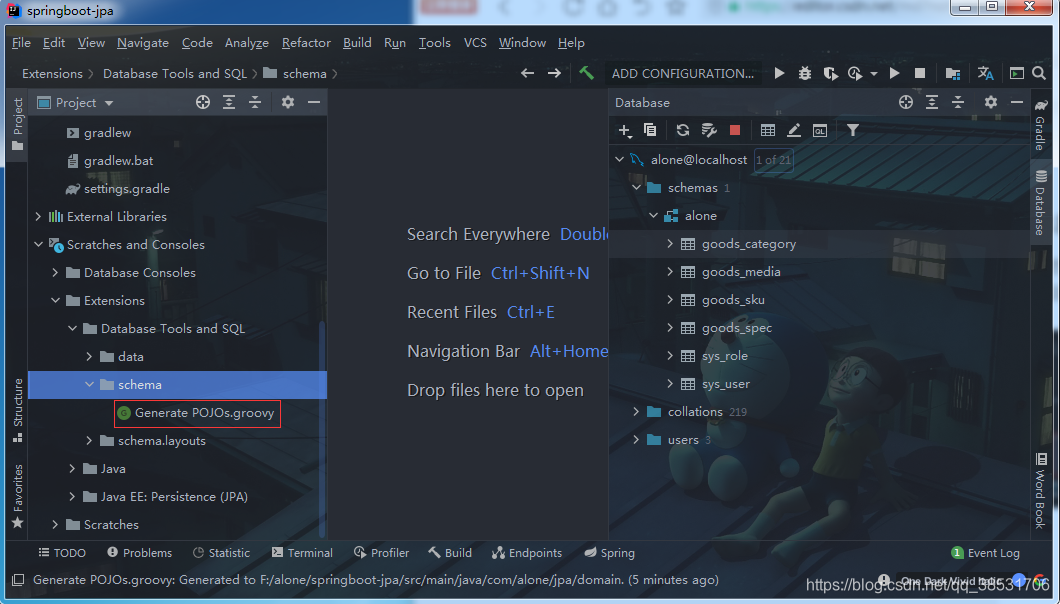
(3)先展示下添加脚本后效果如下图所示: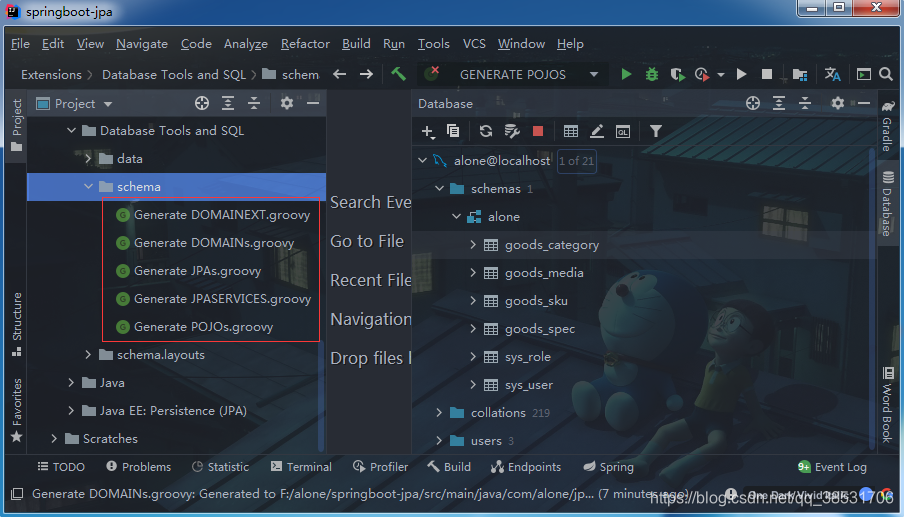
2.1.domain脚本
复制添加以下脚本,并放到脚本目录下(有兴趣可以自己写groovy脚本放置进去就可以生成自己想要的格式,groovy还是挺易入门的)对应的脚本生成的效果附在脚本后
2.1.1 脚本
Generate DOMAINs.groovy
import com.intellij.database.model.DasTable
import com.intellij.database.model.ObjectKind
import com.intellij.database.util.Case
import com.intellij.database.util.DasUtil

//这里记得改成你的包路径
packageName = "com.alone.jpa.domain;"
typeMapping = [
        (~/(?i)tinyint|smallint|mediumint/)      : "Integer",
        (~/(?i)int/)                             : "Long",
        (~/(?i)float|double|decimal|real/)		 : "double",
        (~/(?i)bool|bit/)                        : "Boolean",
        (~/(?i)datetime|timestamp|date|time/)    : "Date",
        (~/(?i)blob|binary|bfile|clob|raw|image/): "InputStream",
        (~/(?i)/)                                : "String"
]

FILES.chooseDirectoryAndSave("Choose directory", "Choose where to store generated files") { dir ->
    SELECTION.filter { it instanceof DasTable && it.getKind() == ObjectKind.TABLE }.each { generate(it, dir) }
}

def generate(table, dir) {
    def className = javaName(table.getName(), true)
    def fields = calcFields(table)
    PrintWriter output = new PrintWriter(new OutputStreamWriter(new FileOutputStream(new File(dir, className + ".java")), "utf-8"))
    output.withPrintWriter { out -> generate(out, table, className, fields) }
}

def generate(out, table, className, fields) {
    def tableName = table.getName();
    out.println "package $packageName"
    out.println ""
    out.println "import javax.persistence.*;"
    out.println "import java.io.Serializable;"
    out.println ""
    out.println "@Entity"
    out.println "@Table(name = \"$tableName\")"
    out.println "public class $className implements Serializable{"
    out.println ""
    out.println generateSerialId()
    out.println ""
    fields.each() {
        if (isNotEmpty(it.commoent)) {
            out.println "\t/**"
            out.println "\t * ${it.commoent.toString()}"
            out.println "\t */"
        }
        if (it.annos != "") out.println "  ${it.annos}"
        //判断如果是主键id则多打印注解@Id,@GeneratedValue(当然前提是你的表主键id字段名是id或_id,不是的话这里自己改成你的主键字段)
        if (it.colum.equalsIgnoreCase("id") || it.colum.equalsIgnoreCase("_id")){
            out.println "\t@Id"
            out.println "\t@GeneratedValue(strategy = GenerationType.IDENTITY)"
        }
        out.println "\t@Column(name = \"${it.colum}\")"
        out.println "\tprivate ${it.type} ${it.name};"
        out.println ""
    }

    //生成get set
    fields.each() {
        out.println ""
        out.println "\tpublic ${it.type} get${it.name.capitalize()}() {"
        out.println "    return ${it.name};"
        out.println "  }"
        out.println ""
        out.println "\tpublic void set${it.name.capitalize()}(${it.type} ${it.name}) {"
        out.println "    this.${it.name} = ${it.name};"
        out.println "  }"
        out.println ""
    }
    out.println "}"
}

def calcFields(table) {
    DasUtil.getColumns(table).reduce([]) { fields, col ->
        def spec = Case.LOWER.apply(col.getDataType().getSpecification())
        def typeStr = typeMapping.find { p, t -> p.matcher(spec).find() }.value
        fields += [[
                           name    : javaName(col.getName(), false),
                           colum   : col.getName(),
                           commoent: col.getComment(),
                           type    : typeStr,
                           annos   : ""]]
    }
}

def javaName(str, capitalize) {
    def s = com.intellij.psi.codeStyle.NameUtil.splitNameIntoWords(str)
            .collect { Case.LOWER.apply(it).capitalize() }
            .join("")
            .replaceAll(/[^\p{javaJavaIdentifierPart}[_]]/, "_")
    //如果你的表有前缀类似 t_ 需要去掉那这里的注释要启用,同样的前缀多长就 size()-长度
    //s = s[1..s.size() - 1]
    capitalize || s.length() == 1 ? s : Case.LOWER.apply(s[0]) + s[1..-1]
}

def isNotEmpty(content) {
    return content != null && content.toString().trim().length() > 0
}

//生成序列号
static String generateSerialId() {
    return "\tprivate static final long serialVersionUID =  "+Math.abs(new Random().nextLong())+"L;"
}
2.1.2.效果
package com.alone.jpa.domain;

import javax.persistence.*;
import java.io.Serializable;

@Entity
@Table(name = "goods_category")
public class GoodsCategory implements Serializable{

	private static final long serialVersionUID =  6797046342858687493L;

	/**
	 * 主键
	 */
	@Id
	@GeneratedValue(strategy = GenerationType.IDENTITY)
	@Column(name = "id")
	private Long id;

	/**
	 * 父节点:0:根节点,不为0则是具体父节点id
	 */
	@Column(name = "parent_id")
	private String parentId;

	/**
	 * 分类id
	 */
	@Column(name = "category_id")
	private String categoryId;

	/**
	 * 分类编码
	 */
	@Column(name = "category_code")
	private String categoryCode;

	/**
	 * 分类名称
	 */
	@Column(name = "category_name")
	private String categoryName;

	/**
	 * 有效状态1:有效,2无效
	 */
	@Column(name = "category_status")
	private Integer categoryStatus;

	/**
	 * 分类层级,具体层级数
	 */
	@Column(name = "category_level")
	private Integer categoryLevel;

	/**
	 * 分类排序
	 */
	@Column(name = "sort")
	private Long sort;

	/**
	 * 是否显示 1:显示 0:不显示
	 */
	@Column(name = "visible")
	private Integer visible;

	/**
	 * 创建时间:10位数时间戳
	 */
	@Column(name = "create_time")
	private Long createTime;

	/**
	 * 更新时间:10位数时间戳
	 */
	@Column(name = "update_time")
	private Long updateTime;


	public Long getId() {
    return id;
  }

	public void setId(Long id) {
    this.id = id;
  }


	public String getParentId() {
    return parentId;
  }

	public void setParentId(String parentId) {
    this.parentId = parentId;
  }


	public String getCategoryId() {
    return categoryId;
  }

	public void setCategoryId(String categoryId) {
    this.categoryId = categoryId;
  }


	public String getCategoryCode() {
    return categoryCode;
  }

	public void setCategoryCode(String categoryCode) {
    this.categoryCode = categoryCode;
  }


	public String getCategoryName() {
    return categoryName;
  }

	public void setCategoryName(String categoryName) {
    this.categoryName = categoryName;
  }


	public Integer getCategoryStatus() {
    return categoryStatus;
  }

	public void setCategoryStatus(Integer categoryStatus) {
    this.categoryStatus = categoryStatus;
  }


	public Integer getCategoryLevel() {
    return categoryLevel;
  }

	public void setCategoryLevel(Integer categoryLevel) {
    this.categoryLevel = categoryLevel;
  }


	public Long getSort() {
    return sort;
  }

	public void setSort(Long sort) {
    this.sort = sort;
  }


	public Integer getVisible() {
    return visible;
  }

	public void setVisible(Integer visible) {
    this.visible = visible;
  }


	public Long getCreateTime() {
    return createTime;
  }

	public void setCreateTime(Long createTime) {
    this.createTime = createTime;
  }


	public Long getUpdateTime() {
    return updateTime;
  }

	public void setUpdateTime(Long updateTime) {
    this.updateTime = updateTime;
  }

}
2.2.dao脚本
2.2.1.脚本
Generate JPAs.groovy
import com.intellij.database.model.DasTable
import com.intellij.database.model.ObjectKind
import com.intellij.database.util.Case
import com.intellij.database.util.DasUtil

//这里改成你自己的包路径
packageName = "com.alone.jpa.dao;"
typeMapping = [
        (~/(?i)tinyint|smallint|mediumint/)      : "Integer",
        (~/(?i)int/)                             : "Long",
        (~/(?i)float|double|decimal|real/)		 : "double",
        (~/(?i)bool|bit/)                        : "Boolean",
        (~/(?i)datetime|timestamp|date|time/)    : "Date",
        (~/(?i)blob|binary|bfile|clob|raw|image/): "InputStream",
        (~/(?i)/)                                : "String"
]

FILES.chooseDirectoryAndSave("Choose directory", "Choose where to store generated files") { dir ->
    SELECTION.filter { it instanceof DasTable && it.getKind() == ObjectKind.TABLE }.each { generate(it, dir) }
}

def generate(table, dir) {
    def className = javaName(table.getName(), true)
    def fields = calcFields(table)
    //Repository是后缀名,这里可以根据自己喜好改
    PrintWriter output = new PrintWriter(new OutputStreamWriter(new FileOutputStream(new File(dir, className + "Repository.java")), "utf-8"))
    output.withPrintWriter { out -> generate(out, table, className, fields) }
}

def generate(out, table, className, fields) {
    def tableName = table.getName();
    out.println "package $packageName"
    out.println ""
    //这里是需要引入domain的 这里根据个人domain 路径设置
    out.println "import com.alone.jpa.domain.$className;"
    out.println "import org.springframework.data.jpa.repository.JpaRepository;"
    out.println ""
    //这里默认主键是表的第一个字段所以使用的是数组第一个字段类型
    out.println "public interface $className"+"Repository extends JpaRepository<$className, ${fields[0].type}>{"
    out.println "}"
}

def calcFields(table) {
    DasUtil.getColumns(table).reduce([]) { fields, col ->
        def spec = Case.LOWER.apply(col.getDataType().getSpecification())
        def typeStr = typeMapping.find { p, t -> p.matcher(spec).find() }.value
        fields += [[
                           name    : javaName(col.getName(), false),
                           colum   : col.getName(),
                           commoent: col.getComment(),
                           type    : typeStr,
                           annos   : ""]]
    }
}

def javaName(str, capitalize) {
    def s = com.intellij.psi.codeStyle.NameUtil.splitNameIntoWords(str)
            .collect { Case.LOWER.apply(it).capitalize() }
            .join("")
            .replaceAll(/[^\p{javaJavaIdentifierPart}[_]]/, "_")
    capitalize || s.length() == 1 ? s : Case.LOWER.apply(s[0]) + s[1..-1]
}
2.2.1.效果
package com.alone.jpa.dao;

import com.alone.jpa.domain.GoodsCategory;
import org.springframework.data.jpa.repository.JpaRepository;

public interface GoodsCategoryRepository extends JpaRepository<GoodsCategory, Long>{
}
2.3.service脚本
2.3.1.脚本
Generate JPASERVICES.groovy
import com.intellij.database.model.DasTable
import com.intellij.database.model.ObjectKind
import com.intellij.database.util.Case
import com.intellij.database.util.DasUtil

//这里要改成你service存储的目录
packageName = "com.alone.jpa.service;"
typeMapping = [
        (~/(?i)tinyint|smallint|mediumint/)      : "Integer",
        (~/(?i)int/)                             : "Long",
        (~/(?i)float|double|decimal|real/)		 : "double",
		(~/(?i)bool|bit/)                        : "Boolean",
        (~/(?i)datetime|timestamp|date|time/)    : "Date",
		(~/(?i)blob|binary|bfile|clob|raw|image/): "InputStream",
        (~/(?i)/)                                : "String"
]

FILES.chooseDirectoryAndSave("Choose directory", "Choose where to store generated files") { dir ->
    SELECTION.filter { it instanceof DasTable && it.getKind() == ObjectKind.TABLE }.each { generate(it, dir) }
}

def generate(table, dir) {
    def className = javaName(table.getName(), true)
    def fields = calcFields(table)
    PrintWriter output = new PrintWriter(new OutputStreamWriter(new FileOutputStream(new File(dir, className + "Service.java")), "utf-8"))
    output.withPrintWriter { out -> generate(out, table, className, fields) }
}

def generate(out, table, className, fields) {
    out.println "package $packageName"
    out.println ""
    out.println "import org.springframework.stereotype.Service;"
    out.println "import org.springframework.beans.factory.annotation.Autowired;"
    out.println "import org.springframework.transaction.annotation.Transactional;"
    //这里要改成你dao目录并跟上你的dao后缀,如果没有后缀可以去除 $className 后拼接的后缀
    out.println "import com.alone.jpa.dao.$className"+"Repository;"
    out.println ""
    out.println "@Service"
    out.println "@Transactional(rollbackFor = Exception.class)"
    out.println "public class $className"+"Service{"
    out.println ""
    out.println "\t@Autowired"
    //这里跟的后缀 Repository 就是dao 中的格式,注意你dao如果有加这里就加上去
    out.println "\tprivate $className"+"Repository ${javaName(className, false)}"+"Service;"
    out.println "}"
}

def calcFields(table) {
    DasUtil.getColumns(table).reduce([]) { fields, col ->
        def spec = Case.LOWER.apply(col.getDataType().getSpecification())
        def typeStr = typeMapping.find { p, t -> p.matcher(spec).find() }.value
        fields += [[
                           name    : javaName(col.getName(), false),
                           colum   : col.getName(),
                           commoent: col.getComment(),
                           type    : typeStr,
                           annos   : ""]]
    }
}

def javaName(str, capitalize) {
    def s = com.intellij.psi.codeStyle.NameUtil.splitNameIntoWords(str)
            .collect { Case.LOWER.apply(it).capitalize() }
            .join("")
            .replaceAll(/[^\p{javaJavaIdentifierPart}[_]]/, "_")
    capitalize || s.length() == 1 ? s : Case.LOWER.apply(s[0]) + s[1..-1]
}
2.3.1.效果
package com.alone.jpa.service;

import org.springframework.stereotype.Service;
import org.springframework.beans.factory.annotation.Autowired;
import org.springframework.transaction.annotation.Transactional;
import com.alone.jpa.dao.GoodsCategoryRepository;

@Service
@Transactional(rollbackFor = Exception.class)
public class GoodsCategoryService{

	@Autowired
	private GoodsCategoryRepository goodsCategoryService;
}
2.4.ext脚本
有时候我们业务或者使用mybatis查询需要用到字段属性,这里就可以利用脚本生成
2.4.1.脚本
Generate DOMAINEXT.groovy
import com.intellij.database.model.DasTable
import com.intellij.database.model.ObjectKind
import com.intellij.database.util.Case
import com.intellij.database.util.DasUtil

//这里改成你存储的包名
packageName = "com.alone.jpa.domain.ext;"
typeMapping = [
        (~/(?i)tinyint|int/)              : "Integer",
        (~/(?i)int/)                      : "Integer",
        (~/(?i)float|double|decimal|real/): "double",
        (~/(?i)datetime|timestamp/)       : "java.sql.Timestamp",
        (~/(?i)date/)                     : "java.sql.Date",
        (~/(?i)time/)                     : "java.sql.Time",
        (~/(?i)/)                         : "String"
]

FILES.chooseDirectoryAndSave("Choose directory", "Choose where to store generated files") { dir ->
    SELECTION.filter { it instanceof DasTable && it.getKind() == ObjectKind.TABLE }.each { generate(it, dir) }
}

def generate(table, dir) {
    def className = javaName(table.getName(), true)
    def fields = calcFields(table)
    PrintWriter output = new PrintWriter(new OutputStreamWriter(new FileOutputStream(new File(dir, className + "Ext.java")), "utf-8"))
    output.withPrintWriter { out -> generate(out, table, className, fields) }
}

def generate(out, table, className, fields) {
    def tableName = table.getName();
    out.println "package $packageName"
    out.println ""
    out.println "import java.io.Serializable;"
    out.println ""
    out.println "public class $className"+"Ext implements Serializable{"
    out.println ""
    out.println generateSerialId()
    out.println ""
    fields.each() {
        if (it.annos != "") out.println "  ${it.annos}"
        out.println "\t/**"
        out.println "\t * 数据库字段:${it.commoent}";
        out.println "\t */"
        out.println "\tpublic static final String C_${it.ext} = \"${it.colum}\";"
        out.println ""
    }
    fields.each() {
        if (it.annos != "") out.println "  ${it.annos}"
        out.println "\t/**"
        out.println "\t * 实体属性:${it.commoent}";
        out.println "\t */"
        out.println "\tpublic static final String P_${it.ext} = \"${it.name}\";"
        out.println ""
    }
    out.println "}"
}

def calcFields(table) {
    DasUtil.getColumns(table).reduce([]) { fields, col ->
        def spec = Case.LOWER.apply(col.getDataType().getSpecification())
        def typeStr = typeMapping.find { p, t -> p.matcher(spec).find() }.value
        fields += [[
                           name    : javaName(col.getName(), false),
                           colum   : col.getName(),
                           ext     : col.getName().toUpperCase(),
                           commoent: col.getComment(),
                           type    : typeStr,
                           annos   : ""]]
    }
}

def javaName(str, capitalize) {
    def s = com.intellij.psi.codeStyle.NameUtil.splitNameIntoWords(str)
            .collect { Case.LOWER.apply(it).capitalize() }
            .join("")
            .replaceAll(/[^\p{javaJavaIdentifierPart}[_]]/, "_")
    capitalize || s.length() == 1 ? s : Case.LOWER.apply(s[0]) + s[1..-1]
}

//生成序列号
static String generateSerialId() {
    return "\tprivate static final long serialVersionUID =  "+Math.abs(new Random().nextLong())+"L;"
}
2.4.2.效果
package com.alone.jpa.domain.ext;

import java.io.Serializable;

public class GoodsCategoryExt implements Serializable{

	private static final long serialVersionUID =  7608349240273677814L;

	/**
	 * 数据库字段:主键
	 */
	public static final String C_ID = "id";

	/**
	 * 数据库字段:父节点:0:根节点,不为0则是具体父节点id
	 */
	public static final String C_PARENT_ID = "parent_id";

	/**
	 * 数据库字段:分类id
	 */
	public static final String C_CATEGORY_ID = "category_id";

	/**
	 * 数据库字段:分类编码
	 */
	public static final String C_CATEGORY_CODE = "category_code";

	/**
	 * 数据库字段:分类名称
	 */
	public static final String C_CATEGORY_NAME = "category_name";

	/**
	 * 数据库字段:有效状态1:有效,2无效
	 */
	public static final String C_CATEGORY_STATUS = "category_status";

	/**
	 * 数据库字段:分类层级,具体层级数
	 */
	public static final String C_CATEGORY_LEVEL = "category_level";

	/**
	 * 数据库字段:分类排序
	 */
	public static final String C_SORT = "sort";

	/**
	 * 数据库字段:是否显示 1:显示 0:不显示
	 */
	public static final String C_VISIBLE = "visible";

	/**
	 * 数据库字段:创建时间:10位数时间戳
	 */
	public static final String C_CREATE_TIME = "create_time";

	/**
	 * 数据库字段:更新时间:10位数时间戳
	 */
	public static final String C_UPDATE_TIME = "update_time";

	/**
	 * 实体属性:主键
	 */
	public static final String P_ID = "id";

	/**
	 * 实体属性:父节点:0:根节点,不为0则是具体父节点id
	 */
	public static final String P_PARENT_ID = "parentId";

	/**
	 * 实体属性:分类id
	 */
	public static final String P_CATEGORY_ID = "categoryId";

	/**
	 * 实体属性:分类编码
	 */
	public static final String P_CATEGORY_CODE = "categoryCode";

	/**
	 * 实体属性:分类名称
	 */
	public static final String P_CATEGORY_NAME = "categoryName";

	/**
	 * 实体属性:有效状态1:有效,2无效
	 */
	public static final String P_CATEGORY_STATUS = "categoryStatus";

	/**
	 * 实体属性:分类层级,具体层级数
	 */
	public static final String P_CATEGORY_LEVEL = "categoryLevel";

	/**
	 * 实体属性:分类排序
	 */
	public static final String P_SORT = "sort";

	/**
	 * 实体属性:是否显示 1:显示 0:不显示
	 */
	public static final String P_VISIBLE = "visible";

	/**
	 * 实体属性:创建时间:10位数时间戳
	 */
	public static final String P_CREATE_TIME = "createTime";

	/**
	 * 实体属性:更新时间:10位数时间戳
	 */
	public static final String P_UPDATE_TIME = "updateTime";

}
其它个人需要的或者修修改改的自己动动手谢谢脚本,这里就只提供以上几个了。
3.执行groovy脚本
(1)对你要生成实体类的表右键 > Scripted > Go To Scripts Diretory 在右方列表中选择你要执行的脚本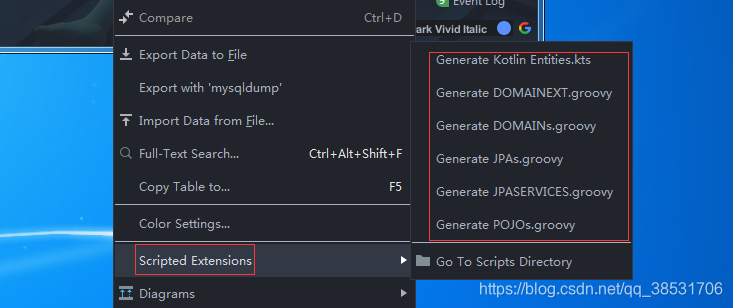
(2)选择生成目录(这里目录要与你脚本中的包名一致)确认,便会在指定目录生成类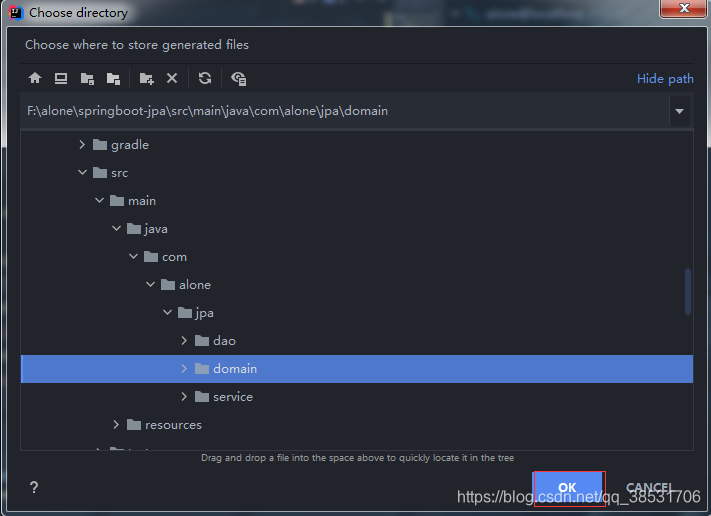
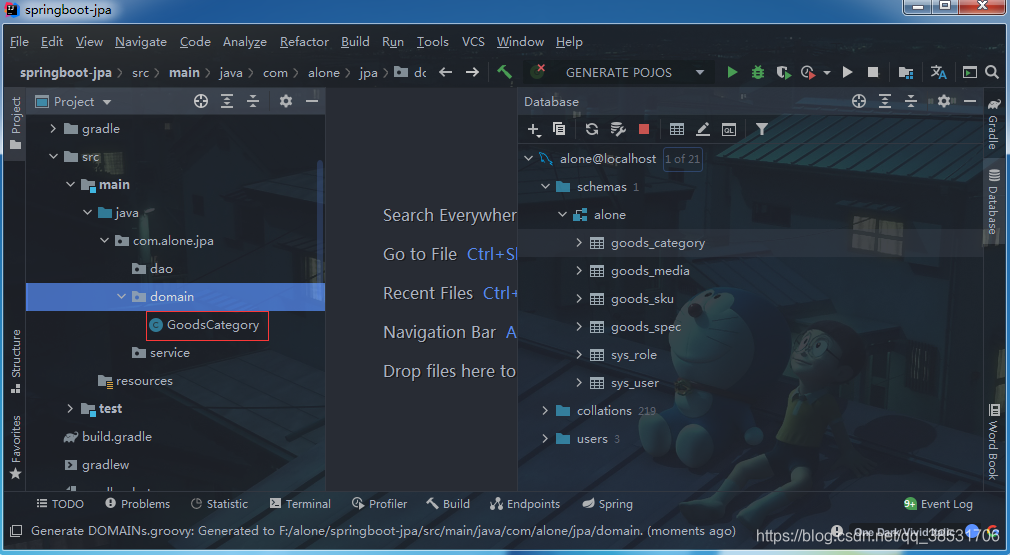
效果如下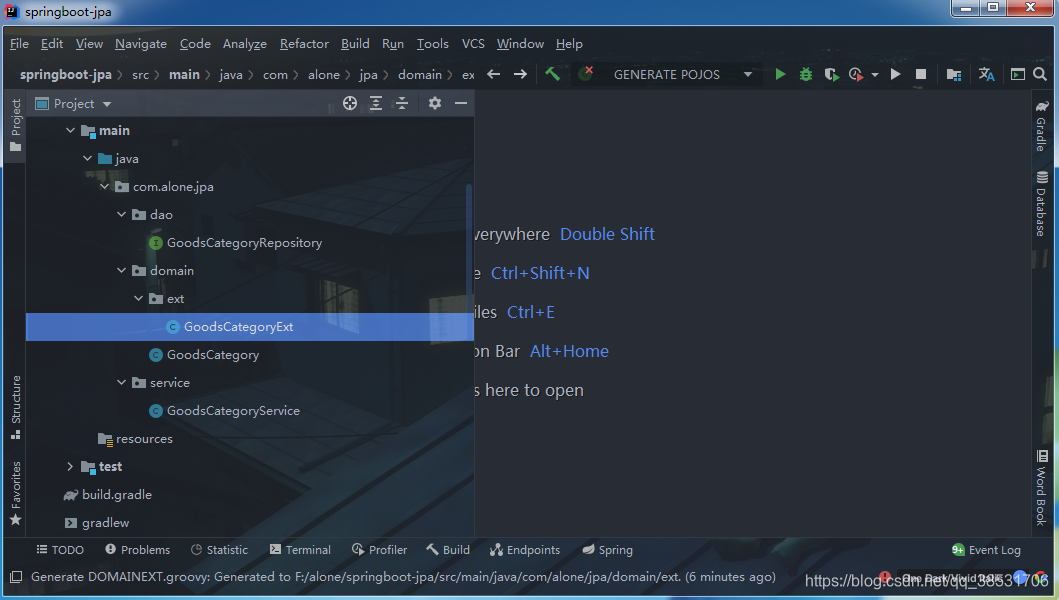
版权声明:本文为qq_38531706原创文章,遵循CC 4.0 BY-SA版权协议,转载请附上原文出处链接和本声明。