原生微信小程序项目基础框架搭建
- 文件目录结构
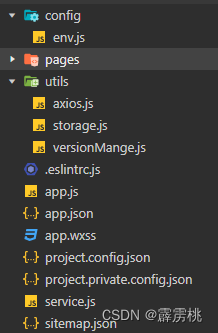
1. 环境变量(开发环境, 线上环境,测试环境)便于在不同环境的切换
- 接口的url
- webview的前缀url
- 埋点相关的环境参数
- 本地存储的环境变量配置
…
根目录中的 config 文件 中的 env.js文件
//dev:开发环境
//test:测试环境
//pre:预上线环境
//pro:线上环境
const env = "dev"
const Env_CONFIG = {
  dev: {
    ENV: "dev",
    API_URL: "http://pixiu.natapp1.cc",
    UPLOAD_URL: "http://pixiu.natapp1.cc",
    IMG_URL: "http://pixiu.natapp1.cc"
  },
  pre: {
    ENV: "pre",
    API_URL: "http://pixiu.natapp1.cc",
    UPLOAD_URL: "http://pixiu.natapp1.cc",
    IMG_URL: "http://pixiu.natapp1.cc"
  },
  pro: {
    ENV: "pro",
    API_URL: "http://pixiu.natapp1.cc",
    UPLOAD_URL: "http://pixiu.natapp1.cc",
    IMG_URL: "http://pixiu.natapp1.cc"
  }
}

module.exports = Env_CONFIG[env]
2.配置本地存储
- 因为微信小程序的体验环境和线上环境的storage是统一的,经常会相互覆盖掉
- 存储的key和环境变量关联
- 添加上过期时间
在根目录utils文件夹中的storage.js文件
// 引入环境变量
const { ENV } = require("../config/env")
// 配置本地存储
class Storage {
  constructor(env) {
    this.ENV = env
  }
  // key 是存储的数据类型,this.env 表示在什么环境变量中存储的数据
  // 获取本地存储的数据
  get(key) {
    // wx.getStorageSync 方法获取数据
    const { value, exp, cTime } = wx.getStorageSync(`${this.ENV}_${key}`)
    // 判断存储的数据是否过期,exp是存储时长
    if (exp) {
      const nowTime = (new Date()).getTime()
      if (nowTime - cTime >= exp) {
        this.move(key)
        return undefined
      }
    }
    return value
  }
  //  wx.setStorageSync 存储数据
  set(key, value, exp = null) {
    let obj = { value, exp, cTime: (new Date()).getTime() }
    wx.setStorageSync(`${this.ENV}_${key}`, obj)
  }
  // wx.removeStorageSync 方法删除数据
  remove(key) {
    wx.removeStorageSync(`${this.ENV}_${key}`)
  }
  //  wx.clearStorageSync 方法清空 storage 数据
  clear() {
    wx.clearStorageSync()
  }
}
module.exports = new Storage(ENV)
3.对请求进行封装
- 请求的loading, 根据参数配置 v
- 拦截的处理函数 v
- 调用方式优化 v
- 全局文件上传
- 后端允许最大的上传图片尺寸2m 图片上传前拦截
- a页面图片 最多500
- b页面最多300k
在根目录utils文件夹中的axios.js文件
const storage = require("./storage")
const { API_URL, UPLOAD_UR } = require("../config/env")

class axios {
  constructor() {
    this.token = storage.get('token')
  }
  // 封装 wx.request 请求
  require(method, url, data, loading) {
    // 开启动画
    if (loading) {
      wx.showLoading({
        title: '数据加载ing',
      })
    }
    // 抛出请求
    return new Promise((resolve, reject) => {
      wx.request({
        url: API_URL + url,
        data: data,
        method: method,
        header: {
          'X-token': `${this.token}`
        },
        // 接口请求成功返回值
        success: (result) => {
          resolve(this.interseptorResponse(result))
        },
        // 请求失败返回值
        fail: (res) => {
          console.log("失败了");
          reject(res)
        },
        // 接口请求完成 关闭 loading 动画
        complete: (res) => {
          console.log("完成了");
          wx.hideLoading()
        }
      })
    })
  }
  // 封装的 get 方法
  get(url, data, loading) {
    return this.require("get", url, data, loading)
  }
  // 封装的 post 方法
  post(url, data, loading) {
    return this.require("post", url, data, loading)
  }
  // 封装的 uploadFile 方法
  uploadFile(path, size) {
    wx.showLoading({
      title: '图片上传中',
    })
    return new Promise((resolve, reject) => {
      if (size >= 1024 * 1024 * 2) {
        reject({
          code: -1,
          msg: "图片尺寸过大"
        })
      }
      wx.uploadFile({
        url: UPLOAD_URL,
        filePath: path,
        name: 'hehe',
        header: {
          authorization: `Bearer ${this.token}`
        },
        success(res) {
          resolve(JSON.parse(res.data))
        },
        fail(res) {
          reject(res)
        },
        complete() {
          wx.hideLoading()
        }
      })
    })
  }
  // 做拦截处理
  interseptorResponse(data) {
    return data.data
  }
}
module.exports = new axios()
4. 版本升级的处理
- 因为小程序的缓存问题,小程序包跟新之后,用户无法第一时间获取
- 控制是否强制更新用户版本
在根目录utils文件夹中的versionMange.js文件
// 版本更新管理
class versionManage {
  constructor(forceUpdate) {
  	// 微信小程序的方法 wx.getUpdateManager
    const updateManager = wx.getUpdateManager()
    updateManager.onUpdateReady(function () {
      if (forceUpdate) {
        updateManager.applyUpdate()
        return false
      }
      wx.showModal({
        title: '更新提示',
        content: '新版本已经准备好了,是否重启应用?',
        success(res) {
          if (res.confirm) {
            updateManager.applyUpdate()
          }
        }
      })
    })
  }
}
module.exports = versionManage
5.处理全局共有的 api 或者 接口请求方法
在根目录下的service.js文件下
const axios = require("./utils/axios")

// 获取版本控制信息
function getVersionUpdate() {
  return axios.get("/products/")

}

// 微信登录
function wxlogin(data) {
  return axios.post("/login", data)
}

// 全局图片上传
function uploadFile(path, size) {
  // return axios.uploadFile(path, size)
}
module.exports = {
  getVersionUpdate,
  wxlogin,
  uploadFile
}
版权声明:本文为weixin_46087056原创文章,遵循CC 4.0 BY-SA版权协议,转载请附上原文出处链接和本声明。