超时是为了解决长时间或者无限期的等待造成服务不可用,通常需要在代码中植入此类的网络层面的弹性处理逻辑,但通过 Istio 就可以使用 Vitual Sevice来优雅的实现超时的处理。
什么场景需要用到超时处理
在生产环境中经常会碰到由于调用方等待下游的响应过长,堆积大量的请求阻塞了自身服务,造成雪崩的情况,通过通过超时处理来避免由于无限期等待造成的故障,进而增强服务的可用性。
通过例子来理解

nginx 服务设置了超时时间为3秒,如果超出这个时间就不在等待,返回超时错误
httpd 服务设置了响应时间延迟5秒,任何请求都需要等待5秒后才能返回
client 通过访问 nginx 服务去反向代理 httpd 服务,由于 httpd 服务需要5秒后才能返回,但nginx 服务只等待3秒,所以客户端会提示超时错误
apiVersion: apps/v1
kind: Deployment
metadata:
  labels:
    app: nginx-deployment
  name: nginx-deployment
spec:
  replicas: 1
  selector:
    matchLabels:
      app: nginx-deployment
  strategy:
    rollingUpdate:
      maxSurge: 25%
      maxUnavailable: 25%
    type: RollingUpdate
  template:
    metadata:
      labels:
        app: nginx-deployment
    spec:
      containers:
        - image: 'nginx:latest'
          name: nginx-deployment
---
apiVersion: apps/v1
kind: Deployment
metadata:
  labels:
    app: httpd-deployment
  name: httpd-deployment
spec:
  replicas: 1
  selector:
    matchLabels:
      app: httpd-deployment
  strategy:
    rollingUpdate:
      maxSurge: 25%
      maxUnavailable: 25%
    type: RollingUpdate
  template:
    metadata:
      labels:
        app: httpd-deployment
    spec:
      containers:
        - image: 'httpd:latest'
          name: httpd-deployment
---
apiVersion: v1
kind: Service
metadata:
  name: nginx-service
spec:
  selector:
    app: nginx-deployment
  type: ClusterIP
  ports:
  - name: http
    port: 80
    targetPort: 80
    protocol: TCP
---
apiVersion: v1
kind: Service
metadata:
  name: httpd-service
spec:
  selector:
    app: httpd-deployment
  type: ClusterIP
  ports:
  - name: http
    port: 80
    targetPort: 80
    protocol: TCP
---
apiVersion: networking.istio.io/v1alpha3
kind: VirtualService
metadata:
  name: nginx-vs
spec:
  hosts:
  - nginx-service
  http:
  - route:
    - destination:
        host: nginx-service
    timeout: 3s
---
apiVersion: networking.istio.io/v1alpha3
kind: VirtualService
metadata:
  name: httpd-vs
spec:
  hosts:
  - httpd-service
  http:
  - fault:
      delay:
        percentage:
          value: 100
        fixedDelay: 5s
    route:
    - destination:
        host: httpd-service
---
apiVersion: apps/v1
kind: Deployment
metadata:
  labels:
    app: client-deployment
  name: client-deployment
spec:
  replicas: 1
  selector:
    matchLabels:
      app: client-deployment
  strategy:
    rollingUpdate:
      maxSurge: 25%
      maxUnavailable: 25%
    type: RollingUpdate
  template:
    metadata:
      labels:
        app: client-deployment
    spec:
      containers:
        - image: 'busybox:latest'
          name: client-deployment
          command: [ "/bin/sh", "-c", "sleep 3600"]
配置 nginx 反向代理 模拟下游调用
kubectl exec -it nginx-deployment-56c94b9957-xgw88 -- sh
tee /etc/nginx/conf.d/default.conf <<-'EOF'
server {
    listen 80;
    server_name localhost;

    location / {
        proxy_pass http://httpd-service;
        proxy_http_version 1.1;
    }
}
EOF
执行 nginx -t ; nginx -s reload 重启服务以生效配置
进入客户端容器测试结果
kubectl exec -it client-deployment-56c94b9957-xgw88 -- sh
while true; do wget -q -O - http://nginx-service; done
每隔3秒,由于 nginx 服务的超时时间到了而 httpd 未有响应,则提示返回超时错误。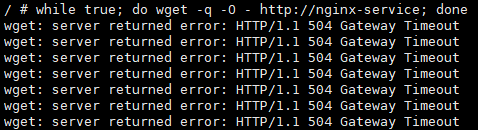
版权声明:本文为m0_38030719原创文章,遵循CC 4.0 BY-SA版权协议,转载请附上原文出处链接和本声明。