windows下
版本:nginx-1.19.2
nginx-1.19.2\conf\nginx.conf
开发端口 7766,代理E盘下的 data文件夹;
注意路径,要用反斜杠
root E:\data
最后重启nginx即可,进入 http:192.168.0.xxx:7766,即可
server {
        listen       7766;
        server_name  192.168.0.xxx;
		add_header Access-Control-Allow-Origin $http_origin;
        add_header Access-Control-Allow-Headers *;
        add_header Access-Control-Allow-Methods *;
        #charset koi8-r;
        #access_log  logs/host.access.log  main;
        location / {
            root E:\data;
			autoindex on;
        }
        #error_page  404              /404.html;
        # redirect server error pages to the static page /50x.html
        #
        error_page   500 502 503 504  /50x.html;
        location = /50x.html {
            root   html;
        }
        # proxy the PHP scripts to Apache listening on 127.0.0.1:80
        #
        #location ~ \.php$ {
        #    proxy_pass   http://127.0.0.1;
        #}
        # pass the PHP scripts to FastCGI server listening on 127.0.0.1:9000
        #
        #location ~ \.php$ {
        #    root           html;
        #    fastcgi_pass   127.0.0.1:9000;
        #    fastcgi_index  index.php;
        #    fastcgi_param  SCRIPT_FILENAME  /scripts$fastcgi_script_name;
        #    include        fastcgi_params;
        #}
        # deny access to .htaccess files, if Apache's document root
        # concurs with nginx's one
        #
        #location ~ /\.ht {
        #    deny  all;
        #}
    }

linux下
修改nginx.conf
开发端口 7766,代理home/mydata 文件夹;
注意路径
root /home/mydata;
        server {
        listen       7766;
        server_name  localhost;
		add_header Access-Control-Allow-Origin $http_origin;
        add_header Access-Control-Allow-Headers *;
        add_header Access-Control-Allow-Methods *;
        #charset koi8-r;
        #access_log  logs/host.access.log  main;
        location / {
            root /home/mydata;
			autoindex on;
        }
        #error_page  404              /404.html;
        # redirect server error pages to the static page /50x.html
        #
        error_page   500 502 503 504  /50x.html;
        location = /50x.html {
            root   html;
        }
    }
重启nginx:
网上方法很多,但如果你的nginx是编译安装(如下),
没有找到sbin目录,就需要换方式启动。
重启方式如下:
find / -name nginx 先找目录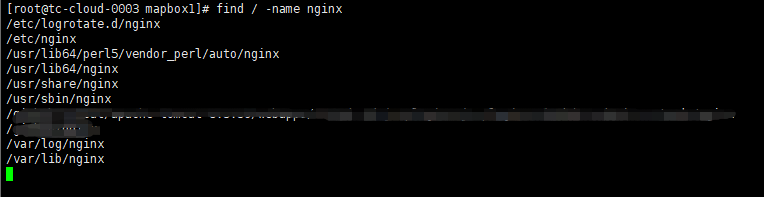
看到sbin位置
/usr/sbin/nginx -s reload
重启即可;
进入 http://xxxxxxx:7766
版权声明:本文为weixin_43813017原创文章,遵循CC 4.0 BY-SA版权协议,转载请附上原文出处链接和本声明。