概述:Apache Flink是由Apache软件基金会开发的开源流处理框架,其核心是用Java和Scala编写的分布式流数据流引擎。Flink以数据并行和流水线方式执行任意流数据程序,Flink的流水线运行时系统可以执行批处理和流处理程序。本文主要介绍Flink下使用Java和Scala程序分别实现塞缪尔·厄尔曼《青春》的词频统计。
1、使用mvn命令创建Flink工程
(1) Java模板
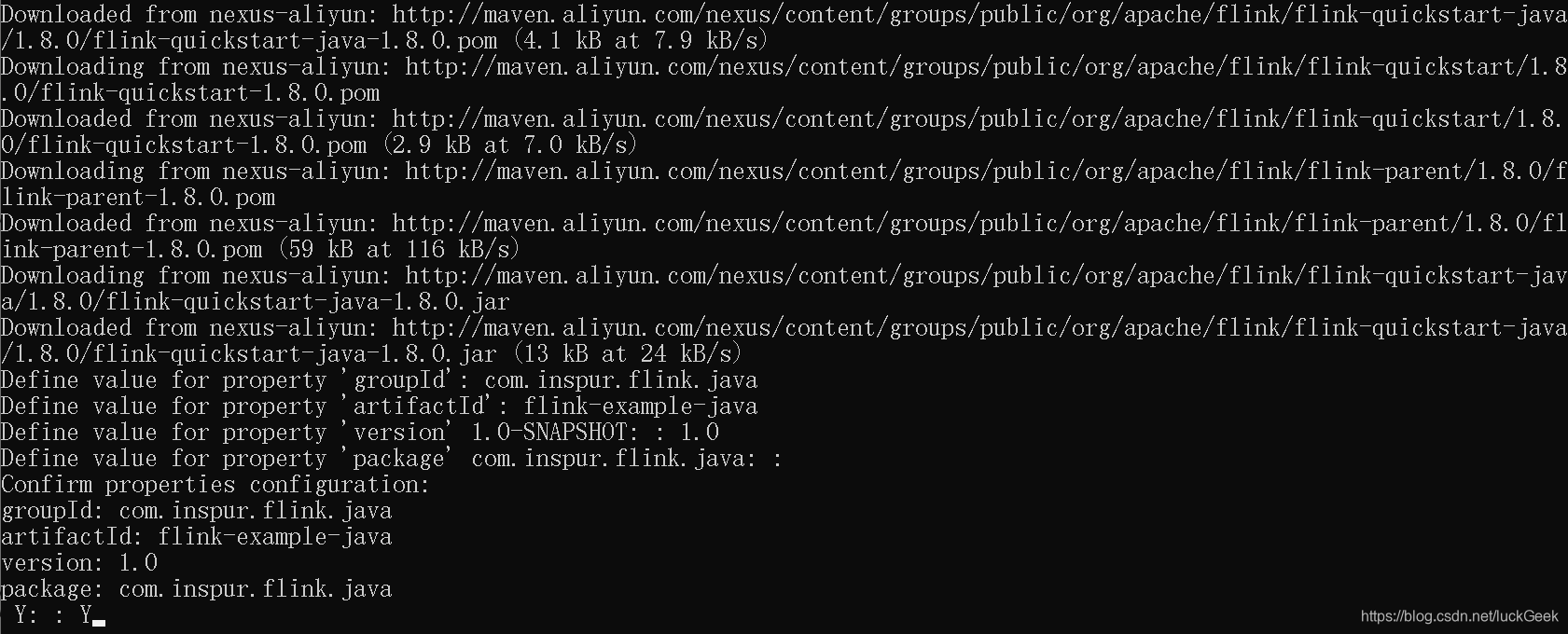
mvn archetype:generate -DarchetypeGroupId=org.apache.flink -DarchetypeArtifactId=flink-quickstart-java -DarchetypeVersion=1.8.0 -DarchetypeCatalog=local说明:需要自定义groupId、artifactId和version,如图
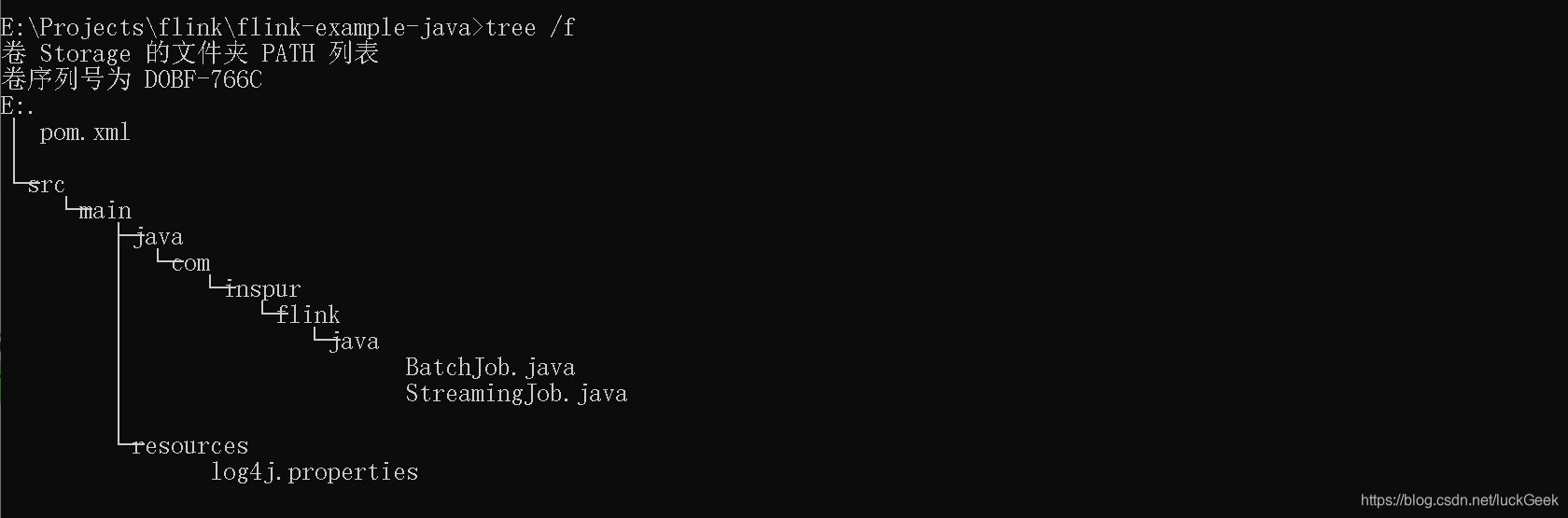
进入flink-example-java目录,查看生成的目录树
2、将maven工程导入IDE(IDEA或Eclipse等)
3、开发流程
- set up the batch execution environment
- create execution plan for Flink(get some data from the environment)
- transform the resulting DataSet<String> using operations
- execute program
4、词频统计程序
(1)java程序
- 批处理
public static void main(String[] args) throws Exception {
String filePath = "E:\\Youth.txt";
//set up the batch execution environment
ExecutionEnvironment env = ExecutionEnvironment.getExecutionEnvironment();
//get some data from the environment
DataSource<String> text = env.readTextFile(filePath);
//text.print();
//transform the resulting DataSet<String> using operations
text.flatMap(new FlatMapFunction<String, Tuple2<String, Integer>>() {
@Override
public void flatMap(String value, Collector<Tuple2<String, Integer>> collector) throws Exception {
String[] tokens = value.toLowerCase().split(" ");
for (String token : tokens) {
if (token.length() > 0) {
collector.collect(new Tuple2<>(token, 1));
}
}
}
}).groupBy(0).sum(1).print();
}- 实时流处理
public static void main(String[] args) throws Exception {
StreamExecutionEnvironment env = StreamExecutionEnvironment.getExecutionEnvironment();
DataStreamSource<String> text = env
.socketTextStream("localhost", 9999);
text.flatMap(new FlatMapFunction<String, Tuple2<String, Integer>>(){
@Override
public void flatMap(String value, Collector<Tuple2<String, Integer>> collector) throws Exception {
for (String token: value.split(" ")) {
collector.collect(new Tuple2<String, Integer>(token, 1));
}
}
} ).keyBy(0).timeWindow(Time.seconds(5)).sum(1).print().setParallelism(1);
text.print();
env.execute("Window WordCount");
}运行上述程序前,可以使用nc -l -p 9999命令实现(windows)服务器监听9999端口并将数据返回给客户端
- 重构实时流处理程序
public static void main(String[] args) throws Exception {
int port=0;
try {
ParameterTool tool = ParameterTool.fromArgs(args);
port=tool.getInt("port");
}catch (Exception e){
System.err.println("端口未设置,使用默认端口9999");
port=9999;
}
StreamExecutionEnvironment env = StreamExecutionEnvironment.getExecutionEnvironment();
DataStreamSource<String> text = env
.socketTextStream("localhost", port);
text.flatMap(new FlatMapFunction<String, Tuple2<String, Integer>>(){
@Override
public void flatMap(String value, Collector<Tuple2<String, Integer>> collector) throws Exception {
for (String token: value.split(" ")) {
collector.collect(new Tuple2<>(token, 1));
}
}
} ).keyBy(0).timeWindow(Time.seconds(5)).sum(1).print().setParallelism(1);
text.print();
env.execute("Window WordCount");
}(2)Scala程序
- 批处理
def main(args: Array[String]): Unit = {
val filePath = "E:\\Youth.txt"
val env = ExecutionEnvironment.getExecutionEnvironment
val text = env.readTextFile(filePath)
//text.print()
//引入隐式转换
import org.apache.flink.api.scala._
text.flatMap(_.toLowerCase().split(" "))
.filter(_.nonEmpty)
.map((_, 1))
.groupBy(0)
.sum(1).print()
}- 流处理
def main(args: Array[String]): Unit = {
val env = StreamExecutionEnvironment.getExecutionEnvironment
val text = env.socketTextStream("localhost", 9999)
import org.apache.flink.api.scala._
text.flatMap(_.split(" "))
.map((_, 1))
.keyBy(0)
.timeWindow(Time.seconds(5))
.sum(1)
.print().setParallelism(1)
env.execute("StreamingWCScalaApp")
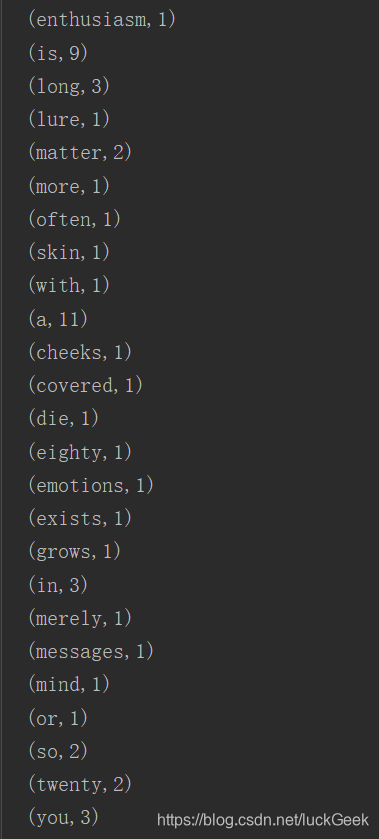
}部分统计结果如图
版权声明:本文为luckGeek原创文章,遵循CC 4.0 BY-SA版权协议,转载请附上原文出处链接和本声明。