方法:
1、下载扩展文件并解压;
2、查看本地php版本,根据版本选择“memcache.dll”文件;
3、拷贝该dll文件到“php7/ext”目录并重命名;
4、打开php.ini ,设置extension项来添加扩展;
5、重启apache。
本教程操作环境:windows7系统、php 7.3版,DELL G3电脑
php7安装memcache扩展
1、下载文件,解压缩
memcache windows php7下载地址: https://github.com/nono303/PHP7-memcache-dll
2、查看本地php版本,根据版本选择文件
打开cmd,输入 php -v
php 7.1.0 选择 php-7.1.x_memcache.dll
php 7.2.0 选择 php-7.2.x_memcache.dll
php 7.3.0 选择 php-7.3.x_memcache.dll

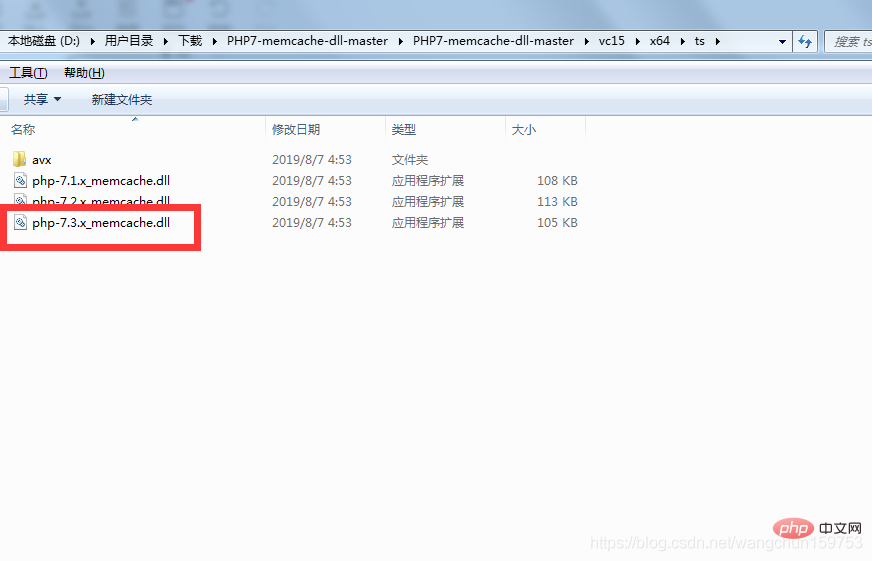
如何查看自己是ts还是nts ?
打开链接: https://blog.csdn.net/wangchun159753/article/details/102794162
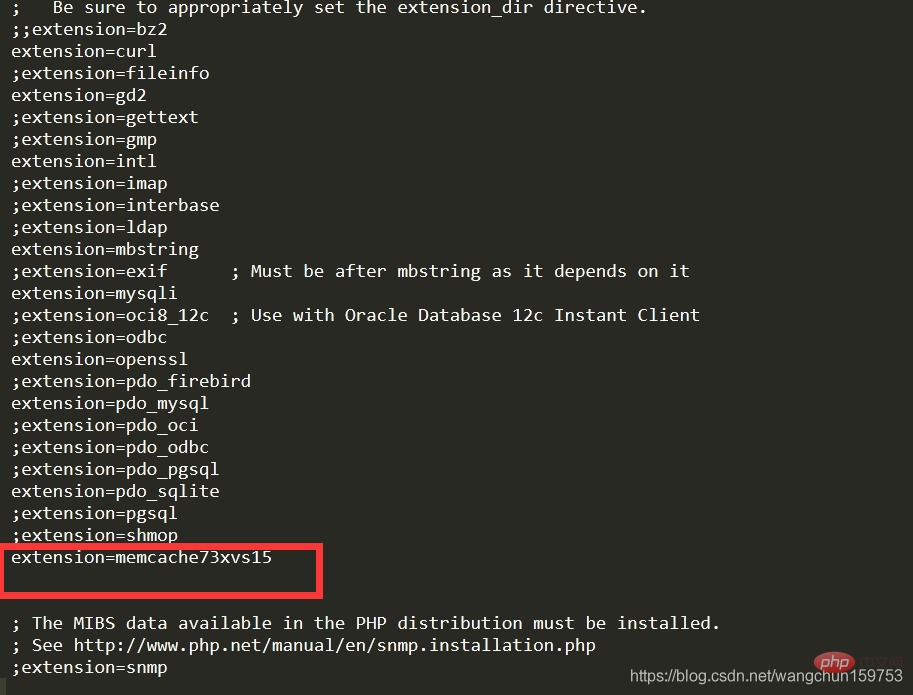
3、拷贝 php-7.3.x_memcache.dll 到php7/ext 目录并修改文件名称为php_memcache73xvs15.dll
4、打开php.ini ,添加memcache扩展
1 |
|
5、重启apache 对网站页面生效