1.重启计算机
在某些应用更换图标后,桌面没有及时更新新图标或者源文件内的文件缩略图和实际文件图标不同,此时重启计算机可以解决。
2.重启explorer
重启文件资源管理器explorer_Administrator的博客-CSDN博客
3.调用ie4uinit.exe
win7使用
ie4uinit.exe -ClearIconCachewin10使用
ie4uinit.exe -show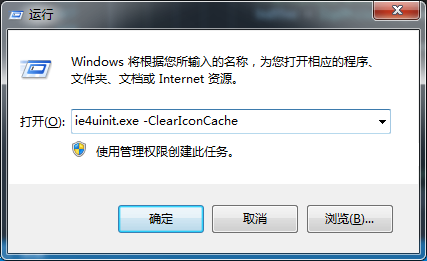
4.命令行
Dim objWshShell
Set objWshShell = WScript.CreateObject("WScript.Shell")
objWshShell.Run "ie4uinit.exe -cleariconcache"
5.完整vbs代码
Option Explicit
Dim objWMIService, objProcess, colProcess
Dim strComputer, strProcessName

strComputer = "."
strProcessName = "'explorer.exe'"

Set objWMIService = GetObject("winmgmts:{impersonationLevel=impersonate}!\\" & strComputer & "\root\cimv2")
Set colProcess = objWMIService.ExecQuery("Select * from Win32_Process Where Name = " & strProcessName )

For Each objProcess in colProcess
	objProcess.Terminate()
Next

Dim objWshShell
Set objWshShell = WScript.CreateObject("WScript.Shell")

objWshShell.Run "ie4uinit.exe -cleariconcache"
Wscript.Echo "Successfully refreshed icon cache."

objWshShell.Run "explorer.exe"
Wscript.Quit版权声明:本文为qq_41863100原创文章,遵循CC 4.0 BY-SA版权协议,转载请附上原文出处链接和本声明。