我创建的项目名为日历表,在创建完的项目中的默认src中创建包,我的包同样为日历表,再在包内创建三个类,创建的三个类分别为CalendarFrame、CalendarMainClass、
CalendarBean;只要把这三部分的三个类的代码复制粘贴上去就可以实现了,除此之外的均是补充说明。下面是实现效果图。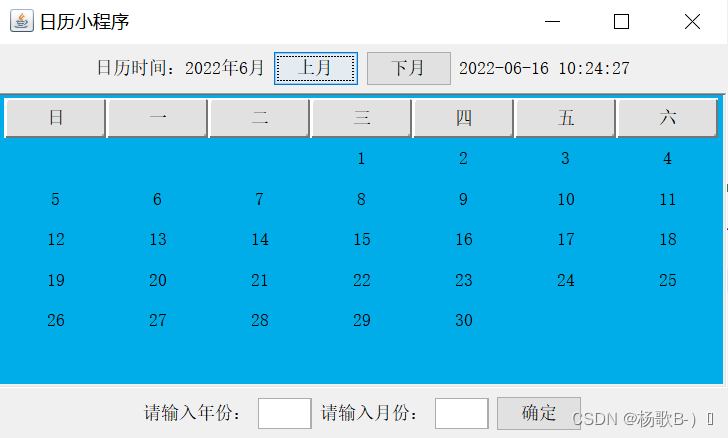
创建CalendarMainClass类;
package 日历表;

import javax.swing.JFrame;
import javax.swing.UIManager;

public class CalendarMainClass
{
        public static void main(String args[])
        {
             try {
                 UIManager.setLookAndFeel("com.sun.java.swing.plaf.windows.WindowsLookAndFeel"); //windows界面风格
              }catch (Exception e) {
                e.printStackTrace();
              }
              CalendarFrame frame=new CalendarFrame();
              frame.setBounds(100,100,500,300);
              frame.setTitle("日历小程序");
              frame.setLocationRelativeTo(null);//窗体居中显示
              frame.setVisible(true);
              frame.setDefaultCloseOperation(JFrame.EXIT_ON_CLOSE);
        }
}
创建Calendarframe类;
package 日历表;

import java.awt.*;
import java.awt.event.*;
import java.text.SimpleDateFormat;
import java.util.Date;

import javax.swing.*;
import javax.swing.border.BevelBorder;
import javax.swing.border.SoftBevelBorder;

public class CalendarFrame extends JFrame implements ActionListener
{
       /**
	 * 2022.06.08
	 */
	   private static final long serialVersionUID = 1L;
	   JLabel labelDay[]=new JLabel[42];
       JTextField  text=new JTextField(5); //文本框的长度为5列
       JTextField  text1=new JTextField(5);
       JButton titleName[]=new JButton[7];
       JButton button = new JButton();
       String name[]={"日","一","二","三", "四","五","六"};
       JButton nextMonth,previousMonth;
       int year=2022,month=6; //启动程序显示的日期信息
       CalendarBean calendar;
       JLabel showMessage=new JLabel("",JLabel.CENTER);
       JLabel lbl1 = new JLabel("请输入年份:");
       JLabel lbl2=new JLabel("请输入月份:");

       //构造方法初始界面
       public CalendarFrame()
       {
    	   //实时时间
    	   JLabel time = new JLabel();
           this.setTimer(time);
           //颜色
       	   setBackground(new Color(0, 128, 128));
           JPanel pCenter=new JPanel();
           pCenter.setBackground(new Color(0,173,232));

         //将pCenter的布局设置为7行7列的GridLayout 布局。
           pCenter.setLayout(new GridLayout(7,7));

         //pCenter添加组件titleName[i]
         //星期栏

           for(int i=0;i<7;i++)
           {
               titleName[i]=new JButton(name[i]);
               titleName[i].setBorder(new SoftBevelBorder(BevelBorder.RAISED));
               pCenter.add(titleName[i]);
           }

         //pCenter添加组件labelDay[i]
         //日期栏
           for(int i=0;i<42;i++)
           {
               labelDay[i]=new JLabel("",JLabel.CENTER);
               pCenter.add(labelDay[i]);
           }

           text.addActionListener(this);
           calendar=new CalendarBean();
           calendar.setYear(year);
           calendar.setMonth(month);
           String day[]=calendar.getCalendar();

           for(int i=0;i<42;i++)
           {
               labelDay[i].setText(day[i]);
           }

           nextMonth=new JButton("下月");
           previousMonth=new JButton("上月");
           button=new JButton("确定");

           //注册监听器
           nextMonth.addActionListener(this);
           previousMonth.addActionListener(this);
           button.addActionListener(this);

           JPanel pNorth=new JPanel(), // 创建北面区域
           pSouth=new JPanel();       //创建南面区域
           pNorth.add(showMessage);
           pNorth.add(previousMonth);
           pNorth.add(nextMonth);
           pSouth.add(lbl1);
           pSouth.add(text);
           pSouth.add(lbl2);
           pSouth.add(text1);
           pSouth.add(button);
           pNorth.add(time);
           showMessage.setText("日历时间:"+calendar.getYear()+"年"+ calendar.getMonth()+"月" );
           ScrollPane scrollPane=new ScrollPane();
           scrollPane.add(pCenter);
           getContentPane().add(scrollPane,BorderLayout.CENTER);// 窗口添加scrollPane在中心区域
           getContentPane().add(pNorth,BorderLayout.NORTH);// 窗口添加pNorth 在北面区域
           getContentPane().add(pSouth,BorderLayout.SOUTH);// 窗口添加pSouth 在南区域。

        }

       //实时时间
       private void setTimer(JLabel time){
   		final JLabel varTime = time;
   		Timer timeAction = new Timer(10, new ActionListener() {
   		     public void actionPerformed(ActionEvent e) {
   		           long timemillis = System.currentTimeMillis();
   		           SimpleDateFormat df = new SimpleDateFormat("yyyy-MM-dd HH:mm:ss");
   		           varTime.setText(df.format(new Date(timemillis)));
   		     }
   		});
   		timeAction.start();
   	}
       //动作事件
        public void actionPerformed(ActionEvent e)
        {
            if(e.getSource()==nextMonth)
            {
                month=month+1;
                if(month>12)
                month=1;
                calendar.setMonth(month);
                String day[]=calendar.getCalendar();

                for(int i=0;i<42;i++)
                {
                    labelDay[i].setText(day[i]);
                }
             }


            //上、下月份
            else if(e.getSource()==previousMonth)
            {
                month=month-1;
                if(month<1)
                month=12;
                calendar.setMonth(month);
                String day[]=calendar.getCalendar();

                for(int i=0;i<42;i++)
                {
                    labelDay[i].setText(day[i]);
                }
             }

            //选择年、月份
            else if(e.getSource()==button)
            {
                month=month+1;
                if(month>12)
                      month=1;
                calendar.setYear(Integer.parseInt(text.getText()));
                calendar.setMonth(Integer.parseInt(text1.getText()));
                String day[]=calendar.getCalendar();
                for(int i=0;i<42;i++)
                {
                    labelDay[i].setText(day[i]);
                }
            }
          showMessage.setText("日历:"+calendar.getYear()+"年"+calendar.getMonth()+"月" );
       }
}
创建类CalendarBean;
package 日历表;

import java.util.Calendar;

public class CalendarBean
{
       String day[];
       int year=2022,month=0;
       public void setYear(int year)
       {
           this.year=year;
       }

       public int getYear()
       {
           return year;
       }

       public void setMonth(int month)
       {
           this.month=month;
       }

       public int getMonth()
       {
           return month;
       }

       public String[] getCalendar()
       {
           String a[]=new String[42];
           Calendar date=Calendar.getInstance();
           date.set(year,month-1,1);
           int week=date.get(Calendar.DAY_OF_WEEK)-1;
           int day=0;

           //判断大月份
           if(month==1||month==3||month==5||month==7
             ||month==8||month==10||month==12)
           {
               day=31;
           }

           //判断小月
           if(month==4||month==6||month==9||month==11)
           {
               day=30;
           }

           //判断平年与闰年
           if(month==2)
           {
               if(((year%4==0)&&(year%100!=0))||(year%400==0))
               {
                   day=29;
               }

               else
               {
                   day=28;
               }
            }

           for(int i=week,n=1;i<week+day;i++)
           {
                   a[i]=String.valueOf(n) ;
                   n++;
           }

           return a;
        }
}
//上面代码类获取实时时间代码的部分,如果不需要可以在CalendarFrame类中自行找出来删掉

JLabel time = new JLabel();
        this.setTimer(time);


pSouth.add(time);


 private void setTimer(JLabel time){
  final JLabel varTime = time;
  Timer timeAction = new Timer(1000, new ActionListener() {
       public void actionPerformed(ActionEvent e) {
             long timemillis = System.currentTimeMillis();
             SimpleDateFormat df = new SimpleDateFormat("yyyy-MM-dd HH:mm:ss");
             varTime.setText(df.format(new Date(timemillis)));
       }
  });
  timeAction.start();
 }
以下是提供颜色修改的具体方法
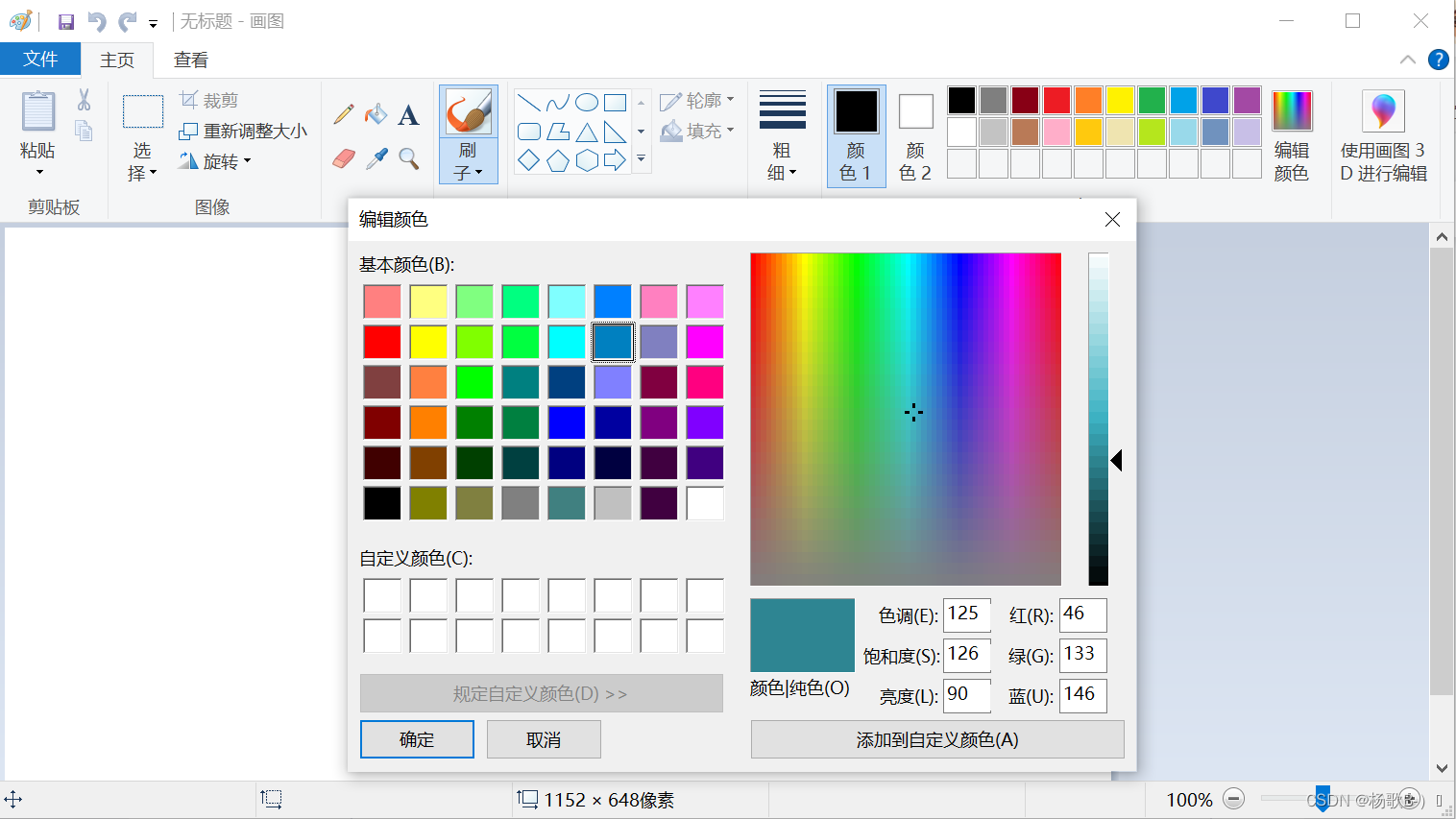
在系统界面按win+R键,输入mspaint,然后可以在
里面点击“编辑颜色”,在里面即可选择任意位置颜色右下角的三个数字即当前你所选定的颜色。
我的代码中是在CalendarFrame类中的此处修改代码的
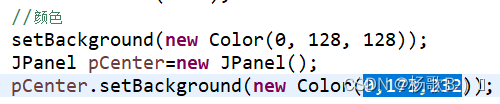
下面是提供界面风格的修改的几个风格
主要是在CalendarMainClass类中实现
其中我的代码部分为

界面风格:
//当前系统风格
String lookAndFeel
=UIManager.getSystemLookAndFeelClassName();
UIManager.setLookAndFeel(lookAndFeel);

//win的界面风格
String lookAndFeel
="com.sun.java.swing.plaf.windows.WindowsLookAndFeel";
UIManager.setLookAndFeel(lookAndFeel);

//Metal界面风格(默认风格)
String lookAndFeel
="javax.swing.plaf.metal.MetalLookAndFeel";
UIManager.setLookAndFeel(lookAndFeel);

//这些风格主要是   =""   里面的改变进行实现的,下面也主要是里面的内容,自己需要的自行添加就好
//Motif风格
="com.sun.java.swing.plaf.motif.MotifLookAndFeel";

//windows classic界面风格
="com.sun.java.swing.plaf.windows.WindowsClassicLookAndFeel";

//Mac界面风格,有操作系统的限制
="com.sun.java.swing.plaf.mac.MacLookAndFeel";

//GTk界面风格,有操作系统的限制
="com.sun.java.swing.plaf.gtk.GTKLookAndFeel";


//跨平台的默认系统风格
=UIManager.getCrossPlatformLookAndFeelClassName();

//来源为百度的总结
当前系统缺点
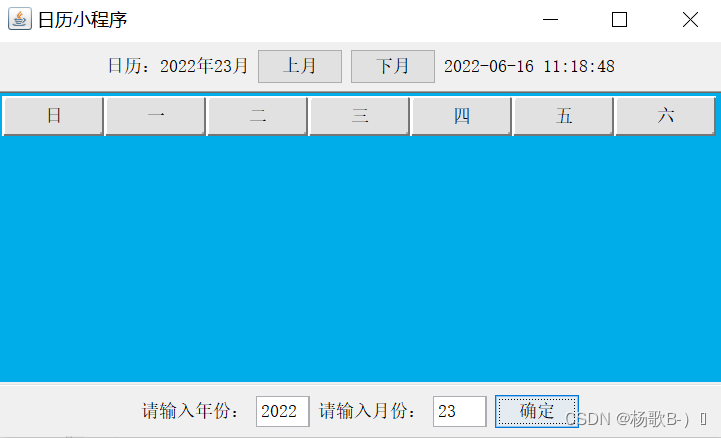
未能够以其他颜色或字体显示上月的后几天和下月的前几天;
输入框的超出限制为
版权声明:本文为weixin_53852210原创文章,遵循CC 4.0 BY-SA版权协议,转载请附上原文出处链接和本声明。