0 前言
Hi,大家好,今天给大家介绍一个大数据可视化项目,大家可以用于自己的课设或毕设,可以灵活耦合任意数据,为自己的项目添加灵活的可视化动态效果!
今天要分享的是:基于大数据的电商数据可视化平台
1 介绍
大数据大屏可视化系列:基于大数据的电商数据可视化平台
可搭载任意自己想用的数据,动态效果不错
项目源码: https://blog.csdn.net/Seniors_DC/article/details/125388429
2 实现效果
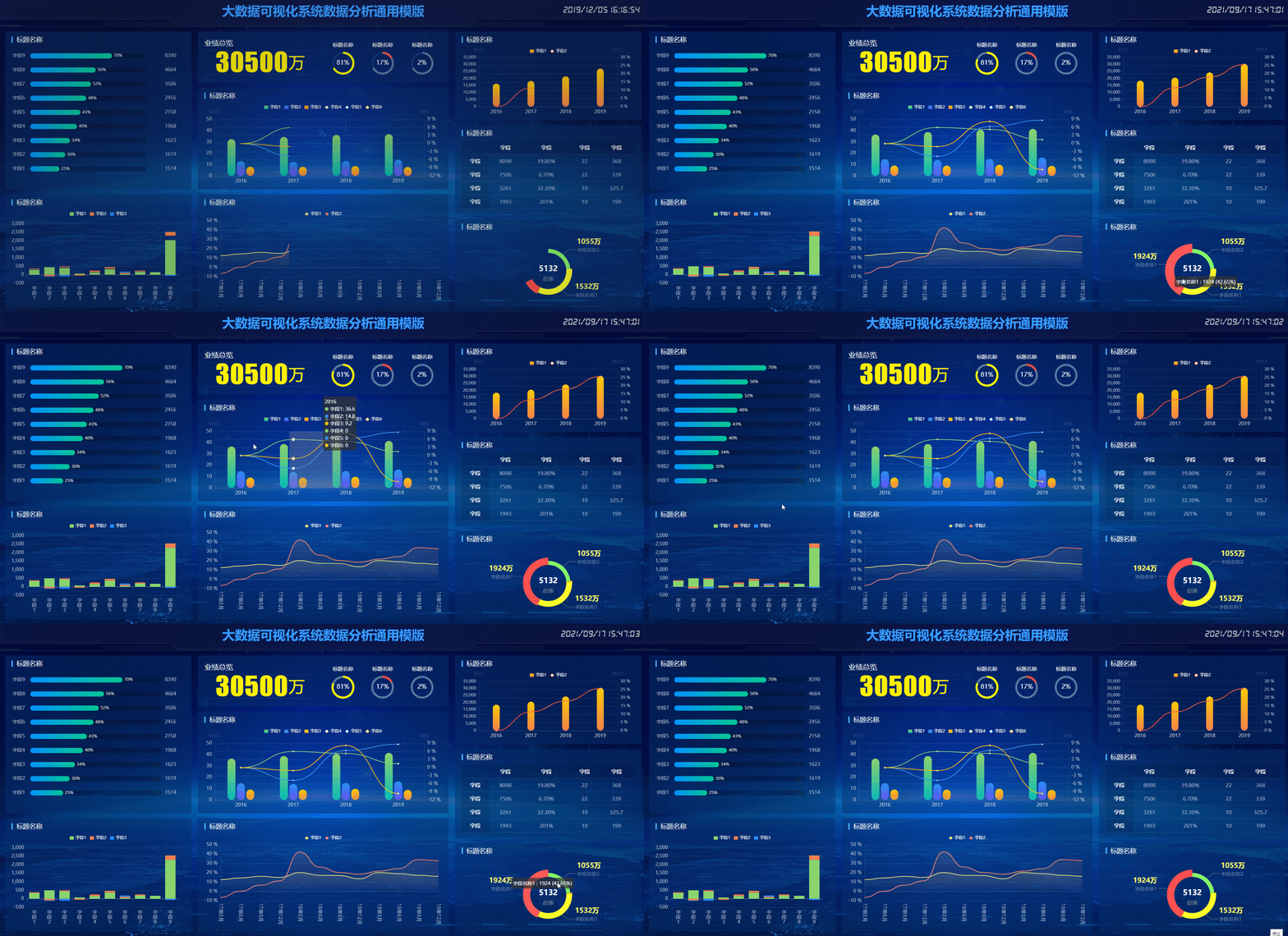
整体实现效果如下,可以看到CSS优化相对漂亮的,而且动态效果也很好,适合搭载各种数据。
3 部分关键代码
 $(window).load(function(){
             $(".loading").fadeOut()
            })

/****/
$(document).ready(function(){
	var whei=$(window).width()
	$("html").css({fontSize:whei/20})
	$(window).resize(function(){
		var whei=$(window).width()
	 $("html").css({fontSize:whei/20})
});
	});


 $(window).load(function(){$(".loading").fadeOut()})
$(function () {
    echarts_1()
    echarts_2()
    echarts_3()
    echarts_4()
    echarts_5()
    echarts_6()
    pe01()
    pe02()
    pe03()

function echarts_1() {
 var myChart = echarts.init(document.getElementById('echarts1'));

 option = {
  tooltip: {
 trigger: 'axis',
 axisPointer: {type: 'shadow'},
},"grid": {
  "top": "20%",
"right":"50",
"bottom":"20",
"left":"30",
},
legend: {
  data: ['字段1', '字段2', '字段3','字段4','字段5','字段6'],
  right: 'center', width:'100%',
  textStyle: {
      color: "#fff"
  },
  itemWidth: 12,
  itemHeight: 10,
},


 "xAxis": [
   {
     "type": "category",
     data: ['2016', '2017', '2018', '2019'],
     axisLine: { lineStyle: {color: "rgba(255,255,255,.1)"}},
     axisLabel:  { textStyle: {color: "rgba(255,255,255,.7)", fontSize: '14', },
         },

     },
],
 "yAxis": [
   {
     "type": "value",
     "name": "单位万",
     axisTick: {show: false},
     splitLine: {
      show: false,

  },
     "axisLabel": {
       "show": true,
       fontSize:14,
       color: "rgba(255,255,255,.6)"

     },
     axisLine: {
      min:0,
      max:10,
       lineStyle: {color: 'rgba(255,255,255,.1)'}
      },//左线色

   },
   {
     "type": "value",
     "name": "增速",
     "show": true,
     "axisLabel": {
       "show": true,
       fontSize:14,
       formatter: "{value} %",
       color: "rgba(255,255,255,.6)"
     },
     axisTick: {show: false},
   axisLine: {lineStyle: {color: 'rgba(255,255,255,.1)'}},//右线色
    splitLine: {show:true,lineStyle: {color:'rgba(255,255,255,.1)'}},//x轴线
   },
 ],
 "series": [

   {
     "name": "字段1",
     "type": "bar",
     "data": [36.6,38.80, 40.84, 41.60],
     "barWidth": "15%",
     "itemStyle": {
       "normal": {
        barBorderRadius: 15,
        color: new echarts.graphic.LinearGradient(0, 0, 0, 1, [{
          offset: 0,
          color: '#8bd46e'
      }, {
          offset: 1,
          color: '#09bcb7'
      }]),
       }
     },
     "barGap": "0.2"
   },
   {
    "name": "字段2",
    "type": "bar",
    "data":[14.8,14.1, 15, 16.30],
    "barWidth": "15%",
    "itemStyle": {
      "normal": {
       barBorderRadius: 15,
       color: new echarts.graphic.LinearGradient(0, 0, 0, 1, [{
        offset: 0,
        color: '#248ff7'
    }, {
        offset: 1,
        color: '#6851f1'
    }]),
      }
    },
    "barGap": "0.2"
  },
  {
    "name": "字段3",
    "type": "bar",
    "data":[9.2,9.1, 9.85, 8.9],
    "barWidth": "15%",
    "itemStyle": {
      "normal": {
       barBorderRadius: 15,
       color: new echarts.graphic.LinearGradient(0, 0, 0, 1, [{
         offset: 0,
         color: '#fccb05'
     }, {
         offset: 1,
         color: '#f5804d'
     }]),
      }
    },
    "barGap": "0.2"
  },
   {
     "name": "字段4",
     "type": "line",
        smooth: true,
     "yAxisIndex": 1,
     "data": [0,6.01, 5.26, 1.48],
   lineStyle: {
        normal: {
          width: 2
        },
      },
     "itemStyle": {
       "normal": {
         "color": "#86d370",

       }
     },

   }
   ,
   {
     "name": "字段5",
     "type": "line",
     "yAxisIndex": 1,

     "data": [0, -4.73, 6.38,8.67],
   lineStyle: {
   normal: {
     width: 2
   },
 },
     "itemStyle": {
       "normal": {
         "color": "#3496f8",

       }
     },
     "smooth": true
   } ,
   {
     "name": "字段6",
     "type": "line",
     "yAxisIndex": 1,

     "data":[0,-1.09, 8.24, -9.64],
   lineStyle: {
   normal: {
     width: 2
   },
 },
     "itemStyle": {
       "normal": {
         "color": "#fbc30d",

       }
     },
     "smooth": true
   }
 ]
};
篇幅有限仅展示关键代码
4 项目源码获取方式
项目源码下载: https://blog.csdn.net/Seniors_DC/article/details/125388429
版权声明:本文为Seniors_DC原创文章,遵循CC 4.0 BY-SA版权协议,转载请附上原文出处链接和本声明。