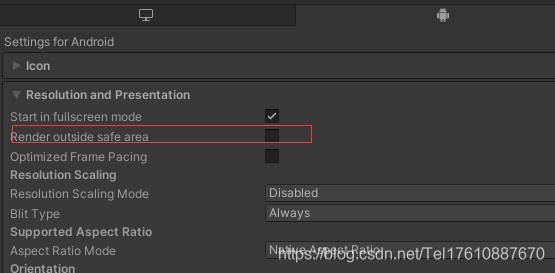
Android:在打包设置中,勾选如下添加/关闭黑边屏
IOS:
如果没有很多全屏背景的话,可以直接改UI摄像机的rect,代码类似于;
gameObject.GetComponent<Camera>().rect = new Rect(0, 0, 1, 1f - (Screen.height - Screen.safeArea.height) / Screen.height)*0.5f;否则深入分析下UGUI,通过rect,将所有min.y>=1的UI减去黑边屏
    private void ShowFun(Transform _tran)
    {
        var _t = _tran.GetComponent<RectTransform>();
        Debug.LogError("适配" + _t.anchorMin + "  " + _t.anchorMax + "  " + _t.pivot);
    }

竖屏代码如下:
  private void SelfAdaption(Transform _tran)
    {
        var _rect= _tran.GetComponent<RectTransform>();

        if (_rect != null)
        {
            if (_rect.anchorMin.y >= 1)
            {
                _rect.anchoredPosition -= Vector2.up*100;
                return;
            }
        }
        if (_tran.childCount > 0)
        {
            foreach (Transform _tt in _tran) SelfAdaption(_tt);
        }
    }
写的比较潦草,有空再整理,有问题留言
版权声明:本文为Tel17610887670原创文章,遵循CC 4.0 BY-SA版权协议,转载请附上原文出处链接和本声明。