文章目录
- 前言
- Cesium.CallbackProperty类
- 总结
前言
第一次在CSDN发表文章,也是作为笔记,记录学习Cesium的点点滴滴,2021年6月23日。
今天学习Cesium中关键的回调函数CallbackProperty 。。。。。
CallbackProperty是什么?
Cesium中的entities可以随时间变化长度高度,主要依赖于CallbackProperty函数。
定义:new Cesium.CallbackProperty (callback, isConstant)
callback:评估属性时要调用的函数
isConstant:每次回调函数返回相同值时,为 true,如果值将更改,则为false
从函数定义可以看出,因为使用CallbackProperty,cesium中一切可视化的要素都可以与时间联系起来。
CallbackProperty是一个类,其值由回调函数延迟计算。也就是说它在不断地自我调用,每当期返回的对象有改变,就抛出改编后的值。
利用这种特性,我们就可以在定义材质时,用CallbackProperty生成动态的对象赋值给材质参数,就可以得到动态材质的效果。
说白了,new Cesium.CallbackProperty(callback, isConstant) 就是一个返回的值,而这个值取决于callback函数返回的值。
该函数通常这样定义:function callback(time, result),返回的值是 时间+位置或长度。
示例
var viewer = new Cesium.Viewer("cesiumContainer");

viewer.clock.shouldAnimate = true;//这个要设置为true,否则线不会变化


var startLatitude = 35;    //线的起点纬度
var startLongitude = -120; //线的起点经度

var endLongitude;  //线的终点经度(随时间变化)
var startTime = Cesium.JulianDate.now(); //JulianDate为朱力安时间

// 添加直线
var isConstant = false;
//不断回调返回新的值
var redLine = viewer.entities.add({
  polyline: {
    positions: new Cesium.CallbackProperty(function (time, result) {
      endLongitude =
        startLongitude + 0.001 * Cesium.JulianDate.secondsDifference(time, startTime);
      return Cesium.Cartesian3.fromDegreesArray(
        [startLongitude, startLatitude, endLongitude, startLatitude],
        Cesium.Ellipsoid.WGS84,
        result
      );
    }, isConstant),
    width: 5,
    material: Cesium.Color.RED,
  },
});

var startCartographic = Cesium.Cartographic.fromDegrees(
  startLongitude,
  startLatitude
);

// use scratch object to avoid new allocations per frame.
var endCartographic = new Cesium.Cartographic();
var scratch = new Cesium.Cartographic();
var geodesic = new Cesium.EllipsoidGeodesic();

// Calculate the length of the line
function getLength(time, result) {
  // Get the end position from the polyLine's callback.
  var endPoint = redLine.polyline.positions.getValue(time, result)[1];
  endCartographic = Cesium.Cartographic.fromCartesian(endPoint);

  geodesic.setEndPoints(startCartographic, endCartographic);
  var lengthInMeters = Math.round(geodesic.surfaceDistance);
  return (lengthInMeters / 1000).toFixed(1) + " km";
}

function getMidpoint(time, result) {
  // Get the end position from the polyLine's callback.
  var endPoint = redLine.polyline.positions.getValue(time, result)[1];
  endCartographic = Cesium.Cartographic.fromCartesian(endPoint);

  geodesic.setEndPoints(startCartographic, endCartographic);
  var midpointCartographic = geodesic.interpolateUsingFraction(
    0.5,
    scratch
  );
  return Cesium.Cartesian3.fromRadians(
    midpointCartographic.longitude,
    midpointCartographic.latitude
  );
}

// Label the polyline with calculated length.
var label = viewer.entities.add({
  position: new Cesium.CallbackProperty(getMidpoint, isConstant),
  label: {
    // This callback updates the length to print each frame.
    text: new Cesium.CallbackProperty(getLength, isConstant),
    font: "20px sans-serif",
    pixelOffset: new Cesium.Cartesian2(0.0, 20),
  },
});

// Keep the view centered.
viewer.trackedEntity = label;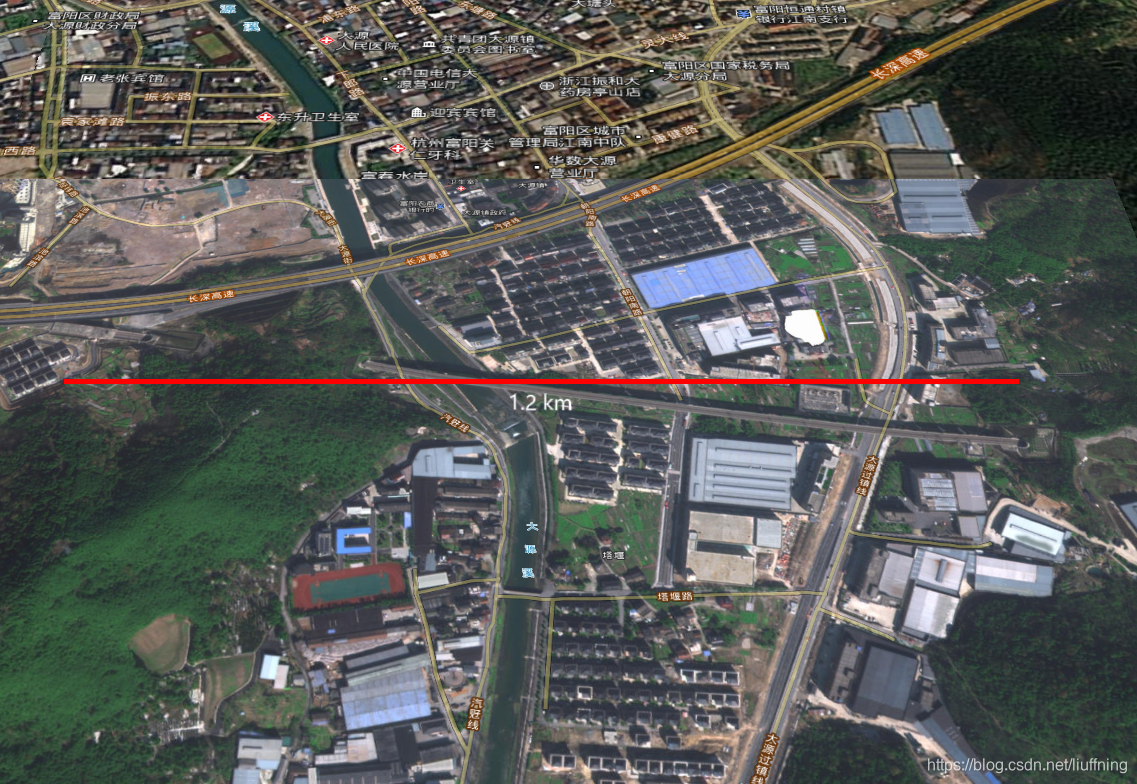
总结
版权声明:本文为liuffning原创文章,遵循CC 4.0 BY-SA版权协议,转载请附上原文出处链接和本声明。