Swagger的介绍
swagger的详细介绍:https://www.jianshu.com/p/349e130e40d5
swagger官网地址:https://swagger.io/%E3%80%82/
Swagger在springboot项目中的使用
swagger,用于根据代码自动生成接口文档,包括请求接口本地测试,相当于普通的接口文档和postman的组合,基于注解实现,在springboot项目中使用时:
pom文件添加依赖:
<!-- https://mvnrepository.com/artifact/io.springfox/springfox-swagger2 -->
    <dependency>
        <groupId>io.springfox</groupId>
        <artifactId>springfox-swagger2</artifactId>
        <version>2.9.2</version>
    </dependency>

    <!-- https://mvnrepository.com/artifact/io.springfox/springfox-swagger-ui -->
    <dependency>
        <groupId>io.springfox</groupId>
        <artifactId>springfox-swagger-ui</artifactId>
        <version>2.9.2</version>
    </dependency>
配置swaggerConfig,开启swagger模式:
package com.wl.springbootdemo01.util;

import org.springframework.context.annotation.Bean;
import org.springframework.context.annotation.Configuration;
import springfox.documentation.builders.ApiInfoBuilder;
import springfox.documentation.builders.PathSelectors;
import springfox.documentation.builders.RequestHandlerSelectors;
import springfox.documentation.service.ApiInfo;
import springfox.documentation.service.Contact;
import springfox.documentation.spi.DocumentationType;
import springfox.documentation.spring.web.plugins.Docket;
import springfox.documentation.swagger2.annotations.EnableSwagger2;

/**
 * 初始化swagger配置类
 * @author w.z
 * @date 2019/10/28 17:03
 */
@Configuration
@EnableSwagger2
public class Swagger {
    /**
     * 添加摘要信息
     * @return
     */
    @Bean
    public Docket swaggerSpringMvcPlugin() {
        return new Docket(DocumentationType.SWAGGER_2)
                .apiInfo(apiInfo())
                .select()
                .apis(RequestHandlerSelectors.basePackage("com.wl.springbootdemo01.controller"))
                .paths(PathSelectors.any())
                .build();
    }

    /**
     * 添加接口文档描述信息
     * @return
     */
    private ApiInfo apiInfo(){
        return new ApiInfoBuilder()
                .title("Springboot集合swagger测试接口文档")
                .description("包含管理区域信息,学生信息的增删改查模块")
                .version("1.0")
                .contact(new Contact("wz","https://blog.csdn.net/qq_43446343","2295206998@qq.com"))
                .build();

    }
}
docket() 方法创建Docket的Bean对象,apiInfo()创建ApiInfo的基本信息,用以在swagger-ui界面的显示,这种写法要在启动类中添加@EnableSwagger2的注解;也可以直接把初始化配置类写在springboot的启动类中。
踩坑记录
1. No mapping for GET /swagger-ui.html
当你的配置文件没问题,访问路径没问题,但是访问的时候报白色页面的404,就要查看代码里面有没有地方定义了WebMvcConfigure相关的配置类;
详细的解决方案:
参考博客
Swagger的常用注解
1.用在实体类中,对实体类的字段进行描述或者限制
@ApiModel:放在类前面,描述类;
@ApiModelProperty:描述字段,对字段做限制,给出字段的写法试例
package com.wl.springbootdemo01.entity;

import io.swagger.annotations.ApiModel;
import io.swagger.annotations.ApiModelProperty;
import lombok.AllArgsConstructor;
import lombok.Data;
import lombok.NoArgsConstructor;

import javax.validation.constraints.NotNull;
import javax.validation.constraints.Pattern;

/**
 * 用户实体类
 * @author w.z
 * @date 2019/11/1 10:38
 */
@Data
@AllArgsConstructor
@NoArgsConstructor
@ApiModel(value = "student",description = "学生信息")
public class Student {

    /**
     * 学号
     */
    @NotNull
    @ApiModelProperty(example = "31201709229")
    @Pattern(regexp = "[0-9]{13}",message = "学号格式错误")
    private String studentno;

    /**
     * 姓名
     */
    @NotNull
    @ApiModelProperty(example = "wz")
    private String stname;

    /**
     * 性别
     */
    @NotNull
    @ApiModelProperty(example = "女")
    private String sex;

    /**
     * 地址
     */
    @NotNull
    @ApiModelProperty(example = "xx大学")
    private String address;
}
这两个注解一般用于传的参数太多,封装成一个dto以json的格式传这种情况,封装之后就在dto里面对字段进行描述,检验,设置填写的试例,启动程序后swagger会自动以一个model来显示整个字段信息,会自动生成一个能请求接口的json格式参数。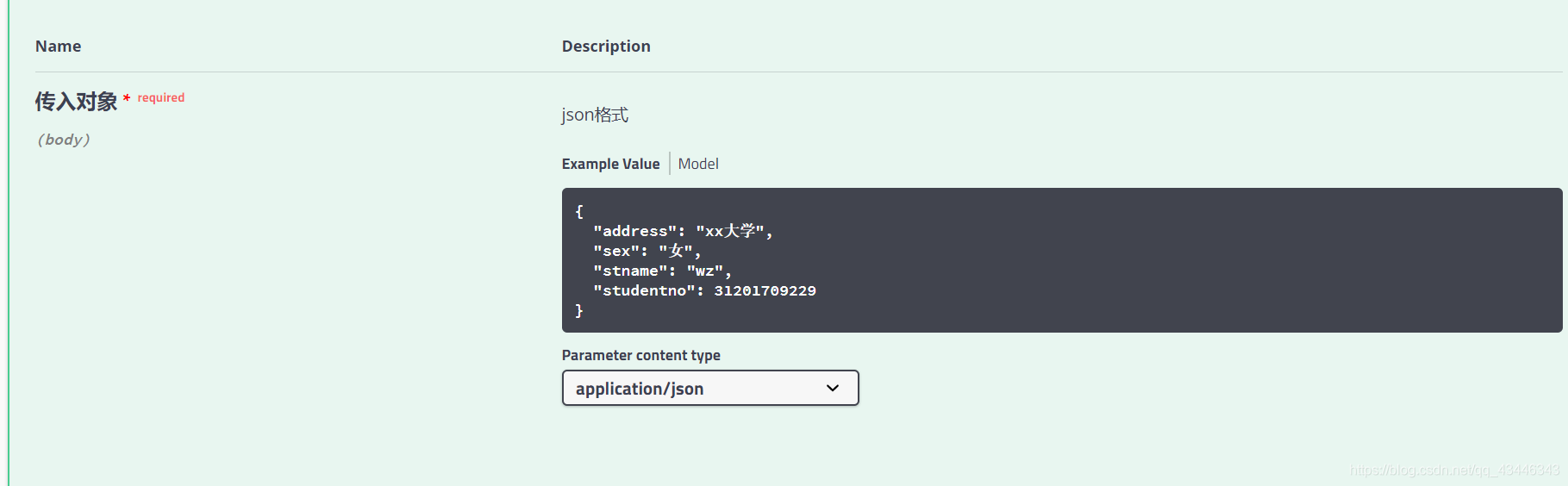
2.用在控制层,描述接口方法,参数信息
@Api:放在类前面,用来描述这个控制类表示的内容模块;
@ApiOperation:放在接口方法前面,用来描述接口的具体功能;
@ApiImplicitParam:用来描述接口的某个参数:name,默认值,是否必填,前端传参的方式,数据类型等;写在方法前面
@ApiImplicitParams:当接口有多个参数时,这个注解中就需要包含多@ApiImplicitParam;写在方法前面
@ApiImplicitParams({@ApiImplicitParam xxx,@ApiImplicitParam xx})
@ApiParam:用在参数前面描述参数;
@ApiResponse :用来设置提示码和提示信息的
@ApiResponses({@ApiResponse xxx,@ApiResponse xxx})
@ApiResponse(code = 404,message = “页面找不到”)
当传多个参数时,一般用@ApiImplicitParams({@ApiImplicitParam xxx,@ApiImplicitParam xx}) 对描述参数;如果传入的是一个dto类,可以用@ApiParam描述传入的参数内容跟注意事项,结合@RequestBody一起使用,表示传入的是json格式的dto类;
3.传参注解
使用了swagger自动生成接口文档的项目,接口必须要严格遵循restful注解格式,便于接收参数。
restful风格注解就记住@Controller变成了RestController,原来的接口方法前面两个注解变成了一个,用@RequestMapping(value=" “,method=)或者用Post/Get/DeleteMapping(” ")都可以。
swagger默认传参位置是path,在参数前面加@PathVariable接收
这个设是在@ApiImplicitParam的paramType属性里:
paramType(表示参数放在哪个地方传过去) =
path : 参数用@PathVariable获取;
query :用@RequestParam获取;
header :用@RequestHeader获取;
body :用@RequestBody获取;(不常用)
form :不常用;
AreaController:
package com.wl.springbootdemo01.controller;


import com.wl.springbootdemo01.entity.Area;
import com.wl.springbootdemo01.service.impl.AreaServiceImpl;
import com.wl.springbootdemo01.util.ResultUtil;
import com.wl.springbootdemo01.vo.ResultVo;
import io.swagger.annotations.*;
import lombok.extern.slf4j.Slf4j;
import org.springframework.beans.factory.annotation.Autowired;
import org.springframework.web.bind.annotation.*;

import java.util.List;

/**
 * @author w.z
 * @date 2019/8/8 16:54
 * 控制层
 */
@RestController
@RequestMapping("/area")
@Api(description = "AreaController API")
@Slf4j
@CrossOrigin
public class AreaController {

    @Autowired
    private AreaServiceImpl areaService;

    /**
     * 查询数据库所有的信息
     *
     * @return
     */
    @ApiOperation(value = "查询区域信息", notes = "查询数据库中所有的区域信息")
    @GetMapping(value = "/listarea")
    public ResultVo queryAll() {
        List<Area> list = areaService.getAreaList();
        return ResultUtil.success(list);
    }

    /**
     * 根据id查询,get方式请求
     *
     * @param id
     * @return
     */
    @ApiOperation(value = "根据id查询区域信息", notes = "查询数据库中某个区域信息")
    @ApiImplicitParam(name = "id", value = "区域id", paramType = "query", required = true, dataType = "int")
    @GetMapping(value = "/area")
    public ResultVo queryById(@RequestParam(value = "id") int id) {
        Area area = areaService.getAreaById(id);
        return ResultUtil.success(area);
    }

    /**
     * 添加数据
     *
     * @param areaName
     * @param priority
     * @return
     */
    @ApiOperation(value = "新增区域信息")
    @ApiImplicitParams({
            @ApiImplicitParam(name = "areaName", value = "地区名", paramType = "query", required = true, dataType = "String"),
            @ApiImplicitParam(name = "priority", value = "权重", paramType = "query", required = true, dataType = "int")
    })
    @PostMapping(value = "/add")
    public ResultVo addArea(@RequestParam(value = "areaName") String areaName,
                            @RequestParam(value = "priority") int priority) {
        Area area = new Area();
        area.setAreaName(areaName);
        area.setPriority(priority);
        areaService.addArea(area);
        return ResultUtil.success(area);
    }

    /**
     * 更新数据
     *
     * @param id
     * @param areaName
     * @param priority
     * @return
     */
    @ApiOperation(value = "修改某个区域信息")
    @ApiImplicitParams({
            @ApiImplicitParam(name = "id", value = "区域id", paramType = "query", required = true, dataType = "int"),
            @ApiImplicitParam(name = "areaName", value = "地区名", paramType = "query", required = true, dataType = "String"),
            @ApiImplicitParam(name = "priority", value = "权重", paramType = "query", required = true, dataType = "int")
    })
    @PutMapping(value = "/update")
    public ResultVo updateArea(@RequestParam(value = "id",required = true) int id,
                               @RequestParam(value = "areaName",required = true) String areaName,
                               @RequestParam(value = "priority",required = true) int priority) {
        Area area = new Area();
        area.setAreaId(id);
        area.setAreaName(areaName);
        area.setPriority(priority);
        areaService.modifyArea(area);
        return ResultUtil.success(area);
    }

    /**
     * 删除区域信息
     *
     * @param id
     * @return
     */
    @ApiOperation(value = "根据id删除区域信息")
    @ApiImplicitParam(name = "id", value = "区域id", paramType = "query", required = true, dataType = "int")
    @DeleteMapping(value = "/delete")
    public ResultVo deleteArea(@RequestParam(value = "id") int id) {
        areaService.deleteArea(id);
        return ResultUtil.success();
    }
}
StudentController:
package com.wl.springbootdemo01.controller;

import com.wl.springbootdemo01.entity.Student;
import com.wl.springbootdemo01.service.StudentService;
import com.wl.springbootdemo01.util.ResultUtil;
import com.wl.springbootdemo01.vo.ResultVo;
import io.swagger.annotations.Api;
import io.swagger.annotations.ApiImplicitParam;
import io.swagger.annotations.ApiOperation;
import io.swagger.annotations.ApiParam;
import org.springframework.beans.factory.annotation.Autowired;
import org.springframework.web.bind.annotation.*;

/**
 * @author w.z
 * @date 2019/11/1 11:12
 */
@RestController
@RequestMapping("/student")
@Api(description = "StudentApi")
public class StudentController {

    @Autowired
    private StudentService studentService;

    @PostMapping("/add")
    @ApiOperation(value = "新增学生信息")
    public ResultVo add(@ApiParam(name = "传入对象",value = "json格式",required = true) @RequestBody Student student){
        boolean result = studentService.insert(student);
        if (result){
            return ResultUtil.success();
        } else {
            return ResultUtil.error("新增出错");
        }
    }

    @GetMapping("/select")
    @ApiOperation(value = "根据学号查询")
    @ApiImplicitParam(name = "studentno",value = "学号",required = true,paramType = "query",dataType ="String" )
    public ResultVo query(@RequestParam String studentno){
        Student student = studentService.select(studentno);
        return ResultUtil.success(student);
    }
}
接口写完之后,启动项目,访问http://localhost:8080/demo/swagger-ui.html
就可以看到已经自动生成的接口文档了,访问路径默认是没有/demo的,我的项目在yml文件中配了一个/demo所以才加的。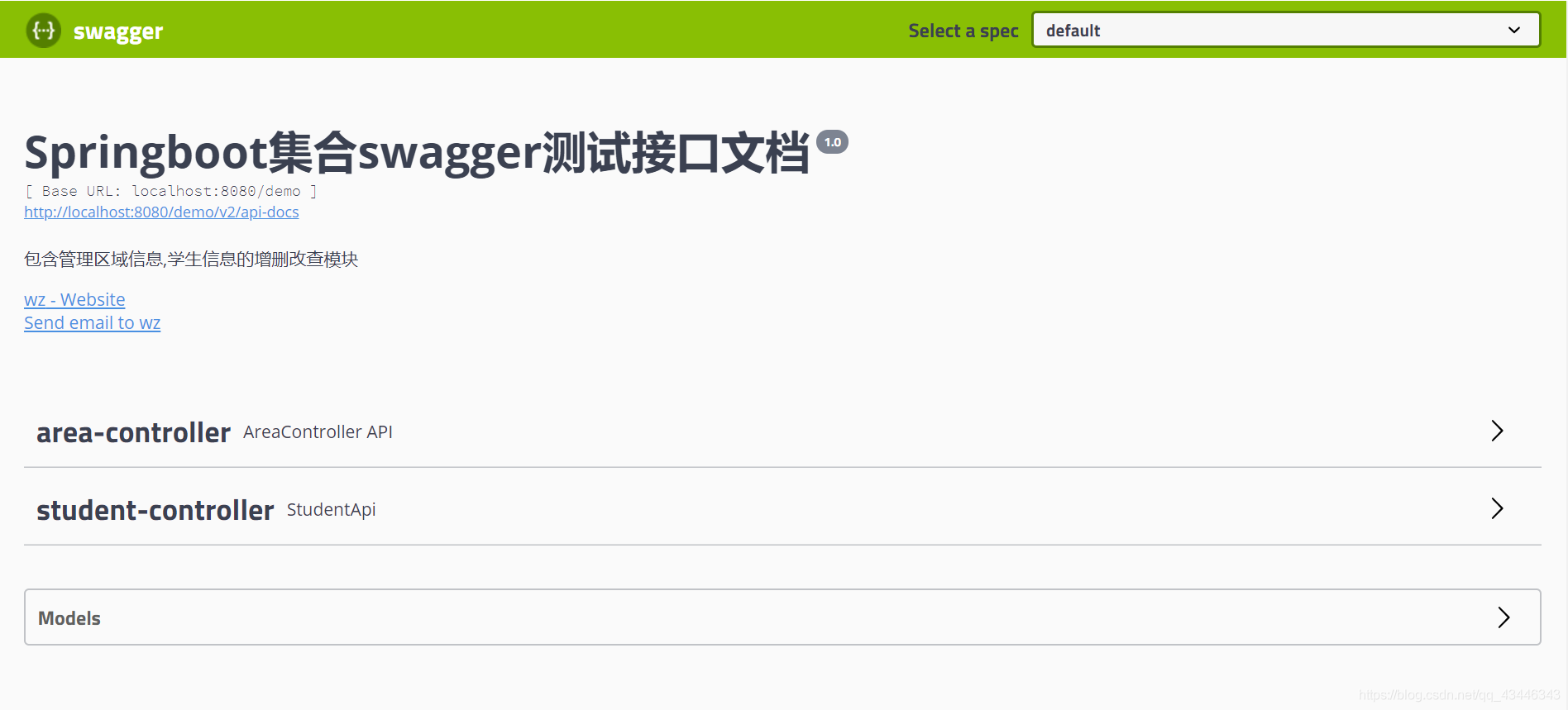
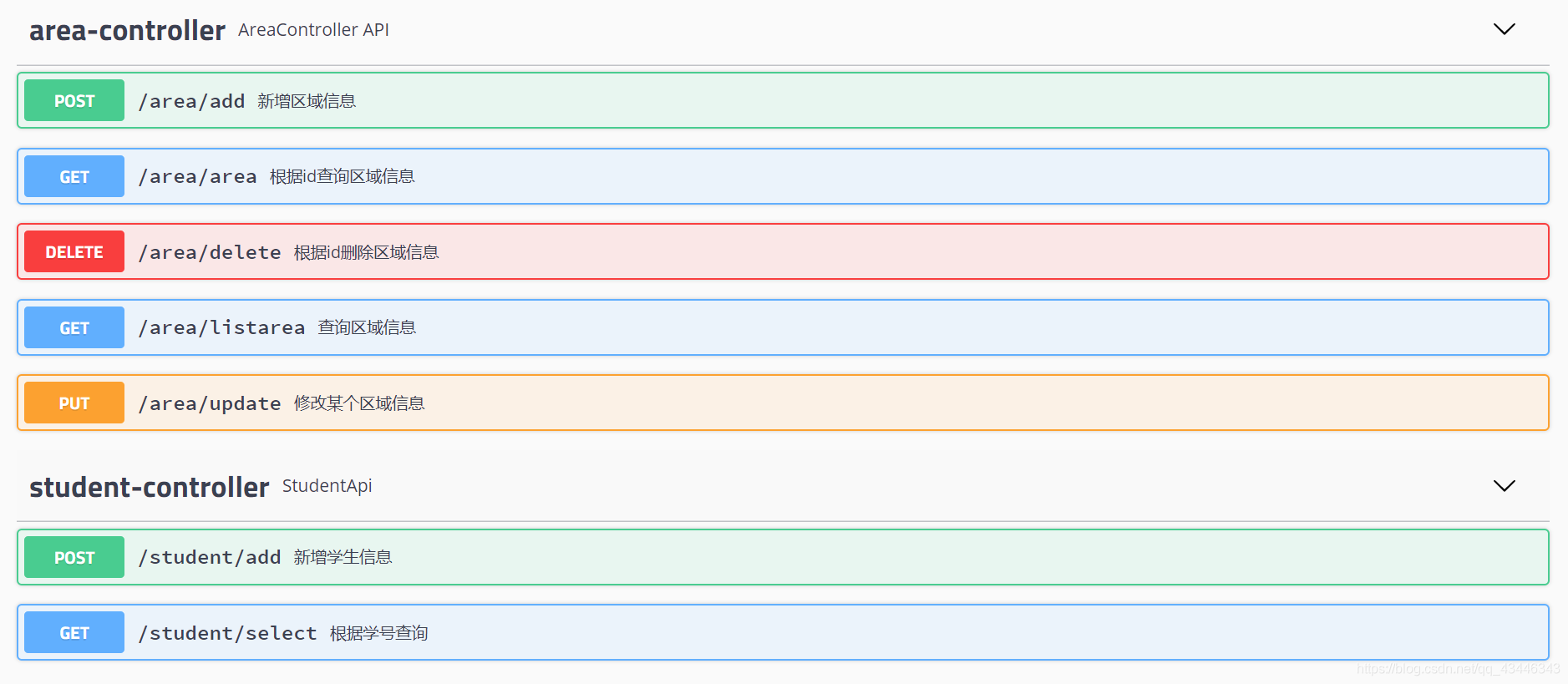
try it out ,填入参数,点击excute就可以看到请求的结果了 :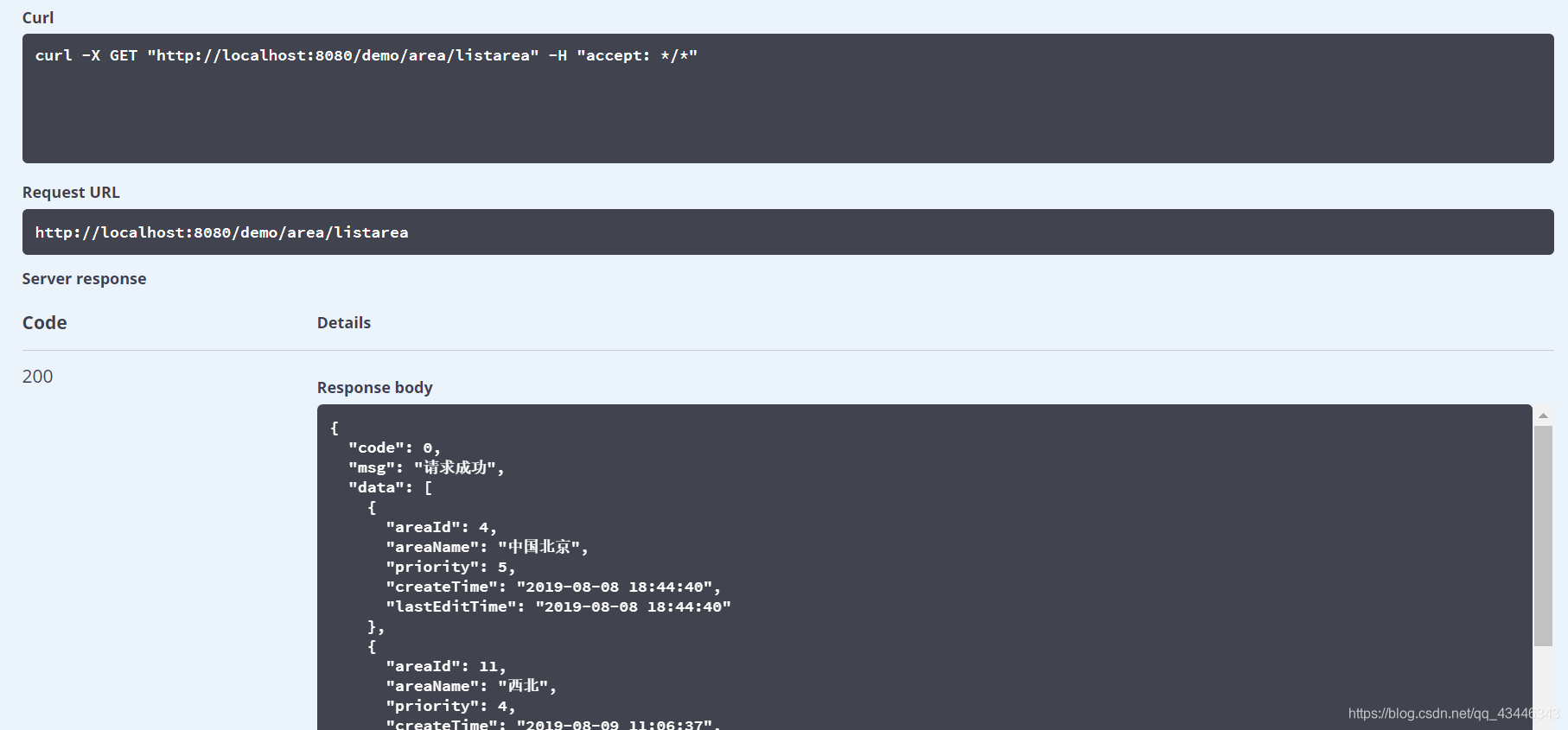
在项目中使用swagger,接口文档自动更新,合作开发的时候衔接会更加紧密。前端就不用疯狂催接口文档了,前端在调接口之前还可以自己测,这样对传参和返回结果的信息就会更加准确。
踩坑记录
写这个项目遇到的最大的问题是,参数类型和导包,虽然很蠢,但还是记录一下吧。
pom添加swagger依赖我整整花了一天,还是没导进去,一直报不能识别的错误,试过了换网,清除缓存,重启编译器,一边在网上查一边导包都没成功。后来脑抽突然意识到是不是setting文件配置的仓库有问题,果然,改了setting文件,删除了配置的远程仓库之后,世界都晴朗了。
swagger-ui界面传参这个事我也一直没明白是怎么回事,只要是接口代码参数类型是Integer的话,接口始终请求不到,还不报错,就是输入框抖一抖,就完了???????
不知道是不是跟前端没有Integer包装类有关,但是按道理,swagger传的应该都是json格式的参数??????跟这个也没关系…我迷茫了…