HTTP本质是由客户端发起请求获取数据,要实现服务端推送消息,最简单的方式是利用ajax不断的轮询,间隔设置越小实时性越高,同时对服务器的压力越大。如果服务端产生消息的间隔比轮询间隔大很多的话,很多请求都是落空的,感觉有点浪费。自然想到使用长轮询的方式改进,请求到达服务端,当有消息的时候立即返回,并再发起一个请求,如果没有消息,则保持连接一段时间,比如30秒,然后重新发起请求。 这样请求的间隔根据消息产生的频率有个最大30秒弹性的间隔,并且能保证消息的实时推送。从fiddler抓包来看,每个客户端一直有个http连接和服务端处于连接状态,(ps:在网上看长连接和长轮询,iframe方式ajax方式,一直搞不清区别,我都认为一致了)。
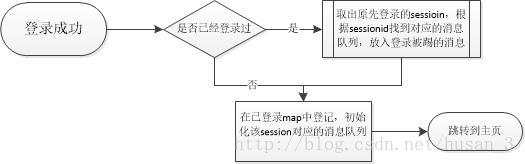
要实现账号重复登录踢出原先登录的账号,则需要定向推送消息,如何找到原先登录的客户端?需要找一个客户端连接唯一的标识,比如sessionid,每个客户端登录后,注册到已登录map中,并且对应生成一个消息队列。 后来登录的账户只要在已登录map中找到sessionid,然后往sessionid对应的消息队列推送消息,每个客户端保持的长连接实时从自己对应的消息队列中poll消息,然后执行相应的操作就行了。
流程图:
代码:
public class LoginServlet extends HttpServlet{
	@Override
	public void init() throws ServletException {
		// TODO Auto-generated method stub
		ServletContext context = this.getServletContext();
		// 如果是多个应用服务负载均衡,loginMap和eventMap和可以存储到分布式存储中或集中式数据库
		context.setAttribute("loginMap", new ConcurrentHashMap<String, HttpSession>());
		context.setAttribute("eventMap", new ConcurrentHashMap<String, ArrayBlockingQueue<Event>>());
	}
	@Override
	public void service(ServletRequest request, ServletResponse response)
			throws ServletException, IOException {
		// TODO Auto-generated method stub
		HttpServletRequest req = (HttpServletRequest)request;
		HttpServletResponse res = (HttpServletResponse)response;
		String name = req.getParameter("usrName");
		String pwd = req.getParameter("usrPwd");
		if(login(name,pwd)){
			HttpSession session = req.getSession(true);
			ConcurrentHashMap<String, HttpSession> loginMap = (ConcurrentHashMap<String, HttpSession>)this.getServletContext().getAttribute("loginMap");
			ConcurrentHashMap<String,ArrayBlockingQueue<Event>> eventMap = (ConcurrentHashMap<String,ArrayBlockingQueue<Event>>)this.getServletContext().getAttribute("eventMap");
			//该用户已登录
			//multi thread not safe
			if(loginMap.containsKey(name)){

				HttpSession oginalSession = loginMap.get(name);
				ArrayBlockingQueue<Event> events = eventMap.get(oginalSession.getId());
				if(events==null){
					events = new ArrayBlockingQueue<Event>(100);
				}
				Event event = new Event(1,"kicked");
				try {
					events.put(event);
				} catch (InterruptedException e) {
					// TODO Auto-generated catch block
					e.printStackTrace();
				}
				eventMap.put(oginalSession.getId(), events);
			}
			session.setAttribute("user", name);
			loginMap.put(name, session);
			eventMap.put(session.getId(),new ArrayBlockingQueue<Event>(100));
		}
		//登录成功
		res.sendRedirect("main.jsp");
	}
	private boolean login(String name, String pwd){
		return true;
	}
}
轮询poll消息:

/**
 * @author husan
 * @Date 2014-4-3
 * @description:message push,like the login invadite message
 */
public class MessagePushServlet extends HttpServlet{
	private int waitTime = 30;
	@Override
	protected void doPost(HttpServletRequest req, HttpServletResponse resp)
			throws ServletException, IOException {
		// TODO Auto-generated method stub
		ServletContext context = this.getServletContext();
		HttpSession session = req.getSession();
		ArrayBlockingQueue<Event> eventQueue = (ArrayBlockingQueue)((ConcurrentHashMap)context.getAttribute("eventMap")).get(session.getId());
		if(eventQueue != null){
			try {
				Event event = eventQueue.poll(waitTime, TimeUnit.SECONDS);
				if(event == null){
					//超时消息
					event = new Event(-1,"time out");
				}
				//被踢出
				if(event.getFalg() == 1){
					session.invalidate();
				}
				String ret = toJson(event);
				resp.setContentType("text/json;charset=UTF-8");
				resp.getWriter().println(ret);
				resp.flushBuffer();
			} catch (InterruptedException e) {
				// TODO Auto-generated catch block
				e.printStackTrace();
			}
		}

	}
	private String toJson(Event event){
		StringBuffer sb = new StringBuffer("{\"flag\":\"");
		sb.append(event.getFalg()).append("\",\"desc\":\"").append(event.getDesc())
		.append("\"}");
		System.out.println(sb.toString());
		return sb.toString();

	}
	public int getWaitTime() {
		return waitTime;
	}

	public void setWaitTime(int waitTime) {
		this.waitTime = waitTime;
	}

}
前端页面:
<%@ page language="java" contentType="text/html; charset=UTF-8"
    pageEncoding="UTF-8"%>
<!DOCTYPE html PUBLIC "-//W3C//DTD HTML 4.01 Transitional//EN" "http://www.w3.org/TR/html4/loose.dtd">
<html>
<head>
<meta http-equiv="Content-Type" content="text/html; charset=UTF-8">
<title>main head</title>
</head>
<body>
欢迎你: <%=session.getAttribute("user") %>
</body>
<script type="text/javascript" src="js/jquery-1.10.2.min.js" ></script>
<script type="text/javascript">
function getMessage(){
	$.ajax({url:"messagePoll",
		type:"post",
		dataType:"json",
		success:function(data){
		if(!process(data)){
			return;
			}
		setTimeout(getMessage());
		}
		});
}
function process(data){
	if(data.flag == 1){
		//被踢下线,不再向服务端poll消息
		if (confirm("你已经被t下线!")){
			window.location.href = "login.html";
			}
		return false;
		}

	return true;
}
$(function(){
	getMessage();
});
</script>
</html>上面的例子只是个人学习的一个例子,并没有实际应用,没有考虑线程安全和用户数过多的情况。如果有很多的用户,或者起了多个应用负载均衡,那肯定不能使用ServletContext来保存数据,一般放到数据库或者各应用共享的分布式缓存中。如果消息很多的话,可不可以一次请求取出多条消息。。等等很多没有考虑。服务端处理连接的Connector使用nio多路就绪选择,参考下http://blog.lifeibo.com/blog/2011/07/07/200-long-connection.html HTTP长连接200万尝试及调优 。
版权声明:本文为husan_3原创文章,遵循CC 4.0 BY-SA版权协议,转载请附上原文出处链接和本声明。