微信小程序解决flex布局,最后一行靠左对齐问题
需求:使用flex布局,每行固定三个元素,元素间距自适应,向左对齐
实际效果与代码如下:
wxml
 <view class="con-list">
 	<view class="con-item" wx:for="{{conList}}" wx:key="item" style="background-color: {{item.bgColor}};">
          {{item.name}}
    </view>
 </view>
wxss
.con-list{display: flex;flex-direction: row;flex-wrap: wrap;justify-content: space-between;margin-top: 100rpx;}
.con-item{width: 30%;height: 100rpx;text-align: center;line-height: 100rpx;color: rgb(83, 74, 74);margin-bottom: 20rpx;}
js
data:{
	conList:[
      {id:1,name:'第一',bgColor:'#D1AFFB',},
      {id:2,name:'第二',bgColor:'#FFDEB1',},
      {id:3,name:'第三',bgColor:'#D1AFFB',},
      {id:4,name:'第四',bgColor:'#FFDEB1',},
      {id:5,name:'第五',bgColor:'#D1AFFB',},
      {id:6,name:'第六',bgColor:'#FFDEB1',},
      {id:7,name:'第七',bgColor:'#FFDEB1',},
      {id:8,name:'第八',bgColor:'#D1AFFB',},
    ]
}
效果图: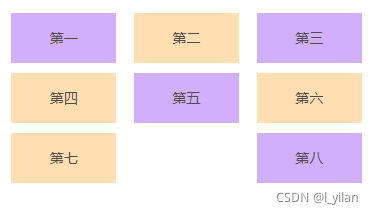
问题:第八的元素靠右了,需要向左对齐
原因:设置了justify-content为space-between,元素自动左右两边对齐了
这时候我们可以给最外层的元素设置个伪元素,宽度为30%(因为设置的每个item的宽度为30%),高度为0,需增加一行以下的wxss代码即可:
.con-list::after{content: '';width: 30%;}
这样,就可以实现想要的效果了,最后效果如下: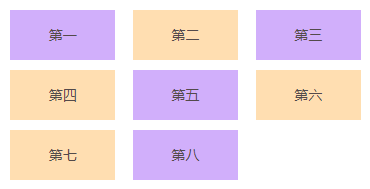
版权声明:本文为l_yilan原创文章,遵循CC 4.0 BY-SA版权协议,转载请附上原文出处链接和本声明。