uniapp 微信小程序 纯js文件中引入自定义modal组件(无需所有页面手动引入组件)
前言
工具:uniapp
开发端:微信小程序
其他:uview 2.0
场景:接口请求统一封装中需要对接口返回token失效的情况做modal显示,引导用户退出小程序,我的想法是将modal的默认confirm按钮替换成小程序自带的退出方法:
<navigator open-type="exit" target="miniProgram" class="item"></navigator>
这样用户点击确认按钮就能退出小程序,因此uni.showModel不满足需求,需要用uview的u-model实现,也就是要在js文件中显示自定义组件。
解决方法
1.自定义组件文件/components/logout-model.vue
<template>
	<view>
		<u-modal ref="modal" title="登录状态失效,请重新登录" :show="showLogout" :closeOnClickOverlay="false" @close="showLogout = false"
			showCancelButton>
			<view style="display: flex;align-items: center;justify-content: space-around;"
				slot="confirmButton">
				<navigator open-type="exit" target="miniProgram" class="item">
					<u-button text="确定" :style="{borderRadius:'5px'}" color='#1F5AA0'>
					</u-button>
				</navigator>
				<view class="item">
					<u-button text="取消" :style="{borderRadius:'5px'}" @click="showLogout = false">
					</u-button>
				</view>
			</view>
		</u-modal>
	</view>
</template>

<script>
	export default {
		data(){
			return{
				showLogout:false
			}
		},
		methods: {
		//显示modal方法
			show() {
				this.showLogout = true
			}
		},
	}
</script>

<style scoped lang="scss">
	.item {
		width: 90%;
		margin-left: 5%;
		display: flex;
		align-items: center;
		height: 115rpx;
		position: relative;
	}
</style>
- 在项目根目录新建
vue.config.js文件
代码原理参考 vue-template-compiler 还能这么用
module.exports = {
	chainWebpack: config => {
			config.module.rule('vue').use('vue-loader').loader('vue-loader').tap(options => {
				const compile = options.compiler.compile
				options.compiler.compile = (template, ...args) => {
					if (args[0].resourcePath.match(/^pages/)||args[0].resourcePath.match(/^secPages\/pages/)) {
						template = template.replace(/[\s\S]+?<[\d\D]+?>/, _ => `${_}
							<logout-modal ref="logoutModal" style="z-index: 123;"/>
						`)
					}
					return compile(template, ...args)
				}
				return options
			})
		}
}
代码args[0].resourcePath.match(/^pages/)||args[0].resourcePath.match(/^secPages\/pages/)需要注意一下。
我的理解是根据路径正则匹配到是否是页面文件,如果是的话就在里面加入自定义组件,因为我小程序分了包,分包里页面文件夹路径是/secPages/pages,所以就加了||args[0].resourcePath.match(/^secPages\/pages/),没分包的一般就是args[0].resourcePath.match(/^pages/)(页面文件夹不一样的另写)。
- 在request.js中使用组件
经过第2步,打开调试器,可以看见每个页面都加了自定义组件。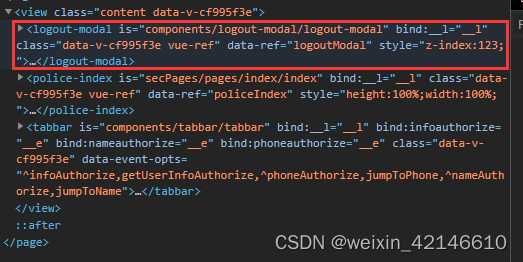
在js文件中通过getCurrentPages()获取当前页面实例,然后用$refs.show()召唤modal,具体代码如下
//token失效
let pages = getCurrentPages();
let currentPage = pages[pages.length-1]
//logoutModal是vue.config.js中添加组件时定义的ref
currentPage.$vm.$refs.logoutModal.show()
结语
以上就是解决方法,亲测有效
版权声明:本文为weixin_42146610原创文章,遵循CC 4.0 BY-SA版权协议,转载请附上原文出处链接和本声明。