一、思路
1.创建数据库(岗位表)
2.创建实体类(要继承Serializable,Comparable两个类)
2.创建控制层(Servlet)–>工具层(Service)—>数据库连接层(Dao)
3.使用junit进行测试
4.测试结果无误后,修改视图层
二、数据库创建
create table station (
stationno int(10)  not null auto_increment,
stationname varchar(100) not null,
remark varchar(100) ,
PRIMARY key(stationno)
)
select * from station
INSERT into station values(DEFAULT,'总裁','公司总体发展战略规划和管理')
INSERT into station values(DEFAULT,'教学经理','负责日常教学管理')
INSERT into station values(DEFAULT,'咨询经理','完成咨询部日常管理')
INSERT into station values(DEFAULT,'咨询师','完成日常咨询任务')
三、实体类创建
package com.facai.entity;

import java.io.Serializable;

public class Station implements Serializable,Comparable{
	private int stationno;
	private String stationname;
	private String remark;
	public int getStationno() {
		return stationno;
	}
	public void setStationno(int stationno) {
		this.stationno = stationno;
	}
	public String getStationname() {
		return stationname;
	}
	public void setStationname(String stationname) {
		this.stationname = stationname;
	}
	public String getRemark() {
		return remark;
	}
	public void setRemark(String remark) {
		this.remark = remark;
	}
	@Override
	public String toString() {
		return "Station [stationno=" + stationno + ", stationname="
				+ stationname + ", remark=" + remark + "]";
	}
	public Station(int stationno, String stationname, String remark) {
		super();
		this.stationno = stationno;
		this.stationname = stationname;
		this.remark = remark;
	}
	public Station() {
		super();
	}
	@Override
	public int hashCode() {
		final int prime = 31;
		int result = 1;
		result = prime * result + ((remark == null) ? 0 : remark.hashCode());
		result = prime * result
				+ ((stationname == null) ? 0 : stationname.hashCode());
		result = prime * result + stationno;
		return result;
	}
	@Override
	public boolean equals(Object obj) {
		if (this == obj)
			return true;
		if (obj == null)
			return false;
		if (getClass() != obj.getClass())
			return false;
		Station other = (Station) obj;
		if (remark == null) {
			if (other.remark != null)
				return false;
		} else if (!remark.equals(other.remark))
			return false;
		if (stationname == null) {
			if (other.stationname != null)
				return false;
		} else if (!stationname.equals(other.stationname))
			return false;
		if (stationno != other.stationno)
			return false;
		return true;
	}
	@Override
	public int compareTo(Object o) {
		// TODO Auto-generated method stub
		return 0;
	}

}
三、创建控制层(Servlet)–>工具层(Service)—>数据库连接层(Dao)
1、控制层:
public class StationServlet extends BaseServlet {
	/*
	 * 查询所有岗位信息
	 */
	public void findAll(HttpServletRequest request, HttpServletResponse response)
			throws ServletException, IOException {
		//调用业务层完成添加操作
				StationService sse=new StationServiceImpl();
				List<Station> stationList=sse.findAll();
				//跳转到stationList页面
				request.setAttribute("stationList", stationList);
				request.getRequestDispatcher("/system/stationList.jsp").forward(request, response);

	}
	/**
	 * 添加岗位信息
	 */
	public void add(HttpServletRequest request, HttpServletResponse response)
			throws ServletException, IOException {
		//接收表单中的数据
		int stationno=Integer.parseInt(request.getParameter("stationno"));
		String stationname=request.getParameter("stationname");
		String remark=request.getParameter("remark");
		//调用业务层完成添加操作
		Station sat=new Station(stationno,stationname,remark);
		StationService sse=new StationServiceImpl();
		int n=(int) sse.add(sat);
		//根据结果跳转到不同的页面
		if(n>0){
			//如果是表单的提交,成功之后建议使用重定向,避免表单的重复提交
			response.sendRedirect(request.getContextPath()+"/servlet/StationServlet?method=findAll");
		}else{
			request.setAttribute("stationError", "岗位添加失败");
			//此时必须使用转发,因为要复用保存在request中的数据
			request.getRequestDispatcher("/system/stationAdd.jsp").forward(request, response);

		}
	}
}
2.业务层:
package com.facai.service.impl;

import java.util.List;

import com.facai.dao.StationDao;
import com.facai.dao.impl.StationDaoImpl;
import com.facai.entity.Station;
import com.facai.service.StationService;

public class StationServiceImpl implements StationService {
	//创建Dao层实体类
	StationDao sdao=new StationDaoImpl();
	/*
	 * 添加岗位信息
	 */
	@Override
	public Object add(Station station) {
		return this.sdao.add(station);

	}
	/*
	 * 查询所有岗位信息
	 */
	@Override
	public List<Station> findAll() {
		return this.sdao.findAll();
	}

}
3.数据库层
package com.facai.dao.impl;

import java.sql.Connection;
import java.sql.PreparedStatement;
import java.sql.ResultSet;
import java.util.ArrayList;
import java.util.List;

import com.facai.dao.StationDao;
import com.facai.entity.Department;
import com.facai.entity.Station;
import com.facai.util.DBUtil;

public class StationDaoImpl implements StationDao {

	@Override
	public Object add(Station station) {
		String sql="insert into station values(?,?,?)";
		Object[] param={station.getStationno(),station.getStationname(),station.getRemark()};
		return DBUtil.executeDML(sql, param);
	}
	//查询所有岗位信息
		@Override
		public List<Station> findAll() {
			//声明jdbc对象
			Connection conn=null;
			PreparedStatement ps=null;
			ResultSet rs=null;
			//声明变量
			List<Station> ls=null;
			try {
				//创建连接
				conn=DBUtil.getConnection();
				//创建SQL语句
				String sql="select * from station";
				//创建SQL语句对象
				ps=conn.prepareStatement(sql);
				//执行SQL命令
				rs=ps.executeQuery();
				//为集合赋值
				ls=new ArrayList<>();
				//遍历
				while(rs.next()){
					Station station=new Station();
					station.setStationno(rs.getInt("stationno"));
					station.setStationname(rs.getString("stationname"));
					station.setRemark(rs.getString("remark"));
					ls.add(station);
				}
			} catch (Exception e) {
				e.printStackTrace();
			}finally{
				//关闭资源
				DBUtil.closeAll(rs, ps, conn);
			}
			//返回集合
			return ls;
		}
}
4.junit测试
package com.facai.test;

import org.junit.Test;

import com.facai.entity.Station;
import com.facai.service.StationService;
import com.facai.service.impl.StationServiceImpl;

public class TestStationService {
	@Test
	public void testAddStation(){
		StationService statService=new StationServiceImpl();
		Station stat=new Station(6,"发大财","春秋大梦");
		statService.add(stat);
	}
}
运行图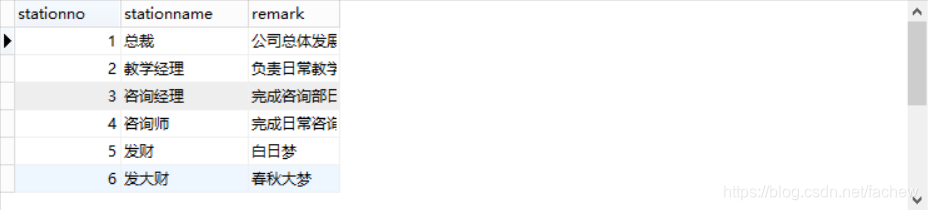
四、视图层修改
1.左边菜单栏
<li><cite></cite><a href="system/stationAdd.jsp" target="rightFrame">添加岗位</a><i></i></li>
					<li><cite></cite><a href="servlet/StationServlet?method=findAll" target="rightFrame">岗位管理</a><i></i></li>
2.stationAdd.jsp
<%@ page language="java" import="java.util.*" pageEncoding="utf-8"%>
<%
String path = request.getContextPath();
String basePath = request.getScheme()+"://"+request.getServerName()+":"+request.getServerPort()+path+"/";
%>
<!DOCTYPE html PUBLIC "-//W3C//DTD XHTML 1.0 Transitional//EN" "http://www.w3.org/TR/xhtml1/DTD/xhtml1-transitional.dtd">
<html xmlns="http://www.w3.org/1999/xhtml">
<head>
<base href="<%=basePath%>"/>
<meta http-equiv="Content-Type" content="text/html; charset=utf-8" />
<title>添加岗位</title>
<link href="css/style.css" rel="stylesheet" type="text/css" />
</head>
<body>
<div class="place">
<span>位置:</span>
<ul class="placeul">
<li><a href="#">人事管理</a></li>
<li><a href="#">添加岗位</a></li>
</ul>
</div>
<div class="formbody">
<div class="formtitle"><span>基本信息</span></div>
<form action="servlet/StationServlet?method=add" method="post">
<ul class="forminfo">
<li><label>岗位编号</label><input name="stationno" type="text" class="dfinput" /></li>
<li><label>岗位名称</label><input name="stationname" type="text" class="dfinput" /></li>
<li><label>岗位描述</label><input name="remark" type="text" class="dfinput" /></li>
<li><label> </label><input name="" type="submit" class="btn" value="确认保存"/></li>
</ul>
</form>
</div>
<span style="color:red;font-size:16px;font-weight:bold;">${stationError}</span>
</body>
</html>
3.stationList.jsp
<%@ page language="java" import="java.util.*" pageEncoding="utf-8"%>
<%@taglib prefix="c" uri="http://java.sun.com/jsp/jstl/core" %>
<%
String path = request.getContextPath();
String basePath = request.getScheme()+"://"+request.getServerName()+":"+request.getServerPort()+path+"/";
%>
<!DOCTYPE html PUBLIC "-//W3C//DTD XHTML 1.0 Transitional//EN" "http://www.w3.org/TR/xhtml1/DTD/xhtml1-transitional.dtd">
<html xmlns="http://www.w3.org/1999/xhtml">
<head>
<base href="<%=basePath%>"/>
<meta http-equiv="Content-Type" content="text/html; charset=utf-8" />
<title>岗位管理</title>
<link href="css/style.css" rel="stylesheet" type="text/css" />
<script type="text/javascript" src="js/jquery.js"></script>
<script type="text/javascript">
$(document).ready(function(){
$(".click").click(function(){
$(".tip").fadeIn(200);
});
$(".tiptop a").click(function(){
$(".tip").fadeOut(200);
});
$(".sure").click(function(){
$(".tip").fadeOut(100);
});
$(".cancel").click(function(){
$(".tip").fadeOut(100);
});
});
</script>
</head>
<body>
<div class="place">
<span>位置:</span>
<ul class="placeul">
<li><a href="#">人事管理</a></li>
<li><a href="#">岗位管理</a></li>
</ul>
</div>
<div class="rightinfo">
<div class="formtitle1"><span>岗位列表</span></div>
<table class="tablelist" >
<thead>
<tr>
<th><input name="" type="checkbox" value="" checked="checked"/></th>
<th>编号<i class="sort"><img src="images/px.gif" /></i></th>
<th>岗位名称</th>
<th>岗位描述</th>
<th>操作</th>
</tr>
</thead>
<tbody>
<c:forEach items="${stationList}" var="station">
<tr>
<td><input name="" type="checkbox" value="" /></td>
<td>${station.stationno}</td>
<td>${station.stationname }</td>
<td>${station.remark }</td>
<td> <a href="positionUpdate.html" class="tablelink">修改</a> <a href="#" class="tablelink click"> 删除</a></td>
</tr>
</c:forEach>
</tbody>
</table>
<div class="tip">
<div class="tiptop"><span>提示信息</span><a></a></div>
<div class="tipinfo">
<span><img src="images/ticon.png" /></span>
<div class="tipright">
<p>是否确认对信息的修改 ?</p>
<cite>如果是请点击确定按钮 ,否则请点取消。</cite>
</div>
</div>
<div class="tipbtn">
<input name="" type="button" class="sure" value="确定" />
<input name="" type="button" class="cancel" value="取消" />
</div>
</div>
</div>
<script type="text/javascript">
$('.tablelist tbody tr:odd').addClass('odd');
</script>
</body>
</html>
4.运行图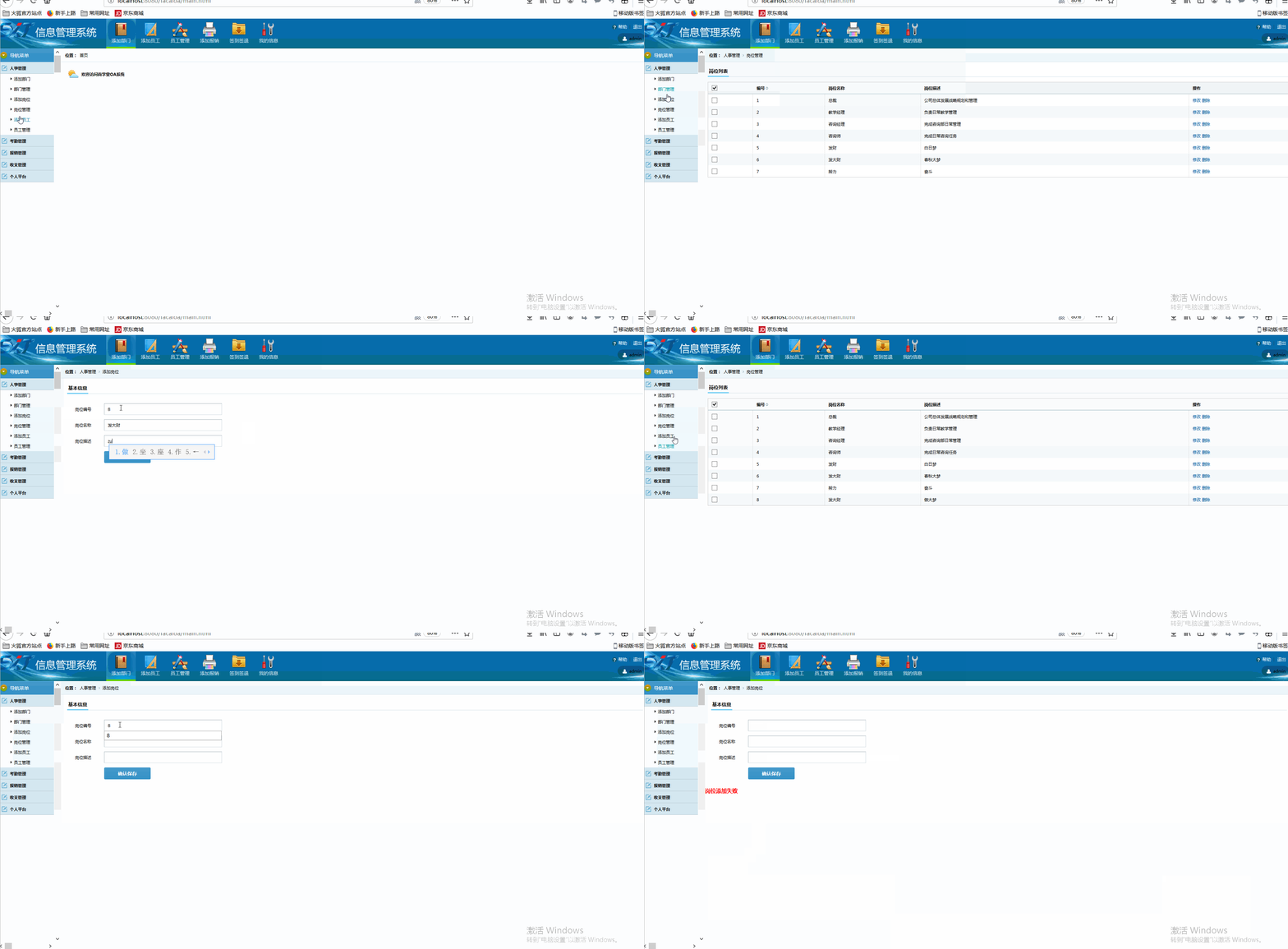
五修改删除功能的实现
参照
修改
员工
信息
版权声明:本文为fachew原创文章,遵循CC 4.0 BY-SA版权协议,转载请附上原文出处链接和本声明。