1、结构体
(1)使用赋值方法创建结构体
%% 使用赋值方法创建结构体
person(1).name = ‘张三‘;
person(1).weight = 66;
person(1).length = 200;
person(1).width = 30;
person(2).name = ‘李四‘;
person(2).weight = 70;
person(2).lengh = 100;
person(2).width = 40;
(2)使用struct创建结构体
%% 使用struct创建结构体
person = struct(‘name‘,‘张三‘,‘weight‘,66,‘lengh‘,100,‘width‘,200);
person = struct(‘name‘,{‘张三‘,‘李四‘},‘weight‘,{66,70},‘lengh‘,{100,120},‘width‘,{200,150});
person(1)
person(2)
ans =
包含以下字段的 struct:
name: ‘张三‘
weight: 66
lengh: 100
width: 200
ans =
包含以下字段的 struct:
name: ‘李四‘
weight: 70
lengh: 120
width: 150
(3)访问结构体内部元素
获取:结构体名称.字段名
赋值:结构体名称.字段名 = 新值
%% 访问结构体内部元素
person = struct(‘name‘,{‘张三‘,‘李四‘},‘weight‘,{66,70},‘lengh‘,{100,120},‘width‘,{200,150});
person(1).name % ‘张三‘
person(1).width = 222
person(1)
% name: ‘张三‘
% weight: 66
% lengh: 100
% width: 222
2、元胞数组
元胞数组每个元素为一个元胞,元胞可以是任意类型、任意尺寸的数据。
(1)使用大括号创建元胞数组
元胞数组名 = {元胞...元胞}
%% 使用大括号创建元胞数组
a = {rand(3,4),zeros(3);ones(4),rand(4,3)};
size(a) % 2 2
(2)使用元胞创建元胞数组
元胞数组名(指定索引)= {元胞}
%% 使用元胞创建元胞数组
a(1,1) = {rand(2,3)};
a(1,2) = {ones(4)};
a(2,1) = {zeros(6)};
a(2,2) = {rand(6,4)};
(3)由元胞内容创建元胞数组
元胞数组名{指定索引}= 元胞内容
【注意】注意区分上面两个
%% 由元胞内容创建元胞数组
a{1,1} = rand(2,3);
a{1,2} = ones(4);
a{2,1} = zeros(6);
a{2,2} = rand(6,4);
(4)使用celldisp显示元胞数组
%% 使用celldisp显示元胞数组
a{1,1} = rand(2,3);
a{1,2} = ones(4);
a{2,1} = zeros(6);
a{2,2} = rand(6,4);
celldisp(a) % 每一个元胞都会具体显示出来
(5)使用cellplot显示元胞数组
%% 使用cellplot显示元胞数组
a(1,1) = {rand(2,3)};
a(1,2) = {ones(4)};
a(2,1) = {zeros(6)};
a(2,2) = {rand(6,4)};
cellplot(a)
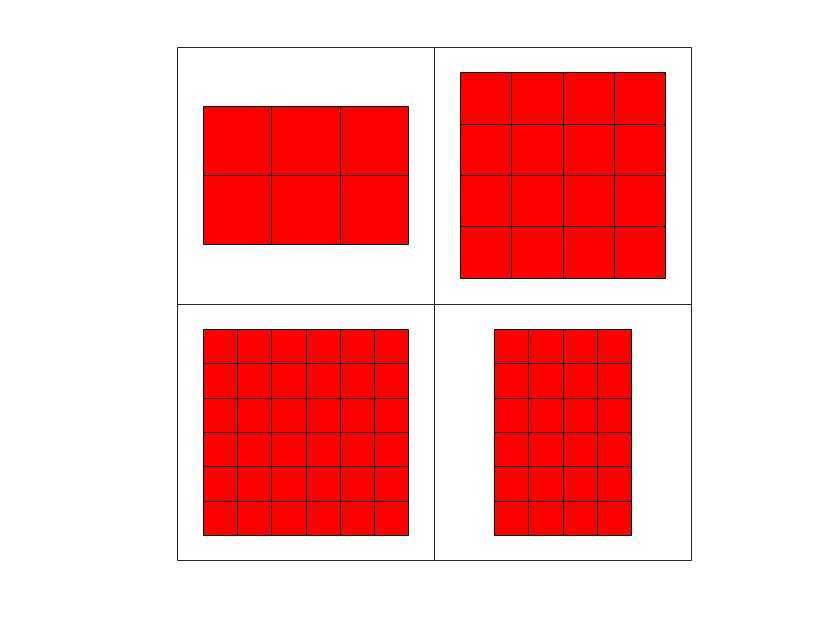
(6)使用大括号访问元胞数组
元胞数组{下标}
元胞数组{下标}(下标)
%% 使用大括号访问元胞数组
a(1,1) = {rand(2,3)};
a(1,2) = {ones(4)};
a(2,1) = {zeros(6)};
a(2,2) = {rand(6,4)};
a{1,1} % 访问第一个元胞
a{1,1}(1,2) % 访问第一个元胞中的第1行第2列那个元素
a{1,1}(1,3) = 10 % 修改第一个元胞中第1行第3列的元素为10
(7)使用小括号访问元胞数组
元胞数组(下标)
%% 使用小括号访问元胞数组
a(1,1) = {rand(2,3)};
a(1,2) = {ones(4)};
a(2,1) = {zeros(6)};
a(2,2) = {rand(6,4)};
a(1,1) % 访问元胞数组的元素,不是元胞的元素
a(1,:) % 访问元胞数组的一行
3、字符串
(1)使用方括号创建单行字符串
%% 使用方括号创建单行字符串
s1 = ‘MATLAB‘;
s2 = ‘ is‘;
s3 = ‘ a very good‘;
s4 = ‘ software‘;
% s = [s1 s2 s3 s4];
s = [s1,s2,s3,s4];
disp(s)
% MATLAB is a very good software
(2)使用strcat创建单行字符串
strcat(子串1,子串2,....,子串n)
使用strcat函数连接字符串时,每个字符串的最右侧空格会被忽略。
%% 使用strcat创建单行字符串
s1 = ‘MATLAB‘;
s2 = ‘ is‘;
s3 = ‘ a very good‘;
s4 = ‘ software‘;
s = strcat(s1,s2,s3,s4);
disp(s)
(3)使用中括号构建多行字符串
每行的长度要求一致,不足空格来补。
%% 使用中括号构建多行字符串
s1 = ‘MATLAB ‘;
s2 = ‘ is ‘;
s3 = ‘ a very good‘;
s4 = ‘ software ‘;
s = [s1;s2;s3;s4];
size(s)
(4)使用strvcat构建多行字符串(过时,尽量不用)
strvcat(子串1,子串2,...,子串n)——不要求每行的长度一致
若有一行是空字符串,那么会被忽略掉。
%% 使用strvcat构建多行字符串
s1 = ‘MATLAB‘;
s2 = ‘ is‘;
s3 = ‘ a very good‘;
s4 = ‘ software‘;
s = strvcat(s1,s2,s3,s4);
(5)使用char构建多行字符串
char(子串1,子串2,...,子串n)
空字符串不会被忽略掉,会用空格填满所要求的长度。
%% 使用char构建多行字符串
s1 = ‘MATLAB‘;
s2 = ‘ is‘;
s3 = ‘ a very good‘;
s4 = ‘ software‘;
s = char(s1,s2,s3,s4);
size(s) % 4 12
s
(6)使用函数比较字符串
strcmp(a,b)——比较字符串a,b是否完全相同
strcmpi(a,b)——比较字符串a,b在忽略大小写的情况下是否完全相同
strncmp(a,b,n)——比较字符串a,b的前n个字符是否完全相同
strncmpi(a,b,n)——比较字符串a,b的前n个字符在忽略大小写的情况下是否完全相同
%% 使用函数比较字符串
s1 = ‘matlab‘;
s2 = ‘matlab‘;
s3 = ‘matlab is very good‘;
s4 = ‘MATLAB‘;
s5 = ‘MATLAB IS VERY GOOD‘;
strcmp(s1,s2) % 1
strcmp(s1,s3) % 0
strcmp(s1,s4) % 0
strncmp(s1,s3,6) % 1
strcmpi(s3,s5) % 1
strncmpi(s1,s5,6) % 1
(7)使用等号比较字符串
== 比较的每个字符中的元素相比较
%% 使用等号比较字符串
s1 = ‘MATLAB‘;
s2 = ‘matlab‘;
s3 = ‘m‘;
s4 = ‘a‘;
s1 == s2 % 0 0 0 0 0 0
s2 == s3 % 1 0 0 0 0 0
s2 == s4 % 0 1 0 0 1 0
(8)使用strfind查找字符串
strfind(string,pattern)——查找字符串string中是否包含pattern子串;
如果包含返回子串位置,否则返回空数组。
%% 使用strfind查找字符串
s = ‘matlab is a very good software‘;
pl = ‘matlab‘;
strfind(s,pl) % 1
(9)使用strrep替换字符串
sNew = strrep(s,s1,s2)——把字符串s中的s1替换成s2
要有返回值(新字符串);该函数区分大小写;有几个换几个。
%% 使用strrep替换字符串
s = ‘matlab is a very good software‘;
s1 = ‘matlab‘;
s2 = ‘MATLAB‘;
sNew = strrep(s,s1,s2);
s % ‘matlab is a very good software‘
sNew % ‘MATLAB is a very good software‘
(10)使用函数int2str将数值数组转换为字符数组
s = int2str(n)
%% 使用函数int2str将数值数组转换为字符数组
x1 = 55;
y1 = int2str(x);
whos % 查看类型、大小
x2 = [1,2,3,4];
y2 = int2str(x);
whos
x3 = 2017;
s = ‘matlab‘;
p = [s int2str(x3)];
disp(p) % matlab2017
(11)使用函数str2num将字符数组转换为数值数组
n = str2num(s)
%% 使用函数str2num将字符数组转换为数值数组
s = ‘56‘;
n = str2num(s);
whos
n % 56
原文:https://www.cnblogs.com/fengxb1213/p/12642795.html