
原理
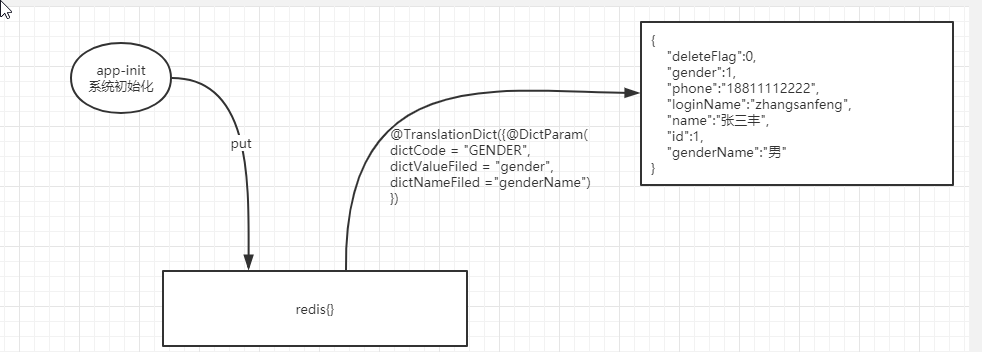
使用拦截器,初始化时加载缓存到,使用时判断注解,根据注解解析缓存类,并用正则表达式,翻译后重写json数据,直到返回结果
使用
系统启动时,初始化查询字典,将字典缓存到redis中格式为
/**
     * 功能描述: 加载字典到内存中
     *
     * @param dictInfo@return
     * @author Mei.HaiBo <mail:haibo.mei@ge.com>
     * @date 2019/4/15 17:14
     */
    @Override
    @ServiceCache(action = ServiceCacheActionEnum.UPDATE,scope = CacheType.DICT_INFO_TRANSLATION,keyExpression="#dictInfo.type")
    public WebReturn<DictInfo> loadDictInfoToCache(DictInfo dictInfo) {

        List<DictInfo> dictInfoList = dictSysCommonDetailMapper.loadDictInfoToCache(dictInfo);
        WebReturn webReturn = new WebReturn();
        webReturn.setData(dictInfoList);
        return webReturn;
    }
DICT_INFO_TRANSLATION#USER_GENDER_CODE {"data":[{"createDate":1517559323000,"dictCode":"USER_GENDER_CODE","dictId":1,"dictInfoId":1,"dictInfoName":"男性","dictInfoValue":0,"order":0},{"createDate":1517559323000,"dictCode":"USER_GENDER_CODE","dictId":1,"dictInfoId":2,"dictInfoName":"女性","dictInfoValue":1,"order":0},{"createDate":1517559323000,"dictCode":"USER_GENDER_CODE","dictId":1,"dictInfoId":3,"dictInfoName":"不男不女","dictInfoValue":2,"order":0}],"status":"200"}
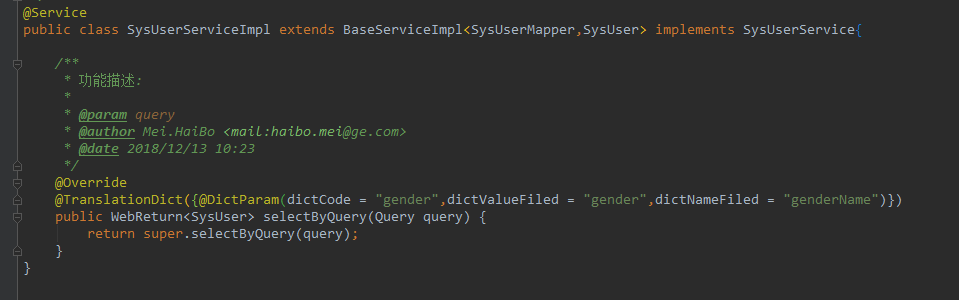
使用注解 @TranslationDict翻译字典
@TranslationDict({@DictParam(dictCode = "USER_GENDER_CODE",dictValueFiled = "gender",dictNameFiled = "genderName")})

@TranslationDict参数为@DictParam数组
@DictParam注解有三个属性:dictCode  要翻译字典的类型,如GENDER DEPT等
			dictValueFiled 需要翻译的字段,如user中的gender
			dictNameFiled 目标字段,将字典翻译后的值存入的字段名,为了维护需要在javabean中包含这个字段
例子
注解需要使用在service方法上
翻译完成后

注意
使用时要引入
	<dependency>
            <groupId>com.ge.hcd.ecg</groupId>
            <artifactId>ecg-cache-starter</artifactId>
            <version>${project.parent.version}</version>
        </dependency>
配置文件中,配置缓存为打开
ecg:
  cache:
    service:
      enable: true
转载于:https://my.oschina.net/angelbo/blog/3037408