问题一:https跨域问题
下面举了三个前后端分离项目的例子,配置都差不多,只不过我想写详细一些给你们看,因为我配置第一个项目的时候还好,但是配置第二个项目遇到了一些问题。所以多写几个例子,方便大家看的明白一些。
修改vue项目中 config 下的 index.js 配置文件,加上代理
dev: {
	assetsSubDirectory: 'static',
	assetsPublicPath: '/',
	proxyTable: {
	   '/api': { //代理标识
	       target: 'http://localhost:8888',
	       changeOrigin: true, // 允许跨域
	       secure: false,
	       pathRewrite: {
	           '^.api': '/'
	       }
	   },
	   '/apis': { //代理标识
	       target: 'http://localhost:8889',
	       changeOrigin: true, // 允许跨域
	       secure: false,
	       pathRewrite: {
	           '^.apis': '/'
	       }
	   },
	   '/apiss': { //代理标识
	       target: 'http://localhost:8887',
	       changeOrigin: true, // 允许跨域
	       secure: false,
	       pathRewrite: {
	           '^.apiss': '/'
	       }
	   },
}
打开Linux上的安装的nginx下的目录,对nginx.conf文件进行修改
在server 443里面进行修改
server {
  listen 443 ssl;
  server_name www.upahead.cn;
  root /www/wwwroot/upahead.cn;#前端文件存放地址(官网 前端文件存放地址)
  index index.html index.htm;
  ssl_certificate  cert/cert_file_name.pem;
  ssl_certificate_key cert/cert_file_name.key;
  ssl_session_timeout 5m;
  ssl_ciphers ECDHE-RSA-AES128-GCM-SHA256:ECDHE:ECDH:AES:HIGH:!NULL:!aNULL:!MD5:!ADH:!RC4;
  ssl_protocols TLSv1 TLSv1.1 TLSv1.2;
  ssl_prefer_server_ciphers on;
  location / { # 前端项目一
      index index.html index.htm;
  }

  location /manager{ # 前端项目二
  	alias /www/wwwroot/upahead.cn/manager/;#(Xxx 管理系统 前端文件存放地址)
  	try_files $uri $uri/ /manager/index.html;
  	index index.html index.htm;
  }

  location /farm{ # 前端项目三
  	alias /www/wwwroot/upahead.cn/farm/;#(Xxx 智慧农场 前端文件存放地址)
  	try_files $uri $uri/ /farm/index.html;
  	index index.html index.htm;
  }

  # https跨域配置
  add_header Access-Control-Allow-Origin *;
  add_header Access-Control-Allow-Headers X-Requested-With;
  add_header Access-Control-Allow-Methods GET,POST,OPTIONS;

  location /api { # 后端项目一
      rewrite  ^/api/?(.*)$ /$1 break;
      proxy_set_header Host $host;
      proxy_set_header X-Real-IP $remote_addr;
      proxy_set_header X-Forwarded-For $proxy_add_x_forwarded_for;
      proxy_pass http://xx.xx.xx.xx:8888/; # 转发地址
  }

  location /apis { # 后端项目二
      proxy_set_header Host $host;
      proxy_set_header X-Forwarded-For $proxy_add_x_forwarded_for;
      proxy_pass http://xx.xx.xx.xx:8889/; # 转发地址
  }

  location /apiss { # 后端项目三
	proxy_set_header Host $host;
	proxy_set_header X-Forwarded-For $proxy_add_x_forwarded_for;
	proxy_pass http://xx.xx.xx.xx:8887/; # 转发地址
  }
}
问题二:端口开放问题
如果访问项目不报跨域问题了,而是报504,那么一般情况下就是没有开放端口。
放行443端口、以及后端项目的端口号
1.因为我用的是阿里云服务器,所以进入阿里云,开放安全组规则,
我一共有三个项目,那就把三个项目的端口都开放了 2.或者在“宝塔面板”上放行端口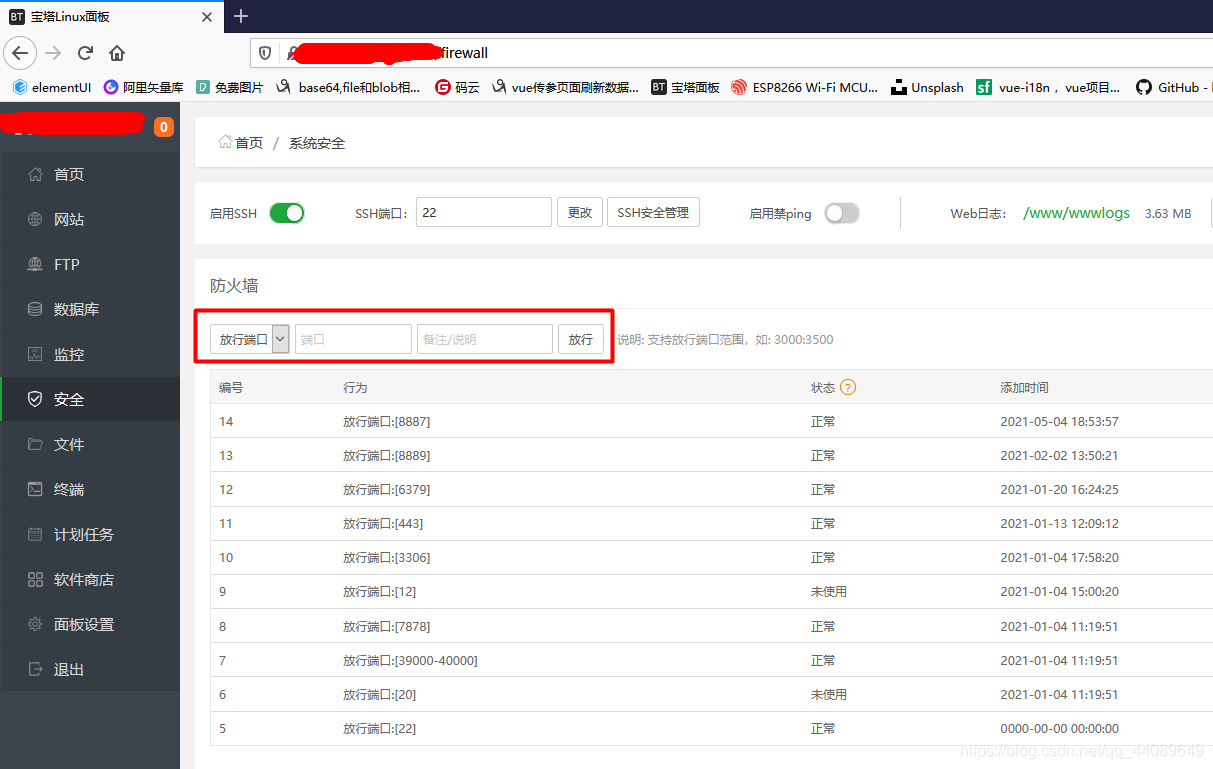
问题三:查看后端代码是否报错或未启动
还有些前两个都配置了,但是前端无法访问后端,那就先看看:
1.项目是否正常启动,查看进程命令
lsof -i:8888(这里的8888是你后端项目的端口号);
1.如果是SpringBoot项目,那么可以尝试更改SpringBoot的版本,回退一个版本试试
2.看看包是否导入完整
3.看看端口号是否被占用导致无法启动
2.项目是否报错了,查看日志命令 ,根据错误找对应的解决方式
tail -f nohup.out
tail -100f nohup.out
tips1:这是我自己写项目遇到的一部分问题,大家的问题不可能全部都一样,所以我发出来给大家借鉴一下。也有可能这就是你们遇到的问题,那我这篇文章就发挥了它的用处了。
tips2:这些配置都是我自己已经使用过的,我的很多个项目都用的这个配置,所以没什么问题,大家可以看看!
tips3:也可以把问题抛到评论区,我看看之前有没有遇到过类似的问题,可以帮大家解答一下的(我几乎每天都在的)。
版权声明:本文为qq_44089649原创文章,遵循CC 4.0 BY-SA版权协议,转载请附上原文出处链接和本声明。