springboot整合mybatis注解开发
这是总体的目录结构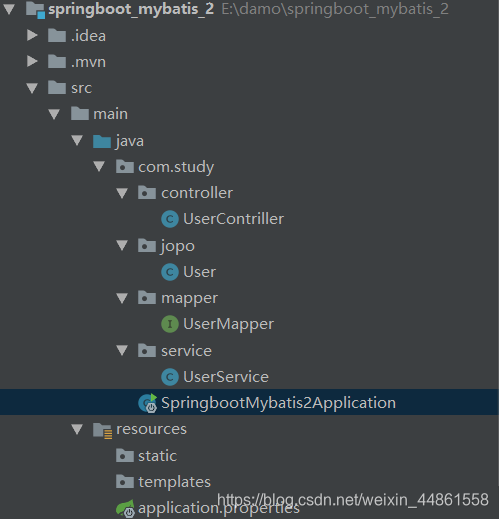
- 引入pom.xml的依赖
<?xml version="1.0" encoding="UTF-8"?>
<project xmlns="http://maven.apache.org/POM/4.0.0" xmlns:xsi="http://www.w3.org/2001/XMLSchema-instance"
         xsi:schemaLocation="http://maven.apache.org/POM/4.0.0 https://maven.apache.org/xsd/maven-4.0.0.xsd">
    <modelVersion>4.0.0</modelVersion>
    <parent>
        <groupId>org.springframework.boot</groupId>
        <artifactId>spring-boot-starter-parent</artifactId>
        <version>2.2.0.RELEASE</version>
        <relativePath/> <!-- lookup parent from repository -->
    </parent>
    <groupId>com.study</groupId>
    <artifactId>springboot_mybatis_2</artifactId>
    <version>0.0.1-SNAPSHOT</version>
    <name>springboot_mybatis_2</name>
    <description>Demo project for Spring Boot</description>

    <properties>
        <java.version>1.8</java.version>
    </properties>

    <dependencies>
        <dependency>
            <groupId>org.springframework.boot</groupId>
            <artifactId>spring-boot-starter-web</artifactId>
        </dependency>

        <dependency>
            <groupId>org.springframework.boot</groupId>
            <artifactId>spring-boot-starter-test</artifactId>
            <scope>test</scope>
            <exclusions>
                <exclusion>
                    <groupId>org.junit.vintage</groupId>
                    <artifactId>junit-vintage-engine</artifactId>
                </exclusion>
            </exclusions>
        </dependency>
        <dependency>
            <groupId>org.mybatis.spring.boot</groupId>
            <artifactId>mybatis-spring-boot-starter</artifactId>
            <version>1.3.2</version>
        </dependency>
        <dependency>
            <groupId>mysql</groupId>
            <artifactId>mysql-connector-java</artifactId>
        </dependency>
        <dependency>
            <groupId>junit</groupId>
            <artifactId>junit</artifactId>
        </dependency>
    </dependencies>

    <build>
        <plugins>
            <plugin>
                <groupId>org.springframework.boot</groupId>
                <artifactId>spring-boot-maven-plugin</artifactId>
            </plugin>
        </plugins>
    </build>

</project>
- 编写application.properties文件将数据库的连接密码配置导入
spring.datasource.driverClassName=com.mysql.jdbc.Driver
spring.datasource.url=jdbc:mysql://localhost:3306/mybatis?serverTimezone=UTC
spring.datasource.username=root
spring.datasource.password=4869
- 编写pojo的对象属性
package com.study.jopo;

import org.springframework.stereotype.Component;
//@Component 把普通pojo实例化到spring容器中,相当于配置文件中的<bean id="" class=""/>
@Component
public class User {
    private Integer id;
    private String  username;
    private String password;

    public Integer getId() {
        return id;
    }

    public void setId(Integer id) {
        this.id = id;
    }

    public String getUsername() {
        return username;
    }

    public void setUsername(String username) {
        this.username = username;
    }

    public String getPassword() {
        return password;
    }

    public void setPassword(String password) {
        this.password = password;
    }

    public User() {
    }

    public User(Integer id, String username, String password) {
        this.id = id;
        this.username = username;
        this.password = password;
    }

    @Override
    public String toString() {
        return "User{" +
                "id=" + id +
                ", username='" + username + '\'' +
                ", password='" + password + '\'' +
                '}';
    }
}
- 定义UserMapper接口来获取数据库里的数据
package com.study.mapper;

import com.study.jopo.User;
import org.apache.ibatis.annotations.Delete;
import org.apache.ibatis.annotations.Insert;
import org.apache.ibatis.annotations.Mapper;
import org.apache.ibatis.annotations.Select;

import java.util.List;

@Mapper
public interface UserMapper {
    //获取用户
    @Select("select * from user")
    public List<User> getUser();
    //根据id删除用户
    @Delete("delete from user where id =#{id}")
    public void deleteUser(int id);
    //新增用户
    @Insert("insert into user(id,username,password)values(#{id},#{username},#{password})")
    public void addUser(User user);
}
- 定义Service层的UserService将接口获得的数据放入Service提供的方法中
package com.study.service;

import com.study.jopo.User;
import com.study.mapper.UserMapper;
import org.springframework.beans.factory.annotation.Autowired;
import org.springframework.stereotype.Service;

import java.util.List;

@Service//@Service用于标注业务层组件
public class UserService {

    @Autowired
    private UserMapper userMapper;

    public List<User> getUser()
    {
        return userMapper.getUser();
    }
    public void deleteUser(int id)
    {
        userMapper.deleteUser(id);
    }
    public void addUser(User user)
    {
        userMapper.addUser(user);
    }
}
- 定义Controller层获取前端传来的参数调用Service层里的方法返回给前端页面
package com.study.controller;

import com.study.jopo.User;
import com.study.service.UserService;
import org.springframework.beans.factory.annotation.Autowired;
import org.springframework.web.bind.annotation.PathVariable;
import org.springframework.web.bind.annotation.RequestMapping;
import org.springframework.web.bind.annotation.RestController;

import java.util.List;

@RestController
public class UserContriller {
    @Autowired
    private UserService userService;
    @Autowired
    private User user;
    //显示用户
    @RequestMapping("/list")
    public List<User> index() throws Exception {
        return userService.getUser();
    }
    //删除用户
    @RequestMapping("/delete/{id}")
    public String delete(@PathVariable int id) throws Exception {
        userService.deleteUser(id);
        return "你已经删掉了id为"+id+"的用户";
    }
    //增加用户
    @RequestMapping("/addUser")
    public String addUser() throws Exception {
        user.setPassword("1768");
        user.setUsername("阿明");
        userService.addUser(user);
        return "增加用户";
    }
}
- 最后在主类上加上扫描
package com.study;

import org.mybatis.spring.annotation.MapperScan;
import org.springframework.boot.SpringApplication;
import org.springframework.boot.autoconfigure.SpringBootApplication;
@MapperScan(basePackages= {"com.study.mapper"})//扫描mapper接口的注解
@SpringBootApplication
public class SpringbootMybatis2Application {

    public static void main(String[] args) {
        SpringApplication.run(SpringbootMybatis2Application.class, args);
    }

}


版权声明:本文为weixin_44861558原创文章,遵循CC 4.0 BY-SA版权协议,转载请附上原文出处链接和本声明。