设置一个起始点,终止点,和速度。
一,在Hierarchy面板上右击,选择3D Object----Cube,建立Cube,并将Cube放到物体移动的终点(大小可以调整)

二,右击Project面板,Create----C# Script, 创建move脚本,双击输入:

using System.Collections;
using System.Collections.Generic;
using UnityEngine;

public class move : MonoBehaviour {

    public Transform start;
    public Transform end;
    public float speed;
    void Start()
    {
    }
    void Update()
    {
        transform.position = Vector3.MoveTowards(start.position,end.position,speed * Time.deltaTime);
    }
}
三,将脚本拖动到想要移动的物体的Inspector面板上,Start是要移动的物体,End是我们放置在终点的Cube,Speed速度可以根据需要进行设置。
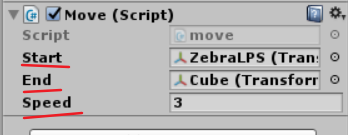
这样动画就可以移动了。
版权声明:本文为Ciel_Y原创文章,遵循CC 4.0 BY-SA版权协议,转载请附上原文出处链接和本声明。