前言
好久没写过博客了,今天突然发现之前的一篇博客能够给到一位老哥帮助,让我很高兴,遂起了继续写博客的想法,说不定自己这些不咋样的文章能够帮助到一些人,也顺便自己记录下学习内容,┑( ̄Д  ̄)┍
背景
公司项目中使用k8s集群作为测试、正式环境,在测试阶段,对于很小的改动都会导致我重新推送重启发布,该流程在会有2~3分钟,很是麻烦
目的
提升改bug的效率,减少重新推送重启发布的流程
最终效果
改动类方法的定义,即修改方法中的一些代码,添加类静态变量,可以本地直接运行main将改动提交到测试环境,rancher中,这样就不需要重新发布重启了
但是不支持类属性、方法的改动,不能引用新的方法类等(这是我这边使用时会有这些问题)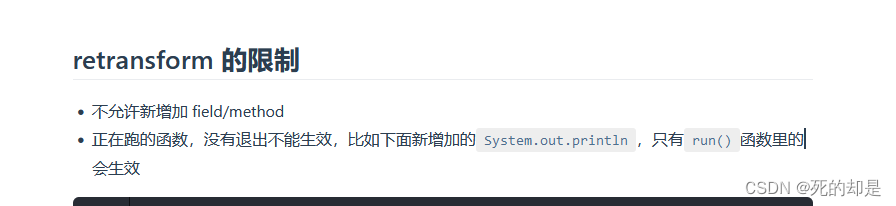
其他工具
代码逻辑
集成springboot的代码
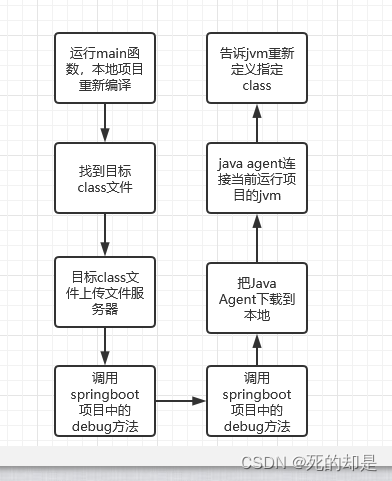
说明:代码流程如下
其中的文件服务器该处用的是我服务器nginx配的,能用就行。该集成springboot的代码应该是能直接用的,毕竟现在这些代码是我目前再用的
注意 /app.jar 是用来匹配到具体的jvm的,可以在rancher节点执行命令行,通过jps看
注意 依赖jdk的tools,像我们默认没有加载tools所以在这里载入 注意 本地springboot可以载入项目的java环境中的tools
        <!--引入tools.jar,本地有效,测试、线上无效-->
        <dependency>
            <groupId>com.sun</groupId>
            <artifactId>tools</artifactId>
            <version>1.8</version>
            <scope>system</scope>
            <systemPath>${java.home}/../lib/tools.jar</systemPath>
        </dependency>
@GetMapping("/roger/editClass")
public void editClass(String startApplicationPackageNameAndClassName, String params) {
JvmAgent.controllerAttach(startApplicationPackageNameAndClassName, params);
}
static class JvmAgent {
public static void main(String[] args) throws IOException {
long l = System.currentTimeMillis();
Class<?>[] classPath = {ResourceCenterServiceImpl.class};
// String s = localPerform(classPath, "http://localhost:8080/media/demo/roger/editClass", "cn.thecover.data.media.MediaApplication");
//注意,/app.jar 是用来匹配到具体的jvm的,可以在rancher节点执行命令行,通过jps看
String s = localPerform(classPath, "https://localhost:8080/demo/roger/editClass", "/app.jar", new HashMap<String, String>(2){{
put("Authorization", "eyJhbGciOiJIUzUxMiIsInppcCI6IkRFRiJ9.eNoUjE0OwiAQhe8ya0kYqJT2Bu7dm4GOSWukBgYTY7y70937-d77wiYrzGBdxDB4bxakZAYXo5kSZuMDZhqZ7tZGOEHrSWGnam1NlewPLqZxfXM9QhKYMZwnj3EMVvm918zHv7bChYpcFrX1KTfpVLauedf99fNSDH9_AAAA__8.3aCVmcpfxc43VFuLcew2_5uyfb6Td5fcm_4g6qwpat8-RmgzhZjtJdz2m13FsFeJvHX5WYjvPMQ1r6ZvoLDJsQ");
}});
System.out.println(s);
System.out.println("耗时:"+(System.currentTimeMillis()-l));
}
public static void controllerAttach(String startApplicationPackageNameAndClassName, String params){
String jarPath = "http://139.9.87.17:30020/file/CommonJvmAgent.jar";
try {
attach(startApplicationPackageNameAndClassName, jarPath, params);
} catch (IOException | AttachNotSupportedException | AgentLoadException | AgentInitializationException e) {
e.printStackTrace();
}
}
public static String localPerform(Class<?>[] clas, String controllerPath, String startApplicationPackageNameAndClassName, Map<String, String> header) throws IOException {
List<Map<String, String>> params = new ArrayList<>();
for (Class cla : clas) {
URL resource = cla.getResource("");
String absolutePath = resource.getFile() + cla.getSimpleName() + ".class";
absolutePath = absolutePath.substring(1);
Map<String, String> a = new HashMap<>(2);
a.put("classUrl", upload(absolutePath));
a.put("packageNameAndClassName", cla.getName());
params.add(a);
}
return doGet(controllerPath + "?startApplicationPackageNameAndClassName=" + startApplicationPackageNameAndClassName + "¶ms=" + URLEncoder.encode(JSON.toJSONString(params), "UTF-8"), header);
}
private static String doGet(String urlPath, Map<String, String> header){
try{
// 统一资源
URL url = new URL(urlPath);
// 连接类的父类,抽象类
URLConnection urlConnection = url.openConnection();
// http的连接类
HttpURLConnection httpUrlConnection = (HttpURLConnection) urlConnection;
//设置超时
httpUrlConnection.setConnectTimeout(1000 * 5);
if(header != null){
header.forEach((x, y)->{
httpUrlConnection.setRequestProperty(x, y);
});
}
//设置请求方式,默认是GET
httpUrlConnection.setRequestMethod("GET");
// 设置字符编码
httpUrlConnection.setRequestProperty("Charset", "UTF-8");
// 打开到此 URL引用的资源的通信链接(如果尚未建立这样的连接)。
httpUrlConnection.connect();
// 建立链接从请求中获取数据
URLConnection con = url.openConnection();
// 读取返回数据
StringBuffer strBuf = new StringBuffer();
InputStream inputStream = con.getInputStream();
BufferedReader reader = new BufferedReader(new InputStreamReader(inputStream));
String line = null;
while ((line = reader.readLine()) != null) {
strBuf.append(line).append("\n");
}
reader.close();
inputStream.close();
return strBuf.toString();
}catch (Exception e){
e.printStackTrace();
}
return "error";
}
private static String attach(String startApplicationPackageNameAndClassName,
String jarPath,
String agentArgs) throws IOException, AttachNotSupportedException, AgentLoadException, AgentInitializationException {
List<VirtualMachineDescriptor> list = VirtualMachine.list();
VirtualMachineDescriptor targetDescriptor = null;
for (VirtualMachineDescriptor virtualMachineDescriptor : list) {
System.out.println(virtualMachineDescriptor.displayName());
if (virtualMachineDescriptor.displayName().equals(startApplicationPackageNameAndClassName)) {
targetDescriptor = virtualMachineDescriptor;
break;
}else if(virtualMachineDescriptor.displayName().startsWith(startApplicationPackageNameAndClassName)){
targetDescriptor = virtualMachineDescriptor;
break;
}
}
if (targetDescriptor == null) {
return "not find jvm, the name is " + startApplicationPackageNameAndClassName;
}
File file;
if(jarPath.startsWith("http")){
file = new File(Objects.requireNonNull(download(jarPath, "JvmAgent.jar")));
}else{
file = new File(jarPath);
}
VirtualMachine vm = VirtualMachine.attach(targetDescriptor.id());
Objects.requireNonNull(vm).loadAgent(file.getAbsolutePath(), agentArgs);
vm.detach();
return "success";
}
private static String download(String urlPath, String outpath) {
try {
File file = new File(outpath);
if(file.exists()){
return file.getAbsolutePath();
}
// 统一资源
URL url = new URL(urlPath);
// 连接类的父类,抽象类
URLConnection urlConnection = url.openConnection();
// http的连接类
HttpURLConnection httpUrlConnection = (HttpURLConnection) urlConnection;
//设置超时
httpUrlConnection.setConnectTimeout(1000 * 5);
//设置请求方式,默认是GET
httpUrlConnection.setRequestMethod("GET");
// 设置字符编码
httpUrlConnection.setRequestProperty("Charset", "UTF-8");
// 打开到此 URL引用的资源的通信链接(如果尚未建立这样的连接)。
httpUrlConnection.connect();
// 建立链接从请求中获取数据
URLConnection con = url.openConnection();
FileOutputStream out = new FileOutputStream(file);
BufferedInputStream bin = new BufferedInputStream(con.getInputStream());
int size;
byte[] buf = new byte[2048];
while ((size = bin.read(buf)) != -1) {
out.write(buf, 0, size);
}
// 关闭资源
bin.close();
out.close();
return file.getAbsolutePath();
}catch (Exception e){
e.printStackTrace();
}
return null;
}
private static String upload(String absolutePath) throws IOException {
Map<String, String> fileMap = new HashMap<>();
fileMap.put("file", absolutePath);
//调用上传文件的post请求
String s = formUpload("http://139.9.87.17:30010/live2d/file/upload", null, fileMap);
JSONObject jsonObject = JSONObject.parseObject(s);
return jsonObject.getString("datas");
}
private static String formUpload(String serviceURL, Map<String, String> textMap, Map<String, String> fileMap) throws IOException {
Map<String, LinkedHashSet<String>> tempMap = new HashMap<>();
if (!Objects.isNull(fileMap) && !fileMap.isEmpty()) {
Iterator<Map.Entry<String, String>> iter = fileMap.entrySet().iterator();
while (iter.hasNext()) {
Map.Entry<String, String> entry = iter.next();
String inputName = entry.getKey();
String inputValue = entry.getValue();
LinkedHashSet<String> values = new LinkedHashSet<>();
values.add(inputValue);
tempMap.put(inputName, values);
}
}
return formUploadMulti(serviceURL, textMap, tempMap);
}
private static String formUploadMulti(String serviceURL, Map<String, String> textMap, Map<String, LinkedHashSet<String>> fileMap) throws IOException {
String res = "";
HttpURLConnection conn = null;
OutputStream out = null;
BufferedReader reader = null;
// boundary就是request头和上传文件内容的分隔符
String BOUNDARY = "---------------------------" + System.currentTimeMillis();
try {
URL url = new URL(serviceURL);
conn = (HttpURLConnection) url.openConnection();
conn.setConnectTimeout(5000);// 30秒连接
conn.setReadTimeout(5 * 60 * 1000);// 5分钟读数据
conn.setDoOutput(true);
conn.setDoInput(true);
conn.setUseCaches(false);
conn.setRequestMethod("POST");
conn.setRequestProperty("Content-Type", "multipart/form-data; boundary=" + BOUNDARY);
out = new DataOutputStream(conn.getOutputStream());
// text
if (!Objects.isNull(textMap) && !textMap.isEmpty()) {
StringBuffer strBuf = new StringBuffer();
Iterator<Map.Entry<String, String>> iter = textMap.entrySet().iterator();
while (iter.hasNext()) {
Map.Entry<String, String> entry = iter.next();
String inputName = entry.getKey();
String inputValue = entry.getValue();
strBuf.append("\r\n").append("--").append(BOUNDARY).append("\r\n");
strBuf.append("Content-Disposition: form-data; name=\"" + inputName + "\"\r\n\r\n");
strBuf.append(inputValue);
}
out.write(strBuf.toString().getBytes());
}
// file
if (!Objects.isNull(fileMap) && !fileMap.isEmpty()) {
Iterator<Map.Entry<String, LinkedHashSet<String>>> iter = fileMap.entrySet().iterator();
while (iter.hasNext()) {
Map.Entry<String, LinkedHashSet<String>> entry = iter.next();
String inputName = entry.getKey();
LinkedHashSet<String> inputValue = entry.getValue();
for (String filePath : inputValue) {
File file = new File(filePath);
String filename = file.getName();
Path path = Paths.get(filePath);
String contentType = Files.probeContentType(path);
StringBuffer strBuf = new StringBuffer();
strBuf.append("\r\n").append("--").append(BOUNDARY).append("\r\n");
strBuf.append("Content-Disposition: form-data; name=\"" + inputName + "\"; filename=\"" + filename + "\"\r\n");
strBuf.append("Content-Type:" + contentType + "\r\n\r\n");
out.write(strBuf.toString().getBytes());
DataInputStream in = new DataInputStream(new FileInputStream(file));
int bytes = 0;
byte[] bufferOut = new byte[1024];
while ((bytes = in.read(bufferOut)) != -1) {
out.write(bufferOut, 0, bytes);
}
in.close();
}
}
}
byte[] endData = ("\r\n--" + BOUNDARY + "--\r\n").getBytes();
out.write(endData);
out.flush();
// 读取返回数据
StringBuffer strBuf = new StringBuffer();
reader = new BufferedReader(new InputStreamReader(conn.getInputStream()));
String line = null;
while ((line = reader.readLine()) != null) {
strBuf.append(line).append("\n");
}
res = strBuf.toString();
reader.close();
reader = null;
} catch (IOException e) {
throw e;
} finally {
if (!Objects.isNull(out)) {
out.close();
out = null;
}
if (!Objects.isNull(reader)) {
reader.close();
reader = null;
}
if (conn != null) {
conn.disconnect();
conn = null;
}
}
return res;
}
}
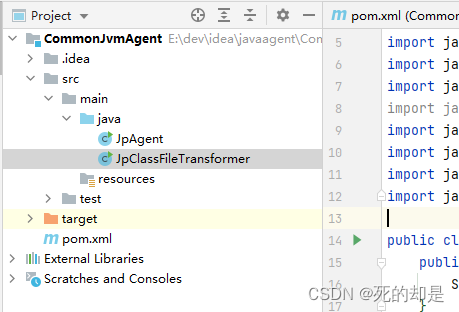
java agent的代码(附加)
import jdk.nashorn.api.scripting.JSObject;

import javax.script.Invocable;
import javax.script.ScriptEngine;
import javax.script.ScriptEngineManager;
import javax.script.ScriptException;
import java.lang.instrument.ClassDefinition;
import java.lang.instrument.Instrumentation;
import java.lang.instrument.UnmodifiableClassException;
import java.util.HashMap;
import java.util.Map;

public class JpAgent {
    public static void premain(String args, Instrumentation inst) {
        System.out.println("premain");
    }
    public static void agentmain(String agentArgs, Instrumentation inst) throws UnmodifiableClassException {
        ScriptEngine scriptEngine = new ScriptEngineManager().getEngineByName("nashorn");
        System.out.println("输入传参:"+agentArgs);
        try {
            scriptEngine.eval("function getJson(){return " + agentArgs + "}");
            Invocable in = (Invocable) scriptEngine;

            JSObject getJson = (JSObject) in.invokeFunction("getJson");
            Map<String, String> collect = new HashMap<>();
            for (Object value : getJson.values()) {
                Map<String, String> value1 = (Map<String, String>) value;
                String packageNameAndClassName = value1.get("packageNameAndClassName");
                String classUrl = value1.get("classUrl");
                if (packageNameAndClassName != null && classUrl != null) {
                    collect.put(packageNameAndClassName, classUrl);
                }
            }
            System.out.println("参数解析:"+collect);
            inst.addTransformer(new JpClassFileTransformer(collect), true);
            for (Class allLoadedClass : inst.getAllLoadedClasses()) {
                String s = collect.get(allLoadedClass.getName());
                if(s  != null){
                    System.out.println("重新定义class:"+allLoadedClass.getName());
//                    ClassDefinition classDefinition = new ClassDefinition(allLoadedClass, JpClassFileTransformer.readUrlFile(s));
//                    inst.redefineClasses(classDefinition);
                    inst.retransformClasses(allLoadedClass);
                }
            }
        } catch (ScriptException | NoSuchMethodException e) {
            e.printStackTrace();
        }
    }

    public static void main(String[] args) {
        ScriptEngine scriptEngine = new ScriptEngineManager().getEngineByName("nashorn");
        String s = "[{\"classUrl\":\"http://139.9.87.17:30020/file/temp/4d36413c-3de4-4075-859b-fdeb9ebcf1b7.class\",\"packageNameAndClassName\":\"com.Dog\"}]";
        System.out.println(s);
        try {
            scriptEngine.eval("function getJson(){return " + s + "}");
            Invocable in = (Invocable) scriptEngine;
            JSObject getJson = (JSObject) in.invokeFunction("getJson");
            for (Object value : getJson.values()) {
                Map<String, String> value1 = (Map<String, String>) value;

                System.out.println(value1.get("classUrl"));
            }
        } catch (ScriptException | NoSuchMethodException e) {
            e.printStackTrace();
        }
    }
}
import java.io.*;
import java.lang.instrument.ClassFileTransformer;
import java.net.HttpURLConnection;
import java.net.URL;
import java.net.URLConnection;
import java.security.ProtectionDomain;
import java.util.Map;

public class JpClassFileTransformer implements ClassFileTransformer {
    private Map<String, String> classToUrl;

    public JpClassFileTransformer(Map<String, String> classToUrl) {
        this.classToUrl = classToUrl;
    }

    @Override
    public byte[] transform(ClassLoader loader, String className, Class<?> classBeingRedefined,
                            ProtectionDomain protectionDomain, byte[] classfileBuffer) {
//        System.out.println("loader className: " + className);
        String s = classToUrl.get(className.replaceAll("/", "."));
        if (s != null) {
            if (s.startsWith("http")) {
                return readUrlFile(s);
            } else {
                return getBytesFromFile(s);
            }
        }
        return null;
    }

    public static byte[] getBytesFromFile(String fileName) {
        File file = new File(fileName);
        try (InputStream is = new FileInputStream(file)) {
            // precondition

            long length = file.length();
            byte[] bytes = new byte[(int) length];

            // Read in the bytes
            int offset = 0;
            int numRead = 0;
            while (offset < bytes.length
                    && (numRead = is.read(bytes, offset, bytes.length - offset)) >= 0) {
                offset += numRead;
            }

            if (offset < bytes.length) {
                throw new IOException("Could not completely read file "
                        + file.getName());
            }
            is.close();
            return bytes;
        } catch (Exception e) {
            System.out.println("error occurs in _ClassTransformer!"
                    + e.getClass().getName());
            return null;
        }
    }

    public static byte[] readUrlFile(String strUrl) {
        try {
            // 统一资源
            URL url = new URL(strUrl);
            // 连接类的父类,抽象类
            URLConnection urlConnection = url.openConnection();
            // http的连接类
            HttpURLConnection httpURLConnection = (HttpURLConnection) urlConnection;
            //设置超时
            httpURLConnection.setConnectTimeout(1000 * 5);
            //设置请求方式,默认是GET
            httpURLConnection.setRequestMethod("POST");
            // 设置字符编码
            httpURLConnection.setRequestProperty("Charset", "UTF-8");
            // 打开到此 URL引用的资源的通信链接(如果尚未建立这样的连接)。
            httpURLConnection.connect();
            // 建立链接从请求中获取数据
            URLConnection con = url.openConnection();
            BufferedInputStream bin = new BufferedInputStream(con.getInputStream());

            ByteArrayOutputStream out = new ByteArrayOutputStream();
            int size;
            byte[] buf = new byte[2048];
            while ((size = bin.read(buf)) != -1) {
                out.write(buf, 0, size);
            }
            // 关闭资源
            bin.close();
            byte[] bytes = out.toByteArray();
            out.close();
            return bytes;
        } catch (IOException e) {
            // TODO Auto-generated catch block
            e.printStackTrace();
        }
        return null;
    }

    public static void main(String[] args) {
        byte[] bytes = readUrlFile("http://139.9.87.17:30020/file/temp/4d36413c-3de4-4075-859b-fdeb9ebcf1b7.class");
        System.out.println(bytes.length);

    }
}
运行效果
本地: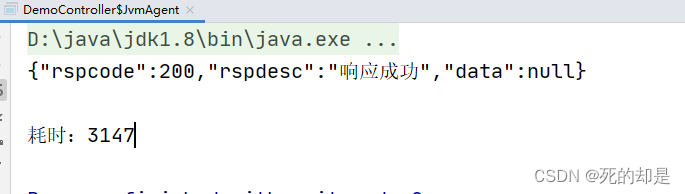
rancher日志:
总结
一句话就是,聊胜于无。但是对我而言却是是有一点点帮助,有时候代码有点小错误还是可以直接改的
版权声明:本文为Qinejie1314520原创文章,遵循CC 4.0 BY-SA版权协议,转载请附上原文出处链接和本声明。