目录
一、概述
有时候Ui需要显示的信息由不止一个数据来源决定,这时候就需要使用MultiBinding。MultiBinding与Binding一样均以BindingBase为基类。也就是说,凡是能使用Binding对象的场合都能使用MultiBinding。MultiBinding具有一个名为Binding的属性,其类型是Collection<BindingBase>,通过这个属性把一组Binding对象聚合起来,处在这个集合中的Binding对象可以拥有自己的数据效验和转换机制,它们汇集起来的数据共同决定传往MultiBinding目标的数据。
二、实例
考虑这样一个需求,有一个用于新用户注册的UI(包含4个TextBox和一个Button),还有如下一些限定:
一二个TextBox输入的用户名,要求内容一致。
三四个TextBox输入的用户名E-Mail,要求内容一致。
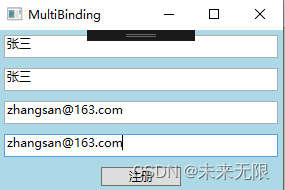
当TextBox的内容全部符合要求的时候,Button可用。
此UI的XAML代码如下:
<Window x:Class="WpfApp1.MainWindow"
        xmlns="http://schemas.microsoft.com/winfx/2006/xaml/presentation"
        xmlns:x="http://schemas.microsoft.com/winfx/2006/xaml"
        xmlns:d="http://schemas.microsoft.com/expression/blend/2008"
        xmlns:mc="http://schemas.openxmlformats.org/markup-compatibility/2006"
        xmlns:local="clr-namespace:WpfApp1"
        mc:Ignorable="d"
        Title="MultiBinding" Height="200" Width="300">
    <StackPanel Background="LightBlue">
        <TextBox x:Name="txtbox1" Height="23" Margin="5"/>
        <TextBox x:Name="txtbox2" Height="23" Margin="5"/>
        <TextBox x:Name="txtbox3" Height="23" Margin="5"/>
        <TextBox x:Name="txtbox4" Height="23" Margin="5"/>
        <Button x:Name="button1" Content="注册" Width="80" Margin="5"/>
    </StackPanel>
</Window>
CS代码:
public MainWindow()
        {
            InitializeComponent();

            Binding bind1 = new Binding("Text") { Source = this.txtbox1 };
            Binding bind2 = new Binding("Text") { Source = this.txtbox2 };
            Binding bind3 = new Binding("Text") { Source = this.txtbox3 };
            Binding bind4 = new Binding("Text") { Source = this.txtbox4 };

            MultiBinding mb = new MultiBinding() { Mode = BindingMode.OneWay };
            mb.Bindings.Add(bind1);
            mb.Bindings.Add(bind2);
            mb.Bindings.Add(bind3);
            mb.Bindings.Add(bind4);

            mb.Converter = new LogonMultiBindingConverter();
            this.button1.SetBinding(Button.IsEnabledProperty, mb);
        }
Converter类代码如下:
public class LogonMultiBindingConverter : IMultiValueConverter
    {
        public object Convert(object[] values, Type targetType, object parameter, CultureInfo culture)
        {
            if (!values.Cast<string>().Any(text => string.IsNullOrEmpty(text))
            && values[0].ToString() == values[1].ToString()
            && values[2].ToString() == values[3].ToString())
            {
                return true;
            }
            return false;
        }
        public object[] ConvertBack(object values, Type[] targetTypes, object parameter, CultureInfo culture)
        {
            throw new NotImplementedException();
        }
}
效果如下:
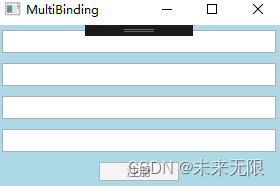
输入正确信息后,Button可用:
版权声明:本文为qq_30725967原创文章,遵循CC 4.0 BY-SA版权协议,转载请附上原文出处链接和本声明。