 `using System;
using System.Collections.Generic;
using System.ComponentModel;
using System.Data;
using System.Drawing;
using System.Linq;
using System.Text;
using System.Windows.Forms;
using ZXing;
using ZXing.Common;
namespace WindowsFormsApp5
{
public partial class Form1 : Form
{
    public Form1()
    {
        InitializeComponent();


    }

    private void Form1_Load(object sender, EventArgs e)
    {


        this.ShowInTaskbar = true;

    }


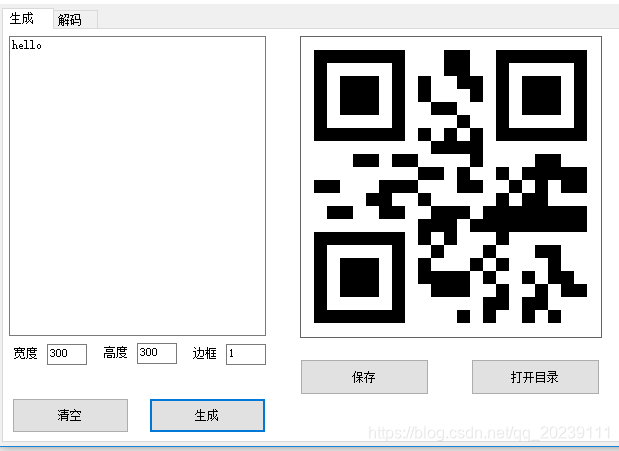
    private Bitmap generentcode (string 文本, int _width,int _hight,int _margin)
    {
        Bitmap result = null;
        BarcodeWriter barcodeWriter = new BarcodeWriter();
        barcodeWriter.Format = BarcodeFormat.QR_CODE;
       barcodeWriter.Options.Height = _hight;
       barcodeWriter.Options.Width = _width;
        barcodeWriter.Options.Margin = _margin;
        barcodeWriter.Options.Hints.Add(EncodeHintType.CHARACTER_SET, "UTF-8");
        barcodeWriter.Options.Hints.Add(EncodeHintType.ERROR_CORRECTION, ZXing.QrCode.Internal.ErrorCorrectionLevel.H);
        ZXing.Common.BitMatrix pic = barcodeWriter.Encode(文本);
        result = barcodeWriter.Write(pic);
        return result;

     }


    private void button1_Click_2(object sender, EventArgs e)
    {

        if (textBox_width.Text == "")
        {
            MessageBox.Show("请输入宽度!");
        }
        else
        {
            int _width = Convert.ToInt32(textBox_width.Text);
            if (textBox_hight.Text == "")
            {
                MessageBox.Show("请输入高度!");
            }
            else
            {
                int _height = Convert.ToInt32(textBox_hight.Text);
                int _margin = Convert.ToInt32(textBox_margin.Text);
                if (textBox_msg.Text == "")
                {
                    MessageBox.Show("请输入要编码的文本!");
                }
                else {
                    pictureBox1.Image = generentcode(textBox_msg.Text, _width, _height, _margin);
                }

            }
        }

    }
    // 下面是文本框属性,只能输入数字 和 退格键!
    private void button2_Click_1(object sender, EventArgs e)
    {
        textBox_msg.Text = "";
        pictureBox1.Image = null;
    }

    private void textBox_width_KeyPress(object sender, KeyPressEventArgs e)
    {
        if (e.KeyChar != '\b' && !Char.IsDigit(e.KeyChar))
        {
            e.Handled = true;
        }
    }

    private void textBox_hight_KeyPress(object sender, KeyPressEventArgs e)
    {
        if (e.KeyChar != '\b' && !Char.IsDigit(e.KeyChar))
        {
            e.Handled = true;
        }
    }

    private void textBox_margin_KeyPress(object sender, KeyPressEventArgs e)
    {
        if (e.KeyChar != '\b' && !Char.IsDigit(e.KeyChar))
        {
            e.Handled = true;
        }
    }

    private void button3_Click(object sender, EventArgs e)
    {
        string 文件名 = 时间类.GetTimeStamp(DateTime.Now.ToLocalTime(),13);
        // this.Text = 文件名;
        文件名 = 文件名 + ".jpg";
        Bitmap bm = new Bitmap(pictureBox1.Image);
      //  _imageformat = System.Drawing.Imaging.ImageFormat.Png;

        bm.Save(Application.StartupPath+"\\"+文件名,System.Drawing.Imaging.ImageFormat.Jpeg );
        MessageBox.Show("保存成功!");

    }

    private void button4_Click(object sender, EventArgs e)
    {
        System.Diagnostics.Process.Start("ExpLore", Application.StartupPath);
    }

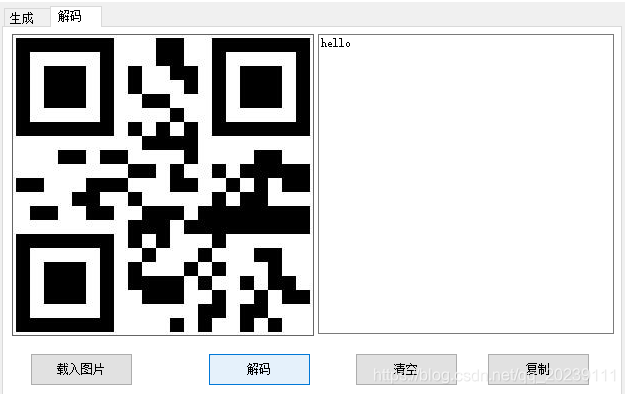
    private string DecodeQrCode(Bitmap barcodeBitmap)
    {
        BarcodeReader reader = new BarcodeReader();
        //reader.Options.CharacterSet = "UTF-8";
        var result = reader.Decode(barcodeBitmap);
        return (result == null) ? null : result.Text;
    }

    private void button5_Click(object sender, EventArgs e)
    {
        Bitmap bm = new Bitmap(pictureBox2.Image);
        textBox_DeMsg.Text = DecodeQrCode(bm);
    }

    private void button6_Click(object sender, EventArgs e)
    {
        OpenFileDialog ofd = new OpenFileDialog();
        if (ofd.ShowDialog() == DialogResult.OK)
        {
            string _filename = ofd.FileName;
            pictureBox2.Image = Image.FromFile(_filename);
        }
    }

    private void button7_Click(object sender, EventArgs e)
    {
        textBox_DeMsg.Text = "";

    }

    private void button8_Click(object sender, EventArgs e)
    {
        if (textBox_DeMsg.Text!="")
        {
            //textBox_DeMsg.Copy ()
            Clipboard.SetDataObject(textBox_DeMsg.Text);
            MessageBox.Show("复制成功!");
        }
    }
}
}
`
版权声明:本文为qq_20239111原创文章,遵循CC 4.0 BY-SA版权协议,转载请附上原文出处链接和本声明。