题目:
一、基于Zookeeper实现简易版配置中心要求实现以下功能:
- 创建一个Web项目,将数据库连接信息交给Zookeeper配置中心管理,即:当项目Web项目启动时,从Zookeeper进行MySQL配置参数的拉取
- 要求项目通过数据库连接池访问MySQL(连接池可以自由选择熟悉的)
- 当Zookeeper配置信息变化后Web项目自动感知,正确释放之前连接池,创建新的连接池
思路:
1.新建maven web项目,导入相关jar包;
2.使用druid连接池自动管理连接;
3.读取本地配置文件并上传到zk;然后读取zk节点信息初始化druid配置;
4.使用zk监听器监听数据变化,执行对应操作;
5.手动更新zk数据,触发zk监听器。
代码:
pom文件:
	<dependency>
      <groupId>junit</groupId>
      <artifactId>junit</artifactId>
      <version>4.11</version>
      <scope>test</scope>
    </dependency>

    <!-- druid连接池 -->
    <dependency>
      <groupId>com.alibaba</groupId>
      <artifactId>druid</artifactId>
      <version>1.1.22</version>
    </dependency>

    <!-- mysql驱动-->
    <dependency>
      <groupId>mysql</groupId>
      <artifactId>mysql-connector-java</artifactId>
      <version>5.1.45</version>
    </dependency>

    <!-- zk相关jar包 -->
    <dependency>
      <groupId>org.apache.zookeeper</groupId>
      <artifactId>zookeeper</artifactId>
      <version>3.4.14</version>
    </dependency>
    <dependency>
      <groupId>com.101tec</groupId>
      <artifactId>zkclient</artifactId>
      <version>0.2</version>
    </dependency>
本地配置常量类:
package com.lagou;

public class Const {
//   数据库配置信息
    public static final String JDBCURL = "jdbc:mysql://bfd01.com:3306/hive?characterEncoding=UTF-8";
    public static final String USERNAME = "root";
    public static final String PASSWORD = "123456";

//    zk连接信息
    public static final String ZKHOSTS = "bfd01.com,bfd02.com,bfd03.com";
}
druid连接池工具类:
package com.lagou;

import com.alibaba.druid.pool.DruidDataSourceFactory;
import org.I0Itec.zkclient.ZkClient;
import org.slf4j.Logger;
import org.slf4j.LoggerFactory;

import javax.sql.DataSource;
import java.sql.Connection;
import java.sql.ResultSet;
import java.sql.SQLException;
import java.sql.Statement;
import java.util.HashMap;
import java.util.Map;

public class DruidUtils {
//    private static DataSource dataSource;
    static Logger logger = LoggerFactory.getLogger(DruidUtils.class);


    /**
     * 获取zk节点中的数据库配置信息并加载配置信息
     * @param path zk节点路径
     * @param zkClient zk客户端连接
     */
    public static DataSource addConf(ZkClient zkClient ,String path){
//        ZkUtils.createNode(zkClient,path);
        String dbConfig = zkClient.readData(path);
        String url = dbConfig.split("\t")[0];
        String username = dbConfig.split("\t")[1];
        String password = dbConfig.split("\t")[2];
        logger.info("dbConfig from zk is " +dbConfig);
        logger.info("url = " + url);
        logger.info("username = " + username);
        logger.info("password = " + password);
        DataSource dataSource = null;
        try {
            Map<String,String> dbConfigMap = new HashMap<>();
            dbConfigMap.put("url",url);
            dbConfigMap.put("username",username);
            dbConfigMap.put("password",password);
            dataSource = DruidDataSourceFactory.createDataSource(dbConfigMap);
        }  catch (Exception e) {
            e.printStackTrace();
            return null;
        }
        return dataSource;
    }
//    获取连接
    public static Connection getConnection(DataSource dataSource){
        try {
            return dataSource.getConnection();
        } catch (SQLException e) {
            e.printStackTrace();
        }
        return null;
    }

//    释放资源
    public static void close(Connection con, Statement statement, ResultSet resultSet){
        if (con != null && statement !=null && resultSet !=null){
            try {
                resultSet.close();
                statement.close();
                con.close();
            } catch (SQLException e) {
                e.printStackTrace();
            }
        }
    }

    /**
     * 执行查看数据库中所有表数据的查询
     * @param zkPath zk数据库连接信息
     * @param dataSource druid连接
     */
    public static void execQuery(DataSource dataSource,String zkPath){
//        DruidUtils.addConf(zkClient,zkPath);
        Connection con = DruidUtils.getConnection(dataSource);
        Statement statement = null;
        ResultSet re = null;
        try {
            statement = con.createStatement();
            re = statement.executeQuery("show tables");
            while (re.next()){
                logger.info(re.getString(1));
            }
        } catch (SQLException e) {
            e.printStackTrace();
        }
        DruidUtils.close(con,statement,re);
    }
}
自定义zk序列化与反序列化类:
package com.lagou;

import org.I0Itec.zkclient.exception.ZkMarshallingError;
import org.I0Itec.zkclient.serialize.ZkSerializer;

public class ZkStrSerializer implements ZkSerializer {
    @Override
    public byte[] serialize(Object o) throws ZkMarshallingError {
        return  String.valueOf(o).getBytes();
    }

    @Override
    public Object deserialize(byte[] bytes) throws ZkMarshallingError {
        return new String(bytes);
    }
}
zk工具类:
package com.lagou;

import org.I0Itec.zkclient.ZkClient;
import org.slf4j.Logger;
import org.slf4j.LoggerFactory;


public class ZkUtils {
    static Logger logger = LoggerFactory.getLogger(ZkUtils.class);


//  获取连接
    public static ZkClient getCon(){
        ZkClient zkClient = new ZkClient(Const.ZKHOSTS);
        logger.info("get Connection!");
        return zkClient;
    }

    /**
     * 创建节点和数据
     * @param zkClient zk客户端
     * @param path zk节点路径
     */
    public static void createNode(ZkClient zkClient, String path){
//       判断节点是否存在
        boolean exists = zkClient.exists(path);
        String dbConfig = Const.JDBCURL +"\t" + Const.USERNAME + "\t" + Const.PASSWORD;
        logger.info("dbConfig is " +dbConfig);
//        不存在则创建
        if (!exists){
//        创建节点并写入数据库连接信息
            zkClient.createPersistent(path,true);
            zkClient.writeData(path,dbConfig);
//            zkClient.delete(path);
        }else {
            zkClient.writeData(path,dbConfig);
            logger.info("new dbconfig is " + dbConfig);
            logger.info("data write success!!!");
        }
        logger.info(path +" created!");
    }

}
测试类:
我这里用的是手动更新数据库的url连接,然后使用show tables查询数据,来模拟更新zk节点数据的操作。
package com.lagou;


import org.I0Itec.zkclient.IZkDataListener;
import org.I0Itec.zkclient.ZkClient;
import org.slf4j.Logger;
import org.slf4j.LoggerFactory;

import javax.sql.DataSource;
import java.sql.SQLException;


public class JdbcTest {
    static ZkClient zkClient = null;

    public static void main(String[] args) throws SQLException, InterruptedException {

        String zkPath = "/lg-zkClient/dbConfig";
//        获取zk连接
        zkClient = ZkUtils.getCon();
//        使用自定义序列化
        zkClient.setZkSerializer(new ZkStrSerializer());
//        创建zk节点并将常量文件中的数据库配置信息写入zk
        ZkUtils.createNode(zkClient,zkPath);
//        使用配置信息初始化数据库连接信息
        DataSource dataSource = DruidUtils.addConf(zkClient, zkPath);
//        执行查询
        DruidUtils.execQuery(dataSource,zkPath);
        Thread.sleep(3000);
//        ZkUtils.listen(zkClient,zkPath);

//        匿名内部类监听节点数据是否变化
        zkClient.subscribeDataChanges(zkPath, new IZkDataListener() {
            Logger logger = LoggerFactory.getLogger(JdbcTest.class);
            @Override
            public void handleDataChange(String s, Object o) throws Exception {
                logger.info(s + "data is changed,new data" + o);
//                配置信息变化,重新获取配置信息并执行查询
                DataSource dataSource = DruidUtils.addConf(zkClient, s);
                DruidUtils.execQuery(dataSource,s);
            }

            @Override
            public void handleDataDeleted(String s) throws Exception {
                logger.info(s + "is deleted!!!");
            }
        });

//      手动更新zk节点里的配置信息,用来触发监听器
        zkClient.writeData(zkPath,"jdbc:mysql://bfd01.com:3306/mysql?characterEncoding=UTF-8	root	123456");
        Thread.sleep(5000);
    }
}
演示结果:
启动程序从常量类中读取配置信息并查询结果
手动更新zk节点信息后,执行新的查询结果
题目二:
在社交网站,社交APP上会存储有大量的用户数据以及用户之间的关系数据,比如A用户的好友列表会展示出他所有的好友,现有一张Hbase表,存储就是当前注册用户的好友关系数据,如下: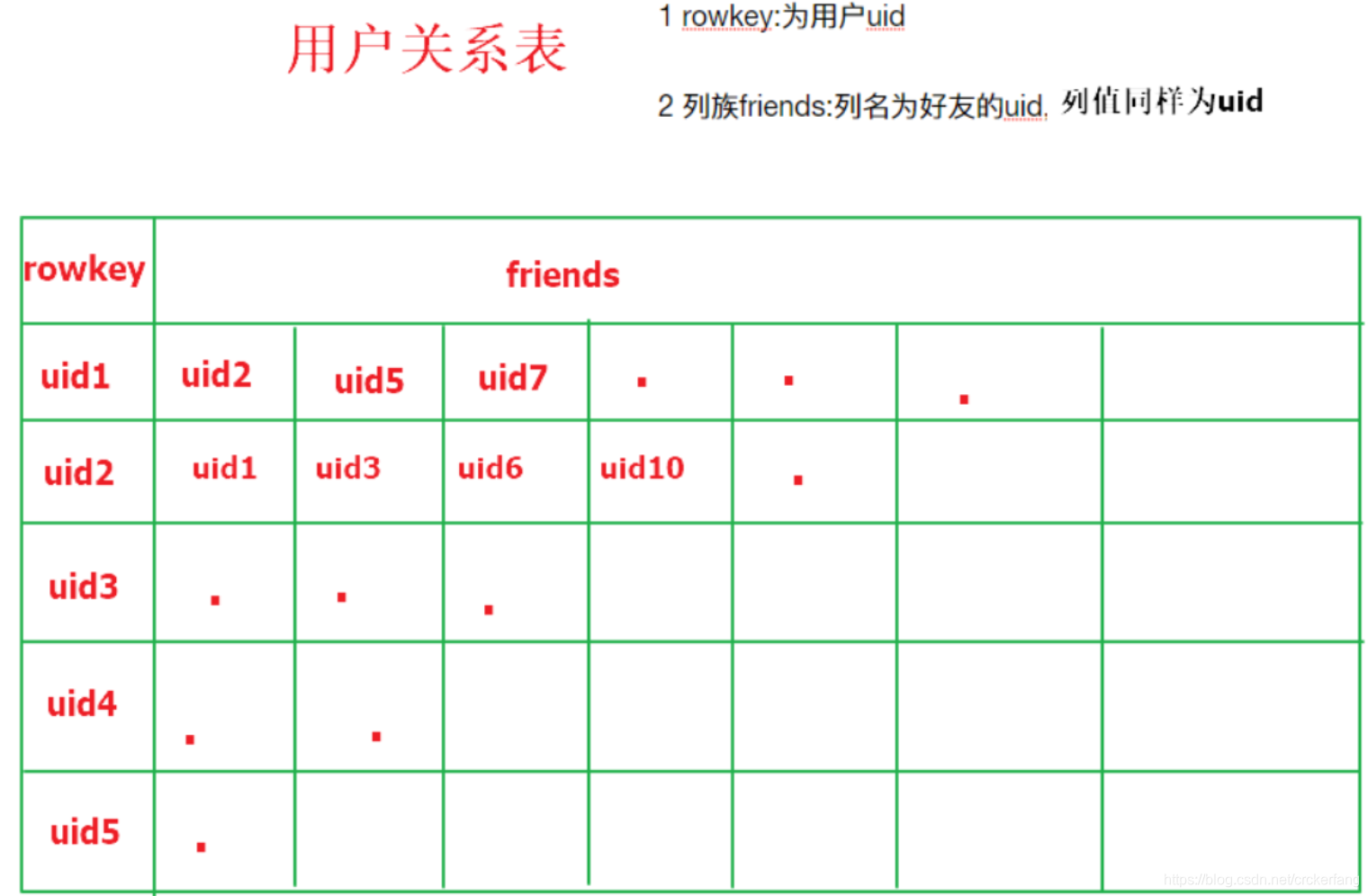
需求
- 使用Hbase相关API创建一张结构如上的表
- 删除好友操作实现(好友关系双向,一方删除好友,另一方也会被迫删除好友)
例如:uid1用户执行删除uid2这个好友,则uid2的好友列表中也必须删除uid1
思路:
1.使用API创建表;
2.使用API插入数据;
3.使用协处理器处理双向删除
代码:
pom文件
<dependency>
        <groupId>org.apache.hbase</groupId>
        <artifactId>hbase-client</artifactId>
        <version>1.2.0</version>
    </dependency>
    <dependency>
        <groupId>junit</groupId>
        <artifactId>junit</artifactId>
        <version>4.12</version>
        <scope>compile</scope>
    </dependency>
    <dependency>
        <groupId>org.apache.hbase</groupId>
        <artifactId>hbase-server</artifactId>
        <version>1.2.0</version>
    </dependency>
HbaseClient类:
package com.lagou;

import com.sun.org.apache.bcel.internal.generic.PUTFIELD;
import org.apache.hadoop.conf.Configuration;
import org.apache.hadoop.hbase.*;
import org.apache.hadoop.hbase.client.*;
import org.apache.hadoop.hbase.util.Bytes;
import org.junit.After;
import org.junit.Before;
import org.junit.Test;
import org.slf4j.Logger;
import org.slf4j.LoggerFactory;

import java.io.IOException;
import java.util.ArrayList;
import java.util.List;

public class HbaseClient {
    Configuration conf = null;
    Connection conn = null;
    HBaseAdmin admin = null;
    Logger logger = LoggerFactory.getLogger(HbaseClient.class);

//  hbase连接信息
    @Before
    public void init() throws IOException {
        conf = HBaseConfiguration.create();
        conf.set("hbase.zookeeper.quorum","bfd01.com,bfd02.com,bfd03.com");
        conf.set("hbase.zookeeper.property.clientPort","2181");
        conn = ConnectionFactory.createConnection(conf);
        logger.info("Hbase connected!!!");
    }

//    断开连接
    @After
    public void destroy() throws IOException {
        if (admin != null){
            admin.close();
        }
        if (conn != null){
            conn.close();
        }
        logger.info("Hbase disconnected!!!");
    }

    @Test
    public void createTable() throws IOException {
        admin = (HBaseAdmin) conn.getAdmin();
//        创建表描述器
        HTableDescriptor relation = new HTableDescriptor(TableName.valueOf("relations"));
//        设置列族描述器
        relation.addFamily(new HColumnDescriptor("friends"));
//        执行操作
        admin.createTable(relation);
        logger.info("releation table created!");
    }

    @Test
    public void putData() throws IOException {
//        获取一个表对象
        Table t = conn.getTable(TableName.valueOf("relations"));
//        设置rowkey
        Put put = new Put(Bytes.toBytes("uid1"));
        List<Put> puts = new ArrayList<Put>();
//        添加数据
        put.addColumn(Bytes.toBytes("friends"), Bytes.toBytes("uid2"), Bytes.toBytes("uid2"));
        put.addColumn(Bytes.toBytes("friends"), Bytes.toBytes("uid3"), Bytes.toBytes("uid3"));
        put.addColumn(Bytes.toBytes("friends"), Bytes.toBytes("uid4"), Bytes.toBytes("uid4"));
        puts.add(put);
        //设置rowkey
        put = new Put(Bytes.toBytes("uid2"));
//        添加数据
        put.addColumn(Bytes.toBytes("friends"), Bytes.toBytes("uid1"), Bytes.toBytes("uid1"));
        put.addColumn(Bytes.toBytes("friends"), Bytes.toBytes("uid3"), Bytes.toBytes("uid3"));
        puts.add(put);
        //设置rowkey
        put = new Put(Bytes.toBytes("uid3"));
//        添加数据
        put.addColumn(Bytes.toBytes("friends"), Bytes.toBytes("uid1"), Bytes.toBytes("uid1"));
        put.addColumn(Bytes.toBytes("friends"), Bytes.toBytes("uid2"), Bytes.toBytes("uid2"));
        puts.add(put);
        //设置rowkey
        put = new Put(Bytes.toBytes("uid4"));
//        添加数据
        put.addColumn(Bytes.toBytes("friends"), Bytes.toBytes("uid1"), Bytes.toBytes("uid1"));
        puts.add(put);
//       执行插入
        t.put(puts);
        logger.info("data put success!");
    }

    @Test
    public void scanAllData() throws IOException {
        HTable relation = (HTable) conn.getTable(TableName.valueOf("relations"));
        Scan scan = new Scan();
        ResultScanner results = relation.getScanner(scan);
        for (Result result : results) {
            Cell[] cells = result.rawCells();
            for (Cell cell : cells) {
                String cf = Bytes.toString(CellUtil.cloneFamily(cell));
                String column = Bytes.toString(CellUtil.cloneQualifier(cell));
                String value = Bytes.toString(CellUtil.cloneValue(cell));
                String rowKey = Bytes.toString(CellUtil.cloneRow(cell));
                logger.info(rowKey + "-------" +cf + "----" + column + "----" + value);
            }
        }
    }

}
协处理器类:
package com.lagou;

import org.apache.hadoop.hbase.Cell;
import org.apache.hadoop.hbase.CellUtil;
import org.apache.hadoop.hbase.TableName;
import org.apache.hadoop.hbase.client.*;
import org.apache.hadoop.hbase.coprocessor.BaseRegionObserver;
import org.apache.hadoop.hbase.coprocessor.ObserverContext;
import org.apache.hadoop.hbase.coprocessor.RegionCoprocessorEnvironment;
import org.apache.hadoop.hbase.regionserver.wal.WALEdit;
import org.apache.hadoop.hbase.util.Bytes;
import org.apache.hadoop.hbase.util.CollectionUtils;
import org.slf4j.Logger;
import org.slf4j.LoggerFactory;

import java.io.IOException;
import java.util.List;
import java.util.Map;
import java.util.Set;

public class DelProcessor extends BaseRegionObserver {
    Logger logger = LoggerFactory.getLogger(HbaseClient.class);

    @Override
    public void postDelete(ObserverContext<RegionCoprocessorEnvironment> e, Delete delete, WALEdit edit, Durability durability) throws IOException {
        HTableInterface relations = e.getEnvironment().getTable(TableName.valueOf("relations"));
        byte[] row = delete.getRow();
        Set<Map.Entry<byte[], List<Cell>>> entries = delete.getFamilyCellMap().entrySet();
        for (Map.Entry<byte[], List<Cell>> entry : entries) {
            logger.info("------------" + Bytes.toString(entry.getKey()));
            List<Cell> values = entry.getValue();
            for (Cell value : values) {
                byte[] rowkey = CellUtil.cloneRow(value);
                byte[] column = CellUtil.cloneQualifier(value);
                logger.info(" rowkey------------" + rowkey);
                logger.info(" column------------" + column);
//                判断要删除的数据是否存在
                boolean flag = relations.exists(new Get(column).addColumn(Bytes.toBytes("friends"),rowkey));

                if (flag){
                    logger.info("begin delete---------" + column+"--" + rowkey );
                    Delete deleteF = new Delete(column).addColumn(Bytes.toBytes("friends"), rowkey);
                    relations.delete(deleteF);
                }
            }
        }
        relations.close();
    }
}
打包上传并注册协处理器
hdfs dfs -mkdir -p /processor
hdfs dfs -put /root/Hbase.jar /processor
alter 'relations',METHOD =>'table_att','Coprocessor'=>'hdfs://bfd01.com/processor/Hbase.jar|com.lagou.DelProcessor|1001|'
最终结果:
删除前数据
手动删除uid1 的uid2数据后表中数据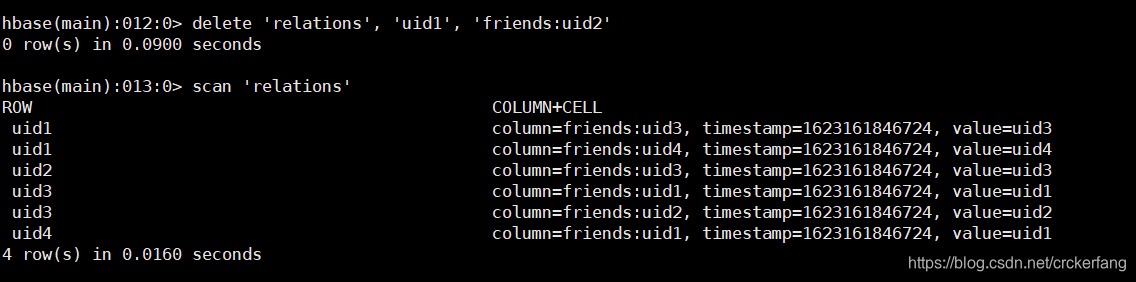
3.
现有用户点击行为数据文件,每天产生会上传到hdfs目录,按天区分目录,现在我们需要每天凌晨两点定时导入Hive表指定分区中,并统计出今日活跃用户数插入指标表中。
日志文件
clicklog
userId click_time index
uid1 2020-06-21 12:10:10 a.html
uid2 2020-06-21 12:15:10 b.html
uid1 2020-06-21 13:10:10 c.html
uid1 2020-06-21 15:10:10 d.html
uid2 2020-06-21 18:10:10 e.html
用户点击行为数据,三个字段是用户id,点击时间,访问页面
hdfs目录会以日期划分文件,例如:
/user_clicks/20200621/clicklog.dat
/user_clicks/20200622/clicklog.dat
/user_clicks/20200623/clicklog.dat
…
Hive表
原始数据分区表
create table user_clicks(id string,click_time string ,index string) partitioned by(dt string) row format delimited fields terminated by ‘\t’ ;
需要开发一个import.job每日从hdfs对应日期目录下同步数据到该表指定分区。(日期格式同上或者自定义)
指标表
create table user_info(active_num string,dateStr string) row format delimited fields terminated by ‘\t’;
需要开发一个analysis.job依赖import.job执行,统计出每日活跃用户(一个用户出现多次算作一次)数并插入user_inof表中。
作业:
开发以上提到的两个job,job文件内容和sql内容需分开展示,并能使用azkaban调度执行。
思路:
1.先将导入数据和计算活跃用户的sql写出来;
2.编写shell脚本和job文件;
3.打包上传azkaban;
4.编写调度计划。
loaddata脚本
#!/bin/sh

echo 'import data from hdfs。。。'
currDate=`date +%Y%m%d`
echo "the current time is '$currDate'"
hive -e "USE test;LOAD DATA INPATH '/user_clicks/$currDate/*' OVERWRITE INTO TABLE user_clicks PARTITION (dt='$currDate');"
dealdata脚本
#!/bin/sh

currDate=`date +%Y-%m-%d`

hive -e "USE test;INSERT INTO TABLE user_info SELECT COUNT(DISTINCT id) active_num, TO_DATE(click_time) dateStr FROM user_clicks WHERE TO_DATE(click_time) = '$currDate' GROUP BY TO_DATE(click_time);"
import job文件
type=command
command=sh loaddata.sh
analysis job文件
type=command
dependencies=import
command=sh dealdata.sh
打包上传后job关系图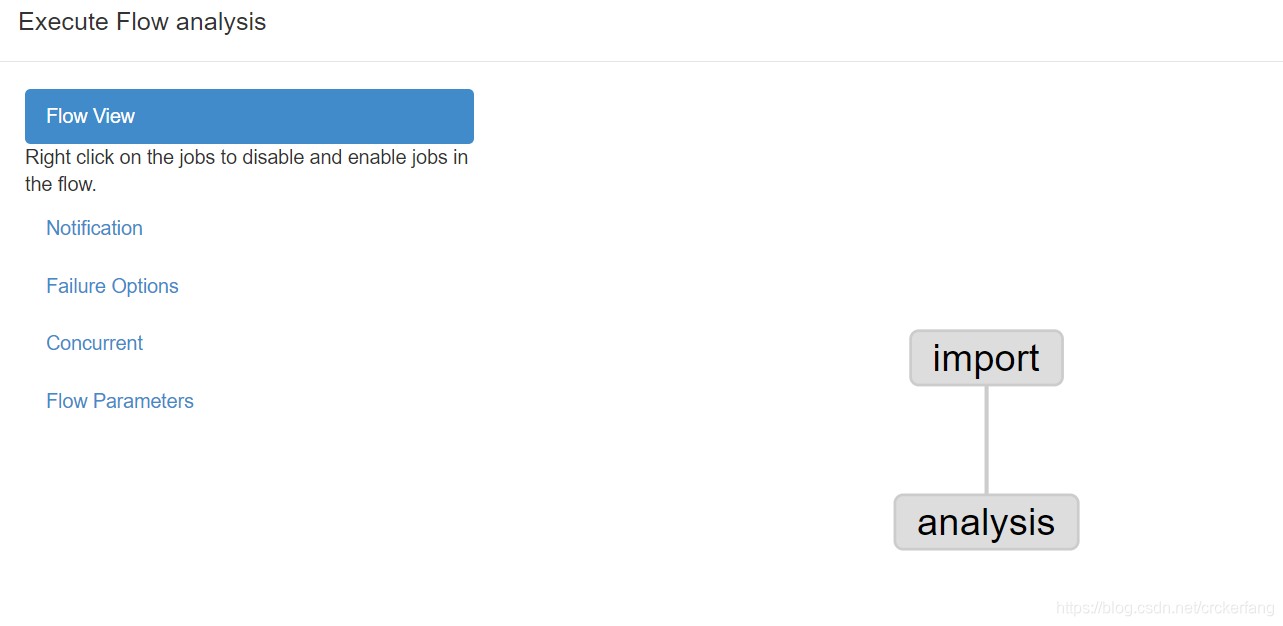
调度时间

执行结果:
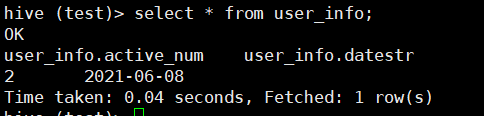
hive数据: