开发前的准备:
1.需要有一个公众号(我这里用的测试号),拿到AppID和AppSecret;
2.进入公众号开发者中心页配置授权回调域名。具体位置:接口权限-网页服务-网页账号-网页授权获取用户基本信息-修改
注意,这里仅需填写全域名(如www.qq.com、www.baidu.com),勿加 http:// 等协议头及具体的地址字段;
我们可以通过使用Ngrok来虚拟一个域名映射到本地开发环境,网址https://www.ngrok.cc/
这里推荐一篇Ngrok的下载使用博客:使用Ngrok进行内网穿透(Windows)
开启内网穿透如下图: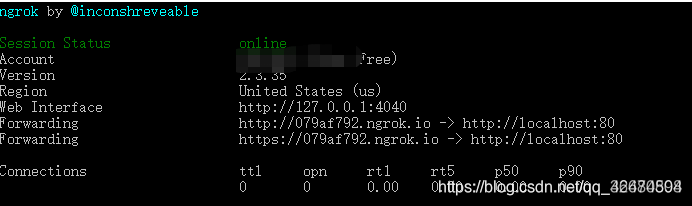
在测试平台页面也进行设置:
同时拉下去进行网页授权配置: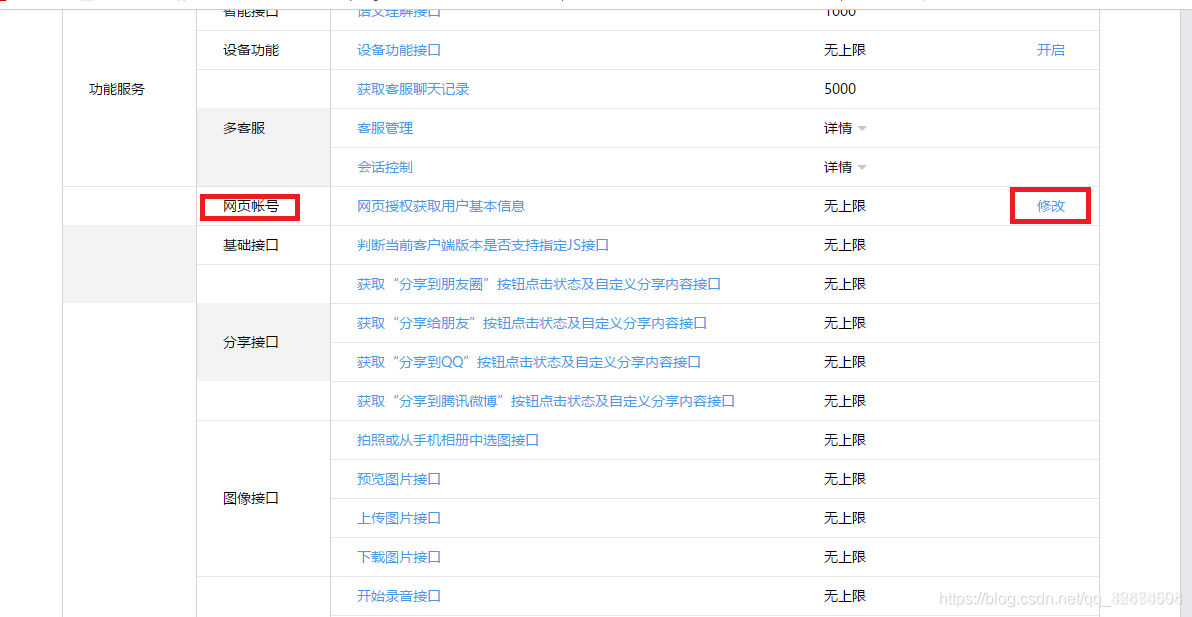
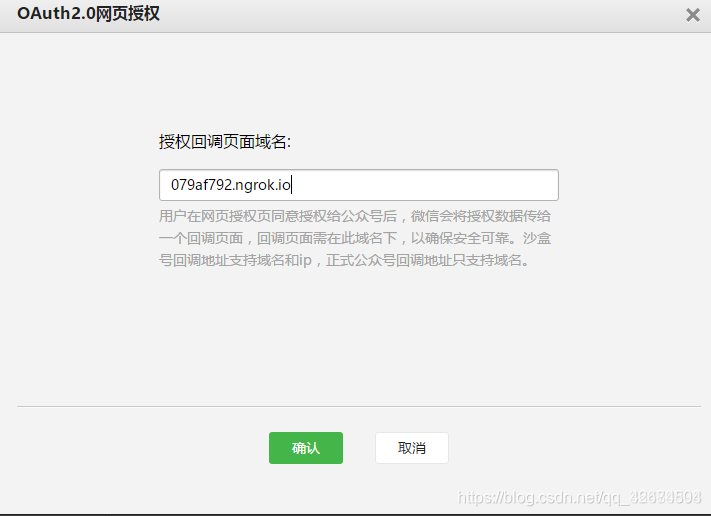
同时还需要扫一下这个二维码
授权步骤:
1、引导用户进入授权页面同意授权,获取code
2、通过code换取网页授权access_token(与基础支持中的access_token不同)
3、通过网页授权access_token和openid获取用户基本信息
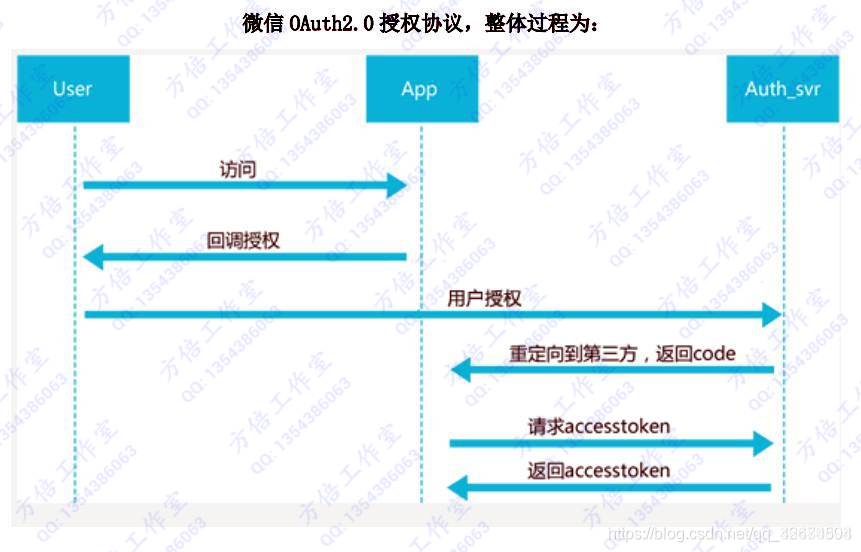
具体请参考: 微信网页授权开发文档
要实现的效果是,在从公众号打开平台的时候获取到微信公众号的授权:
首先根据APPID获取到 code
/**
     * 微信端首页跳转
     * @return
     */
    @GetMapping()
    public String index(HttpServletRequest request){
        try {
            String urlHead = request.getScheme() + "://" + request.getServerName() + request.getContextPath();
            String redirect_uri = urlHead + "/wx/main";
//            redirect_uri = URLEncoder.encode(redirect_uri, "utf-8");
            redirect_uri = URLEncoder.encode("http://demo.pantryn.com/wx/main", "utf-8");
            String url = "https://open.weixin.qq.com/connect/oauth2/authorize?appid=" + appId + "&redirect_uri=" + redirect_uri + "&response_type=code&scope=snsapi_base&state=0#wechat_redirect";
            return "redirect:" + url + "";
        } catch (Exception e) {
            return null;
        }
    }
根据code值,去获取openid code只有五分钟的时效
//    主页
    @RequestMapping("/main")
    public ModelAndView main(HttpServletRequest request, HttpServletResponse response,String code, String userId) {
        ModelAndView modelAndView = new ModelAndView("wx/index");
        //获取到返回的参数
        try {
/*// 从request中获取Cookie,拿到的是一个Cookie数组
            Cookie[] cookies = request.getCookies();
// 然后迭代之
            if (cookies != null && cookies.length > 0) { //如果没有设置过Cookie会返回null
                for (Cookie cookie : cookies) {
                    if ("openid".equals(cookie.getName())&&!"".equals(cookie.getValue().trim())){
                        return modelAndView;
                    }

                }
            }*/
            //首先拿到微信公众号的AppID、AppSecret等参数
            if (userId != null) {
                WxUser wxUserByPhone = wxUserMapper.selectWxUserById(Long.parseLong(userId));
                modelAndView.addObject("cardId", wxUserByPhone.getCardid());
                modelAndView.addObject("name", wxUserByPhone.getName());
                modelAndView.addObject("phone", wxUserByPhone.getPhone());
            }
            String url = null;
            if (code != null) {
                /**
                 *  2 第二步:通过code换取网页授权access_token
                 */
                //用户授权,获取code
                url = "https://api.weixin.qq.com/sns/oauth2/access_token";
                Map<String, Object> param = new HashMap<>();
                param.put("appid", appId);
                logger.info("---wxAppid-----" + appId);
                param.put("secret", appSecret);
                param.put("code", code);
                param.put("grant_type", "authorization_code");
                String tokenInfo = HttpClientUtils.httpGetRequest(url, param, "UTF-8");
                JSONObject wxResponse = JSONObject.parseObject(tokenInfo);
                if (wxResponse.containsKey("errcode")) {
                    logger.error("---------wxTokenError------" + wxResponse.get("errcode") + "---------" + wxResponse.get("errmsg"));

                }
                logger.info("---code-----" + JSON.toJSONString(wxResponse));
                String pageToken = wxResponse.get("access_token").toString();
                String expires_in = wxResponse.get("expires_in").toString();
                String refresh_token = wxResponse.get("refresh_token").toString();
                String openid = wxResponse.get("openid").toString();
                String scope = wxResponse.get("scope").toString();

                /**
                 *  4 第四步:拉取用户信息(需scope为 snsapi_userinfo)
                 */
                /*String urlUser = "https://api.weixin.qq.com/sns/userinfo?"
                        + "access_token=" + accTok.getAccess_token() + ""
                        + "&openid=" + accTok.getOpenid() + ""
                        + "&lang=zh_CN";

                String httpUser = WeixinUtil.httpRequest(urlUser, requestMethod, outputStr);
                System.out.println("拉取用户信息==" + httpUser);

                WechatUser wechatUser = JSON.parseObject(httpUser, WechatUser.class);
                wechatUser.setAccess_token(accTok.getAccess_token());*/
                /**
                 *  5 附:检验授权凭证(access_token)是否有效
                 */
                param.clear();
                param.put("access_token", pageToken);
                param.put("openid", openid);
                String check = HttpClientUtils.httpGetRequest("https://api.weixin.qq.com/sns/auth", param, "UTF-8");
                logger.info("---check-----" + check);

//                System.out.println("openId:+++++++++++++++++++++++++++++"+openid);

                //用户访问过之后重新设置用户的访问时间,存储到cookie中,然后发送到客户端浏览器
                Cookie cookie = new Cookie("openid", openid);//创建一个cookie,cookie的名字是lastAccessTime
                //设置Cookie的有效期为7天
                cookie.setMaxAge(7 * 24 * 60 * 60);
                //将cookie对象添加到response对象中,这样服务器在输出response对象中的内容时就会把cookie也输出到客户端浏览器
                response.addCookie(cookie);

                return modelAndView;

            } else {
                //如果access_token失效,则再次进行调用,并存储access_token值,access_token有效期为2个小时
                this.index(request);
            }
        } catch (Exception e) {

            e.printStackTrace();

        }

        return modelAndView;
    }
获取到的openid存在cookie中
然后用户登录或者注册的时候从 cookie中取出openid存到用户表表中