首先,先了解一下什么是模态对话框,百度百科的给出了下面一个定义:
模态对话框(Modal Dialogue Box,又叫做模式对话框),是指在用户想要对对话框以外的应用程序进行操作时,必须首先对该对话框进行响应。如单击【确定】或【取消】按钮等将该对话框关闭。
游戏中经常会出现很多模态对话框,例如登陆框、提示框等等。
下面来看下效果图:
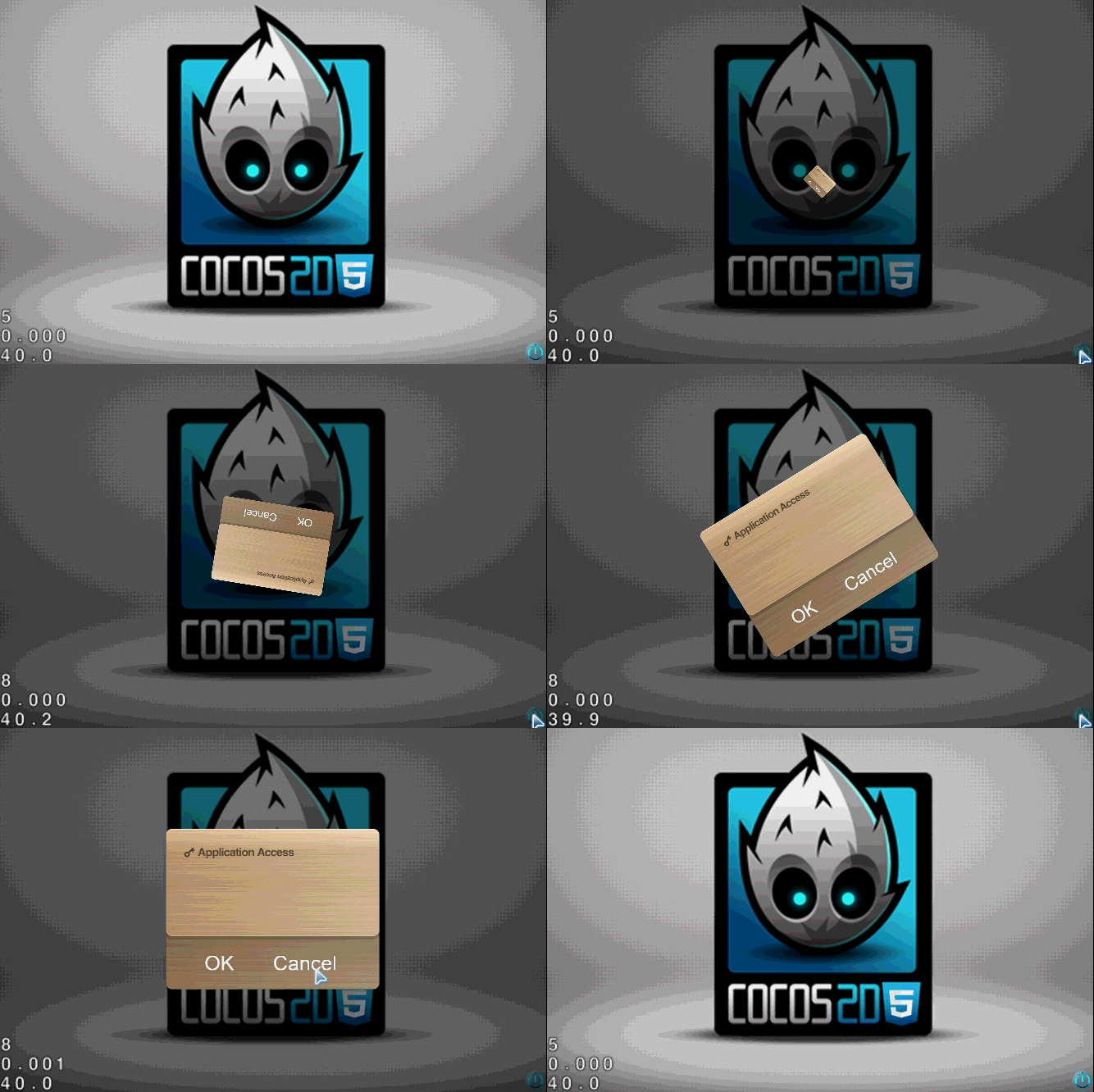
有几点值得关注的:
1.当对话框出现后,对话框外不响应触摸。
这就需要用到setSwallowTouches(),设置为true时,并且onTouchBegan返回true,就会吞没事件,不再向下传递
2.当对话框出现后,背景变暗
这里用到LayerColor的两个方法,设置颜色setColor()和设置透明度setOpacity()
下面,请看代码:
var ModalDialogueBox = cc.LayerColor.extend({
    _listener: null,
    ctor: function() {
        this._super(cc.color.BLACK);
        this.ignoreAnchorPointForPosition(false);   //忽略锚点设置为false,默认为true,锚点(0, 0)
        this.setOpacity(128);       //透明度

        //初始化对话框
        this._initDialog();

        return true;
    },

    onEnter: function()
    {
        this._super();
        //监听器
        this._listener = new cc.EventListener.create({
            event: cc.EventListener.TOUCH_ONE_BY_ONE,
            swallowTouches: false,
            onTouchBegan: function(touch, event)
            {
                return true;
            }
        });

        //添加触摸监听
        cc.eventManager.addListener(this._listener, this);
    },

    //初始化对话框
    _initDialog: function()
    {
        var winSize = cc.winSize;

        //背景
        var bg = new cc.Sprite(res.dialog_png);
        bg.setPosition(cc.p(winSize.width / 2, winSize.height / 2));
        this.addChild(bg, 0, 101);

        //OK按钮
        var OKLabel = new cc.LabelTTF("OK", "Arial", 36);
        var OKMenuItem = new cc.MenuItemLabel(OKLabel, this._onCallback, this);
        OKMenuItem.setPosition(cc.p(100, 50));

        //Cancel按钮
        var cancelLabel = new cc.LabelTTF("Cancel", "Arial", 36);
        var cancelMenuItem = new cc.MenuItemLabel(cancelLabel, this._onCallback, this);
        cancelMenuItem.setPosition(cc.p(250, 50));

        //菜单
        var menu = new cc.Menu(OKMenuItem, cancelMenuItem);
        menu.setPosition(cc.p(0, 0));
        bg.addChild(menu);      //注意是添加到背景里面

        this.setVisible(false);     //默认设置为不可见
    },

    _onCallback: function()
    {
        this.hidden();
    },

    //弹出
    popup: function()
    {
        this.setVisible(true);
        this._listener.setSwallowTouches(true);

        var bg = this.getChildByTag(101);
        bg.setScale(0);
        var scaleTo = new cc.ScaleTo(2.0, 1);
        var rotateBy = new cc.RotateBy(2.0, 360, 0);
        var spawn = new cc.Spawn(scaleTo, rotateBy);
        bg.runAction(spawn);
    },

    //隐藏
    hidden: function()
    {
        this.setVisible(false);
        this._listener.setSwallowTouches(false);
    },

    onExit: function()
    {
        this._super();
        //移除触摸监听
        cc.eventManager.removeListeners(cc.EventListener.TOUCH_ONE_BY_ONE, true);
    }
});
源码下载: 点击打开链接
版权声明:本文为u013455818原创文章,遵循CC 4.0 BY-SA版权协议,转载请附上原文出处链接和本声明。