一、背景:
Pytest的运行方式包含有命令行模式及main()主函数,本篇主要介绍通过主函数来驱动Pytest
二、代码介绍:
2.1、代码详情:
# 创建main.py文件,主函数执行框架用例并生成allure测试报告
if __name__ == '__main__':
    # 按配置清除测试报告
    clearReports().clear_reports()
    file_name = os.path.basename(__file__).split('.')[0]  # 获取档前的文件名称(不带后缀),作为存放
    time_stamp = str(int(time.time()))  # 用时间戳生成一串不重复的数字
    html_path = f'{BASE_DIR}/report/html/'
    if not os.path.exists(html_path):
        os.makedirs(html_path)
    new_dir_name = str(file_name) + time_stamp  # 生成测试报告文件名称
    new_html_path = f'{BASE_DIR}/report/html/' + new_dir_name  # 生成html报告文件名称
    os.mkdir(new_html_path)

    pytest.main(['-s', '-v', f'--env={ENV_Default}', f'{BASE_DIR}/conftest.py::test_start'])
    pytest.main(['-s', '-v', f'{BASE_DIR}/test_cases/test_product/tax',
                 f'{BASE_DIR}/test_cases/test_product/credit',
                 '--reruns=1', '--reruns-delay=2',  # 对失败用例重跑一次,重跑前间隔2s
                 '--alluredir', f'{BASE_DIR}/report/xml/' + new_dir_name])  # 生成xml
    # 此时就在项目report文件下生成以:当前文件名称+时间戳生成的.xml和.html文件,在html下即可查看生成的allure报告文件
    command_word = f'allure generate {BASE_DIR}/report/xml/{new_dir_name} -o {BASE_DIR}/report/html/{new_dir_name} --clean'
    os.system(command_word)  # 执行cmd命令,生成html
    # 清除根目录下含有:interface-autotest-pytest路径的文件
    clearReports().clear_interface()
    # 直接打开生成的allure报告
    os.system(f'allure open {BASE_DIR}/report/html/{new_dir_name}')
生成allure报告后可以直接在本地浏览器进行打开了,局域网内可以分享网址达到共享
2.2、递归删除路径文件:
2.2.1、代码介绍
运用os函数判断路径是否存在,从而对路径做出相应逻辑,shutil-执行递归动作
    def clear_interface():
        # 清除根目录下含有:interface - autotest - pytest路径的文件
        if os.path.exists(INTERFACE): # 判断是否存在该路径
            shutil.rmtree(INTERFACE) # 将目录及目录下的文件执行递归删除
            self.log.info(f"清理路径:{INTERFACE}完成")
这样就可以有效清除,指定路径下的目录及文件
2.3、钩子函数获取测试用例名称及用例节点:
2.3.1、代码介绍:
通过该函数写在conftest.py文件夹下不用导入搜集完成测试用例后自动执行
def pytest_collection_modifyitems(items):
    list_node_credit = []
    list_node_tax = []
    for item in items:
        item1 = str(item.name.encode("utf-8").decode("unicode-escape")).split("::")[0]
        item2 = str(item.nodeid.encode("utf-8").decode("unicode-escape")).split("::")[0]
        # list_name.append(item.name)
        if 'test_product/credit' in item2:
            list_node_credit.append(item2)
        if 'test_product/tax' in item2:
            list_node_tax.append(item2)

    print(f"搜集tax测试用例节点:{list_node_tax}")
    print(f"搜集credit测试用例节点:{list_node_credit}")
    print(f"搜集tax测试用例个数:{len(list_node_tax)}")
    print(f"搜集credit测试用例个数:{len(list_node_credit)}")
执行完成后会清晰看到每个域测试用例个数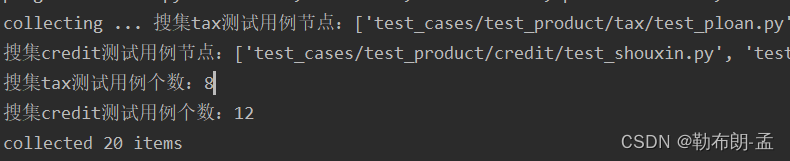
版权声明:本文为weixin_52358204原创文章,遵循CC 4.0 BY-SA版权协议,转载请附上原文出处链接和本声明。