public static class SQLiteHelper
{
///
/// ConnectionString样例(Sqlite文件放dbug目录下):Data Source=Test.db;Pooling=true;FailIfMissing=false
///
public static string ConnectionString = “Data Source=Production.db;Pooling=true;FailIfMissing=false”;
///
/// 参数设置
///
///
///
///
///
private static void PrepareCommand(SQLiteCommand cmd, SQLiteConnection conn, string sqlStr, params SQLiteParameter[] p)
{
try
{
if (conn.State != ConnectionState.Open)
{
conn.Open();
}
cmd.Parameters.Clear();
cmd.Connection = conn;
cmd.CommandText = sqlStr;
cmd.CommandType = CommandType.Text;
cmd.CommandTimeout = 30;
if (p != null)
{
foreach (SQLiteParameter parm in p)
{
cmd.Parameters.AddWithValue(parm.ParameterName, parm.Value);
}
}
}
catch (Exception ex)
{
return;
}
}
///
/// 查询dataSet
///
///
///
///
public static DataSet ExecuteQuery(string sqlStr, params SQLiteParameter[] p)
{
using (SQLiteConnection conn = new SQLiteConnection(ConnectionString))
{
using (SQLiteCommand command = new SQLiteCommand())
{
                DataSet ds = new DataSet();
                try
                {
                    PrepareCommand(command, conn, sqlStr, p);
                    SQLiteDataAdapter da = new SQLiteDataAdapter(command);
                    da.Fill(ds);
                    return ds;
                }
                catch (Exception ex)
                {
                    return ds;
                }
            }
        }
    }
    /// <summary>
    /// 事务处理
    /// </summary>
    /// <param name="SQL"></param>
    /// <param name="p"></param>
    public static bool ExecSQL(string sqlStr, params SQLiteParameter[] p)
    {
        bool result = true;
        using (SQLiteConnection conn = new SQLiteConnection(ConnectionString))
        {
            using (SQLiteCommand command = new SQLiteCommand())
            {
                PrepareCommand(command, conn, sqlStr, p);
                SQLiteTransaction transaction = conn.BeginTransaction();

                try
                {
                    command.Transaction = transaction;
                    command.ExecuteNonQuery();
                    transaction.Commit();
                    result = true;
                }
                catch (Exception ex)
                {
                    transaction.Rollback();
                    result = false;
                }
            }
        }
        return result;
    }

    public static int ExecuteNonQuery(string sqlStr, params SQLiteParameter[] p)
    {
        using (SQLiteConnection conn = new SQLiteConnection(ConnectionString))
        {
            using (SQLiteCommand command = new SQLiteCommand())
            {
                try
                {
                    PrepareCommand(command, conn, sqlStr, p);
                    return command.ExecuteNonQuery();
                }
                catch (Exception ex)
                {
                    return -99;
                }
            }
        }
    }

    public static object ExecuteScalar(string sqlStr, params SQLiteParameter[] p)
    {
        using (SQLiteConnection conn = new SQLiteConnection(ConnectionString))
        {
            using (SQLiteCommand command = new SQLiteCommand())
            {
                try
                {
                    PrepareCommand(command, conn, sqlStr, p);
                    return command.ExecuteScalar();
                }
                catch (Exception ex)
                {
                    return -99;
                }
            }
        }
    }
以上就是帮助类。
用法:
1.添加一个按钮,查询
添加一个显示控件dataGridview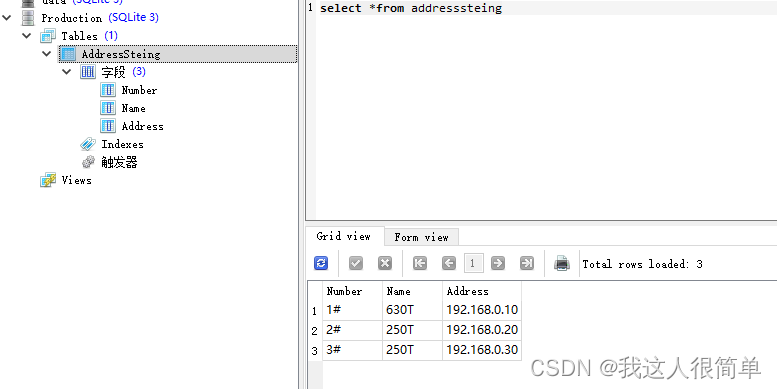
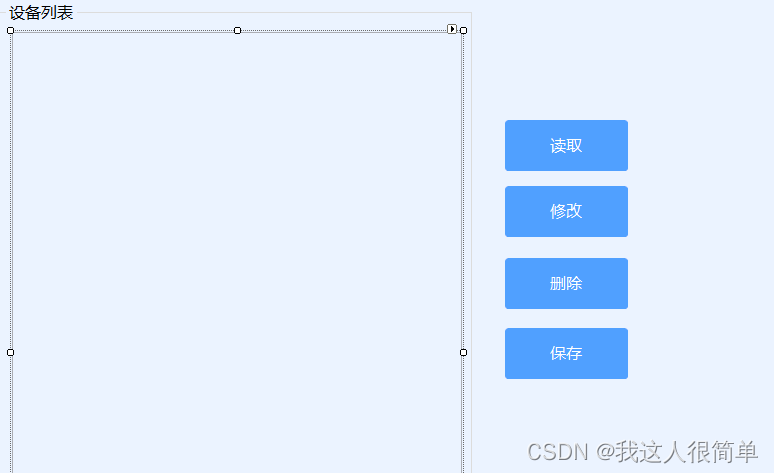
查询按钮代码
string strSql = “select * from AddressSteing”;
DataSet ds = SQLiteHelper.ExecuteQuery(strSql);
if (ds != null && ds.Tables.Count > 0)
{
dataGridView1.DataSource = ds.Tables[0];
}
输入查询命令我的是在addresssteing下面。
在用帮助类的查询获取数据显示在datagridview里。