1, 修改ssh配置
man sshd_config : 查看配置项说明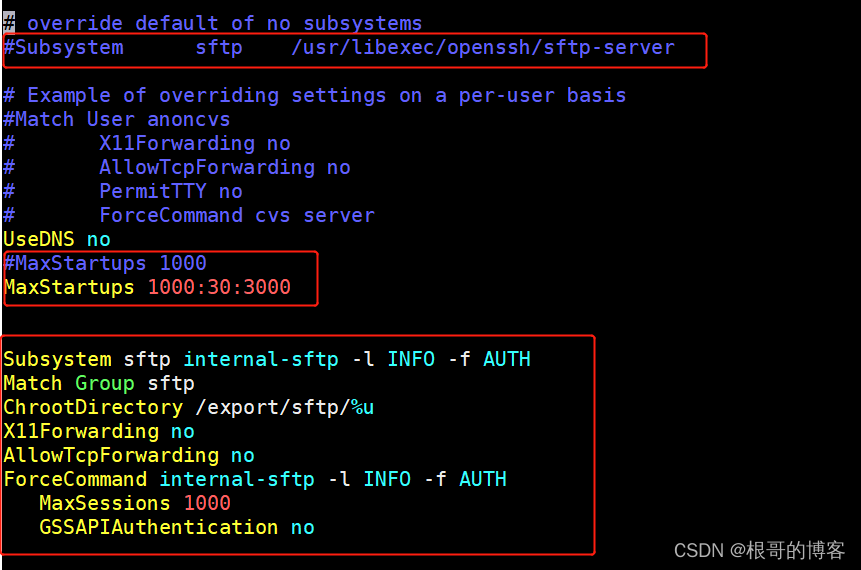
[root@c7 ssh]# vim /etc/ssh/sshd_config
# override default of no subsystems
#Subsystem      sftp    /usr/libexec/openssh/sftp-server

# Example of overriding settings on a per-user basis
#Match User anoncvs
#       X11Forwarding no
#       AllowTcpForwarding no
#       PermitTTY no
#       ForceCommand cvs server
UseDNS no
#MaxStartups 1000
MaxStartups 1000:30:3000

Subsystem sftp internal-sftp -l INFO -f AUTH
Match Group sftp
ChrootDirectory /export/sftp/%u
X11Forwarding no
AllowTcpForwarding no
ForceCommand internal-sftp -l INFO -f AUTH
   MaxSessions 1000
   GSSAPIAuthentication no
#重启ssh服务
[root@c7 ssh]# service sshd restart

############## 服务端 c7
###创建sftp登录用户
[root@c7 ssh]# ssh-keygen -t rsa
Generating public/private rsa key pair.
Enter file in which to save the key (/root/.ssh/id_rsa):
Enter passphrase (empty for no passphrase):
Enter same passphrase again:
Your identification has been saved in /root/.ssh/id_rsa.
Your public key has been saved in /root/.ssh/id_rsa.pub.
The key fingerprint is:
SHA256:knqr1Q1yvkd34YS7Ahe6sH61rikS1pJFsJWWycA4614 root@c73
The key's randomart image is:
+---[RSA 2048]----+
|   oo+.+         |
|  o .oB          |
|   o.o       .   |
|  .   ..  . . o  |
| .   ++ S. . + . |
|  . E.o*oo+ o o  |
| . o.oooo*.o o   |
|  . .oo.oo+ .    |
|    .+oo++..     |
+----[SHA256]-----+
[root@c7 ssh]# useradd -g sftp mysftp
[root@c7 ssh]# mkdir /home/mysftp/.ssh/
[root@c7 ssh]# cp /root/.ssh/id_rsa.pub  /home/mysftp/.ssh/authorized_keys
[root@c7 ssh]# chown -R mysftp:sftp /home/mysftp2/.ssh/

###创建sftp登录目录( chroot目录:/export/sftp/mysftp/ 权限, 上传目录: upload权限)
[root@c7 ssh]# mkdir /export/sftp/mysftp
[root@c7 ssh]# chown root:sftp /export/sftp/mysftp/

[root@c7 ssh]# mkdir /export/sftp/mysftp/upload
[root@c7 ssh]# chown mysftp:sftp /export/sftp/mysftp/upload

#测试sftp用户ssh登录
[root@c7 ssh]# ssh -i /tmp/id_rsa mysftp@c7
This service allows sftp connections only.
Connection to c7 closed.

#测试其他用户ssh登录
[root@c7 ssh]# ssh vagrant@c7
vagrant@c7's password:
Last login: Mon Dec 27 14:06:58 2021 from 192.168.56.7
[vagrant@c7 ~]$
2, 验证sftp登录
############## 服务端 c7
[root@c7 ssh]#  sftp -i /root/.ssh/id_rsa mysftp@c7
Connected to c7.
sftp> ls
upload
sftp> ^D
[root@c7 ssh]# scp /root/.ssh/id_rsa c73:/tmp/
root@c73's password:
id_rsa                            100% 1679     1.7MB/s   00:00
############## 客户端  c73
[root@c73 tt]# sftp -i /tmp/id_rsa mysftp@c7
Connected to c7.
sftp> ls
upload
sftp>
版权声明:本文为eyeofeagle原创文章,遵循CC 4.0 BY-SA版权协议,转载请附上原文出处链接和本声明。