1.首先使用pw groupadd创建一个组,组名sshd,GID为22,如果现实该组已经存在则这步可以略去。

如上图显示这个组已经存在
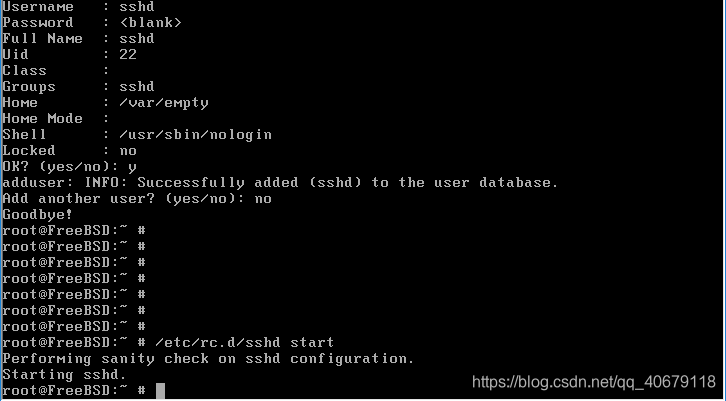
2.然后使用adduser添加一个用户,名字为sshd,UID为22,shell为nologin,家目录为/var/empty
root@FreeBSD:~ # adduser
Username: sshd
Full name: sshd
Uid (Leave empty for default): sshd
Login group [sshd]:
Login group is ls. Invite ls into other groups? []:
Login class [default]:
Shell (sh csh tcsh nologin) [sh]: nologin
Home directory [/var/empty]:
Home directory permissions (Leave empty for default):
Use password-based authentication? [yes]:
Use an empty password? (yes/no) [no]:yes
3.然后再重启/etc/rc.d/ssh start 开启ssh,如下图成功开启ssh服务。
版权声明:本文为qq_40679118原创文章,遵循CC 4.0 BY-SA版权协议,转载请附上原文出处链接和本声明。