1.权限管理思路 (权限(被分配)——》角色(被分配)---------》用户) 框架采用 vue-element-admin
2,我设计是角色中直接配置权限,看界面
角色列表

点击列表中 权限设置 打开的界面

权限设置中的树形菜单结构 id是唯一的。对应动态路由中 meta: { permission: "对应树形菜单中唯一的id" }, 便于后期比对显示动态路由
{

    "data": [

        {

            "label": "测试模块",

            "id": "test",

            "children": [

                {

                    "label": "测试列表",

                    "id": "test-list",

                    "children": [

                        {

                            "label": "增加",

                            "id": "test-add"

                        },

                        {

                            "label": "删除",

                            "id": "test-delete"

                        },

                        {

                            "label": "修改",

                            "id": "test-update"

                        },

                        {

                            "label": "查看",

                            "id": "test-view"

                        }

                    ]

                }

            ]

        },
   ]
}
看一下动态路由
 {
      path: 'test',
      component: () => import('@/views/modular/test/index'),
      name: 'test',
      alwaysShow: true,
      meta: {
        title: '测试模块',
        noCache: true,
        permission: "test",
      },
      children: [{
        path: 'test-list',
        component: () => import('@/views/modular/test/list'),
        name: 'test-list',
        meta: {
          title: '测试模块列表',
          noCache: true,
          permission: "test-list",
        },
      }]
    }
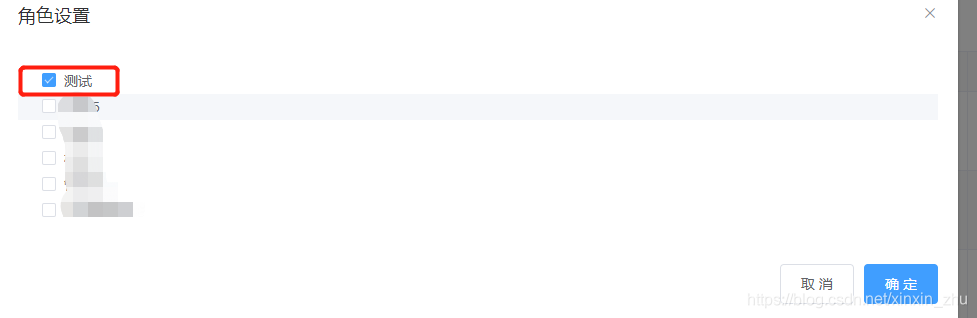
4.用户列表:

点击 角色设置 选中 角色列表中的测试
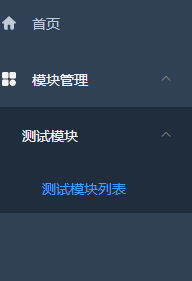
切换用户登陆 系统用户登陆 看到的菜单
二:代码编写
1)核心代码
vuex 中 peimission.js
import { asyncRoutes, constantRoutes } from '@/router'

/**
 * 通过meta.role判断是否与当前用户权限匹配
 * @param permission
 * @param route
 */
function hasPermission(permission, route) {
  if(route.meta && route.meta.permission) {
    return permission.indexOf(route.meta.permission) != -1
  } else {
    return false
  }
}

/**
 * 递归过滤异步路由表,返回符合用户角色权限的路由表
 * @param routes asyncRoutes
 * @param permission
 */
export function filterAsyncRoutes(routes, permission) {
  const res = []

  routes.forEach(route => {
    const tmp = { ...route }

    if (tmp.children) {
      tmp.children = filterAsyncRoutes(tmp.children, permission)
      if (tmp.children && tmp.children.length > 0) {
        res.push(tmp)
      }
    } else {
      if (hasPermission(permission, tmp)) {
        res.push(tmp)
      }
    }
  })
  return res
}

const permission = {
  state: {
    routes: [],
    addRoutes: []
  },
  mutations: {
    SET_ROUTES: (state, routes) => {
      state.addRoutes = routes
      state.routes = constantRoutes.concat(routes)
    }
  },
  actions: {
    GenerateRoutes({ commit }, data) {
      return new Promise(resolve => {
        const { permission } = data
        let accessedRoutes;
        if(permission.indexOf("*") != -1) {
          accessedRoutes = asyncRoutes;
        } else {
          accessedRoutes = filterAsyncRoutes(asyncRoutes, permission)
        }
        commit('SET_ROUTES', accessedRoutes)
        resolve(accessedRoutes)
      })
    }
  }
}

export default permission
按钮权限检查代码 untis->permission.js
import store from '@/store'

/**
 * @param {Array} value
 * @returns {Boolean}
 * @example see @/views/permission/directive.vue
 */
export default function checkPermission (value) {
  const permissions = store.getters && store.getters.permission
  if (permissions && permissions instanceof Array && permissions.includes("*")) return true
  if (value && value instanceof Array && value.length > 0) {
    const hasPermission = permissions.some(permission => {
      return value.includes(permission)
    })

    if (!hasPermission) return false
    return true
  } else if (value && typeof value == 'string') {
    return permissions.includes(value)
  } else {
    return false
  }
}
mian.js中
import Vue from 'vue'

import 'normalize.css/normalize.css' // A modern alternative to CSS resets

import ElementUI from 'element-ui'
import 'element-ui/lib/theme-chalk/index.css'
//import locale from 'element-ui/lib/locale/lang/zh-CN' // lang i18n

import '@/styles/index.scss' // global css

import App from './App'
import store from './store'
import router from './router'

import '@/icons' // icon
import '@/permission' // permission control
import Avue from '@smallwei/avue';
import '@smallwei/avue/lib/index.css';

import '@/assets/css/index.scss'
/**
 * If you don't want to use mock-server
 * you want to use MockJs for mock api
 * you can execute: mockXHR()
 *
 * Currently MockJs will be used in the production environment,
 * please remove it before going online ! ! !
 */
// if (process.env.NODE_ENV === 'production') {
//   const { mockXHR } = require('../mock')
//   mockXHR()
// }
Vue.prototype.checkPermission = require("@/utils/permission").default
// set ElementUI lang to EN
Vue.use(Avue);//使用AVUE
Vue.use(ElementUI)
// 如果想要中文版 element-ui,按如下方式声明
// Vue.use(ElementUI)


Vue.config.productionTip = false

new Vue({
  el: '#app',
  router,
  store,
  render: h => h(App)
})
mian.js 中 引入的这个文件 import '@/permission' 和main.js 平级
import router from './router'
import store from './store'
import { Message } from 'element-ui'
import NProgress from 'nprogress' // progress bar
import 'nprogress/nprogress.css' // progress bar style
import { getToken } from '@/utils/auth' // get token from cookie

NProgress.configure({ showSpinner: false }) // NProgress Configuration
function hasPermission(permissions, permission) {
  if (!permission || permission == 'home' || permissions.indexOf("*") != -1) {
    return true
  }
  return permissions.indexOf(permission) != -1
}
const whiteList = ['/login','/auth-redirect'] // no redirect whitelist

router.beforeEach((to, from, next) => {

  NProgress.start()

  if (to.meta.title) {
    document.title = "cq-" + to.meta.title;
  } else {
    document.title = "cqadmin";
  }

  const hasToken = getToken()
  if (hasToken) {
    if (to.path === '/login') {
      next({ path: '/' })
      NProgress.done()
    } else {
      if (store.getters.permission.length === 0) {
        store.dispatch('user/getInfo').then(res => {

          const permission = res.results.permission
          if (res.results.is_admin) {
            res.results.permission.push('*')
          }

          if (permission.length) {
            store.dispatch('GenerateRoutes', res.results).then(accessRoutes => { // 根据后台查询出的菜单权限生成可访问的路由表
              router.addRoutes(accessRoutes) // 动态添加可访问路由表
              router.options.routes=store.getters.routers;   //很重要的一句

              next({ ...to, replace: true }) // hack方法 确保addRoutes已完成
            })
          } else {
            next({ path: '/401', replace: true, query: { noGoBack: true } })
          }
        }).catch(err => {
          store.dispatch('FedLogOut').then(() => {
            Message.error(err)
            next({ path: '/' })
          })
        })
      }else {
       // debugger
        //next()
        if (hasPermission(store.getters.permission, to.meta.permission)) { // 有权限
          next()
        } else { // 无权限
          next({ path: '/401', replace: true, query: { noGoBack: true } })
        }
      }

    }
  } else {
    /* has no token*/

    if (whiteList.indexOf(to.path) !== -1) {
      // in the free login whitelist, go directly
      next()
    } else {
      // other pages that do not have permission to access are redirected to the login page.
      next(`/login?redirect=${to.path}`)
      NProgress.done()
    }
  }
})

router.afterEach(() => {
  // finish progress bar
  NProgress.done()
})
版权声明:本文为xinxin_zhu原创文章,遵循CC 4.0 BY-SA版权协议,转载请附上原文出处链接和本声明。