
以下是复制的版本信息:
Android Studio Arctic Fox | 2020.3.1 Patch 1
Build #AI-203.7717.56.2031.7621141, built on August 8, 2021
Runtime version: 11.0.10+0-b96-7249189 amd64
VM: OpenJDK 64-Bit Server VM by Oracle Corporation
Windows 10 10.0
GC: G1 Young Generation, G1 Old Generation
Memory: 1280M
Cores: 4
Registry: external.system.auto.import.disabled=true, ide.balloon.shadow.size=0
Non-Bundled Plugins: GsonFormat-Plus, com.duke.screenmatch, org.jetbrains.kotlin, arouter-roadsign, com.chrisrm.idea.MaterialThemeUI
新建了一个项目,gradle-wrapper.properties里面的配置截图: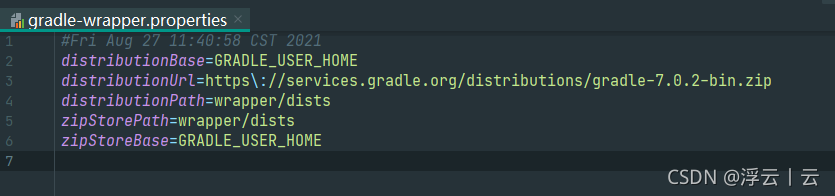
项目级build.gradle截图:
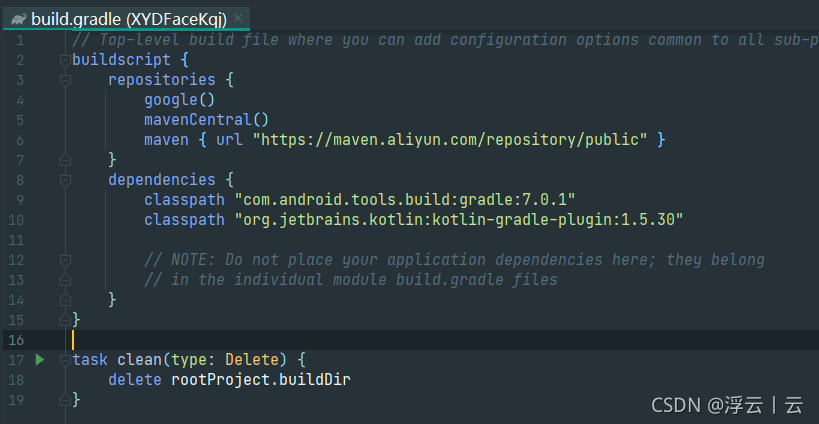 下面发现的问题就是如果我们引入的三方库是在https://jitpack.io上面的话,正常的操作就是在项目级build.gradle里面添加如下代码
allprojects {
    repositories {
        maven {
            url "https://jitpack.io"
        }
    }
}
但是这个时候就会报错,然后各种网上搜,完全找不到答案,报错为:
Caused by: org.gradle.api.InvalidUserCodeException: Build was configured to prefer settings repositories over project repositories but repository 'maven' was added by build file 'build.gradle'
解决方案:
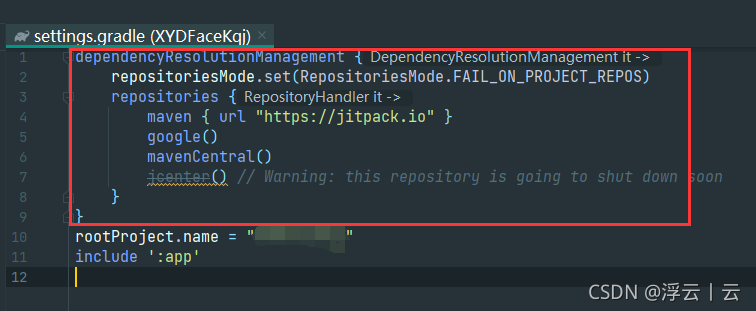
打开项目下面的settings.gradle才发现里面多了红框里面的代码,我之前的项目都是gradle4.0.2的,所以可以肯定是没有那段代码的,然后只需要把jitpack.io仓库地址添加进去就可以正常依赖jitpack上的三方库了