MyBatis
概念:Mybatis是一个优秀的持久层框架,基于ORM(对象关系映射)设计思想,实现了以对象的方式操作数据库。
mybatis和mp都会动态回显
一、springboot整合mybatis
<!--mybatis依赖包 -->
<dependency>
     <groupId>org.mybatis.spring.boot</groupId>
     <artifactId>mybatis-spring-boot-starter</artifactId>
     <version>2.2.0</version>
 </dependency>
<!-- jdbc依赖包 -->
<dependency>
<groupId>mysql</groupId>
<artifactId>mysql-connector-java</artifactId>
</dependency>server:
port: 8092
#整合1.数据源
spring:
datasource:
# mysql高版本加cj
driver-class-name: com.mysql.cj.jdbc.Driver
url: jdbc:mysql://127.0.0.1:3306/jt?serverTimezone=GMT%2B8&useUnicode=true&characterEncoding=utf8&autoReconnect=true&allowMultiQueries=true
username: root
#如果password开头为0,则整个密码需要使用引号引起 password: "0123456"
password: root
url各参数类型:
1. serverTimezone=GMT%2B8 指定时区 东八区
2. useUnicode=true&characterEncoding=utf8 开启使用Unicode编码,并且指定字符集utf-8
3. autoReconnect=true 断线是否重新链接.
4. &allowMultiQueries=true 是否允许批量操作
# 连接池
hikari:
# 连接池name
pool-name: seckill-system
# 最小空闲连接
minimum-idle: 5
# 空闲连接最大时间 默认10分钟
idle-timeout: 180000
# 最大连接数, 默认10
maximum-pool-size: 10
# 从连接池返回的连接自动提交
auto-commit: true
# 连接最大存活时间 0表示永久存货, 默认半小时
max-lifetime: 180000
# 连接超时时间,m默认30秒
connection-timeout: 30000
# 测试连接是否是可用的查询语句
connection-test-query: SELECT 1
#SpringBoot整合MP
mybatis-plus:
#指定别名包
type-aliases-package: com.jt.pojo
#加载指定的xml映射文件
mapper-locations: classpath:/mybatis/mappers/*.xml
#开启驼峰映射
configuration:
map-underscore-to-camel-case: true
#Sql日志文件打印
logging:
level:
com.jt.mapper: debug
二、Mybatis实现步骤
(1)指定mybatis-config.xml的路径
(2)读取指定的核心配置文件.
(3)通过SelSessionFactoryBuilder.buid方法创建SqlSessionFactory.
(4)获取SqlSession
(5)获取Mapper的接口
(6)从mapper接口文件中获取业务数据.
(7)调用xml文件的Sql语句实现数据获取.
(8)mybatis自动封装为对象返回 交给用户处理.
String resource = "mybatis/mybatis-config.xml";
InputStream inputStream = Resources.getResourceAsStream(resource);
SqlSessionFactory sqlSessionFactory = new SqlSessionFactoryBuilder().build(inputStream);
SqlSession sqlSession = sqlSessionFactory.openSession();
EmpMapper empMapper = sqlSession.getMapper(EmpMapper.class);
List<Emp> list = empMapper.allSelect();
System.out.println(list);
sqlSession.close();
三、Mapper接口中方法的参数封装:
1、Mapper层参数封装
(1)将参数封装为实体对象,如果传递的参数是一个对象,则直接调用属性 #{属性名}
(2)将参数封装为Map集合,如果传入的参数是一个Map集合,则直接调用集合中key #{key值}
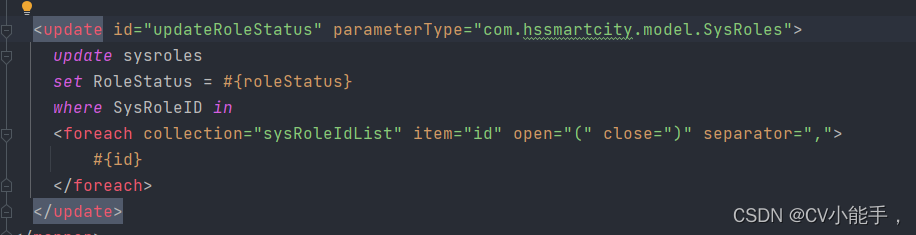
(3)删除多条数据的sql语法,将参数封装为数组或list或map,删除多条数据的sql语法,在xml中使用foreach标签
(4)如果传入多个参数,在接口方法中使用注解@Param List<DemoUser> findAll1(@Param("age") int age, @Param("sex") String sex);
2、post/put接收参数为一个变量外加一个数组


四、sql语句的标签中常用属性
(1)id :与mapper接口中的方法相对应
(2)resultType:返回值类型。增删改不需要。 当结果集中的字段名与属性的名称一致时,才会实现自动的数据封装
(3)resultMap:当结果集中的字段名称,与对象中的属性不一致时,可以使用resultMap实现自定义的封装
(4)parameterType:表示传入的参数类型,程序会自动识别,建议省略不写
五、动态sql
1、foreach标签
将传入参数(1,2,3,4,5)封装为①数组 ②List集合 ③Map
集合套入List集合。然后使用foreach标签遍历
 <delete id="adddelete">
    delete from demo_user where id in
    <foreach collection="array" item="id" open="(" close=")" separator=",">
       #{id}
    </foreach>
</delete>

foreach标签中各个属性的作用:
1.collection:三种方法的唯一区别 。封装为数组array,封装为集合 list(小写),
封装到map集合中的list key,封装在对象中的list集合  属性名
2.item 每次遍历的数据的形参
3.open 循环的开始标签
4.close 循环的结束标签
5.index 循环遍历下标 一般不用
6.separator 循环遍历的分割符 //设坡瑞特
2、Sql-where
动态拼接where,避免传入条件为空,自动去除为空条件的and
<select id="selectByUser" parameterType="Demouser" >
     select * from demo_user
     <where>
          <if test="id !=null"> id= #{id}</if>
          <if test="name !=null">  and name = #{name}</if>
          <if test="age !=null">  and age = #{age}</if>
      </where>
</select>
3、动态Sql-set条件
动态拼接更新语句,自动去除末尾逗号
<update id="updateUserSet" parameterType="user">
     update demo_user
          <set>
              <if test="name !=null">name = #{name},</if>
              <if test="age != null"> age = #{age},</if>
          </set>
          where id = #{id}
</update>
4、动态Sql-choose、when、otherwise
该放法类似于if else-if else
<select id="selectChoose" resultType="User">
     select * from demo_user
     <where>
         <choose>
              <when test='name !=null'> name = #{name} </when>
              <when test='birthday != null '> u.birthday = #{birthday} </when>
              <otherwise> sex = #{sex} </otherwise>
         </choose>
     </where>
</select>
六、sql语句简化操作
1、xml中sql语句复用
<!--该标签用户重复sql的封装,一般用于封装字段-->
<sql id="aa">  select * from demo_user</sql>


<select id="addSelect" resultType="DemoUser">
    <include refid="aa"> </include>  where name = #{name}
</select>
2、mapper层使用注解调用sql,简化xml配置
// 适用于简单sql
@Delete("delete from user where id=#{id}")
void deleteUserById(Integer id);
3、简化resultType返回值为全类名的情况
当返回的类型为pojo对象,需要写入全类名,简化方法
(1)给resuType的值起别名
(2)当pojo中有多个类中,引入了别名包概念
(3)使用注解,直接在pojo包中类上使用注解@Alias(“别名”)
(4)建议写全路径,方便维护
七、其他标签使用
1、if标签使用
<select id="getCaseNumTwo" resultType="java.lang.Integer" parameterType="com.hssmartcity.model.CaseDeadline">
        select
         count(*)
        FROM
        casedeadline
        <if test="mark == 1">
            RIGHT JOIN (
            SELECT
            *
            FROM
            casetypes
            WHERE
            CategoryCode IN ( SELECT CaseTypeID FROM casetypes WHERE CategoryCode = #{forCaseTypeId,jdbcType=VARCHAR} )) AS casetypes ON casedeadline.ForCaseTypeId = casetypes.CasetypeID
        </if>
        <if test="mark == 2">
            RIGHT JOIN ( SELECT * FROM casetypes WHERE CategoryCode = #{forCaseTypeId,jdbcType=VARCHAR} ) AS casetypes ON casedeadline.ForCaseTypeId = casetypes.CasetypeID
        </if>
    </select>
2、trim标签
一般用户insert操作,作用为去除sql语句中多余的and关键字,逗号,或者给sql语句前拼接 “where“、“set“以及“values(“ 等前缀,或者添加“)“等后缀。
<trim prefix="WHERE" prefixOverrides="AND">  </trim>
prefix	给sql语句拼接的前缀
suffix	给sql语句拼接的后缀
prefixOverrides	去除sql语句前面的关键字或者字符,该关键字或者字符由prefixOverrides属性指定,假设该属性指定为"AND",当sql语句的开头为"AND",trim标签将会去除该"AND"
suffixOverrides	去除sql语句后面的关键字或者字符,该关键字或者字符由suffixOverrides属性指定
<!--查询操作,去除where条件中多余and-->
<select id="findActiveBlogLike" resultType="Blog">
SELECT * FROM BLOG
<trim prefix="WHERE" prefixOverrides="AND">
<if test="state != null">
state = #{state}
</if>
<if test="title != null">
AND title like #{title}
</if>
<if test="author != null and author.name != null">
AND author_name like #{author.name}
</if>
</trim>
</select》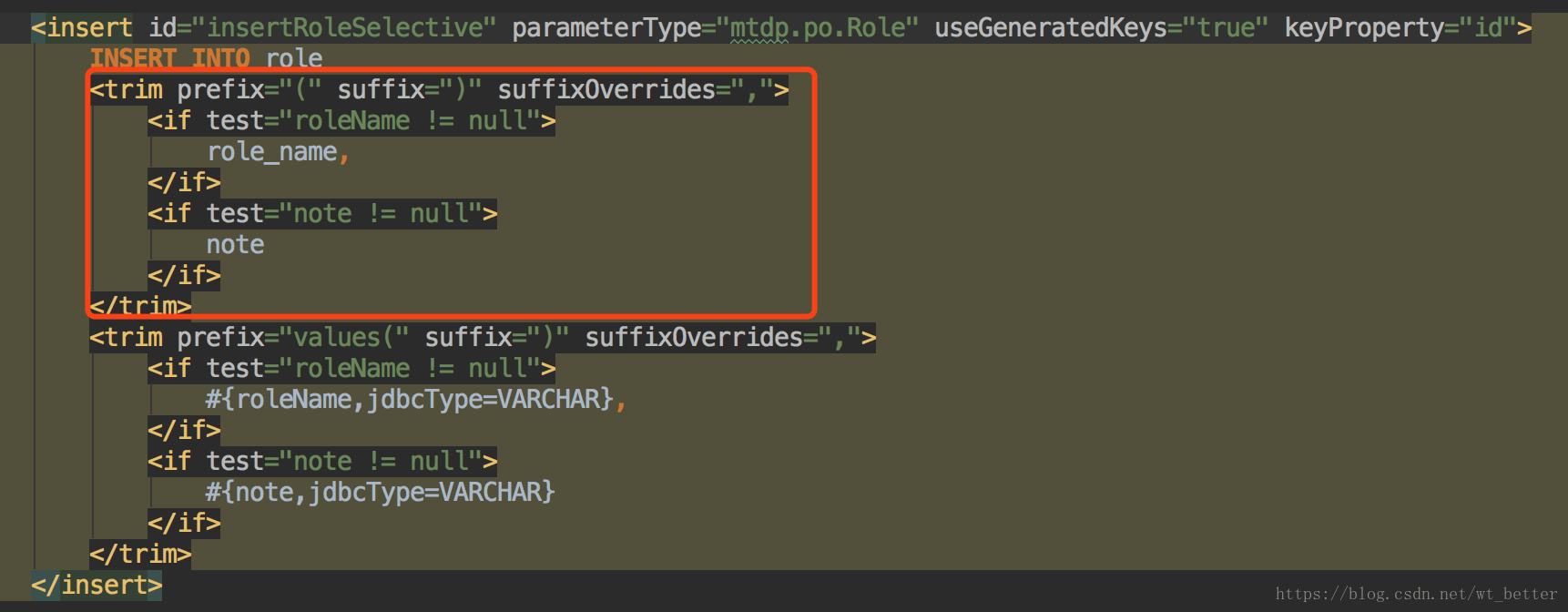
八、xml文件注意事项
1、#{} 和 ${} 的区别
(1)#{}是占位符,会进行预编译处理,mybatis会将sql中的#{}换为?号,在sql执行前会使用PreparedStatement给sql的 ?号占位符设置参数值,能够避免SQL注入。
(2)$是变量拼接符,属于静态文本替换,不能避免sql注入。当传入参数为字段名称的时候,使用${column}获取参数值,但有sql注入的风险。
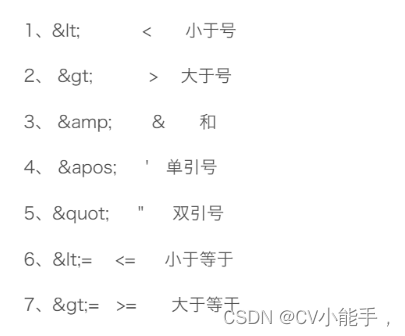
2、xml转义字符
'<'在sql语句中出现会报错,原因:xml文档将<符号认成标头,当有大量转义字符的时候,使用:<![CDAT[...内容]]> 将里 面内容变成普通字符串.
3、mybatis使用模糊查询
1、传入的参数自带%
2、传入时不带参数,需要在sql中name like '%${name}%'
3、
<if test="groupname != null and groupname != ''"> and GroupName like concat('%', #{groupname}, '%')</if>4、sql语句中包含关键字处理

order是sql语句的关键字,添加反引号进行处理
5、sql语句条件判断
对于String类型,需要先判null,在判''
<if test="userName!=null and userName != ''">
       and UserName like '%${userName}%'
</if>
九、结果集封装
1、resultType
pojo类中的属性名和sql查询出的结果集中字段名保持一致,将查询结果自动封装到pojo中
或者是sql语句查询出来的内容可以使用普通类型接收(String Integer 等等)
2、 resultMap映射
当结果集中的字段名称与对象中的属性不一致时,使用resultMap实现自定义的封装.
<select id="findAll" resultMap="deptRM">
         select * from dept
</select>

<!--自定义映射关系-->
<resultMap id="deptRM" type="com.jt.Dept">
        <id column="dept_id" property="deptId"/>
        <result column="dept_name" property="deptName"/>
</resultMap>


1.id标签代表主键 (每张表中都会有一个主键)
      1.1.column: 代表sql语句查询出的结果集中的字段.
      1.2.property: pojo对象中的属性
2.result 主键之外其他字段映射关系
3、 resultMap标签内容继承
<resultMap id="BaseResultMap" type="com.hssmartcity.model.StandardSpecification">
    <id column="LawId" jdbcType="VARCHAR" property="lawId" />
    <result column="LawName" jdbcType="VARCHAR" property="lawName" />
    <result column="ArticleContent" jdbcType="VARCHAR" property="articleContent" />
</resultMap>

继承上面的resultMap
<resultMap id="ExtBaseResultMap" type="com.hssmartcity.model.StandardSpecification" extends="BaseResultMap">
    <result column="UserName" jdbcType="VARCHAR" property="userName" />
    <result column="ParentLawName" jdbcType="VARCHAR" property="parentLawName" />
</resultMap>十、 关联查询
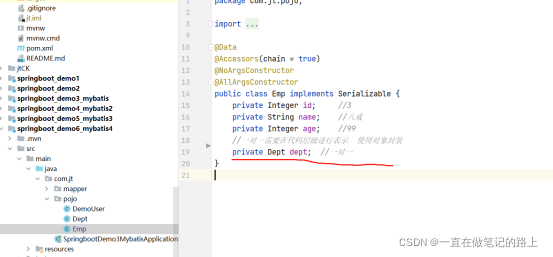
1、一对一表关系
pojo封装一对一数据
(1)关联查询
<select  id="allSelect"  resultMap="empRM">
    select emp.id,emp.name,emp.age,dept.dept_id,dept.dept_name  from emp left join dept on emp.dept_id=dept.dept_id
</select>


<resultMap   id="empRM"  type= "com.jt.pojo.Emp" autoMapping="true">
    <id column="id" property="id"></id>
    <association property="dept" javaType="com.jt.pojo.Dept">
        <!-- association标签完成对象映射   property属性表示被封装对象的属性      javaType属性表示该类的全路径 /əˌsəʊ siˈeɪʃn/ -->
        <id column="dept_id" property="deptId" autoMapping="true"></id>
    </association>
</resultMap>

resultMap标签中autoMapping属性:
1、主要功能是完成结果集的自动映射。
2.如果映射的字段与对象的属性一致,则可以直接autoMapping=true,省略手动映射。
3.不管什么情况最好保留主键的字段信息
4.当映射字段和对象属性不一致,开启自动映射驼峰规则(dept_id自动变为deptId),继而autoMapping省略手动映射
(2)子查询
<!--一对一查询语句 一个emp员工表中对应一个dept部门信息 -->
<select id="allSelect1" resultMap="empRM1">
    select * from emp
</select>
<resultMap id="empRM1"  type="com.jt.pojo.Emp"   autoMapping="true">
    <id column="id"  property="id"></id>
    <!-- property:本表对应的字段     javaType:另一张表对应的实体类      column:本表与另一张表相关联字段    select:对应的子查询sql标签-->
    <association property="dept"  javaType="com.jt.pojo.Dept" column="dept_id" select="deptSelect"> </association>
</resultMap>
<!--   select 属性可以跨包调用
<association property="user"
               select="com.hssmartcity.dao.UserInfosDao.findUserByUserNum"
               column="PersonCode">
</association>   -->


<!--dept部门表查询-->
<select id="deptSelect" resultMap="deptRM">
     select * from dept where dept_id = #{dept_id}
</select>
<resultMap id="deptRM" type="com.jt.pojo.Dept">
    <id column="dept_id" property="deptId"></id>
    <result column="dept_name" property="deptName"></result>
</resultMap>
resulyMap标签(映射)的子标签用法总结
1、<id>映射主键字段。建议不省略
2、<result>映射普通字段,由于自动映射与驼峰映射规则的出现,可以省略。
3、<association>一对一关系中映射其他表,拥有property和javaType属性
2、一对多表关系
pojo封装一对多数据:
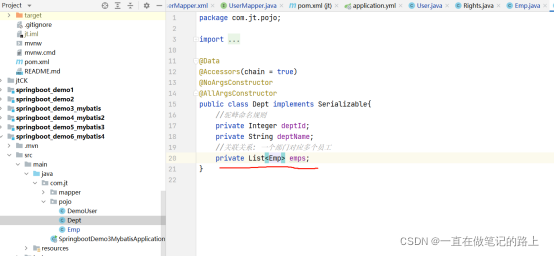
(1)关联查询
<select id="findDept" resultMap="listRM">
      SELECT d.dept_id,d.dept_name,e.id,e.name,e.age FROM
      dept d  LEFT JOIN  emp e  ON   d.dept_id = e.dept_id
</select>


<resultMap id="listRM" type="Dept">
    <id column="dept_id" property="deptId"/>
    <result column="dept_name" property="deptName"/>

//collection: 封装集合的固定写法.  property:指定属性 ofType:封装List集合的泛型对象
    <collection property="emps" ofType="Emp" autoMapping="true">
        <id column="id" property="id"/>
    </collection>
</resultMap>
(2)一对多子查询
<!--一个部门对应多个员工-->
<select id="allSelect3" resultMap="dept">
        select * from dept
</select>
<resultMapid="dept" type="com.jt.pojo.Dept" autoMapping="true">
    <id column="dept_id" property="deptId"></id>
    <result column="dept_name" property="deptName"></result>
    <!-- property:本表字段    ofType:另一张表的实体类     column:本表与另一张表相关联字段      select:对应的子查询sql标签-->
    <collection property="emps" ofType="com.jt.pojo.Emp" column="dept_id" select = "empRm">   <collection>
</resultMap>


<select id="empRM" resultMap="emp">
      select * from emp where dept_id = #{dept_id}
</select>
<resultMap id="emp" type="com.jt.pojo.Emp"  autoMapping="true">
      <id column="id"  property="id"></id>
</resultMap>

resulyMap标签(映射)的子标签用法总结
1、<id>映射主键字段。建议不省略
2、<result>映射普通字段,由于自动映射与驼峰映射规则的出现,可以省略。
3、<collection>一对多关系中映射其他表,拥有property和ofType属性
十一、缓存机制
引入缓存可以有效降低用户访问物理设备的频次.提高用户响应速度.
- 一级缓存 默认开启,SqlSession内共享数据.
- 二级缓存 默认开启,需要标识 SqlSessionFactory内共享数据
- 在映射XML文件中写入cache标签可以使用二级缓存
十二、PageHelper分页插件(适用于mybatis和mp,遇到过获取总条数失效情况)
<dependency>
	<groupId>com.github.pagehelper</groupId>
	<artifactId>pagehelper-spring-boot-starter</artifactId>
	<version>1.4.1</version>
</dependency>
#pagehelper分页插件配置
pagehelper:
  helper-dialect: mysql
  reasonable: false
  support-methods-arguments: true
  params: count=countSql
public Result getPunchingCardRecordInfor(Integer pageNum, Integer pageSize, Integer type, DateVO dateVO) {
// 传入页码和每页条数,只针对最近的一条sql语句
if (pageNum != null && pageSize!= null) {
PageHelper.startPage(pageNum, pageSize);
}
// 在数据库获得数据
List<WorkRecord> workRecordList = workRecordDao.getPunchingCardRecordInfor(hashMap);
// 将获得的数据传入
PageInfo<WorkRecord> pageInfo = new PageInfo<>(workRecordList);
// 最后返回前端数据,getTotal是数据总量
return ResultUtil.success(ResultEnum.SUCCESS, pageInfo);
/* 分页插件源码
@Data
public class PageList {
private long totalNum;
private Object Data;
public PageList(long totalNum, Object data) {
this.totalNum = totalNum;
Data = data;
}
}
*/
}十三、mybatis中使用函数
// map层参数接收 当一个函数中有多个返回值
List<List<?>> getLawCount_details(Map<String, Object> param);
<resultMap id="getCasemapXY_resultMap" type="java.util.HashMap">
<result property="lawID" column="LawId" />
<result property="mapX" column="Mapx" />
<result property="mapY" column="MapY" />
</resultMap>
<select id="getLawCount_details" statementType="CALLABLE" resultMap="getCasemapXY_resultMap,getCasemapXY_resultMap,getCasemapXY_resultMap">
call getCaseCount_details(#{starttime,mode=IN},#{endtime,mode=IN})
</select>MyBatis-Plus
全自动的ORM,可以做大部分的单表的CRUD。是一个 MyBatis的增强工具,在 MyBatis 的基础上只做增强不做改变,为简化开发、提高效率而生。
一、springboot整合mybatis
1、修改pom文件和yml文件
<dependency>
      <groupId>com.baomidou</groupId>
      <artifactId>mybatis-plus-boot-starter</artifactId>
      <version>3.4.3</version>
</dependency>
mybatis-plus:
# 指定别名包
type-aliases-package:com.jt.pojo2、编辑POJO对象
核心: 实现对象关系映射->对象与数据库中表的映射关系
- 对象名称与表名一一映射.
- 对象的属性与表中的字段一一映射.
@TableName("demo_user")  //对象与表名映射   注意:当类名和包名一样时,可以省略括号及其内容
public class User implements Serializable {

    @TableId(type = IdType.AUTO)//标记这是主键自增
    private Integer id;

    private String name;

    @TableField("age")  //实现属性与字段映射  注意:当字段名与属性名一样,TableField注解可以省略
    private Integer age;

    private String sex;

    @TableField(exist = false) //表示该属性不是数据库里面的字段,默认true
    private List<ItemCat> children;  //业务属性

}3、编辑Mapper对象
继承BaseMapper<> 接口

二、MP动态Sql实现原理
1. 用户调用接口方法 userMapper.insert(User)方法
2. 根据UserMapper的接口找到父级接口BaseMapper<T>
3. 根据父级接口动态获取当前接口的泛型对象T
4. 根据泛型T 获取指定的注解@TableName("demo_user"),之后获取表名demo_user
5. 根据泛型对象T,获取其中的属性,之后再找到属性的注解@TableField("id"),之后再次获取注解的值, 即字段名称.
6. 根据字段名称,获取对应属性的值.
7. 根据Sql拼接 形成最终的可以执行的Sql.
8. MP将生成的Sql交给Mybatis执行入库操作.
三、BaseMapper接口中的方法:
1、增加操作
(1)insert()
@Test
void updateUser() {
    User user = new User();
    user.setAge(12).setName("mybatis-plus").setSex("男").setId(null);
    //insert根据传入对象中不为空的属性进行sql语句书写
    userMapper.insert(user);
}
2、查询操作
(1)selectById()查询,参数为主键列的值
Integer id =1;
User user = userMapper.selectById(id);(2)selectList()查询,自由拼接where条件
@Test   // or()表示条件使用or连接,不写默认and连接

public void selectList1(){
    QueryWrapper<User> queryWrapper = new QueryWrapper<>();
    queryWrapper.eq("name", "金角大王").or().eq("age", 3000);
    //传入两个参数,参数一为字段名,参数二为字段值
    List<User> list =  userMapper.selectList(queryWrapper);
    //selectList里面传入null,表示查询所有,没有where条件
    System.out.println(list);

}
(3)selectObjs()只获取主键列的数据,关联查询时使用
@Test

public void selectObjs(){
    QueryWrapper<User> queryWrapper = new QueryWrapper<>();
    queryWrapper.eq("sex","女");
    List<Object> list = userMapper.selectObjs(queryWrapper);
    System.out.println(list);
}
(4)selectOne 只获取一个对象
@Override
public UserInfos findUserByUserAccount(String userAccount) {
   // 查询条件
   QueryWrapper<UserInfos> queryWrapper = new QueryWrapper<>();
   queryWrapper.eq("UserAccount", userAccount);
   UserInfos userInfos = userInfosDao.selectOne(queryWrapper);
   return userInfos;
}
(5)模糊查询
queryWrapper.likeLeft("name", "君").eq("sex", "女");
like:%君%    likjeLeft:%君  likeRight:君%
(6)in和order的使用
@Test

public void selectInOrder(){
    Integer[] integers = {1,2,3,4,5,6,7,8};
    //不能传入int[]
    QueryWrapper<User> queryWrapper = new QueryWrapper<>();
    //orderByDesc:降序    orderByAsc:升序
    queryWrapper.in("id", integers).orderByDesc("age", "sex");
    List<User> list = userMapper.selectList(queryWrapper);
    System.out.println(list);
}
(7)查询部分字段
方法一:查询id和username字段
@RequestMapping("/selectByWrapper1")
public List<SysUser> selectByWrapper1(){
   QueryWrapper<SysUser> queryWrapper = new QueryWrapper<>();
   queryWrapper.select("id", "username");//指定查询某字段
   List<SysUser> sysUsers=sysUserService.list(queryWrapper);
   return sysUsers;
}
方法二:查询除了id和email字段除外的其他字段
@RequestMapping("/selectByWrapper2")
public List<SysUser> selectByWrapper2(){
   QueryWrapper<SysUser> queryWrapper = new QueryWrapper<>();
   queryWrapper.select(SysUser.class, info ->!info.getColumn().equals("id") && !info.getColumn().equals("email"));//查询指定某字段以外的数据
   List<SysUser> sysUsers=sysUserService.list(queryWrapper);
   return sysUsers;
}
(8)selectCount根据某个字段获取条数
QueryWrapper<CommunityActivity> communityActivityQueryWrapper = new QueryWrapper<>();
communityActivityQueryWrapper.eq("CommunityName", communityActivityDTO.getCommunityName());
Integer integer = communityActivityMapper.selectCount(communityActivityQueryWrapper);
(9)分组查询
QueryWrapper<User> lqw = new QueryWrapper<User>();
lqw.select("count(*) as count, tel");
lqw.groupBy("tel");
List<Map<String, Object>> userList = userDao.selectMaps(lqw);
System.out.println(userList);
(10)条件构造器复杂应用
LambdaQueryWrapper适用于lambda表达式,与QueryWrapper作用一样
// QueryWrapper条件查询
@Test
public void selectLIst2(){
     String name = "黑熊精";
     Integer age =   null;
     QueryWrapper<User> queryWrapper = new QueryWrapper<>();
     // 参数一为传入条件判断,boolean类型,true放行   参数二为数据库字段    参数三传入的数据
     // 条件之间默认连接符是and,省略不写。如果是or,条件之间需要.or()
     // 连接符:  eq =      gt >      lt <      ge >=    le <=       ne <>
     queryWrapper.eq(StringUtils.hasLength(name), "name", name).or().eq(age != null, "age", age);
     List<User> list = userMapper.selectList(queryWrapper);
     System.out.println(list);
     // 条件构造器实现复用
     queryWrapper.clean
}
// LambdaQueryWrapper条件删除
@Test
public void deleteByWrappersLamdba(){
LambdaQueryWrapper<User> lambdaQueryWrapper = Wrappers.<User>lambdaQuery();
lambdaQueryWrapper.eq(User::getAge,33).eq(User::getEmail,"xn@baomidou.com");
int delete = userMapper.delete(lambdaQueryWrapper);
System.out.println("删除记录:"+delete);
}
3、更新操作方式
(1)updateById的方式
这种方式需要传入实体类,生成的Sql,根据主键更新所有字段。所以更推荐第二种。
User user = new User();
user.setUserId(1);
user.setAge(23);
userMapper.updateById(user);
(2)UpdateWrapper构造修改条件
这种方式可以只更新指定的几个字段。
UpdateWrapper<User> updateWrapper = new UpdateWrapper<>();
updateWrapper
.set("age", 23);   //set实现的是sql语句的update set age = 18的部分
.eq("name","张三")   //eq实现的是sql 的where 后面的部分。
userMapper.update(null, updateWrapper);   //第一个参数一定是null,才只会更新Wrapper里的指定字段。
4、删除操作
(1)根据Id删除
@Test
public void testDeleteById(){
    int result = userMapper.deleteById(5L);
    system.out.println(result);
}
(2)批量删除
@Test
public void testDeleteBatchIds(String[] ids) {
    int result = enterpriseMapper.deleteBatchIds(Arrays.asList(ids));
    system.out.println(result);
}

@Override
public int deleteResidentiaInfoByIds(String[] ids) {
    List<String> collect = Arrays.stream(ids).collect(Collectors.toList());
    return residentiaInfoMapper.deleteBatchIds(collect);
}
(3)deleteByMap条件删除
@Test
public void testDeleteByMap() {
    HashMap<String, Object> map = new HashMap<>();
    map.put("name", "Helen");
    map.put("age", 18);
    int result = userMapper.deleteByMap(map);
    system.out.println(result);
}
(4)QueryWrapper条件删除
@Test
public void deleteByWrapper2(){
    QueryWrapper<User> queryWrapper = new QueryWrapper<>();
    queryWrapper.eq("age",23).eq("name","向中");
    int delete = userMapper.delete(queryWrapper);
}
四、MP分页查询
selectPage()方法,分页查询为方言,使用MP可以实现代码跨数据库使用,需要手动指定是哪款数据库
1、分页查询实现步骤
(1)在config包中新建MybatisPlusConfig类,类上面加注解:@Configuration ,标记这是一个配置类,相当于早期的xml文件
(2)引入官网中的方法
/**
 * @Description
 * @ClassName MybatisPlusConfig
 * @Author syh
 * @Date 2022/11/10 15:05
 */
@Component
public class MybatisPlusConfig {
    @Bean
    public MybatisPlusInterceptor mybatisPlusInterceptor() {
        MybatisPlusInterceptor interceptor = new MybatisPlusInterceptor();
        interceptor.addInnerInterceptor(new PaginationInnerInterceptor(DbType.MYSQL));
        return interceptor;
    }
}
(3)配置Service层代码
   /**
     * @MethodName getBusinessAdministration11
     * @Description  mybatis-plus分页测试  可分页可不分页版本
     * @param pageNum   页码
     * @param pageSize   每页条数
     * @return com.hssmart.vo.PaginationVO
     *
     * @Author syh
     * @Date 2022/11/10 16:25
     */
    @Override
    public PaginationVO getBusinessAdministration11(Integer pageNum, Integer pageSize) {

        Page<EnterprisePartyBuilding> page;
        if (pageNum == null || pageSize == null) {
            /*
             * 如果想不分页,两个参数就传入负值
             * 参数一为开始索引  参数二为条数。实际应用中会传入页码和条数
             * */
            page = new Page<>(-1, -1);
        } else {
            page = new Page<>((long) (pageNum - 1) * pageSize, pageSize);
        }
        LambdaQueryWrapper<EnterprisePartyBuilding> lambdaQueryWrapper = new LambdaQueryWrapper<>();
        // 分页查询方法:参数一page<>接口类型   参数二为传入的其他where条件
        page = enterprisePartyBuildingMapper.selectPage(page, lambdaQueryWrapper);
        // 获取总条数
        long total = page.getTotal();
        // 获取分页后的数据
        List<EnterprisePartyBuilding> records = page.getRecords();
        PaginationVO paginationVO = new PaginationVO();
        paginationVO.setTotalNum(total);
        paginationVO.setData(records);
        return paginationVO;
    }
/**
* @Description 分页信息封装
* @ClassName PaginationVO
* @Author syh
* @Date 2022/11/10 16:10
*/
@Data
public class PaginationVO {
private Long totalNum;
private Object data;
}五、自动填充功能
1、编辑pojo层,添加注解
@Data
@Accessors(chain=true)
public class BasePojo implements Serializable{

    //表示入库时需要自动赋值
    @TableField(fill = FieldFill.INSERT)
    private Date created;

    //表示入库/更新时自动赋值.
    @TableField(fill = FieldFill.INSERT_UPDATE)
    private Date updated;
}
2、实现元对象处理器接口
创建一个config包,创建MyMetaObjectHandler类实现接口
@Component
public class MyMetaObjectHandler implements MetaObjectHandler {

    @Override
    public void insertFill(MetaObject metaObject) {
        Date date =new Date();
        this.setFieldValByName("created",date,metaObject);
        this.setFieldValByName("updated",date, metaObject);
    }

    @Override
    public void updateFill(MetaObject metaObject) {
        Date date =new Date();
        this.setFieldValByName("updated",date,metaObject);
    }
}