目录结构
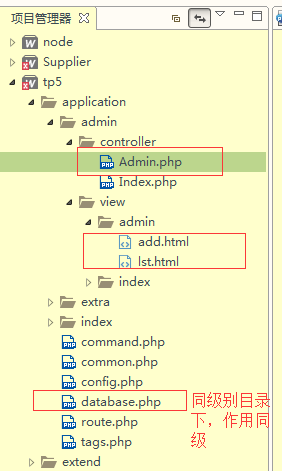
Admin.php
- <?php
- namespace app\admin\controller;
- use think\Controller;
- class Admin extends Controller{
- public function lst(){
- return $this->fetch('lst');
- }
- public function add(){
- //判断页面是否提交
- if(request()->isPost()){
- // dump(input('post.')); //打印接收到的参数
- $data = [ //接受传递的参数
- 'username' => input('username'),
- 'password' => md5(input('password')),
- ];
- /* Db('表名') 数据库助手函数*/
- if(Db('admin') -> insert($data)){ //添加数据
- return $this->success('添加成功','lst'); //成功后跳转 lst 界面
- }else{
- return $this->error('添加管理员失败');
- }
- return;
- }
- return $this->fetch('add');
- }
- }
add.html
- <!DOCTYPE html>
- <html>
- <head>
- <meta charset="UTF-8">
- <title>后台</title>
- <style type="text/css">
- h1{
- color: #f56868;
- text-align: center;
- }
- </style>
- </head>
- <body>
- <h1>我是add</h1>
- <!-- action="" 值如果为空 提交到调用方法 -->
- <form role='form' action="" method="post">
- 管理员名:<input type="text" name="username" /><br /><br />
- 管理员角色:<input type="text" name="password" />
- <input type="submit" value="提交"/>
- </form>
- </body>
- </html>
lst.html
- <!DOCTYPE html>
- <html>
- <head>
- <meta charset="UTF-8">
- <title>后台</title>
- </head>
- <body>
- <div>我是lst</div>
- <a href="{:url('admin/add')}">跳转add</a>
- </body>
- </html>
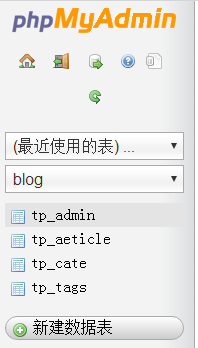
database.php 链接数据库
- <?php
- return [
- // 数据库类型
- 'type' => 'mysql',
- // 服务器地址
- 'hostname' => '127.0.0.1',
- // 数据库名
- 'database' => 'blog',
- // 用户名
- 'username' => 'root',
- // 密码
- 'password' => 'root',
- // 端口
- 'hostport' => '',
- // 连接dsn
- 'dsn' => '',
- // 数据库连接参数
- 'params' => [],
- // 数据库编码默认采用utf8
- 'charset' => 'utf8',
- // 数据库表前缀
- 'prefix' => 'tp_',
- // 数据库调试模式
- 'debug' => true,
- // 数据库部署方式:0 集中式(单一服务器),1 分布式(主从服务器)
- 'deploy' => 0,
- // 数据库读写是否分离 主从式有效
- 'rw_separate' => false,
- // 读写分离后 主服务器数量
- 'master_num' => 1,
- // 指定从服务器序号
- 'slave_no' => '',
- // 是否严格检查字段是否存在
- 'fields_strict' => true,
- // 数据集返回类型
- 'resultset_type' => 'array',
- // 自动写入时间戳字段
- 'auto_timestamp' => false,
- // 时间字段取出后的默认时间格式
- 'datetime_format' => 'Y-m-d H:i:s',
- // 是否需要进行SQL性能分析
- 'sql_explain' => false,
- ];