InputStream与Reader
前者是字节输入流,读取文件内容,文件需要先转换成byte,才能读取得到,如果是中文,可能会出现乱码;后者是字符输入流,可以读取字符串,特别是有中文的时候,可以使用此类,不会出现乱码。
OutputStream 与Writer
前者是字节输出流,数据保存到文本中,需要先转换成byte,有中文会出现乱码;后者是字符输出流,字符串可以直接写入到文本中,不需要转换成byte,中文不会出现乱码
基本关系图
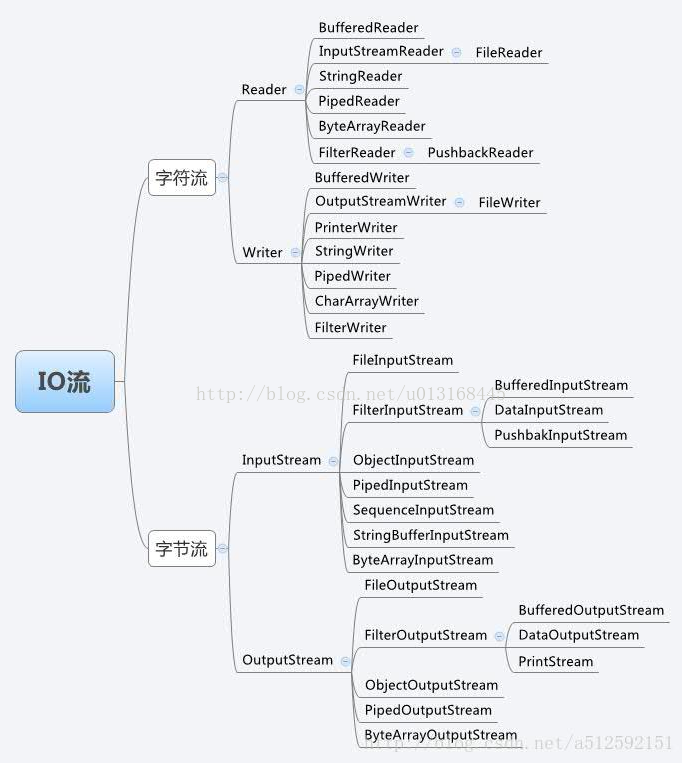
1:InputStream与FileInputStream基本引用
public static void main(String[] args) throws IOException {
    String str=new String();
    InputStream in=new FileInputStream(new File("F:\\t.txt"));
    byte[] bytes=new byte[1024];
    int i=0;
    while ((i=in.read(bytes))!=-1){
        str+=new String(bytes,0,i);
    }
    in.close();
}
2:BufferInputStream
BufferInputStream是一个字节缓冲流,读取的速率能远远大于FileInputStream,对应大文件会有很明显的效果
public static void main(String[] args) throws IOException, ParseException {
    String str=new String();
    InputStream in=new FileInputStream(new File("F:\\t.txt"));
    BufferedInputStream buffered=new BufferedInputStream(in);
    byte[] bytes=new byte[1024];
    int i=0;
    while ((i=buffered.read(bytes))!=-1){
        str+=new String(bytes,0,i);
    }
    in.close();
    buffered.close();
}
3:OutputStream与FileOutPutStream
文件输出流,将数据保存到文件中
public static void main(String[] args) throws IOException, ParseException {
    String str="www.baidu.com";
    InputStream in=new FileInputStream("F:\\t.txt");
    BufferedInputStream bufer=new BufferedInputStream(in);
    OutputStream out=new FileOutputStream("F:\\w.txt");
    byte[] bytes=new byte[1024];
    int len=0;
    while ((len=bufer.read())!=-1){
        out.write(len);
    }
    out.close();
    out.close();
}
4:BufferedOutputStream
bufferedOutputSteam 缓冲字节输出流,速率比FileOutputSream高,大文件时有明显的效果
public static void main(String[] args) throws IOException, ParseException {
    String str="www.baidu.com";
    InputStream in=new FileInputStream("F:\\t.txt");
    BufferedInputStream buferIn=new BufferedInputStream(in);
    OutputStream out=new FileOutputStream("F:\\w.txt");
    BufferedOutputStream bufferedOut=new BufferedOutputStream(out);
    byte[] bytes=new byte[1024];
    int len=0;
    while ((len=buferIn.read())!=-1){
        bufferedOut.write(len);
    }
    bufferedOut.close();
    out.close();
    buferIn.close();
    in.close();
}
5:Reader、FileReader、BufferedReader
Reader 读取文件数据的字符流,FileReader是他的一个子类,BufferedReader,字符缓冲流,能提高读取的效率
public static void main(String[] args) throws IOException, ParseException {
    String str="www.baidu.com";
    InputStream in=new FileInputStream("F:\\t.txt");
    BufferedInputStream buferIn=new BufferedInputStream(in);
    OutputStream out=new FileOutputStream("F:\\w.txt");
    BufferedOutputStream bufferedOut=new BufferedOutputStream(out);
    byte[] bytes=new byte[1024];
    int len=0;
    while ((len=buferIn.read())!=-1){
        bufferedOut.write(len);
    }
    bufferedOut.close();
    out.close();
    buferIn.close();
    in.close();
}
也可以用readline()读取,跟read()方法的区别是,readline()是一行一行读取的,read()是一个一个字符读取的
public static void main(String[] args) throws IOException, ParseException {
    FileReader fileReader = new FileReader("F:\\t.txt");
    //字节转换成字符
    BufferedReader reader = new BufferedReader(fileReader);
    String line = null;
    StringBuffer stringBuffer = new StringBuffer();
    while ((line = reader.readLine()) != null) {
        stringBuffer.append(line).append("\r\n");
    }
}
6:InputStreamReader
字节流到字符流之间的桥梁,读取字节流之后可以直接转换成字符流public static void main(String[] args) throws IOException, ParseException { InputStream in = new FileInputStream("F:\\t.txt"); InputStreamReader inputStreamReader=new InputStreamReader(in); BufferedReader bufferedReader=new BufferedReader(inputStreamReader); String line=null; StringBuffer stringBuffer=new StringBuffer(); while ((line=bufferedReader.readLine())!=null){ stringBuffer.append(line).append("\r\n"); } }
7:Writer、BufferedWriter
字符输出流,数据保存到文件中
public static void main(String[] args) throws IOException, ParseException {
    //读取本地的文件
    InputStream in=new FileInputStream("F:\\t.txt");
    BufferedReader reader=new BufferedReader(new InputStreamReader(in));

    //在本地创建一个文件
    FileWriter fileWriter=new FileWriter("F:\\c.txt");
    BufferedWriter writer=new BufferedWriter(fileWriter);
    String line = null;
    StringBuffer stringBuffer = new StringBuffer();
    while ((line = reader.readLine()) != null) {
        writer.write(line);
        writer.write("\r\n");
    }
    writer.flush();
    writer.close();
    fileWriter.close();
    reader.close();
    in.close();
}
8:OutputStreamWriter
如果使用OutputStream,需要将字符串先转换成字节,再输出,使用OutputStreamWriter可以直接输出使用,不需要再转换成字节
OutputStream
            public static void main(String[] args) throws IOException, ParseException {
    //读取本地的文件
    String str="你好,林泽扬";
    OutputStream out=new FileOutputStream("F:\\g.txt");
    byte[] bytes=str.getBytes();
    out.write(bytes);
    out.close();
}
OutputStreamWriter
public static void main(String[] args) throws IOException, ParseException {
    //读取本地的文件
    String str="你好,林泽扬";
    OutputStream out=new FileOutputStream("F:\\g.txt");
    OutputStreamWriter outWriter=new OutputStreamWriter(out);
    outWriter.write(str);
    outWriter.close();
    out.close();
}
版权声明:本文为u013168445原创文章,遵循CC 4.0 BY-SA版权协议,转载请附上原文出处链接和本声明。